With Insider One, you can send a Dynamic Segment to ChatGPT Ads as a Custom Audience and keep it up to date automatically. ChatGPT Ads matches your users with ChatGPT accounts by their identifiers.
You can build these segments with the first-party data you collect in Insider One, such as:
Behavioral events (such as product views, add to cart, and purchases)
User attributes (for example, gender, country, or loyalty tier)
Channel interactions (for example, email opens and push notification clicks)
Your media team then selects the audience in ChatGPT Ads Manager to include or exclude these users in campaigns.
How ChatGPT Ads Remarketing works
Insider One matches your users with ChatGPT Ads through two identifiers: email address and phone number. Both are included in every ChatGPT Ads Ad Audience. Before sending, Insider One formats them (email in lowercase without extra spaces, phone number in international format) and hashes them with SHA-256. No other identifiers or attributes are sent.
Automatic audience updates
Insider One creates the audience in ChatGPT Ads when you create the Ad Audience. The audience fills at the first scheduled sync.
Insider One keeps the audience in sync with your Dynamic Segment automatically, on a regular schedule.
Users who entered the segment are added, and users who left the segment are removed.
ChatGPT Ads processes each update before the audience changes, so the audience size may take time to appear in ChatGPT Ads Manager.
What you need to get started
A ChatGPT Ads ad account.
A ChatGPT Ads API key for that account. Each API key belongs to one ad account. To create one, open ChatGPT Ads Manager, go to Settings > General > API Keys, and click Create New Key. You need admin access to the ad account (OpenAI Help Center).
Permission to manage integrations in Insider One to add or delete ChatGPT Ads accounts.
An account outside the European Economic Area (EEA) and Switzerland. ChatGPT Ads does not support custom audiences there because personalized ads are not yet available (OpenAI Custom Audiences). In these regions, the ChatGPT Ads card is greyed out.
ChatGPT Ads needs at least 25,000 matched users to use an audience for targeting. Smaller audiences can be used for exclusion only.
ChatGPT Ads does not allow Custom Audiences in campaigns that target the EEA or Switzerland.
Connect your ChatGPT Ads account to Insider One
Before you can send a Dynamic Segment to ChatGPT Ads, connect your ChatGPT Ads ad account to Insider One.
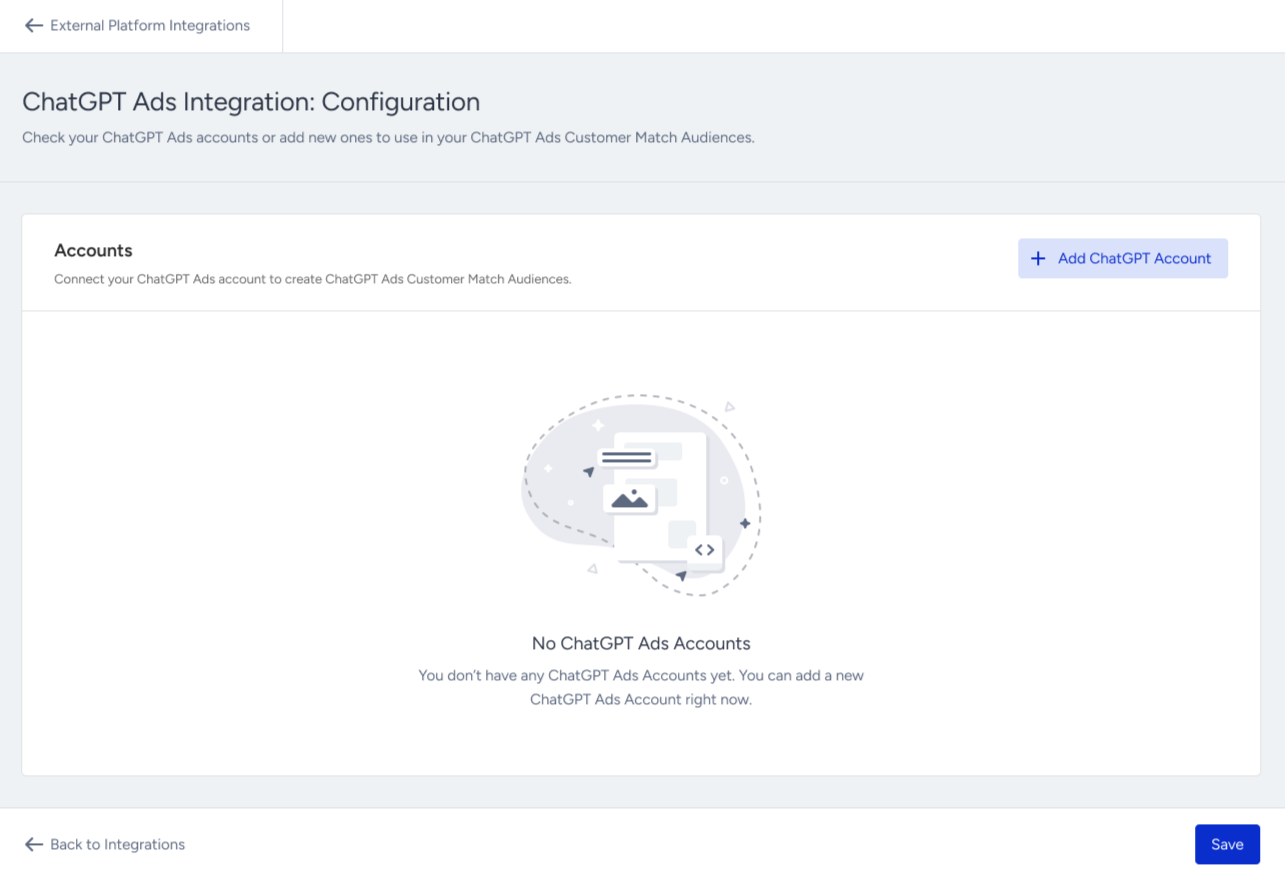
Go to Components > Integrations > External Integrations > ChatGPT Ads.
Click Add ChatGPT Account.
Enter your ChatGPT Ads API Key and click Verify API Key.
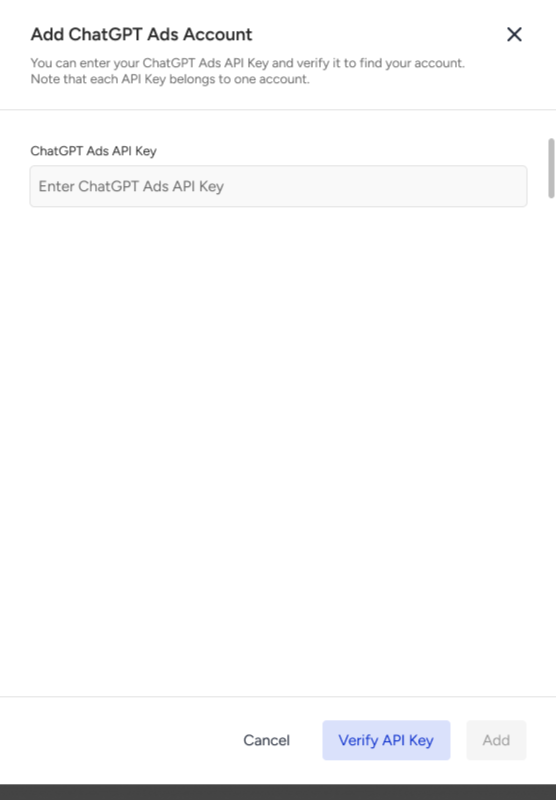
Check the Account Details: Account Name, Account ID, Currency, and Time Zone. Click Add.
Click Save. The account appears in the Accounts table with its API key masked (for example, **** 7f3a).
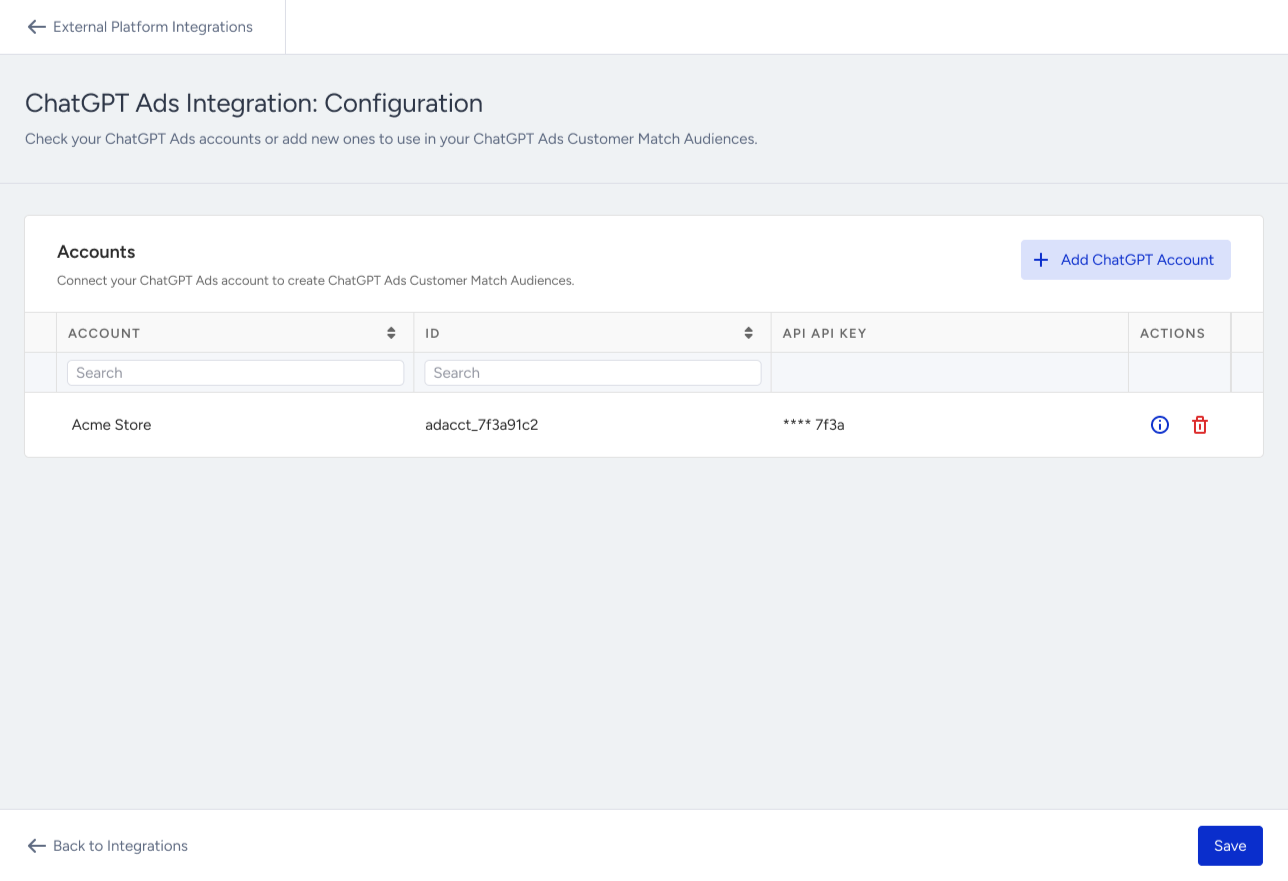
Repeat these steps to add more ChatGPT Ads accounts.
If Insider One cannot add the key, the drawer shows one of these messages:
Situation | Message |
|---|---|
The field is empty | Enter a ChatGPT API Key to continue. |
ChatGPT Ads rejects the key | Enter a valid ChatGPT API Key to continue. |
The key is already connected | This API Key is already added. Enter a different API Key to continue. |
ChatGPT Ads cannot be reached | Your ChatGPT Ads connection couldn't be verified right now. You can wait for a while and try again. |
If an API key is revoked in ChatGPT Ads, a red exclamation mark appears next to the account (API Key Invalid). Reconnect the account with a new API key to continue syncing.
Send your Dynamic Segment to ChatGPT Ads
You send a Dynamic Segment to ChatGPT Ads by creating a ChatGPT Ads Ad Audience.
Go to Audience > Segments > Dynamic Segments and find the segment you want to send.
Click Create Ad Audience in the segment's action menu.
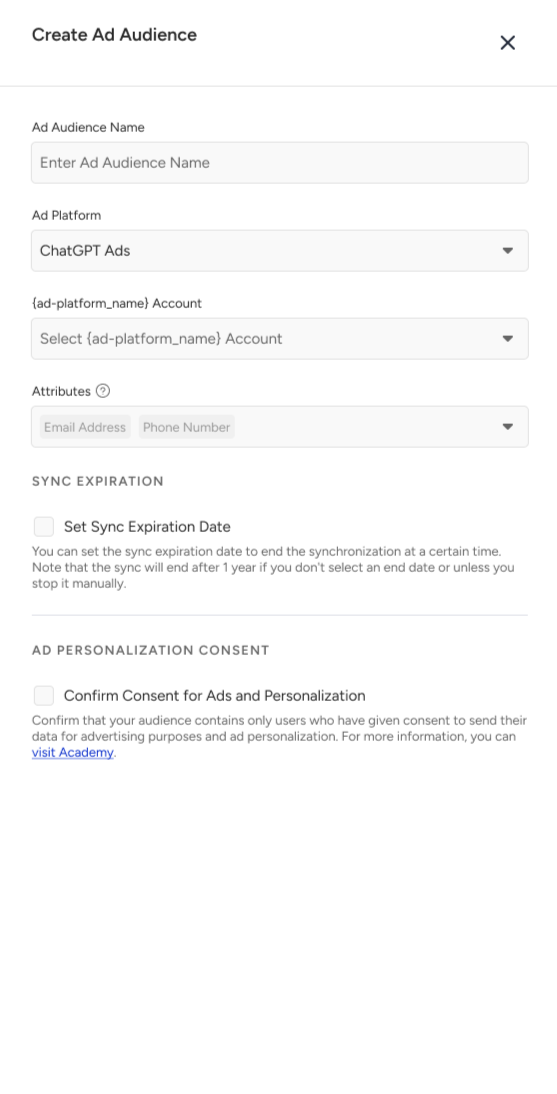
Select ChatGPT Ads as the Ad Platform.
Select one or more accounts in the ChatGPT Ads Account field.
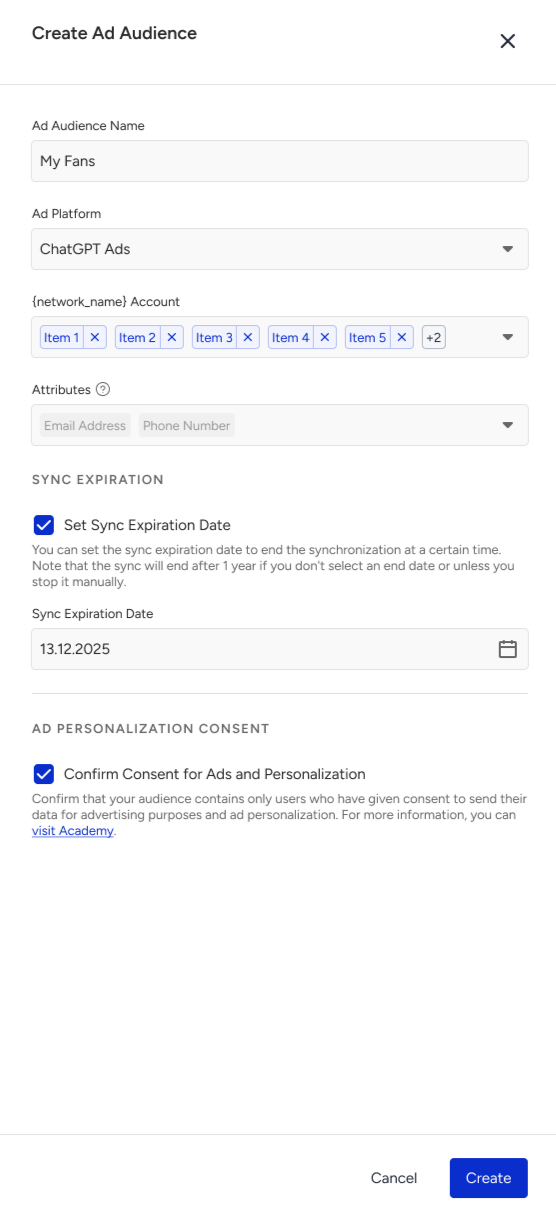
Review the identifiers. Email Address and Phone Number are selected by default and cannot be removed.
Click Create. The message "Your Ad Audience has been created successfully." appears.
If ChatGPT Ads is disabled in the drawer, hover over it to see the reason:
Your region is not eligible.
You have no connected ChatGPT Ads account
The account's API key is invalid.
An account that another Ad Audience of the same segment already targets is disabled (Account Already Targeted).
What happens after you create a ChatGPT Ads Audience
Insider One creates one audience in ChatGPT Ads for each selected account. It never creates a duplicate for the same segment and account.
The audience fills at the first scheduled sync and stays in sync with the segment after that.
The ChatGPT chip in the Dynamic Segments list shows the sync status: Syncing (green), Paused (orange), Error (red), or Not Sending (grey). Hover over the chip to see the status of each account.
To review sync errors, open the Ad Audience details. The Sync Status section lists each error with a message. For an invalid API key, click Visit ChatGPT Ads Integration to reconnect the account.
Insider One does not send an update when the segment is empty. In this case, the audience in ChatGPT Ads keeps its current users, and the Ad Audience shows an error message. Segments with more than approximately 3.5 million users are not synced to ChatGPT Ads.
Pause, edit, or delete a ChatGPT Ads Audience
Open the segment.
Go to the Ad Audiences tab.
Click the three-dots menu next to the Ad Audience.
Select Update as Paused to stop syncing, Update as Syncing to restart it, Edit, or Delete.
After you delete a ChatGPT Ads Ad Audience:
Syncing stops immediately.
The Ad Audience is removed from the list.
The Dynamic Segment itself is not affected.
The audience stays in ChatGPT Ads Manager. Insider One does not delete or archive it there.
Things to know
ChatGPT Ads needs at least 25,000 matched users to use an audience for targeting. Smaller audiences can be used for exclusion only. Insider One sends any non-empty segment.
Insider One does not show matched-user counts or ranges for ChatGPT Ads audiences, and does not warn when an audience is under 25,000 matched users. Check the audience size in ChatGPT Ads Manager.
Segments with more than approximately 3.5 million users are not synced.
Campaigns that target the EEA or Switzerland cannot use ChatGPT Ads Custom Audiences.
Audiences sync on a schedule, not in real time.
Only email address and phone number are used for matching. You cannot map other attributes or identifiers, and Android advertising ID is not supported.
Deleting an Ad Audience in Insider One does not remove the audience from ChatGPT Ads Manager.