These terms might help you as you begin your journey as the Architect.
Attribute
An attribute is a status or property that a user can have. In other words, it refers to users' detailed information that can help you understand user personas, introduce high-level segmentation, and personalize your messaging.
Canvas
Canvas is an intuitive interface where you can design, set up, and evaluate your journey flow with various elements and components.
Channel
The channel is a touchpoint for communicating and engaging with users.
Condition
A condition is composed of an attribute, event, or segment that triggers users into a journey or filters them in the journey. It is also known as criteria.
Contact
Contact is an uploaded list of users that includes user information such as email, age, subscription date, etc.
Conversion Attribution Model
It is a set of rules that determines how to credit the conversion to the channels when it occurs. For example, the Architect assigns 100% credit to the channel that got interaction (click) lastly among the channels when the conversion occurs.
Conversion Goal
It is the desired outcome that can be configured with default or custom events within a journey.
Dry Run
It is a simulation that enables you to see what would happen if you launched the journey. It is one of the test options before launching your journey. On the Dry Run status, real users enter the journey by meeting the starter rule or condition, yet no user receives a message from the channels, or no action is taken on any user. This option helps you see how many users enter the journey and how they are distributed on the flow and elements. Also, you can interpret how many users are reachable on a particular channel. A dry run lets you refine your journey before launching it to all users.
Element
An element is a node on the flow that can be considered a step for different purposes (e.g., channel, checkpoint, starter, etc.).
Event
An event is an action a user can perform across the website, app, or offline (e.g., viewing a product page). Events help you track what users do. Moreover, you can segment and check users' actions with more details. For instance, you can see which product or category a user visited by the product page view event.
Event Parameter
An event parameter is detailed information about an event. For example, your event parameter can be "shoes" and "color red" when your event is "bought a product."
Flow
Flow, also known as a journey, is a branchable way composed of various elements and steps drawn for the customer journey.
GDPR
The General Data Protection Regulation is a regulation in EU law on data protection and privacy in the European Union (EU) and the European Economic Area (EEA). It also addresses the transfer of personal data outside the EU and EEA areas. The GDPR's primary aim is to give individuals control over their personal data and to simplify the regulatory environment for international business by unifying EU regulations.
Interaction
Interaction is an action users can perform on a message, banner, or campaign, such as clicking a URL, opening a push notification, or replying.
Journey
Journey is a series of interactions across all platforms that engage users throughout their life cycle, based on their actions and behaviors. A journey starts with one of the entry points called starters and branches to different paths according to user behavior and actions with the if/else logic (matching/not matching) by the check elements until the flow ends. Based on if/else logic, desired actions or interactions can be designed wisely. Users enter the journey if they fulfill the starter segment/condition/rule and then proceed on the journey flow based on their actions or properties.
Layer
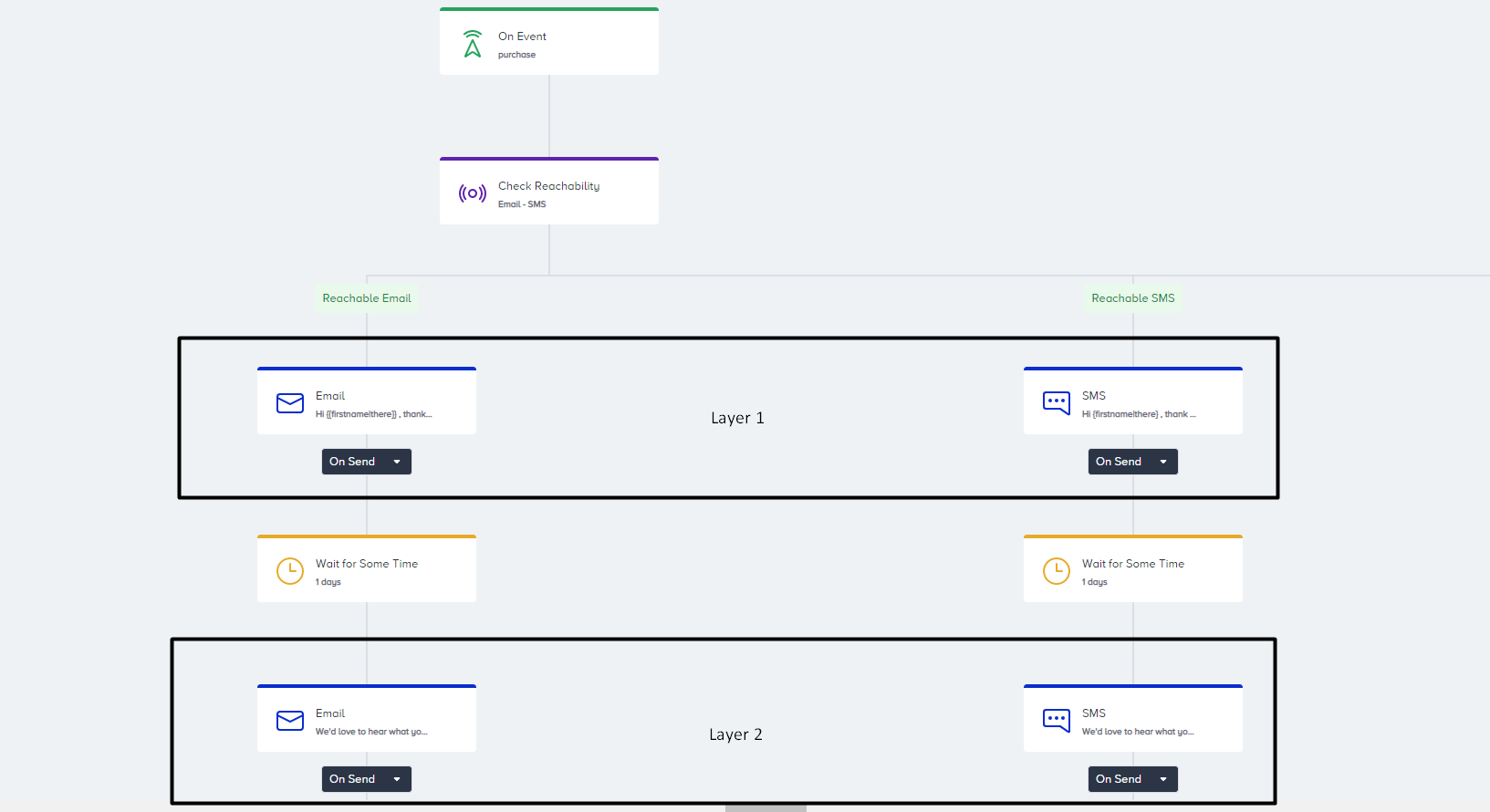
Layers show how many times a user interacts within a journey and aim to detect how metrics change when a second message is sent to a user. A layer can have more than one channel.
Live Actions
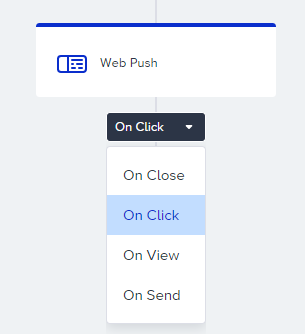
It is a holding point on the journey until the user performs a defined action on a sent message. For example, you can keep users on the flow until they click the Web Push notification.
Opt-in
It is the user's consent, acknowledging interest in a product or service and authorizing a third party to contact them with further information (e.g., email opt-in, web push opt-in).
Path
The path is a part of the flow that can be formed after branchable elements such as check conditions, check reachability, check interaction, A/B split, next best channel, etc. Each path has a name as matching, not matching, reachable, etc.
Promotional Use Case
It is also known as a marketing use case for engaging users to increase sales, promote products, build brand awareness, etc. User consent (opt-in) is required to send messages such as cart abandonment, new product announcements, recommended products, birthdays, discounts, coupons, offers, etc.
Segment
A segment is a default or previously created set of attributes, events, and contact lists.
Sunset
It is one of the journey statuses that closes the entrance gate to the journey. In this status, no new user can enter the journey, but users who are already in the journey can proceed on the journey flow.
Transactional Use Case
This is the case for messaging, which contains the necessary information for users. User consent (opt-in) is ignored when sending messages, as users must receive important messages such as order confirmations with tracking numbers, two-factor authentication, password resets, and reservation confirmations.
Trigger
A trigger, also known as a starter, is the first step in the journey. Starters trigger users based on the selected conditions.