Your sender is the name or number recipients see when they receive your SMS messages. Sender Submission is the first step of Account Registration and affects the documents you need to provide, the registration process, and what recipients see when they receive your messages.
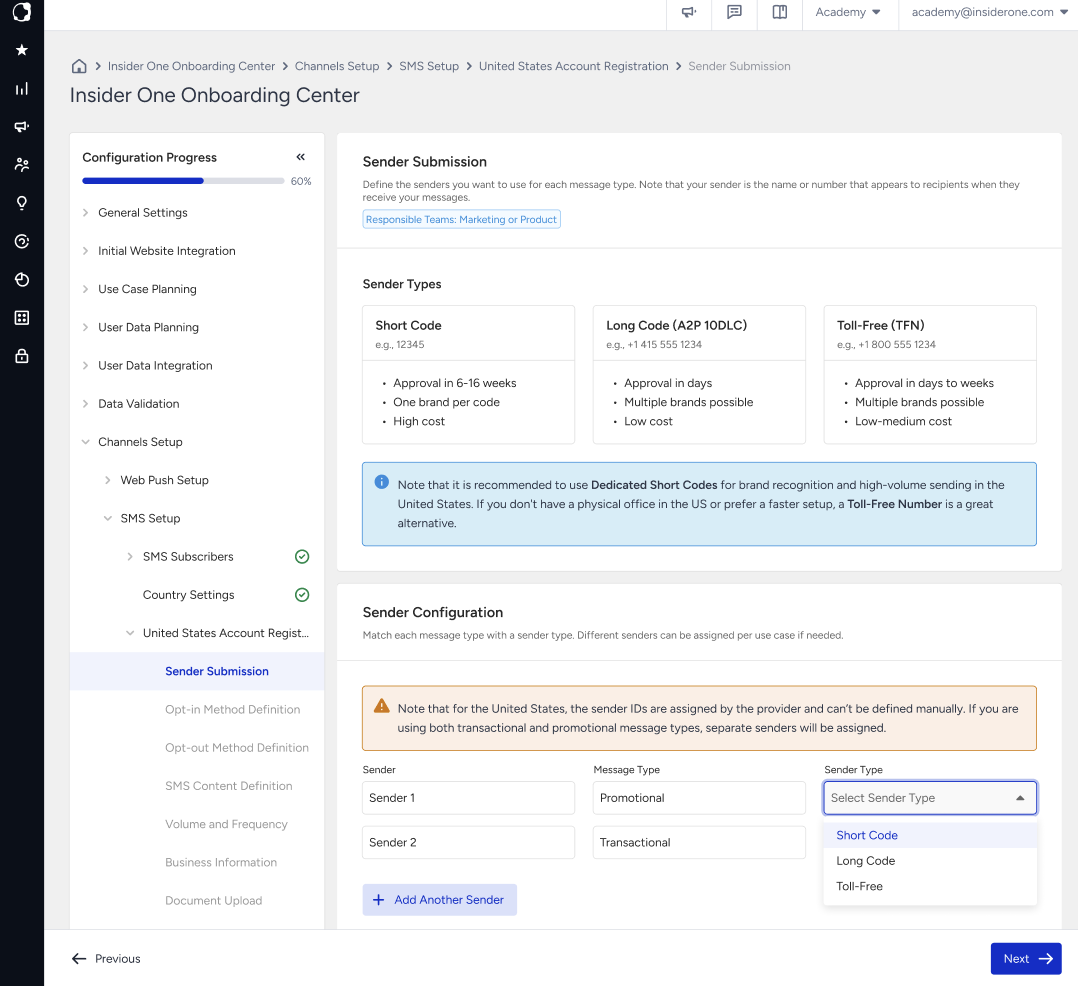
For each sender, select the message type and sender type you plan to use. Available sender types depend on the country you are registering.
Each row includes the following information:
Field | What to enter |
|---|---|
Message Type | Select Promotional, Transactional, or both if you plan to use the same sender for both message types. |
Sender | Enter or select the sender based on the requirements of the country you are registering. |
Both fields are required for each sender.
Click Add Another Sender to add another sender. Use the delete icon to remove a sender before submission.
Sender types
The available sender types depend on the country you are registering. For detailed definitions of Alphanumeric Sender ID, Short Code, Long Code (A2P 10DLC), and Toll-Free (TFN), refer to SMS Terms to Know.
Compare sender types
Sender types differ in their supported use cases, registration requirements, and sending capabilities. Use the following comparison to understand the main differences between the available sender types.
Type | Example | Best for | Approval and registration | Main trade-off |
|---|---|---|---|---|
Alphanumeric Sender ID |
| Brand recognition and one-way messaging in supported markets | Country-dependent, with registration required in some markets, including Türkiye | One-way only. Availability and permitted use cases vary by country. |
Short Code |
| Very high-volume, time-sensitive A2P traffic | The longest and most expensive registration process | Highest throughput and strong A2P capability |
Long Code (A2P 10DLC) |
| Lower-volume A2P messaging and two-way conversations in the United States | Brand and campaign registration required | Lower throughput than a Short Code |
Toll-Free (TFN) |
| US and Canada A2P messaging, including both transactional and promotional traffic | Toll-Free Verification required, which in many cases is simpler and faster than Short Code onboarding | Higher throughput than 10DLC, but lower than a Short Code |
Approval and verification durations can vary depending on the provider and current carrier processes. Treat these comparisons as relative guidance, not fixed registration timelines.
Why senders are registered one by one
Each sender you add is registered separately with the mobile operators of the respective country, and each sender goes through its own compliance review. For example, if you add three senders, they go through three parallel reviews with separate approval timelines rather than a single review covering all senders.
After a country's registration is approved, you can no longer add senders to it. If you need to add another sender after approval, you need to start a new registration cycle, which can take 2 to 12 weeks. Make sure you include all the senders you plan to use before submitting your registration.
Available sender types by country
The sender types available during registration depend on the country:
United States: Short Code, Long Code (A2P 10DLC), and Toll-Free (TFN)
Türkiye: Alphanumeric Sender ID
Australia: Alphanumeric Sender ID and Long Code
Sender name rules in Türkiye
Türkiye uses Alphanumeric Sender IDs, which are custom sender names rather than phone numbers.
Sender names must meet the following requirements:
Contain 3 to 11 characters
Use letters, numbers, and spaces
Contain at least one letter
Not contain special characters
Because an Alphanumeric Sender ID is a name rather than a phone number, recipients cannot reply directly. Configure a supported opt-out method in the next steps of Account Registration.
Complete your IYS registration before submitting your sender for Türkiye.
Sender requirements in the United States
In the United States, you select the sender type during registration, while Insider One or the SMS provider assigns the actual sender ID after the registration is approved.
In the United States, you select the sender type during registration, while the SMS provider assigns the actual sender ID after the registration is approved.
Dedicated Short Codes are recommended for high-volume messaging.
If you plan to send both Promotional and Transactional messages, you need a separate sender for each message type. Each sender requires its own registration and approval process.
Consider the following requirements when registering a sender in the United States:
Sender registration is required. You cannot use an unregistered sender as a fallback option.
The sender type selected during registration must match the sender type used after approval. A mismatch can cause message delivery failures.
You cannot change the sender type after registration approval. To use a different sender type, complete a new registration.
For country-specific rules and requirements, refer to the USA SMS Guideline.
How many senders should you submit?
Submit all senders you expect to use before you complete your registration.
A common setup uses one sender for Promotional messages and another sender for Transactional messages. Keeping these message types separate can reduce the risk of promotional traffic affecting transactional message delivery. For example, a deliverability issue affecting campaign messages can also affect service messages such as order confirmations when both use the same sender.
If the country and sender type support using one sender for both message types, select both Promotional and Transactional for the same sender instead of adding separate senders.
Sender submission best practices
Use a sender name that matches your legal or trademark name. If the requested sender name differs from your registered company name, you might need to provide additional documentation, such as trademark documentation.
Use a recognizable brand name instead of an abbreviation. Choose a sender name that recipients can easily associate with your brand.
Keep the sender name simple. Even where spaces are supported, a simple and continuous sender name can be easier to recognize and display more consistently across devices.
Finalize your sender list before submission. You cannot add new senders after the country's registration is approved.
Common sender submission issues
Submitting only the sender needed for the initial setup: Adding another sender after approval requires a new registration process. Include all senders you expect to use before submitting your registration.
Requesting a sender name without the required supporting documents: If the name is not your legal name and you do not hold the trademark, the sender is rejected at review.
Assuming the requested sender ID is always the final sender ID: In some markets, the SMS provider assigns or adjusts the sender during registration. Confirm the registered sender when you complete Test SMS Setup.
Next step
Continue with Opt-in Method Definition, where you configure how users consent to receive SMS messages.