The WhatsApp Marketing product provides conversational messages, allowing users to initiate conversations with businesses after the business has sent an initial message. One way to create a conversational flow is to integrate a bot to reply to users' WhatsApp messages.
You can send media and text content using this message type.
As this is a different type of template message, you must first create a template with a button reply in InOne before sending these types of template messages. Refer to Create a WhatsApp Business Standard Template on InOne for step-by-step guidance.
You can send this message type if the user has sent a message to your number in the last 24 hours.
The “up to 10-button” limit applies to template buttons. Reply buttons in interactive messages stay at 3, and CTA and reply buttons cannot be used together in an interactive message.
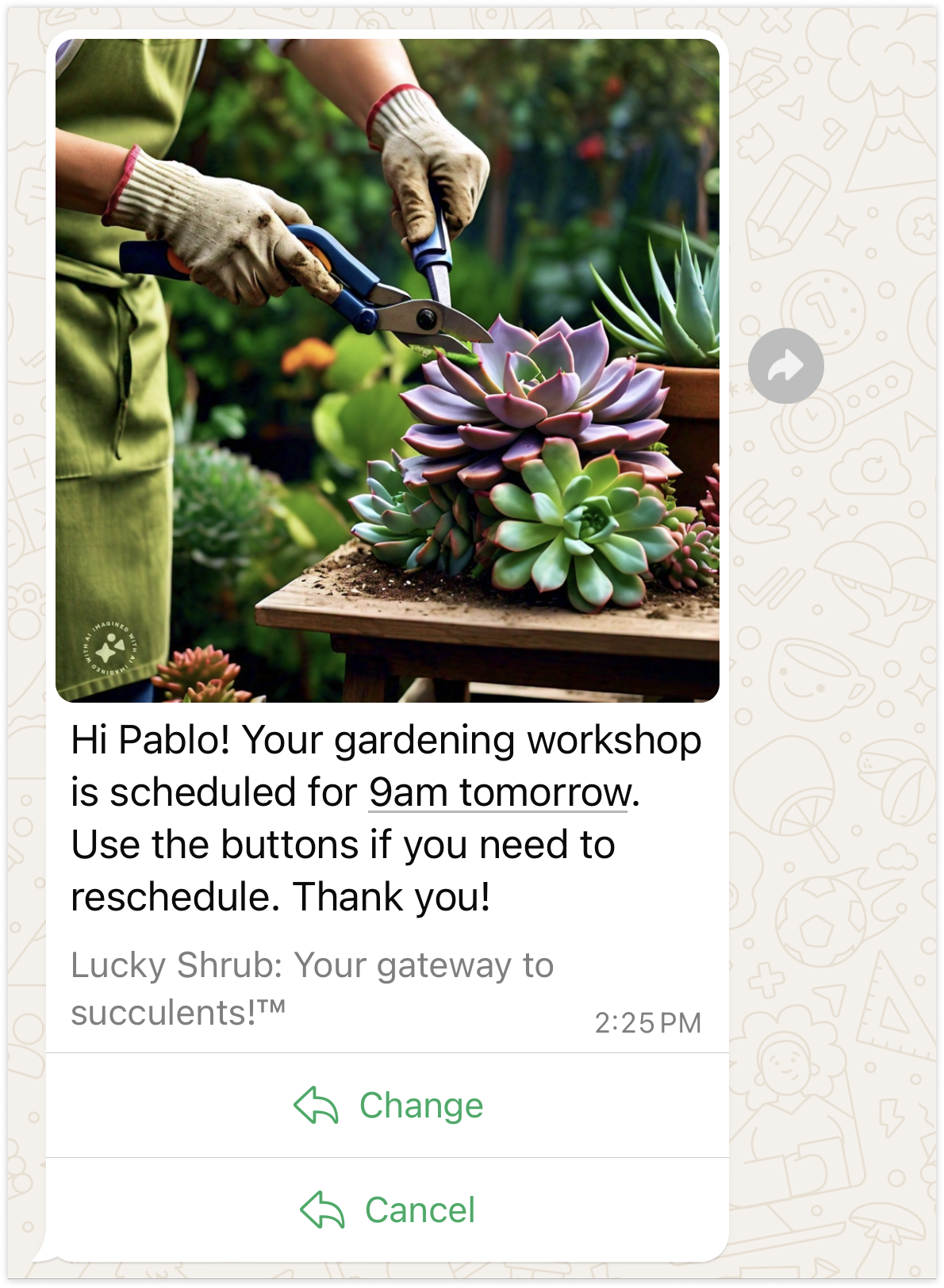
Refer to the visual below to see how a WhatsApp message with interactive quick reply buttons is displayed.
Endpoint and Headers
Visit our Postman collection to test this request.
Header | Sample Value | Description |
|---|---|---|
X-INS-AUTH-KEY | 1a2b3c4d5e6f | This key is required to authorize your request. Refer to API Authentication Tokens to generate your token. |
Content-Type | application/json | This header specifies the media type of the resource. |
Body parameters
Column | Description | Data Type | Required |
|---|---|---|---|
messages | All messages are contained in the messages key. You can send multiple messages with a single request. | Array | Yes |
from | Specifies the sender phone number ID. Only required when multiple phone numbers are configured for the account. If not specified, the default phone number is used. This applies to both Transactional and Conversational WhatsApp APIs. | String | Optional |
phoneNumber | Phone number for the person you want to message.
| String | Conditional. Required if recipient is not sent. |
recipient | Specifies the recipient’s WhatsApp Business-Scoped User ID (BSUID). For example, TR.2124566744990207. Use this identifier to send messages without providing the recipient’s phone number. Pass the complete BSUID, including its country prefix. | String | Conditional. Required if phoneNumber is not provided. |
message | Message object | Object | Yes |
type | Must be “interactive” for this message type. | String | Yes |
interactive | An interactive object. The components of each interactive object generally follow a consistent pattern: header, body, footer, and action. | Object | Yes |
type (in interactive) | Must be a “button” for this message type. | String | Yes |
header | - | Object | No |
type | The header type you would like to use. Supported values are:
| String | Yes |
text | Text for the header. Formatting allows emojis, but not markdown. Maximum length is 60 characters. | String | Yes, if the type is text. |
image | Contains the media object for this image | String | Yes, if the type is an image. |
link | Required when the type is audio, document, image, sticker, or video, and you are not using an uploaded media ID. The file types are image/jpeg and image/png. Max 5 MB. | String | Yes, if there is no id. |
id | Required when the type is audio, document, image, sticker, or video, and you are not using a link. | URL | Yes, there is no link. |
caption | Describes the specified image, document, or video media. Do not use with audio or sticker media. | String | No |
audio | - | Object | Yes, if the type is audio. |
link | Required when the type is audio, document, image, sticker, or video, and you are not using an uploaded media ID. The file types are audio/mp4, audio/mpeg, audio/amr, and audio/ogg. Max 16 MB. | URL | Yes, if there is no id. |
id | Required when the type is audio, document, image, sticker, or video, and you are not using a link. | URL | Yes, there is no link. |
document | - | Object | Yes, the type is document. |
link | Required when the type is audio, document, image, sticker, or video, and you are not using an uploaded media ID. The File Types are:
Max 100 MB. | URL | Yes, if there is no id. |
id | Required when the type is audio, document, image, sticker, or video, and you are not using a link. | URL | Yes, if there is no link. |
caption | Describes the specified image, document, or video media. Do not use with audio or sticker media. | String | No |
filename | Describes the filename for the specific document. Use only with document media. | String | No |
video | - | Object | Yes, if the type is video. |
link | Required when the type is audio, document, image, sticker, or video, and you are not using an uploaded media ID. File Types are video/mp4, video/3gp. Max 16 MB. | URL | Yes, if there is no id. |
id | Required when the type is audio, document, image, sticker, or video, and you are not using a link. | URL | Yes, if there is no link. |
caption | Describes the specified image, document, or video media. Do not use with audio or sticker media. | String | No |
body | The body object contains the following field: textstring – Required if the body is present. The content of the message. Emojis and markdowns are supported. Maximum length: 1024 characters. | Object | Yes |
text | The content of the message. | String | Yes |
action | - | Object | Yes |
buttons | You can use the Min:1 and Max:3 buttons. | Array | Yes |
type | Must be “reply” for this message type. | String | Yes |
reply | - | Object | Yes |
id | ID of the button. | String | Yes |
title | Title of the button | String | Yes |
WhatsApp Status Callback
The Status Callback allows you to track the delivery status of your WhatsApp messages in real time. When you send a message, the system sends status updates to the API URL you’ve specified in the callback parameter. If you don't respond to code between 200 and 300, the system automatically retries the request up to 10 times following this schedule:| Retry Attempt | Time After First Attempt |
|---|---|
| 1st retry | 1 minute |
| 2nd retry | 2 minutes |
| 3rd retry | 3 minutes |
| 4th retry | 8 minutes |
| 5th retry | 13 minutes |
| 6th retry | 18 minutes |
| 7th retry | 28 minutes |
| 8th retry | 38 minutes |
| 9th retry | 48 minutes |
| 10th retry | 1 hour |
Sample Request
Below is a sample request to send a conversational WhatsApp interactive message with reply buttons.
curl --location 'https://whatsapp.useinsider.com/v1/conversational/send' \
--header 'Content-Type: application/json' \
--header 'x-ins-auth-key: INS.**************************' \
--data '{
    "messages": [
        {
            "phoneNumber": "+1**********",
            "message": {
                "type": "interactive",
                "interactive": {
                    "type": "button",
                    "header": {
                        "type": "text",
                        "text": "HEADER_TEXT"
                    },
                    "body": {
                        "text": "BUTTON_TEXT"
                    },
                    "action": {
                        "buttons": [
                            {
                                "type": "reply",
                                "reply": {
                                    "id": "UNIQUE_BUTTON_ID_1",
                                    "title": "BUTTON_TITLE_1"
                                }
                            },
                            {
                                "type": "reply",
                                "reply": {
                                    "id": "UNIQUE_BUTTON_ID_2",
                                    "title": "BUTTON_TITLE_2"
                                }
                            }
                        ]
                    }
                }
            }
        }
    ]
}'
Sample Responses
One key information will be returned for each message to be sent. This key will be added to all events related to the message.
{
    "keys": [
        "whatsapp-*************************"
    ]
}
403 Forbidden
This error occurs when requests are blocked by Cloudflare’s security mechanisms, which act as an additional protection layer for Insider’s infrastructure.
As part of this setup, Insider complies with Cloudflare’s automated security policies. In certain cases, these mechanisms may block specific User-Agent values or IP addresses.
If the client IP is denied or restricted, the API will return the following response:
{
  "message": "ip-restricted",
  "error": {
    "message": "ip-restricted",
    "code": 1088
  }
}
Notes:
403 Forbidden error occurs when the IP address is not whitelisted for you.
Error code 1088 is specific to IP restriction errors.
How to Troubleshoot a 403 Forbidden Error
If you encounter a 403 Forbidden error when making API requests, for example, through the Conversational or Transactional API, please check the following:
Verify the User-Agent header used in your HTTP client (especially default or empty values such as Java’s default
User-Agent).Review blocked requests under Security > Events in your Cloudflare dashboard to identify whether they were rejected due to User-Agent or WAF rules.
For more detailed troubleshooting guidance and Cloudflare’s official documentation, refer to the following resources:
Limitations
All functions must be executed with a simple HTTPS POST request.
Only new WhatsApp messages can be sent via this API. No data can be retrieved.
The API Key should be provided as the authorization key in the request header. If the key is incorrect, the operation will not be executed, and an authorization error will be returned in the response.
The rate limit is 1000 requests per second.
The default limit shown here is a standard baseline. If your use case requires higher capacity, feel free to reach out to the Insider One team. We can adjust it to fit your needs.