In this step, define how users stop receiving your SMS messages and what they receive after unsubscribing.
The unsubscribe sentence you enter here is appended to your SMS messages and is reviewed by the SMS provider during registration. Keep the instruction clear, consistent with your opt-out configuration, and easy for users to follow.
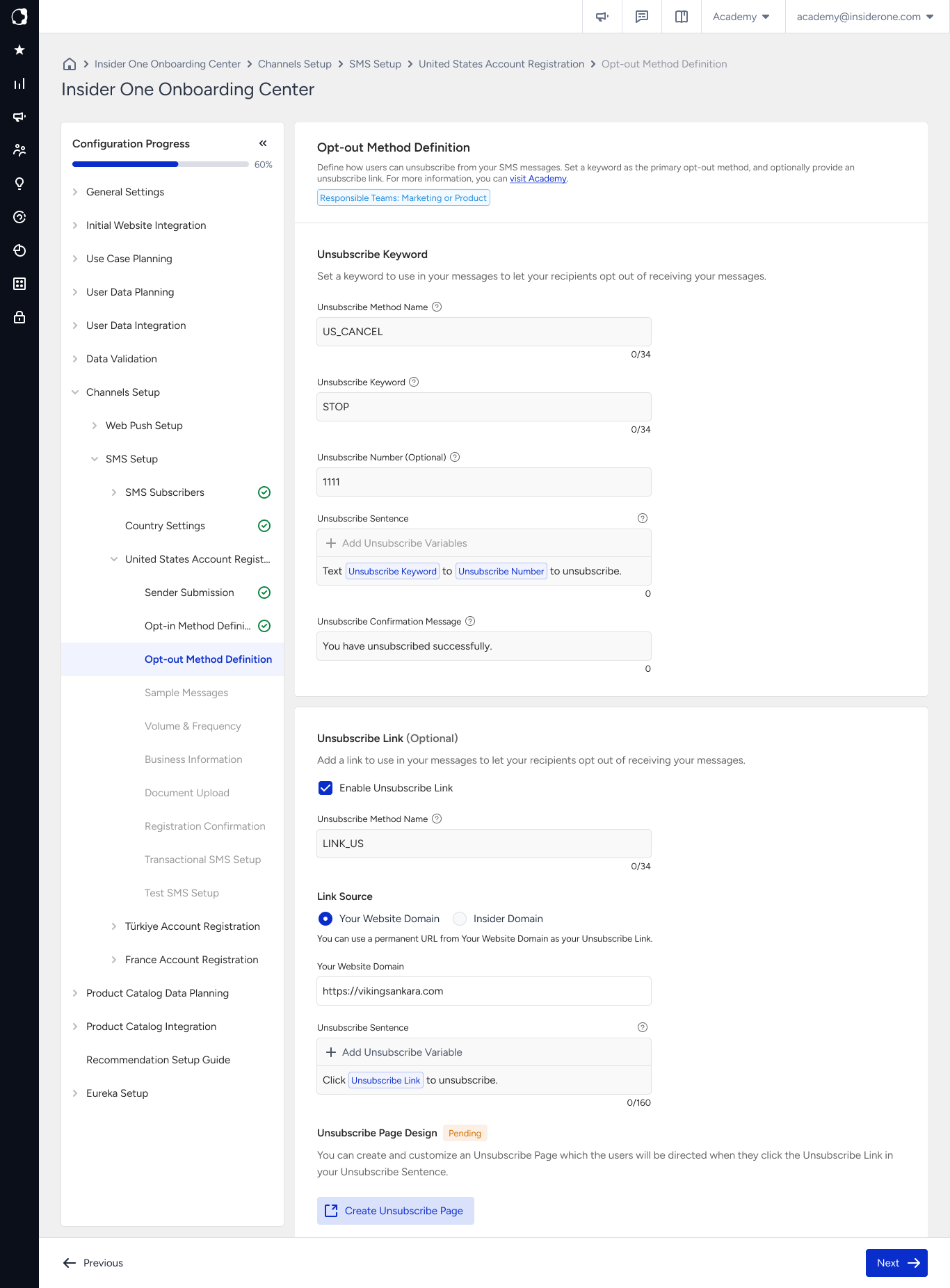
What you enter on this page
Field | What it is | What to enter |
|---|---|---|
Unsubscribe Method Name | Your own label for the unsubscribe method | Enter a name that you can easily recognize later, such as |
Unsubscribe Keyword | The word a recipient sends to unsubscribe | Enter the keyword commonly recognized in your market, such as |
Unsubscribe Number (Optional) | The number recipients send the unsubscribe keyword to | Enter your registered sender number if you already know it. You can leave this field empty and continue. |
Unsubscribe Sentence | The unsubscribe instruction appended to your messages | Enter a short instruction based on your unsubscribe keyword and, if applicable, your unsubscribe number. |
Unsubscribe Confirmation Message | The message users receive after unsubscribing | Enter a message confirming that the user has unsubscribed and will receive no further marketing messages. |
Unsubscribe Link (Optional) | An additional link-based unsubscribe method | Configure an unsubscribe link in addition to the keyword method. Refer to Add an unsubscribe link for details. |
If you do not have your unsubscribe number yet
The Unsubscribe Number is optional, so you can complete this step without entering a number. In some markets, the SMS provider assigns the number after your registration is approved.
You can also add the Unsubscribe Number as a variable in your unsubscribe sentence while leaving the number field empty. The variable is resolved after your number is defined, so you do not need to update the unsubscribe sentence later.
Choose your keyword
Use an unsubscribe keyword that users in your market can easily recognize. For example, users in Türkiye commonly use DUR or IPTAL, while STOP is commonly used in English-speaking markets.
Operators recognize STOP by default in most countries. A user who sends STOP is therefore unsubscribed even if you configure a different keyword. Make sure your SMS content does not suggest otherwise.
Write your unsubscribe sentence
The unsubscribe sentence is appended to your SMS messages, so its length contributes to the total character count of each message.
Keep the sentence short and clearly state what users need to do to unsubscribe.
Example:
Reply STOP to unsubscribe.
This example uses 26 characters. Longer unsubscribe instructions can cause messages that are close to the character limit to be split into additional SMS parts. Each SMS part is charged separately.
The confirmation message
The confirmation message should identify your brand and clearly confirm that the user has unsubscribed.
Example:
Insider Store: You are unsubscribed. You will receive no further marketing messages.
Keep the message focused on confirming the unsubscribe action. Avoid asking users to reconsider their decision or offering alternatives in the confirmation message.
Add an unsubscribe link
You can add an unsubscribe link as an additional opt-out method alongside the unsubscribe keyword. The link lets users unsubscribe by tapping it instead of replying to the SMS.
You can use:
Your own website domain to keep the unsubscribe experience on your domain.
An Insider One domain without additional domain setup on your side.
You can also create a custom Unsubscribe Page that users reach when they tap the link.
Consider the length of the unsubscribe URL when configuring your messages. A full URL counts toward the SMS character limit and can cause a message to split into additional SMS parts.
Best practices
Keep your message content and configuration consistent. If your SMS messages instruct users to reply
STOP, make sure your opt-out configuration reflects the same instruction.Use the same keyword across markets where the language allows it. Using fewer keyword variations can make your opt-out configuration easier to maintain.
Test the complete unsubscribe flow. During Test SMS Setup, send a test message, reply with your unsubscribe keyword, and confirm that the unsubscribe confirmation message arrives.
Common mistakes
Using a long unsubscribe sentence. A longer instruction contributes more characters to every SMS and can cause messages to be split into additional SMS parts.
Using an unfamiliar keyword. Choose a keyword that users in the relevant market can easily recognize and use to unsubscribe.
Using the unsubscribe link as a replacement for the keyword. The keyword is the primary unsubscribe method. The unsubscribe link provides an additional opt-out option.
Next step
Continue with SMS Content Definition, where you provide sample messages that represent your SMS traffic.