WhatsApp Templates are pre-approved message formats that enable businesses to send messages to customers on WhatsApp. These templates help you communicate efficiently with customers, automate messaging processes, and maintain continuous interaction.
This guide aims to answer these questions:
What are the differences between the Marketing and Utility templates?
What are the best practices and use cases for Marketing templates?
What are the best practices and use cases for Utility templates?
Types of WhatsApp Templates
WhatsApp templates, also known as choosing between a promotional or transactional message, are categorized into two main types: Marketing templates for promotional communications and Utility templates for transactional notifications such as order confirmations, delivery updates, and account alerts.
Marketing Templates
Marketing templates are designed for promotional use, such as marketing campaigns, announcements, and special offers. You can use these templates to engage customers by highlighting discounts, promotions, and key product or service details.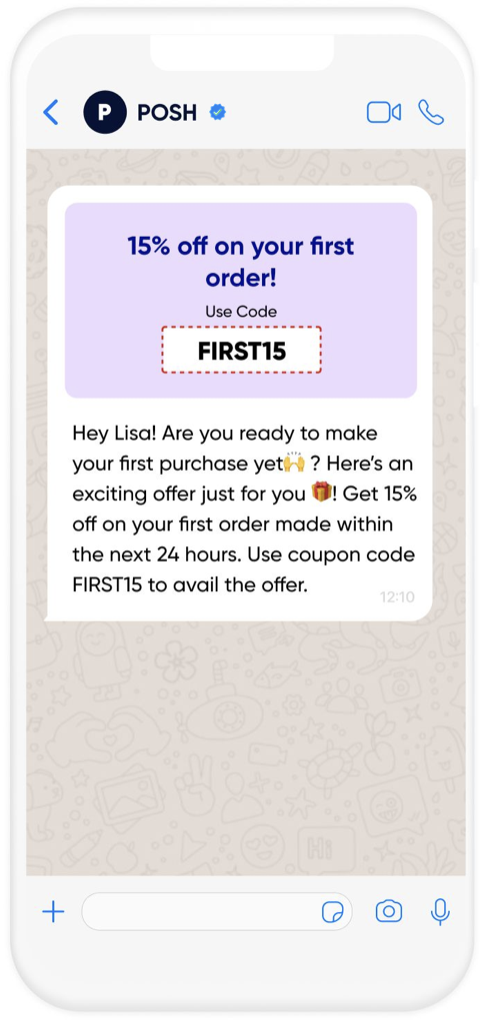
Utility Templates
Utility templates are used for transactional purposes, such as sending order confirmations, appointment reminders, shipping updates, and other operational messages. They provide helpful, non-promotional information to the user.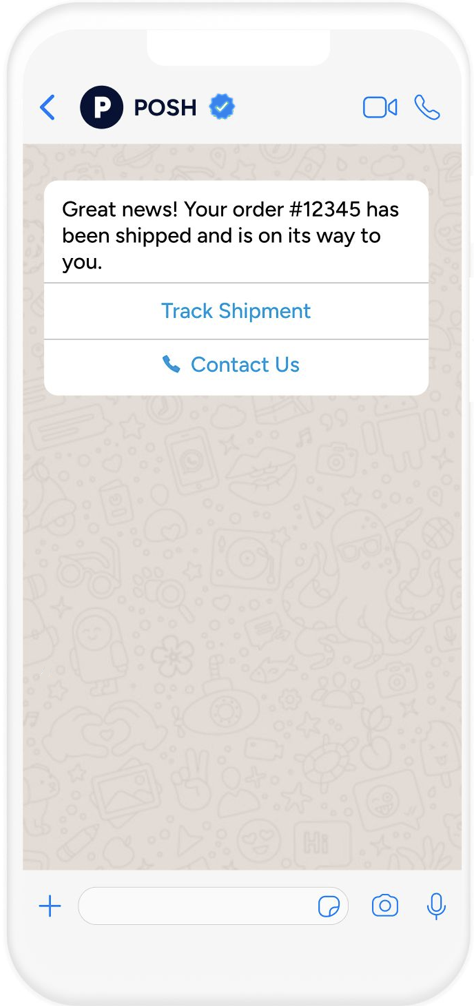
Differences between Marketing and Utility Templates
The key difference between Marketing and Utility templates lies in their intended use and content:
Marketing templates have specific characteristics that define their purpose and usage. Here are their key features:
Purpose: Used for promotional or marketing-related purposes to engage users.
Content: Includes offers, promotions, new product announcements, and other marketing messages.
Tone: Persuasive, focused on encouraging users to take action (e.g., buy, sign up, click a link).
Approval Process: Marketing templates must be approved by WhatsApp to ensure they are relevant, non-spammy, and comply with the platform's guidelines.
Utility templates are designed for essential business communications, providing users with important updates. Here are their key features:
Purpose: Used for transactional or informational purposes to give users essential updates on their accounts or services.
Content: Includes updates such as order confirmations, shipping details, appointment reminders, account activity notifications, and other operational messages.
Tone: Neutral, informative, and straightforward. The focus is on delivering relevant, necessary information without any promotional intent.
Approval Process: Utility templates also require WhatsApp approval, but the focus is more on ensuring they are relevant and accurate and do not include marketing language.
Best Practices for Marketing Templates
You can follow these best practices to ensure your Marketing templates are engaging, effective, and compliant with WhatsApp’s guidelines:
Personalize the message: If possible, use the customer's name to make the message feel more personalized and relevant. For example, “Hi [Name], we have an exclusive offer just for you!”
Clear call-to-action (CTA): Include a clear and concise call-to-action, such as “Shop Now,” “Learn More,” or “Claim Your Discount.” Ensure the CTA aligns with the message’s goal (e.g., driving sales or promoting an event).
Avoid spammy language: Ensure the message does not sound like spam or unsolicited advertising. Keep it relevant and targeted to the recipient's interests. For example, avoid generic phrases like "Huge discounts on everything!" and instead offer tailored promotions.
Timing and frequency: Send marketing messages at the most suitable times. Over-sending messages can annoy customers, so be mindful of the frequency.
Consider segmenting your audience to ensure they receive content relevant to their preferences.Test and optimize: Test different types of marketing messages to see which ones perform better (e.g., different CTAs or promotional offers). Regularly analyze performance metrics (e.g., open rates, click-through rates) to optimize your strategy.
Example Use Cases for Marketing Templates
The table below provides examples of how marketing templates can be used to engage users through promotional messages.
Use Case | Example Message |
|---|---|
Retail store - Promotional discount | Hello [Name], we're excited to introduce new products in our store! |
Service provider - Announcing new features | Hello [Name], we're excited to introduce new features in our app! |
Brand - Loyalty program update | Hi [Name], thanks for being a loyal customer! You’ve unlocked exclusive rewards. Button: View your rewards here: [Link] |
Best Practices for Utility Templates
To ensure the Utility templates are effective and compliant with WhatsApp’s guidelines, you can follow these best practices:
Provide clear and concise information: Keep the content of utility templates brief and focused on the key information that the user needs. For example: “Your order #[Order ID] has been shipped and will arrive on [Date].”
Be transactional and non-promotional: Utility templates should provide updates or alerts directly related to user actions (e.g., order status, appointment reminders) without any promotional or marketing content. For example: “Your meeting with [Service Name] is scheduled for [Time]. Please confirm your attendance.”
Ensure accurate and relevant details: The information provided in utility templates should be accurate and timely. For example, shipping information should include correct tracking numbers and delivery dates. For example: “Your payment of [Amount] has been successfully processed. You can view the receipt here [Link].”
Compliance with privacy regulations: Make sure to respect user privacy when sending utility templates. Avoid sharing sensitive information unless explicitly authorized by the user. For example, never share personal or financial data without clear user consent.
Keep the tone professional and helpful: The tone of utility templates should be neutral, clear, and helpful. Avoid using overly casual or promotional language. For example: “Your ticket has been successfully booked for [Event]. Please find your booking details attached.”
Example Use Cases for Utility Templates
Review the examples below to see how Utility templates can streamline customer communications for various business needs.
Use Case | Example |
|---|---|
Ecommerce - Order confirmation | Your order #[Order ID] has been confirmed. It will be shipped soon. You can track your order here: [Link] |
Healthcare - Appointment reminder | Hi [Name], this is a reminder for your upcoming appointment at [Clinic Name] on [Date] at [Time]. |
Finance - Payment confirmation | Your payment of [Amount] has been successfully processed. |
For additional examples of WhatsApp templates across different categories, you can explore Insider One’s Template Explorer. You can find a variety of use cases to help you understand how to effectively implement templates in different scenarios.