Once the event is ingested, the Array of Objects parameter is available directly in the segment builder.
Select the Parameter
In the Events segment, the parameter dropdown groups parameters as Default Parameters, Custom Parameters, Array of Object Parameters, and Lookup Table Parameters.
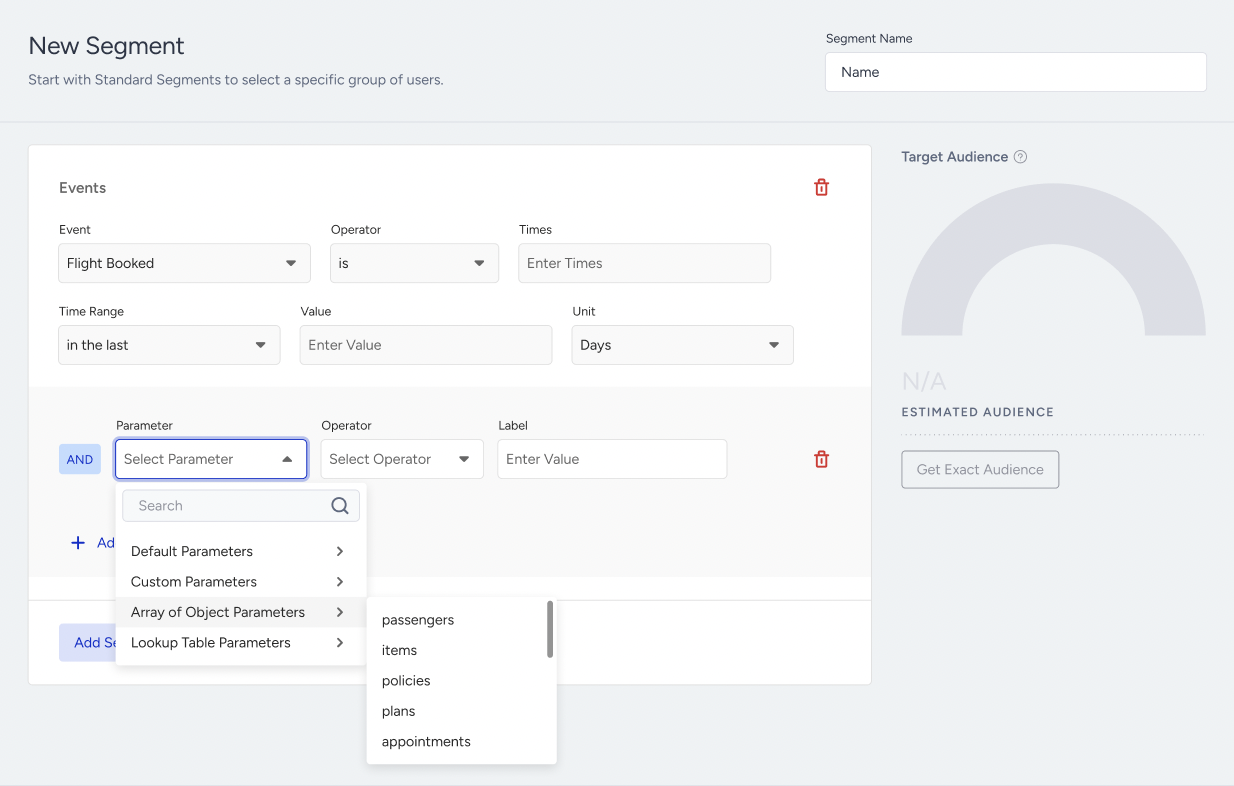
Filter by the Number of Objects
After selecting an Array of Objects parameter, an array-level condition appears with the Number of Objects input.
This lets you segment users based on how many objects inside the array satisfy the conditions. For example:
Purchase Completed WHERE items — Number of Objects is more than 1 → users who bought more than one item in a single transaction
Number of Objects counts matching objects, not matching values inside a single object. An object that contains two matching values still counts as one object.
If no object key condition is added, Number of Objects works as a pure length check on the array. For example, "Number of Objects is more than 1" targets every user whose event carried more than one item, regardless of the item details.
Counting is the only array-level calculation available in this release. Summing, averaging, or taking the maximum or minimum of a numeric object key across the array is planned for a later release.
Add Object Key Conditions
Add Object Key appears above Add Event Parameter. Each object key condition consists of:
Object Key: The key inside the object
Operator
Value
If an object key is of type Object, selecting it reveals its Sub-Object Key so that nested properties can be targeted. A maximum of 2 levels is supported.
Multiple object key conditions are combined with AND, and they are evaluated within the same object. This is the most important rule to understand:
A user matches only if one single object in the array satisfies all conditions together.
For example, category = Shoes AND unit_price > 2000 matches a user who bought a pair of shoes costing more than 2000. It does not match a user who bought cheap shoes and an expensive jacket.
Segment Examples
Users who purchased more than one item in a single transaction → Purchase Completed WHERE items Number of Objects is more than 1.
Users who purchased discounted shoes over 2000 → Purchase Completed WHERE items — category = Shoes AND unit_price > 2000 AND is_discounted = true.
Users with an upcoming policy renewal → Policy Purchased WHERE policies — status = active AND expiry_date in the next 30 days
Array of Objects Event Parameters is available in User Profiles → Filters (Advanced Filter) and Dynamic Segment.