Suggested reading: Historical Data Comparison on Onsite Analytics
Historical Data Comparison on Onsite Analytics, also known as comparing campaign performance before and after or period-over-period reporting, helps you compare key campaign metrics across two date ranges. This lets you gain valuable insights into changes in key metrics and your campaigns' performance over time. You can leverage this feature to better understand the impact and growth of your onsite campaigns, making it easier to make data-driven decisions and optimize your marketing strategies accordingly.
This guide explains how to interpret data comparison results and offers suggestions for improvement.
Understand results
Conducting historical data comparisons on key metrics and analyzing the right metrics will reveal insights and trends and pinpoint campaigns that can be improved.
Two critical metrics indicate areas for improvement: Incremental Revenue & Conversion Rate (CR) Uplift. You can check for increases or decreases in these two metrics to understand where to improve performance.
The diagram below displays this general approach for these two metrics.
.jpg)
To obtain actionable insights, you can follow these best practices to analyze the results:
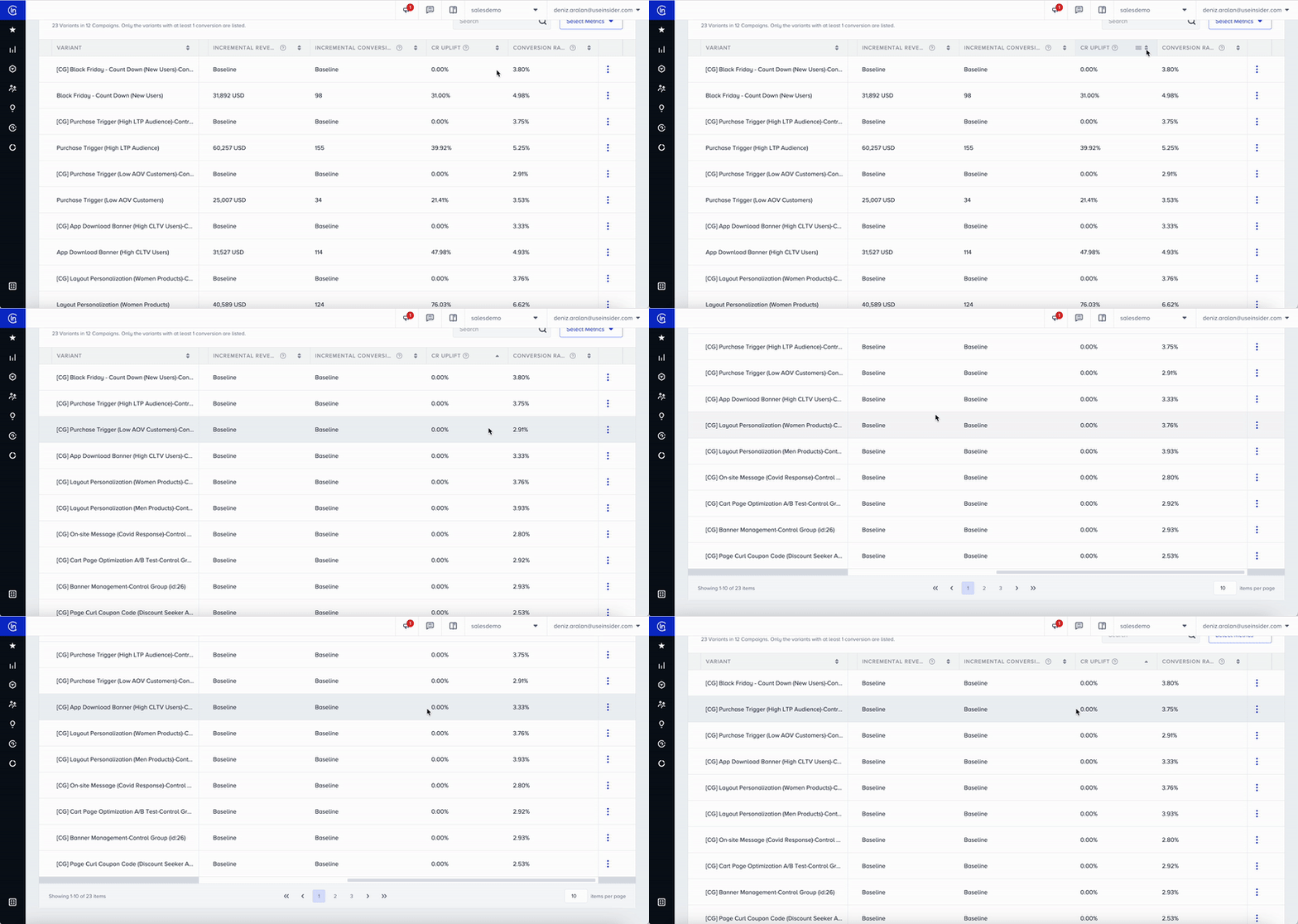
List campaign variations looking at conversion rate uplift from low to high
This practice helps you identify variations with negative CR Uplift. These are the campaigns you need to review and act on to improve performance. You may also end the campaign if significance is high and you conclude the variation is ineffective at reaching conversion goals.
You can also identify variations that have high CR Uplift. Compare low-performing scenarios with these campaigns and use them as reference points to determine what can be changed in segmentation/rules and design.
Filter variations that have a significance value over 85%
Taking action when the campaign reaches a significant level is essential. Significance is a statistical term used in A/B Testing that indicates whether the data is sufficient to continue or end the experiment. This score determines the significance of the results and guides decision-making.
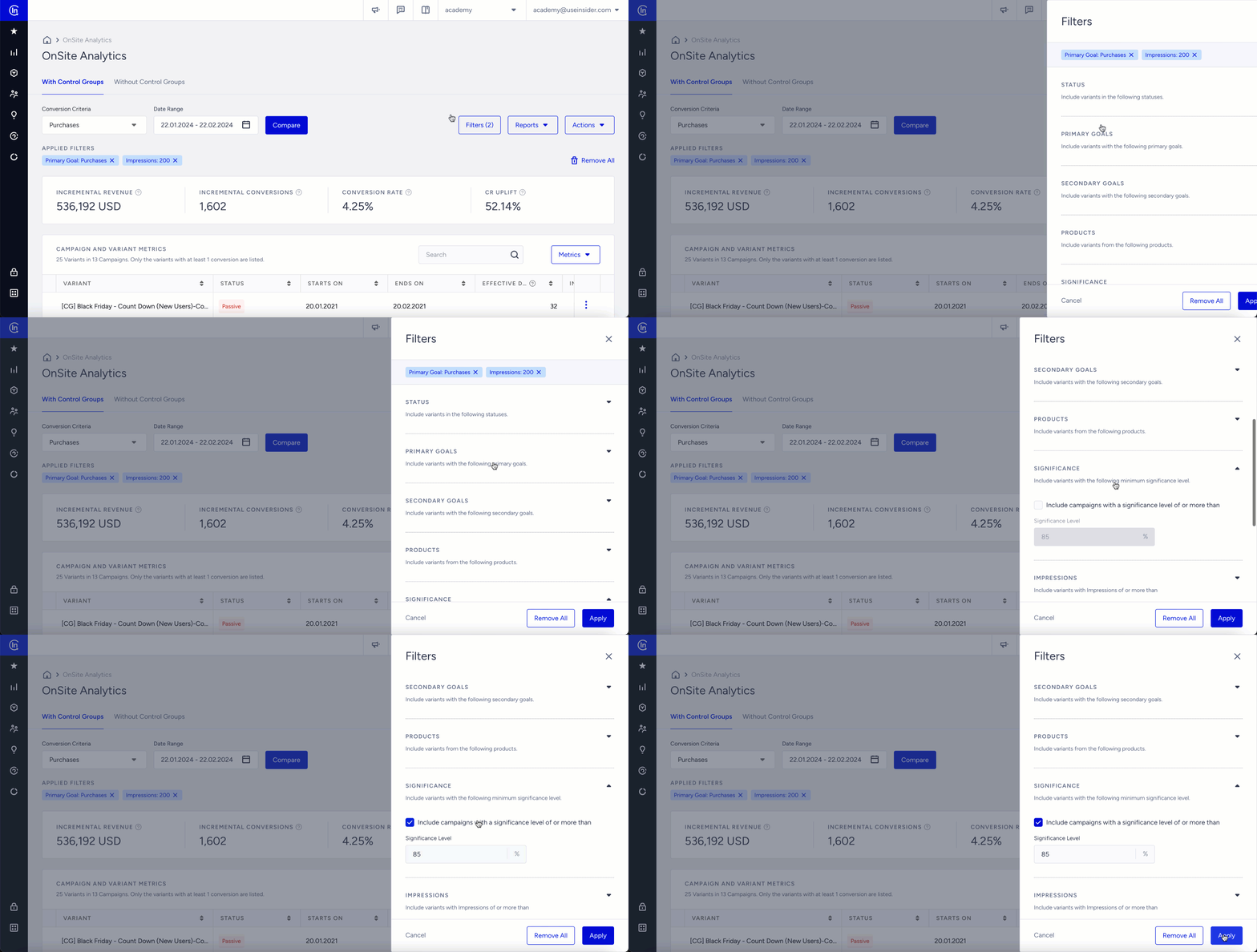
Suppose the analytics lack significant results, as most campaigns have a low significance level. In that case, you can review the segment and campaign rules to ensure the campaign is accessible to a larger population. Expanding the audience will shorten the time needed to collect the data required to reach a valid significance level.
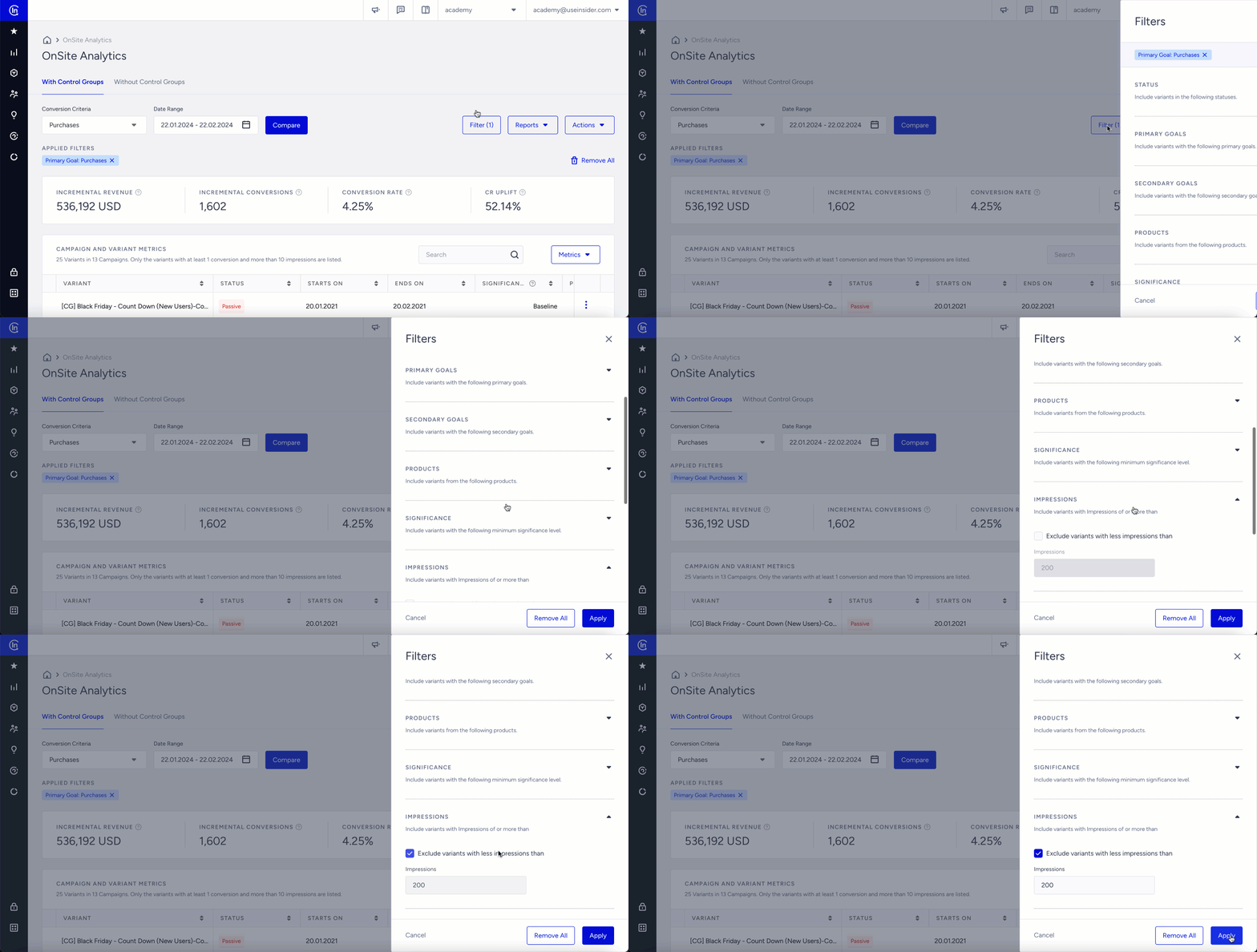
Exclude/filter campaign variations with low impressions
Similar to the significance level, campaign variations with very low impressions can be misleading when assessing results and planning next steps. You can exclude variants with a low sample size and analyze results on a more data-driven, statistically significant basis.
The Onsite Analytics page has a default filter to display the variant results with impressions greater than 200.
Instead of excluding variants one by one, you can set a minimum impression threshold to list the relevant variants.
Enable data comparison
It is strongly recommended that the compared ranges be equal in duration for an accurate and reliable comparison and a balanced number of campaigns to compare. For example, you should avoid comparing 10 days to 30 days. Even in cases where the compared ranges are equal (i.e., 30 days to 30 days), the sample data will not be balanced if the number of campaigns compared is 5 to 25. Therefore, the comparison result will not be healthy to drive accurate insights.

Improve results
We strongly recommend duplicating your campaign before making any changes to its traffic allocation, goals, segments, or rules. This helps prevent any discrepancies in the analytics and ensures accurate tracking of campaign performance.
The recommended actions are not exclusively for the specified metrics. Actions suggested for a particular metric can also help improve others. For example, actions that increase incremental revenue can also help increase incremental conversions, since they are related.
See below for possible actions and recommendations for metric comparison results:
Decrease in Conversion Rate (CR) Uplift
Possible Actions/Recommendations | Explanation |
|---|---|
Increase the traffic allocation for winner variants on your significant A/B test campaigns | If the significance level exceeds 95%, you can list your variations based on their conversion rate in descending order, and increase the traffic allocation of the winner campaigns. This approach will help identify the most effective variants for further optimization. |
Increase the traffic allocation for winner variants on your campaigns with high probability to win | List your variants based on their conversion rate in descending order, and increase the traffic allocation of the winner campaigns. |
Set the priority between campaigns | Priority enables multiple campaigns that can be displayed on the same page to be displayed in a priority order. For example, if you have 10 campaigns and you want 3 of them to be in a priority order, you need to add priority to all your active campaigns. You can prioritize the campaigns that are performing better and driving high revenue. |
Work on the campaign design considering UX/UI | Effective campaigns are the ones that build an appeal for the audience. You can review the design decisions and make changes in the UX. You can take high-performing campaigns as a reference point, compare them to low-performing designs, and adjust the design by identifying the differences |
Decrease in Conversion Rate (CR)
Possible Actions/Recommendations | Explanation |
|---|---|
Configure Notification Display | CR might decrease if users lose incentive to convert due to an excess of campaigns displayed. If you have more than one on-page campaign that can appear on the same page, you can enable this feature. Once enabled, it helps you set the number of screens per user in T time. |
Create satisfaction guarantee on cart abandonment | You can offer a satisfaction guarantee or extended return window to users who added items to their carts but did not purchase them. You can let them know that their purchase is a no-risk purchase to encourage them to check out. You can also use a timer in your promotions for a higher engagement rate and conversions. |
Decrease in Incremental Revenue
Possible Actions/Recommendations | Explanation |
|---|---|
Launch your use cases by using different Campaign Rules | You can trigger your campaigns based on condition groups. Campaign rules will help you select specific conditions your users can match with, and refine your audience. |
Create an engagement for users with coupon codes | Coupon codes drive customers on the hunt for deals to purchase and can even help increase basket value. You can utilize Wheel of Fortune, Side Coupon, Page Curl and Scratch Coupon Templates. |
Returning cart abandoners | If a user abandons their cart and returns to your site, you can offer a side promotion that shows what they left behind, with a CTA that takes them directly to checkout. You can make it easier to check out to encourage your users to complete the purchase. |
Launch Social Proof campaigns to create urgency for users | Social proof acts as reviews, testimonials, or social shares, and encourages users to take the same actions. |
Decrease in Incremental Conversions
Possible Actions/Recommendations | Explanation |
|---|---|
Use Campaign Trigger to sequence your campaigns | Use the Campaign Trigger system to sequence your campaigns and trigger them based on how users interact with other campaigns. |
Use templates with CTAs and pick the right wording and design for your CTA buttons | Effective CTA copy can easily communicate your offer and drive users to take the necessary actions. |
Pick the template from Template Library based on your goals | Template Store helps you select a template based on the goals assigned to each template, It is a collection of templates that you can use to create campaigns. This can be especially useful when there is a list of goals assigned to each template, and you want to be able to customize them to fit the goal of the campaign. For example, if you have a conversion goal other than purchases (e.g., lead collection), a template that fits these needs can increase goal conversions. |
Use enhanced goals like gageview and custom goals | Besides the default purchases and clicks goals, you can create your goals for different metrics you want to track. |
Decrease in Impressions
Possible Actions/Recommendations | Explanation |
|---|---|
Launch your use cases with different segments | Delivering more relevant content to each group of recipients with the help of segmentation will result in an increase in open and click rates |
Organize your mobile menu for better user experience | Category Optimizer provides a solution that lets users create a personalized menu bar to enhance the user experience. You can manually or dynamically reorganize your menu listings and categories based on each user's data to improve navigation and reduce exit rates. |
Arrange the placement of the campaigns for a better user experience | Just as you can customize the look and feel of your templates, you can also customize their placement and position depending on the page(s) you want to display your campaign. If you are receiving low impressions with a campaign, placing the campaign on a page/position that is more visible to users targeted based on your website's UX will help increase impressions. |
Decrease in Average Order Value (AOV)
Possible Actions/Recommendations | Explanation |
|---|---|
Implement Purchase Progress Bar to increase Average Order Value (AOV) | You can create a Purchase Progress Bar to let users track their progress toward completing a purchase, reducing the risk of abandonment. You can also use it to incentivize users with added bonuses, such as free shipping or gifts, for staying on the checkout page longer. |