The Wine & Spirits vertical is shaped by taste preferences, occasion-based buying, discovery, and gifting. Shopper behavior is strongly influenced by product type (such as wine, whiskey, or cocktails), price tier, brand loyalty, and food pairings. Purchases often happen around special occasions, when restocking home bars, or during exploration of new flavors.
Effective recommendations should guide users to discover products, suggest pairings for meals and events, and support gifting or occasion planning. By doing so, they not only enrich the customer experience but also maximize basket size and lifetime value.
What you can achieve with Smart Recommender
Taste-based discovery on homepage
Showcase curated lists such as “Fruity Whites,” “Bold Reds,” or “Smoky Whiskeys” based on taste profiles and user preferences.
Perfect pairings for every bottle
On product pages, recommend food pairings, mixers, or accessories (e.g., wine openers, cocktail shakers) to encourage cross-sells.
Curated gift sets for special occasions
Suggest elegant bundles like an “Anniversary Wine Duo” or “Whiskey Lover’s Kit” for holidays, birthdays, or corporate gifting.
Reordering made easy
Surface previously purchased or frequently bought bottles on the homepage for one-click restock.
Last-minute additions at checkout
Recommend impulse-buy items, such as bitters, snack pairings, or mini bottles, on the cart page to increase the average order value.
Personalized homepages by category affinity
Customize the homepage experience based on whether shoppers prefer wine, spirits, or cocktails.
Attribute-based suggestions (grape, ABV, region)
Use attribute affinity to suggest bottles that align with favored traits, such as grape variety, alcohol content, or origin.
A/B testing to optimize pairing & discovery
Test placement, pairing logic, and messaging (e.g., “Editor’s Picks” vs. “Trending Now”) to identify what resonates most.
Walkthrough: Boosting AOV with Cross-Sells
One of the most effective ways to increase your store’s Average Order Value (AOV) is by encouraging customers to add complementary products to their purchase. In the wine and spirits space, purchases are often tied to an occasion—like hosting a dinner, mixing cocktails, or gifting—so recommending related items at just the right moment can drive meaningful cross-sell opportunities.
In this example, we’ll walk you through how to create and test a cross-sell campaign on wine product pages to boost the AOV of customers who currently have low AOV. The goal is to test and compare which complementary category—cheese pairings or glassware—leads to a higher AOV when recommended alongside wine.
By setting up two separate strategies—one recommending cheese pairings, the other recommending glassware—you’ll be able to run an A/B test and identify which category performs best. Let’s walk through the setup.
1. Create your Recommendation Strategy
It's time to create your first recommendation strategy. Navigate to the Recommendation Strategies and click Create.
Select your page type as Product Detail Page.
Select your algorithm as Purchased Together to recommend suitable products for cross-selling.
Enter the number of products you want to recommend.
Exclude the recently purchased products in the last 4 weeks to keep your customer engaged.
Add a filter for the category attribute to display recommendations from the “Cheese Pairings” category.
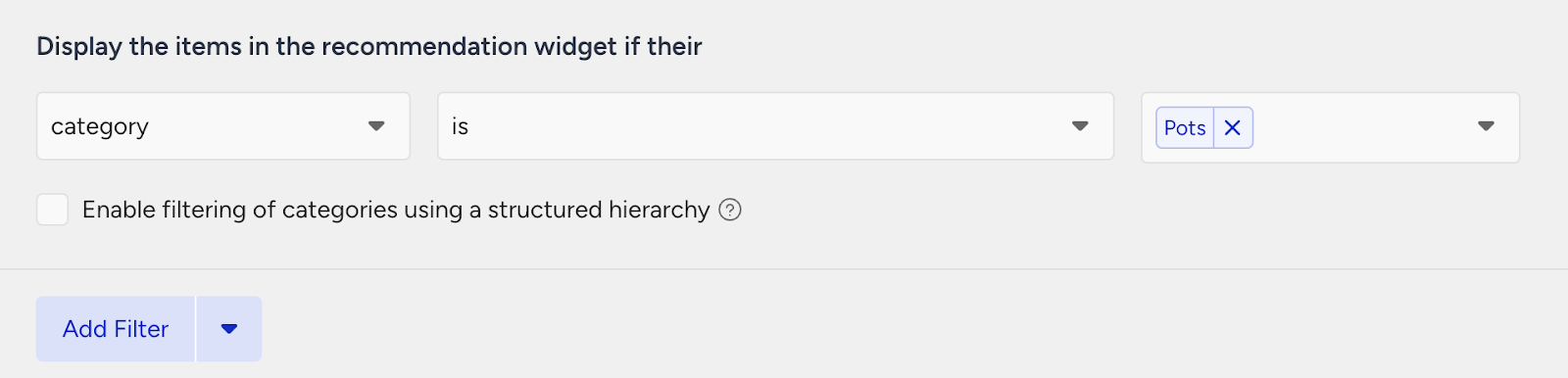
Then, create your second strategy that you want to test against.
Select your page type as Product Detail Page.
Select your algorithm as Purchased Together to recommend suitable products for cross-selling.
Enter the number of products you want to recommend.
Exclude the recently purchased products in the last 4 weeks to keep your customer engaged.
Add a filter for the category attribute to display recommendations from the “Glassware” category.
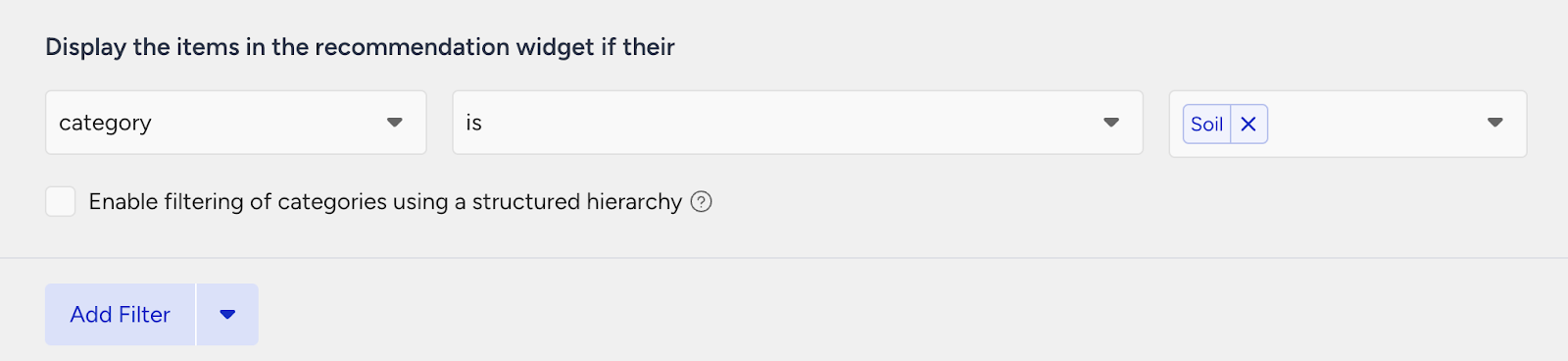
2. Launch your campaign
Now, launch your first campaign using your strategies.
Go to the Web Smart Recommender page and click Create.
Select your integration method for the widget.
On the Segments step, pick the audience.
For this example, you can select customers with a low AOV under Purchasing Behavior and set your threshold.
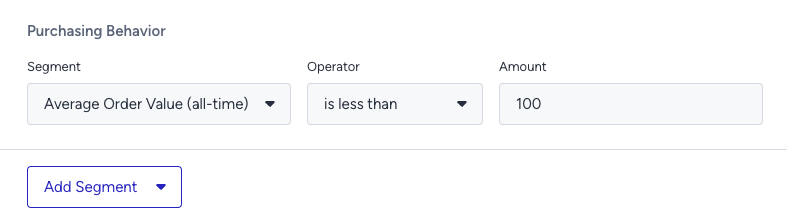
On the Rules step, decide where and when to show your campaign.
Use Page Rules to target the product detail pages of wine products.
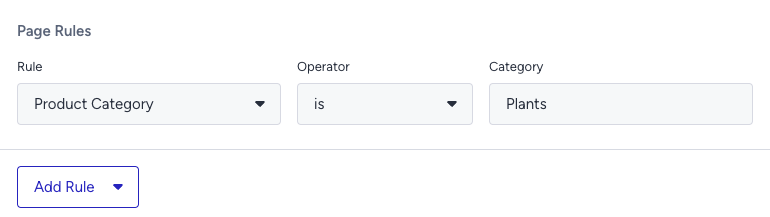
On the Design step:
Assign your two strategies to the variants.
Assign traffic allocation for each variant.
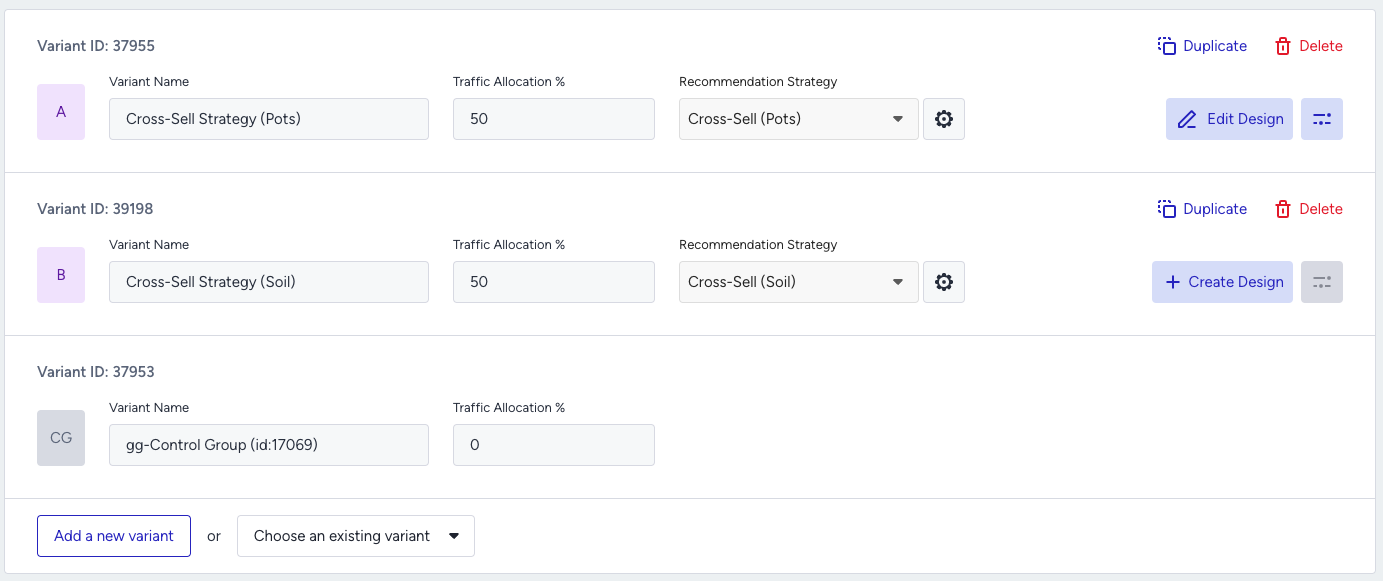
Now you’re ready to design your widget. Click Edit Design to open the Advanced Product Card Designer. Here, you can customize your product cards however you like.
Make sure all the attributes you want to display are included in your product catalog. If you need to show more information on your product cards, you can create custom attributes from Product Attributes page.
After finalizing your campaign design, the next step is to select the locales and stores where you want the campaign to appear.
Once your targeting is set:
Review the campaign details.
Confirm that all settings match your objectives.
Click Launch to activate your first campaign.
3. Track your campaign metrics
You’ve launched your campaign—great work! Now it’s time to track its performance.
Go to the Smart Recommender Analytics page.
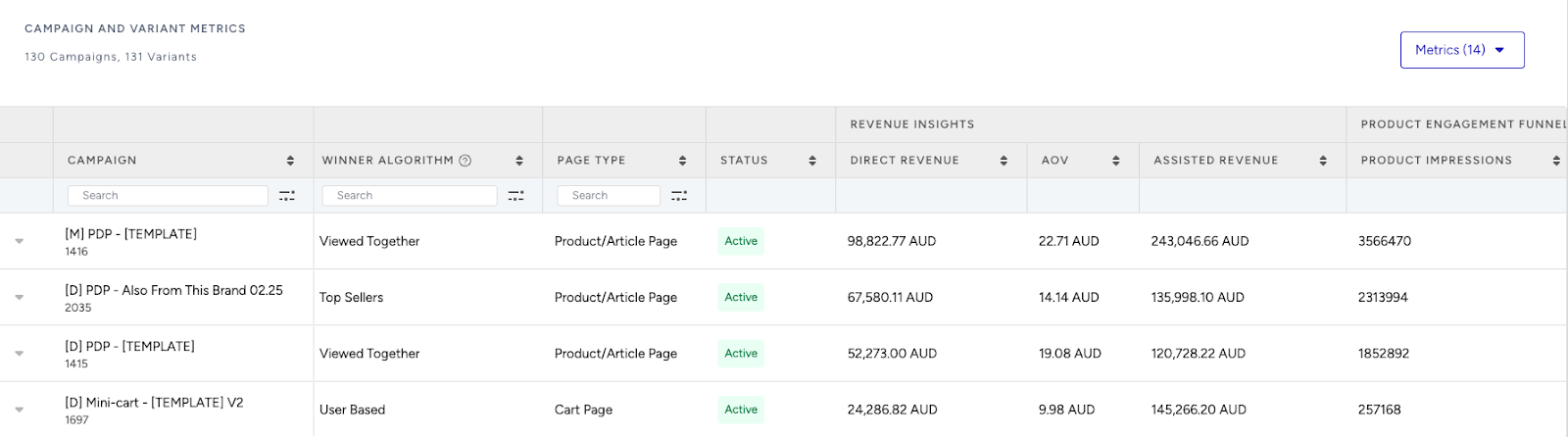
Locate your campaign under the Campaign and Variant Metrics table. Once the experiment duration ends, click your campaign name.
Compare key metrics, including Direct Revenue, Average Order Value (AOV), and Conversion Rate.
You can see which product category—cheese pairings or glassware—led to higher AOV for low-spending customers.
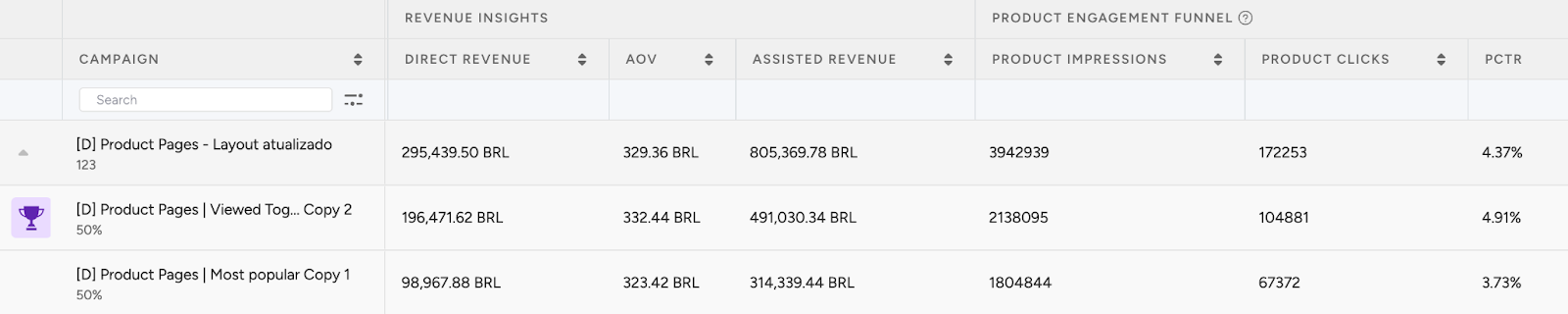
If one variant is clearly winning, adjust the traffic allocation to 100%. This ensures the best-performing strategy receives all traffic and maximizes impact.
You can also test and compare additional cross-sell strategies by adjusting the rules and filters based on other product categories to discover which combinations drive the most value.
4. Optimize your campaigns
Once your campaigns are live and running, it’s time to review results and apply data-driven improvements.
Go to the Smart Recommender Analytics page.
Evaluate campaign performance based on engagement metrics.
Track Engagement Funnel Metrics: Understand how users interact with your recommendations at every step. View product impressions, clickthrough rate, add-to-cart rate, and conversion rate for each campaign to pinpoint where you’re driving engagement and where there’s room to improve.

Compare Campaign and Variant Performance: Use the Campaign and Variant Metrics table to review key KPIs like AOV, Conversion Rate, and Direct Revenue. Identify which strategies are delivering the best results and refine or scale your winning variant accordingly.
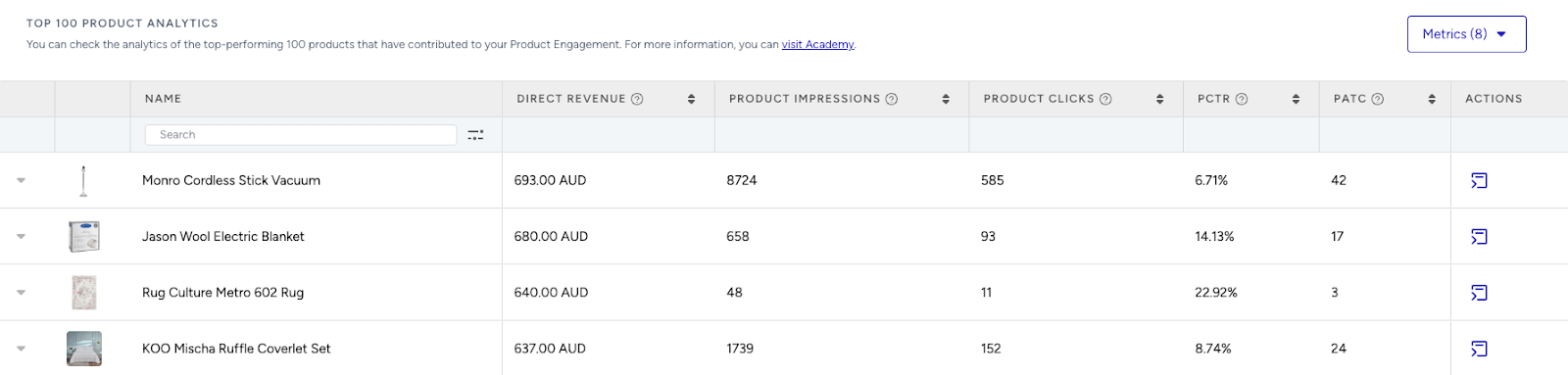
Analyze Product-Level Impact: Visit the Top 100 Product Analytics to see which products are performing well within your campaigns. Consider giving extra visibility to low-performing but strategic items by highlighting them in future recommendation widgets.
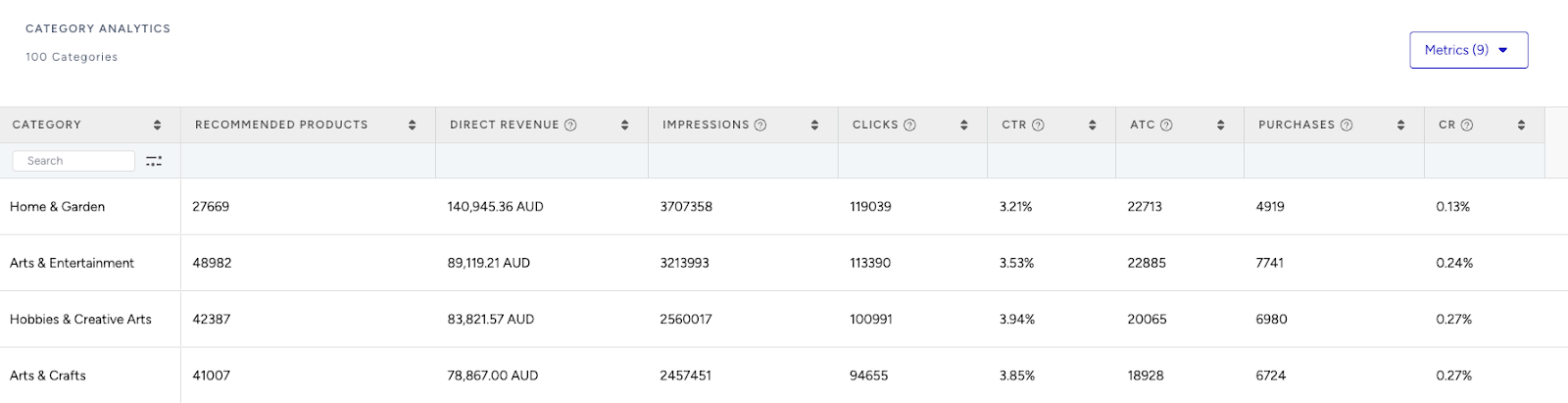
Review Category Trends: Use the Category Analytics view to assess which product categories drive the most conversions. You can prioritize high-performing categories to maximize conversions or spotlight underperforming categories to help boost their visibility and performance.
Use cases based on the page types
Home Page
Taste-based collections
Create a strategy with the Most Popular algorithm to highlight top-viewed popular products on your homepage.
Enable the “Enhance recommendations based on Attribute Affinity” toggle to personalize recommendations based on your customer’s affinities.
Add Taste + is + Fruity filter to your strategy to display popular items of the season.
To filter your recommendations based on the taste, create a new custom attribute from the Product Attributes page and add taste information for your products.
Title options: “Discover Fruity Favorites” or “Explore Bold Reds”
Occasion-ready picks
Make every occasion special by showcasing bottles that fit the moment. For example, highlight popular picks tagged for events like New Year’s, dinner parties, or Father’s Day to help users find the perfect match for their celebration.
Create a strategy with the Top Sellers algorithm.
Add Category + is + New Year filter to your strategy to display products from the starter kits.
Set segments for new users on the campaign to address the right audience for starter kits.
To recommend kits, create a custom attribute called Kit ID on the Product Attributes page. Assign the same Kit ID (e.g., Dinner Kit 01, New Year Kit 02 ) to all items in the kit. Then, use the Kit ID attribute in your filters to recommend other products from the same kit.
Product Detail Page
Mix it up – Cocktail suggestions
Enhance the cocktail experience by recommending everything needed to mix the perfect drink. For example, when a user views a bottle of gin or rum, suggest complementary items like tonic water, syrups, or bitters to complete their bar setup.
Create a strategy with the Real-Time User Engagement algorithm to surface trending follow-ups.
Add Category + is + Liquors filter to your strategy to display products from the liquors category.
Exclude the recently purchased products.
You can use this widget with headlines like “Make It a Perfect Pour” to capture more attention.
Upgrade to a premium bottle
Encourage users to elevate their selection by suggesting premium alternatives within the same category. For example, if they’re browsing a mid-range whiskey, recommend a higher-tier bottle with similar flavor notes or brand preferences to tempt an upgrade.
Utilize the Trending Products algorithm to showcase popular items in the Whiskey category.
Add filters: product_type + Premium and category + matches currently viewed item. Connect these two filters with OR connector to recommend relevant products.
You can use this widget with headlines like “Try This Aged Reserve” to capture more attention.
Category Page
Trending in this category
Build confidence in the buying decision by highlighting top-rated choices in the category the user is exploring. For example, if they’re browsing red wines, surface trending bottles with the highest ratings from other shoppers.
Use Trending Products algorithm to recommend viral products of the category.
Apply category + contains the currently viewing category’s attribute filter.
If your category type is hierarchical, enable the “Expand the category filter to include recommendations from the next category if there aren't enough products to display.” checkbox to make sure recommendations are shown even though there aren’t enough products to recommend from the category the user is visiting.
Enable the “Enhance recommendations based on Attribute Affinity” toggle to personalize recommendations based on your customer’s affinities.
Limited-time deals
Create urgency by spotlighting time-sensitive deals in the category the user is browsing. For example, if they’re exploring sparkling wines, feature bottles with the biggest current discounts to encourage quick action.
Use the Highest Discounted algorithm to surface the biggest deals.
Add a Category + matches the category they’re currently viewing filter to recommend products from the category they are viewing, like recommending the highest discounted pots for the pots category page.
Keep attribute affinity off to focus on value rather than personalization.
Cart Page
Don’t forget these pairings
Boost basket size with popular add-ons that pair well across a wide range of tastes. For example, surface best-selling snacks, bar accessories, or mixers—regardless of personal preferences—to appeal to all types of shoppers.
Use Most Popular algorithm.
Add a Category + is one of + Snacks, Accessories, Mixers filter to suggest practical add-ons.
Leave affinity off to prioritize functional relevance.
A/B test whether messaging like “Complete Your Bar” or “Add the Finishing Touch” increases order value better.
Upsell for free shipping or gift wrap
Increase average order value by suggesting last-minute additions that help users reach a spend threshold. For example, if a shopper is just below 100 USD, recommend a bottle of sparkling wine or a cocktail accessory to nudge them over the line before checkout.
Use the Checkout Recommendation algorithm with a spend threshold (e.g., 100 USD).
No filters required; affinity is optional.
Highlight remaining spend with a note like “Top up to 100 USD more for free shipping!” for urgency. If you don’t have a free shipping campaign, you can also use the Purchased Together algorithm to recommend possible upsell products that align with the items in their cart.