Travel & Hospitality is an experience-driven, planning-intensive vertical. User behavior centers on trip purpose, destination, seasonality, group size, and budget. Shoppers compare accommodation and activity options, evaluate amenities and deals, and often bundle flights, hotels, and local experiences into a single itinerary.
Effective recommendations should:
Upsell better options (e.g., room/seat upgrades, premium amenities, flexible fares).
Cross-sell local add-ons (e.g., transfers, tours, dining, insurance, experiences).
Encourage repeat bookings with personalized offers, saved itineraries, and loyalty perks.
Maximize booking value and occupancy via dynamic packages, length-of-stay nudges, and shoulder-night suggestions.
Personalization across purpose, season, party size, and budget helps simplify planning, improve satisfaction, and lift overall booking value.
What you can achieve with Smart Recommender
Upsell room upgrades on the homepage
Inspire travelers to book premium rooms or suites with exclusive perks, such as lounge access or complimentary breakfast. This not only improves guest satisfaction but also increases the average booking value.
Cross-sell local experiences
Recommend tours, activities, or dining options alongside hotel or flight bookings so guests can get more from their trip while you capture incremental revenue.
Geo-based suggestions for nearby properties
If a preferred hotel is unavailable or fully booked, suggest nearby alternatives. This helps retain customers on your platform, rather than losing them to competitors.
Win back lapsed guests with special offers
Re-engage past guests by highlighting destinations they previously visited or expressed interest in, using personalized offers to encourage repeat bookings.
Last-minute add-ons at checkout
At the cart or checkout stage, surface extras like spa treatments, airport transfers, or breakfast bundles. These time-sensitive prompts drive additional revenue per booking.
Personalized packages by trip type
Tailor packages based on trip purpose—such as family-friendly stays, romantic getaways, or adventure bundles—using attribute affinity to match preferences.
Budget-conscious options
Highlight discounts, deals, and value-for-money stays to appeal to price-sensitive travelers comparing multiple options.
A/B testing across the booking flow
Experiment with upsell placement, package design, or price framing throughout the booking journey to uncover what converts best and maximizes booking value.
Walkthrough: Boosting ABV with Experience Cross-Sells
One of the most effective ways to increase your property’s Average Booking Value (ABV) is by recommending local experiences and add-ons that guests can easily add to their stay. Travelers often decide on these extras spontaneously if they are convenient, relevant, and appealing.
In this example, we’ll walk through how to set up a cross-sell campaign on the booking confirmation page to boost ABV among guests with lower spend. The test will compare two strategies:
Recommending local tours
Recommending dining reservations
The goal is to identify which type of add-on generates higher incremental revenue when offered alongside an accommodation booking.
1. Create your Recommendation Strategy
It's time to create your first recommendation strategy. Navigate to the Recommendation Strategies and click Create.
Select your page type as Product Detail Page.
Choose your algorithm as Purchased Together to recommend popular add-ons booked with the selected stay.
Enter the number of products you want to recommend.
Exclude any add-ons already booked.
Add a filter for the category attribute to display only “Local Tours.”
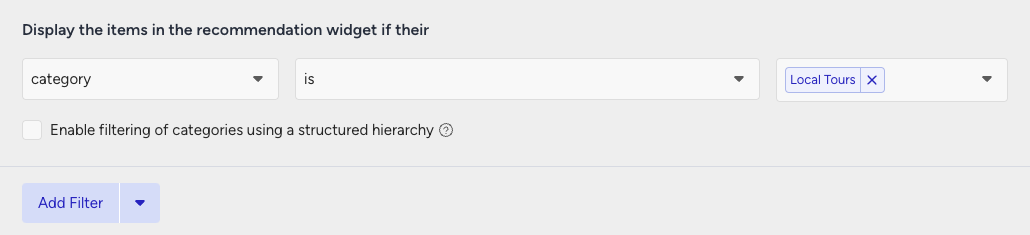
Then, create your second strategy that you want to test against.
Select your page type as Cart Page.
Use the same Viewed Together algorithm.
Define the number of products to recommend.
Exclude any booked extras.
Add a filter for the category attribute to display only “Dining Reservations.”
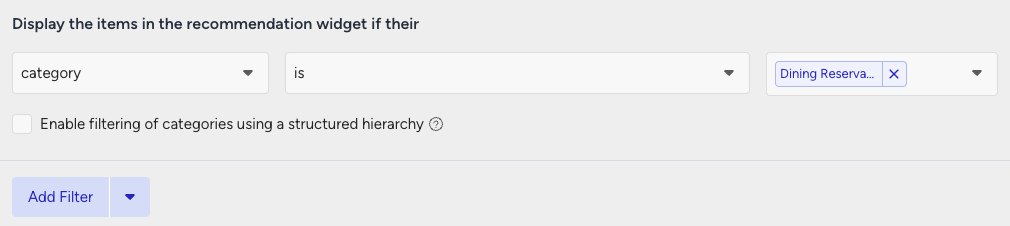
2. Launch your campaign
Now, launch your first campaign using your strategies.
Go to the Web Smart Recommender page and click Create.
Select your integration method for the widget.
On the Segments step, target customers with low AOV under Purchasing Behavior and set your threshold.
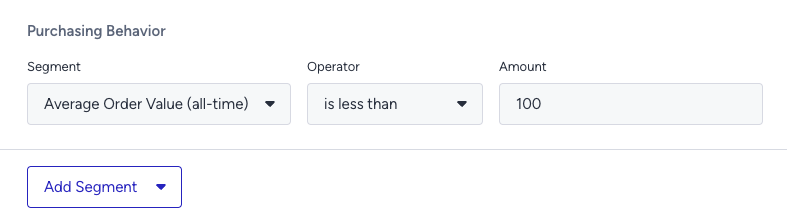
On the Rules step, Page Rules to target the booking confirmation page.
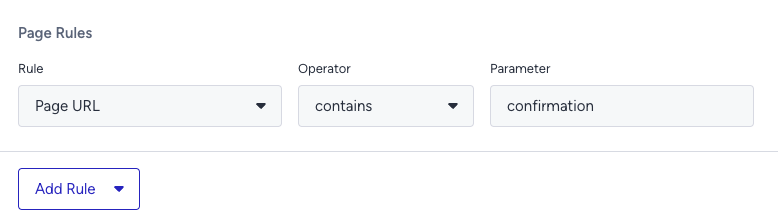
On the Design step:
Assign your two strategies to the variants.
Assign traffic allocation for each variant.
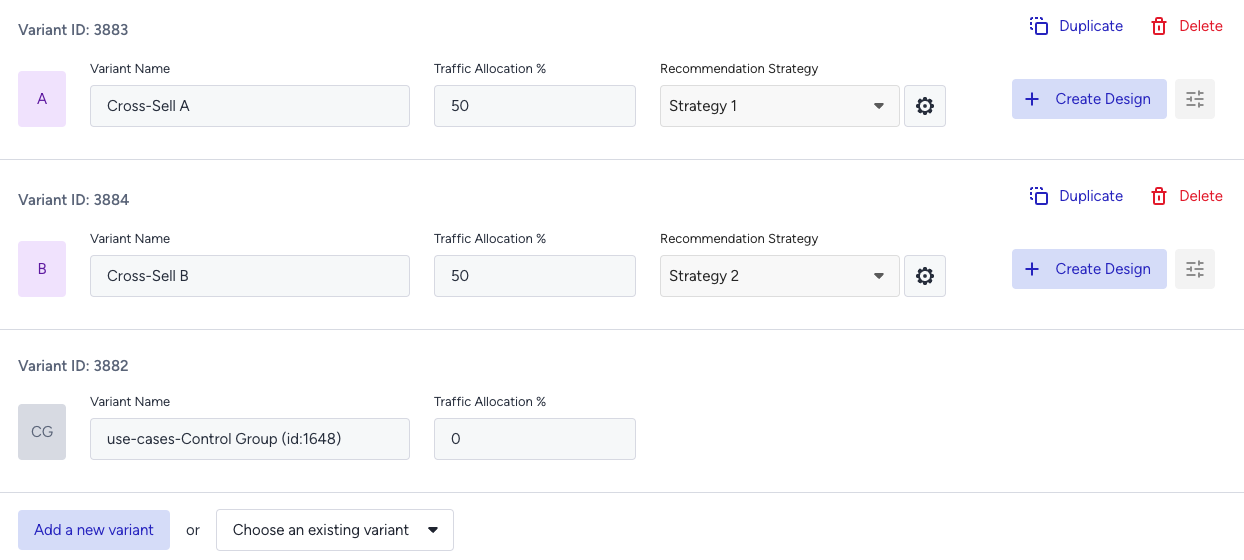
Now you’re ready to design your widget. Click Edit Design to open the Advanced Product Card Designer. Here, you can customize your product cards however you like.
Make sure all the attributes you want to display are included in your product catalog. If you need to show more information on your product cards, you can create custom attributes from Product Attributes page.
After finalizing your campaign design, the next step is to select the locales and stores where you want the campaign to appear.
Once your targeting is set:
Review the campaign details.
Confirm that all settings match your objectives.
Click Launch to activate your first campaign.
3. Track your campaign metrics
You’ve launched your campaign—great work! Now it’s time to track its performance.
Go to the Smart Recommender Analytics page.
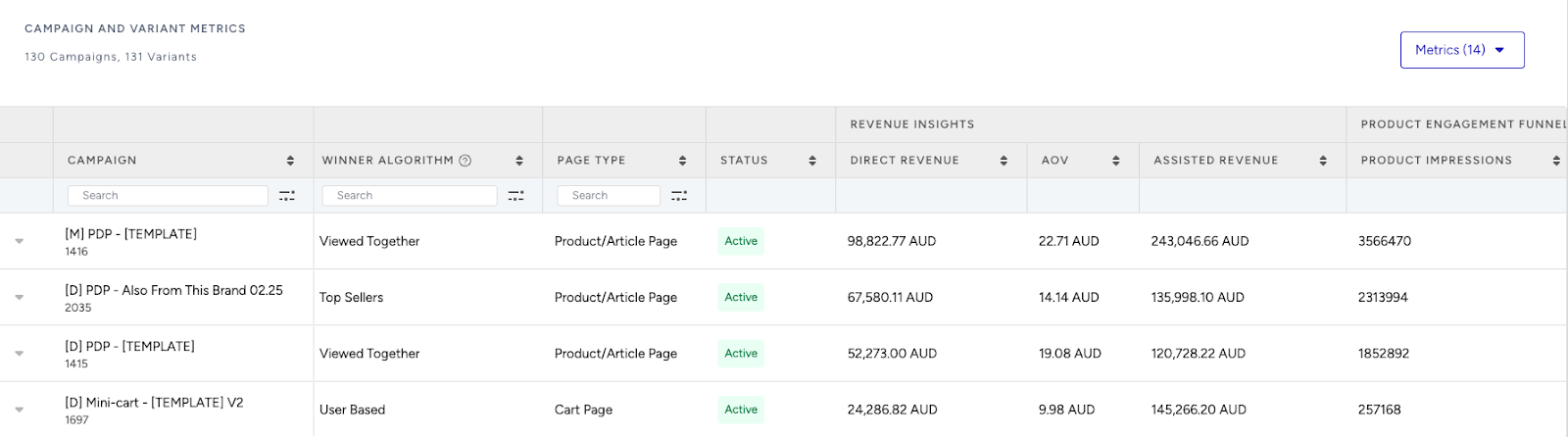
Locate your campaign under the Campaign and Variant Metrics table. Once the experiment duration ends, click your campaign name.
Compare key metrics, including Direct Revenue, Average Order Value (AOV), and Conversion Rate.
See which category—local tours or dining reservations—led to higher spend per guest.
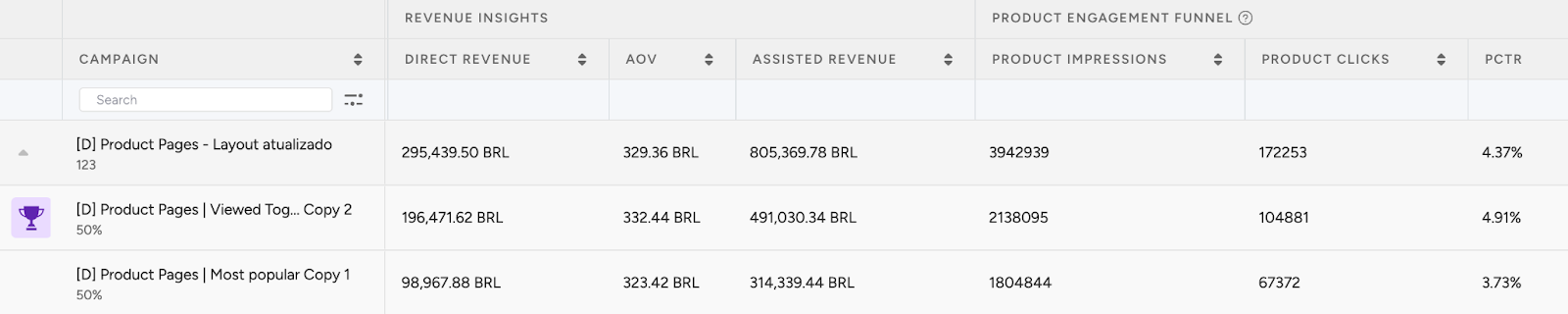
If one variant is clearly winning, adjust the traffic allocation to 100%. This ensures the best-performing strategy receives all traffic and maximizes impact.
Test other experiences, like spa treatments or wellness packages, to find even more high-impact cross-sell opportunities.
4. Optimize your campaigns
Once your campaigns are live and running, it’s time to review results and apply data-driven improvements.
Go to the Smart Recommender Analytics page.
Evaluate campaign performance based on engagement metrics.
Track Engagement Funnel Metrics: Understand how users interact with your recommendations at every step. View product impressions, clickthrough rate, add-to-cart rate, and conversion rate for each campaign to pinpoint where you’re driving engagement and where there’s room to improve.

Compare Campaign and Variant Performance: Use the Campaign and Variant Metrics table to review key KPIs like AOV, Conversion Rate, and Direct Revenue. Identify which strategies are delivering the best results and refine or scale your winning variant accordingly.
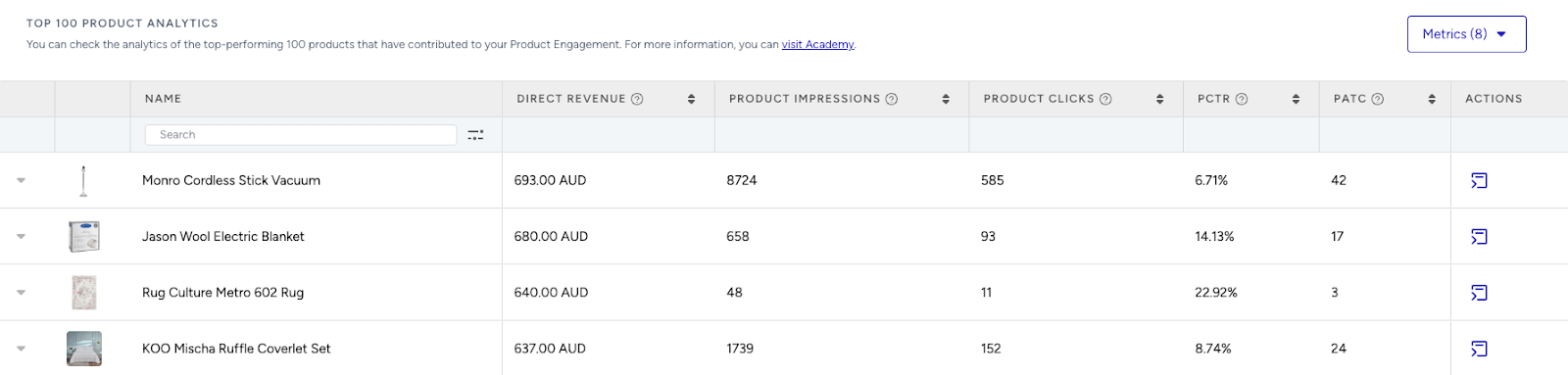
Analyze Product-Level Impact: Visit the Top 100 Product Analytics to see which products are performing well within your campaigns. Consider giving extra visibility to low-performing but strategic items by highlighting them in future recommendation widgets.
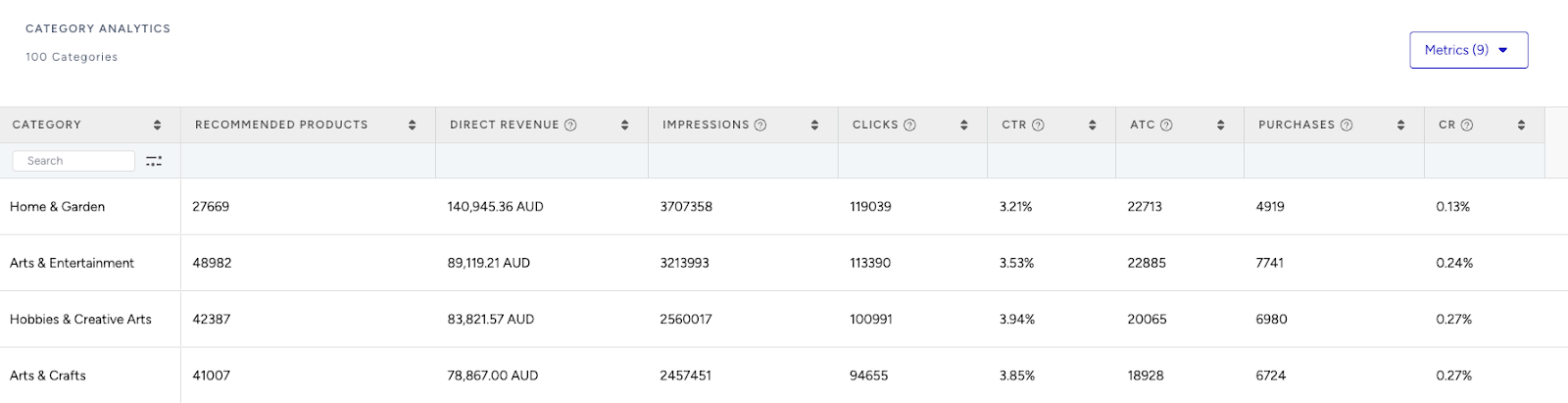
Review Category Trends: Use the Category Analytics view to assess which product categories drive the most conversions. You can prioritize high-performing categories to maximize conversions or spotlight underperforming categories to help boost their visibility and performance.
Use cases based on the page types
Home Page
Recommended stays for your trip
Highlight trending or best-selling accommodations for users’ preferred destination and dates.
Create a strategy with the Most Popular algorithm.
Add filters for destination and date range.
Enable Attribute Affinity for preferences like family-friendly, beachfront, or pet-friendly.
Exclusive upgrades
Show limited-time offers for suite upgrades or special packages to entice visitors.
Create a strategy with the Trending Products algorithm.
Add a filter as room type = Premium.
Use dynamic headlines like “Upgrade Your Getaway!”
Product Detail Page
Better alternatives
Encourage upsells by showing higher-tier rooms or better-rated properties for similar dates and budget.
Create a strategy with the Substitute Products algorithm.
Add a filter as room type with higher value.
Use a headline such as “Stay in More Style.”
Things to do nearby
Recommend local experiences near the selected hotel to boost convenience and value.
Create a strategy with the Complementary Products algorithm.
Add a filter as experience category = Local Tours or Activities.
Use a headline such as “Explore Around Your Stay.”
Category Page
Best value stays
Surface top-discounted accommodations for price-sensitive travelers.
Use the Highest Discounted algorithm.
Filter for the user’s browsing category (e.g., boutique hotels, family resorts).
Turn off affinity for pure value focus.
Top booked in this area
Show what’s trending among other travelers for the same destination.
Use the Trending Products algorithm.
Apply a category filter for destination.
Enable Attribute Affinity for personal relevance.
Cart Page
Popular add-ons for your trip
Suggest high-demand extras like breakfast, airport transfer, or spa access during checkout.
Use the Most Popular algorithm.
Filter for add-on categories.
Upgrade for more comfort
Prompt users to upgrade rooms or add packages with messages like “Add 50 USD to get a suite with ocean view.”
Use the Checkout Recommendation algorithm with a spend threshold.
No filter required; affinity is optional.