This guide offers a detailed overview of Smart Recommender algorithms, also known as the product recommendation engine, explaining:
Applicable verticals
Supported page types
Common use cases
Fallback mechanisms
Prerequisites
Recommendation constraints
The purpose is to help you select the most effective algorithm for each scenario, ensuring that recommendations remain accurate, relevant, and aligned with your campaign goals.
The available algorithms are:
Most Popular
The Most Popular algorithm recommends products based on their total page views over the lookback period in the same locale. It identifies the most popular items and ranks them by page view count, ensuring that the most viewed products appear first.
Top Sellers
The Top Sellers algorithm recommends products based on their total purchase counts over the lookback period in the same locale. It identifies the top-selling items and ranks them by purchase count, ensuring that the most sold products appear first.
Location-Based Top Sellers
The Location-based Top Sellers algorithm allows you to serve product recommendations to each website visitor, analyzing the user's current location (IP address geolocation) and serving the most popular products in that location.
Trending Products
The Trending Products algorithm calculates a trend score for products based on views and purchases over the past seven days and the previous week. It identifies and recommends products with increasing trend scores compared to the previous week to highlight those that are gaining traction and going viral.
Most Valuable Products
The Most Valuable algorithm recommends products that drive the highest revenue across your site. Recommendations are based on each product’s contribution to total revenue and its revenue per visit, ensuring a focus on high-performing, high-value items.
Highest Discounted Products
The Highest Discounted algorithm recommends products based on their discount ratios, calculated using the original price and discounted price in the product catalog. Products are ranked from the highest to the lowest discount within the specified size. Discount ratios are determined separately for each currency type to ensure accurate recommendations.
New Arrivals
The New Arrivals algorithm recommends the most recently added products in your catalog. When a product is first ingested into your catalog, its creation date is recorded. Recommendations are then generated based on this date, with products sorted from newest to oldest to help users discover the latest additions in your catalog.
Recently Viewed
The Recently Viewed algorithm is a personalized algorithm that tracks a user's product view behavior. It recommends the user's most recently viewed items to help them quickly revisit products they showed interest in, enhancing conversions and driving re-engagement.
Viewed Together
The Viewed Together algorithm generates recommendations based on products viewed together within the same sessions and locale. It identifies items frequently explored together and recommends those that are commonly viewed alongside the selected base product(s), enhancing relevance and supporting cross-selling strategies.
Purchased Together
The Purchased Together algorithm generates recommendations based on products that have been purchased together within the same sessions and locale. It identifies items frequently bought alongside the selected base product(s) and ranks them by purchase frequency, supporting effective cross-selling and increasing average order value.
Purchased with Last Purchased
The Purchased with Last Purchased algorithm is a personalized recommendation model that suggests products frequently bought alongside the user’s most recent purchase. Leveraging past purchase behavior helps surface complementary items and encourages repeat engagement.
Complementary Products
The Complementary Products algorithm recommends products from categories that are contextually relevant to the base product. The algorithm uses LLM-based category pair reasoning to determine which categories naturally complement each other, without relying on co-purchase or co-view data.
Key behaviors:
Category relationships are determined by the LLM model, not by transaction history.
Relevant complementary categories are matched against your live catalog; only products you actually carry are recommended.
What changed from the previous model:
The previous Complementary algorithm relied on co-purchase signals. If two products had not been purchased together enough times, the algorithm fell back to generic recommendations. The updated model understands category-level relationships directly, for example, a monitor pairs with a keyboard and screen cleaner, a dress pairs with a bag and sandals, regardless of whether any user has ever bought them together in your store.
Substitute Products
The Substitute Products algorithm recommends products that are similar to the base product, helping with the product discovery process. It takes into account product similarity, category, and price range, offering alternatives that match the user's preferences and budget to enhance the shopping experience by providing more options and encouraging users to explore similar items.
Similar Products
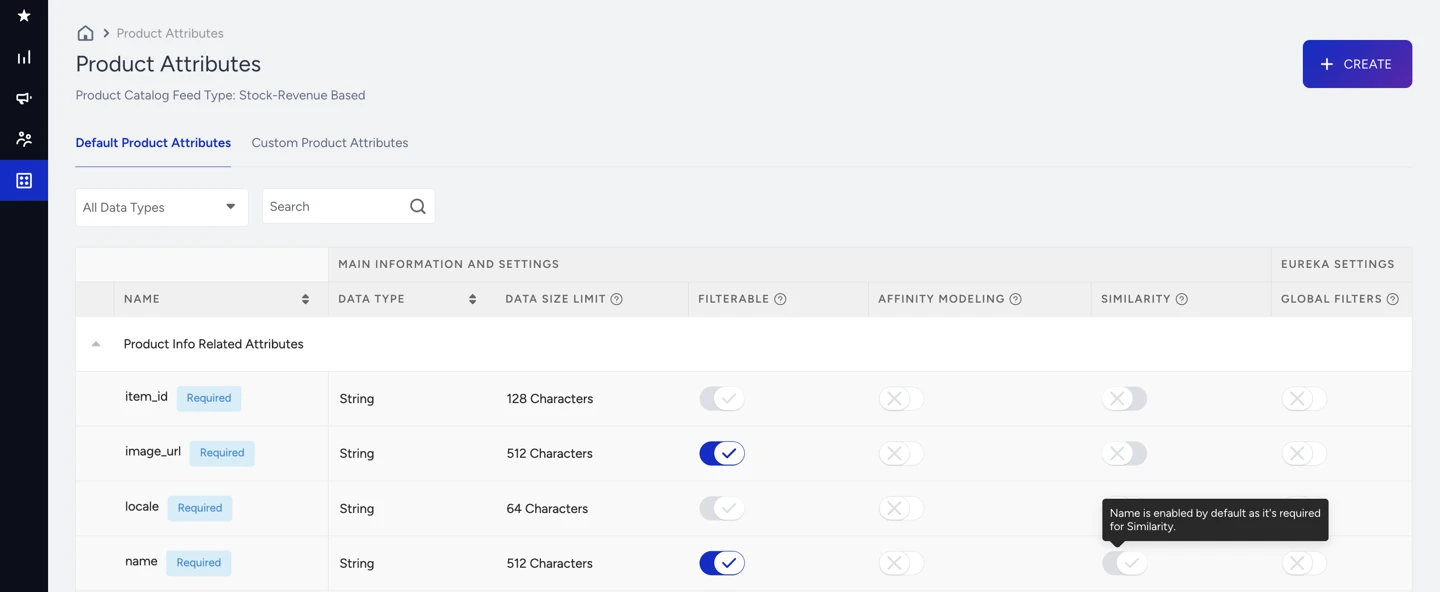
The Similar Products algorithm recommends items that match the description of the product a user is currently viewing by comparing text and attributes such as name, brand, category, and material. It works without prior user activity. It reads the product name and category by default and can be enriched with up to 3 additional custom attributes you define.
Key behaviors:
name and category are always included in similarity calculations, and these cannot be removed.
Up to 3 additional default or custom product attributes can be enabled to enrich matching (configured in the Product Attributes)
Detects signals from free text, even when a material, style, or specification only appears in a product title or description and not as a structured attribute field.
Visually Similar Products
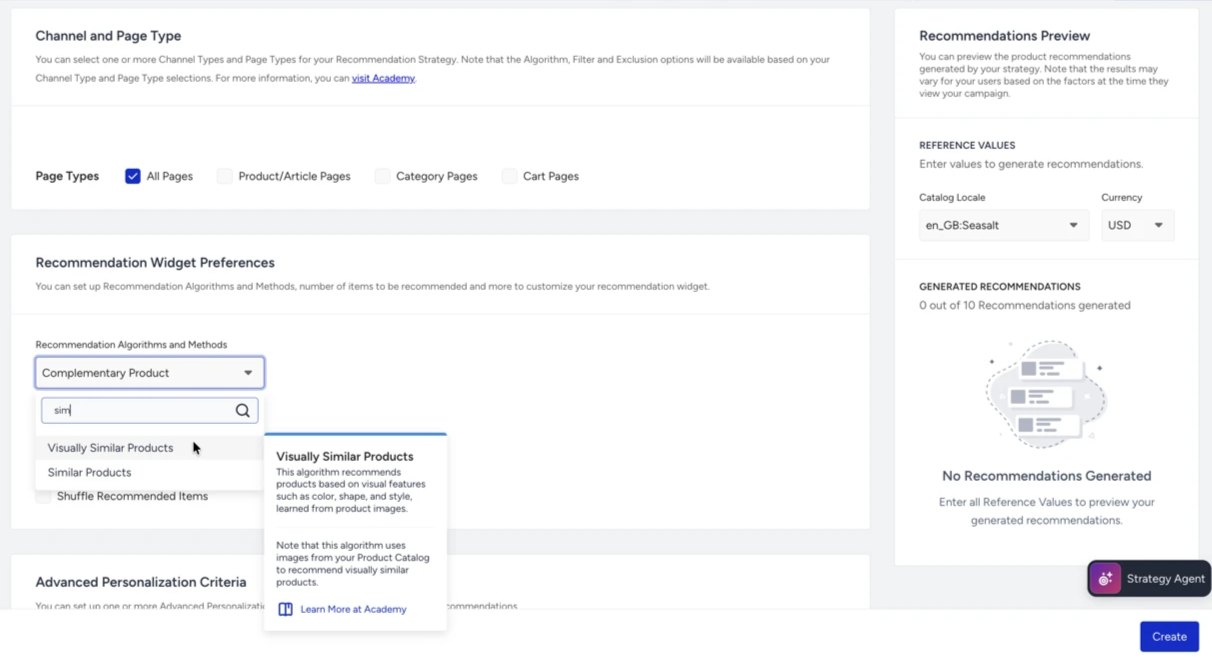
The Visually Similar Products algorithm recommends items that look similar to the product a user is currently viewing by comparing product images with a multimodal AI model. It is a strong fit for visually-driven verticals such as fashion, home décor, and accessories, and works for both known and anonymous visitors.
It works for any product that has a valid image_url in your catalog feed. No purchase history or user interaction data is required.
Insider One processes your product catalog images to generate recommendation results.
Requirements:
Products must have a valid image_url in your catalog feed, and images should be accessible.
Image quality directly affects result relevance. Clear, consistent product images on a clean background produce the best results.
User-Based
The User-based algorithm personalizes recommendations by analyzing a user's behavior, such as views, purchases, and add-to-carts. It identifies users with similar shopping habits and suggests products they’ve engaged with, but the current user hasn’t seen. Think of it like movie recommendations: If two people have the same taste in movies, the algorithm assumes they’ll like new ones the other has liked and recommends those. This method provides more relevant, personalized shopping recommendations.
Recommend Closely Related Items
Recommend Closely Related Items is an optional setting available when User-Based is the selected algorithm. It builds each shopper's recommendations from their strongest interest to provide focused results.
When enabled, the algorithm identifies the category or brand that dominates the shopper's recommended items. It removes items outside this interest and replaces them with top sellers from the same category or brand, keeping the list focused on one interest instead of spanning several.
The setting is off by default. Enable it when your strategy calls for focused, single-interest recommendations, and leave it off when you prefer a broader mix across the shopper's interests.
To enable Recommend Closely Related Items:
Navigate to Recommendation > Recommendation Strategies, click Create, and select Algorithm-Based. To edit an existing strategy, open it from the list.
Select User-Based as the algorithm.
In Adjust Recommendation Widget Preferences, check Recommend Closely Related Items. The checkbox sits above Shuffle Recommended Products.
 Recommend Closely Related Items.png)
Save the strategy.
Things to know
The setting is saved per strategy, so two User-Based strategies can use different values.
The quality of results depends on how complete your catalog attributes are. Catalogs with well-filled attributes such as category and brand produce stronger, more coherent results. See Product Attributes.
Results count as User-Based in analytics.
Real-Time User Engagement
The Real-Time User Engagement algorithm delivers personalized recommendations by analyzing a user’s most recent browsing behavior in real time. Using advanced transformer technology, it identifies key product attributes such as category, brand, or price and instantly suggests similar or complementary items within the same session, much like a shopping assistant who notices your interest in jackets and immediately shows you alternatives or matching accessories.
To work effectively, the algorithm requires 30 days of browsing data to learn product relationships, and once this foundation is in place, it can recommend products dynamically to any user who has viewed at least one item in the past 7 days, continuously adapting its suggestions to align with the shopper’s live intent and driving higher engagement and conversions.
Checkout Recommendation
The Checkout Recommendation algorithm suggests products that help users reach campaign thresholds, such as “Get free shipping on orders over $150,” while also using the Purchased Together algorithm to ensure relevance. It looks at the user’s current basket total and recommends items frequently bought with the cart's products, priced to help meet the campaign goal. If the cart amount already qualifies, no recommendations are shown. This helps boost order value while keeping recommendations purposeful.
Chef
The Chef algorithm is a smart, automated recommendation system that finds the best mix of product recommendations to boost conversions. The Chef tests different algorithm combinations and automatically chooses the one that performs best. It uses 60 days of data—learning from the first 30 days and measuring results from the next 30—to understand what works. The chef evaluates each slot individually to determine which recommendation algorithm best fits, based on how well it helps users discover and engage with products. This eliminates setup guesswork and lets you present the most effective product suggestions with minimal manual effort.
Recommend Based On: Choosing the Base Product
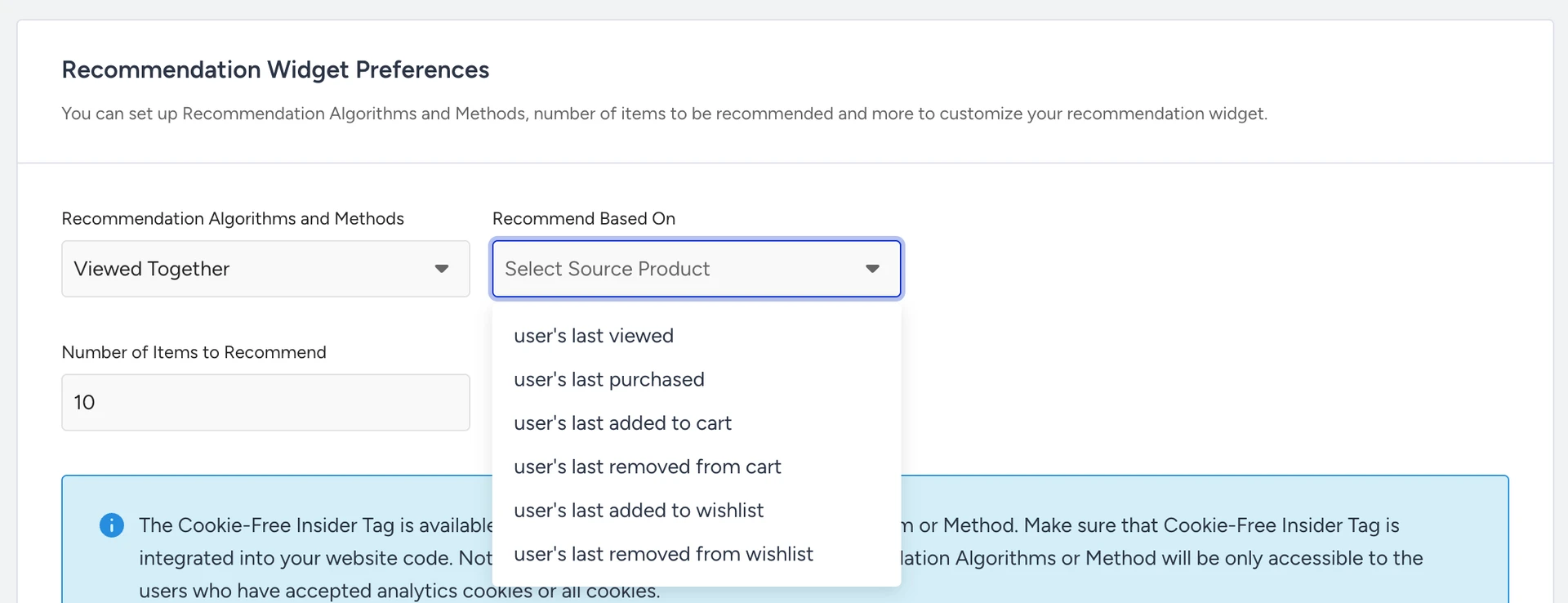
Contextual algorithms, Viewed Together, Purchased Together, Complementary Products, Substitute Products, Visually Similar Products, and Similar Products build their recommendations around a base product. The Recommend Based On field lets you pick the shopper's recent behavior as the anchor product:
user's last viewed
user's last purchased
user's last added to cart
user's last removed from cart
user's last added to wishlist
user's last removed from wishlist
currently viewed item on page (Product Detail Page/Cart Page)
Using more than one base product
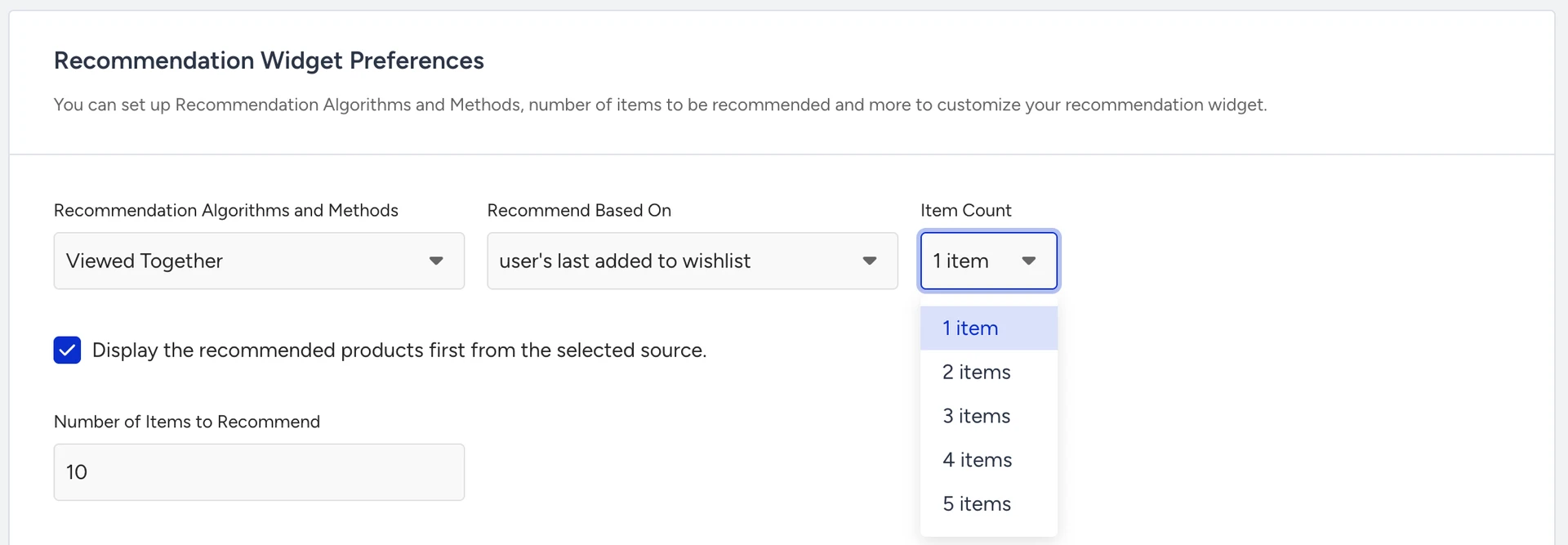
With Item Count (up to 5), you can base recommendations on several recent items at once, for example, the user's last 3 viewed products.
Enable “Display the recommended products first from the selected source” to place those base products at the top of the widget.
Fallbacks
If the selected event doesn't exist for a shopper or the source product is no longer in the catalog, the strategy falls back to the page context (when available) and then to the existing generic fallback, so the slot never goes empty.
Available on PDP, Cart, Home, and other context-bearing page types. Not available on All Pages and Category Page widgets, where page context is not a single product.
Manual Merchandising and Mixed Strategy are no longer available for new Recommendation Strategies. To create the same setup with a Bundle Strategy, use Select from Catalog slots to add specific products, and Add from Algorithm or Add from Filter slots for the remaining recommendations.
Existing Recommendation Strategies that use Manual Merchandising or Mixed Strategy are not affected and continue to work as before.
For setup instructions, refer to Create a Bundle Strategy.
How to choose an algorithm
Selecting the correct algorithm is crucial for developing effective recommendation strategies. Each algorithm in our suite is designed to serve different goals, from boosting conversions and increasing average order value to supporting discovery or personalization. Here's how to choose the most suitable one based on your specific use case:
Drive conversions with popularity and performance
If your goal is to recommend high-performing products to increase conversions, use:
Top Sellers: Best for showing proven top-sellers across your site.
Most Popular: Ideal for pages with high traffic where product views reflect interest.
Trending Products: Great for highlighting products gaining traction.
Most Valuable Products: Focuses on revenue-driving items for high ROI.
Enhance product discovery and engagement
If you're helping users explore your catalog or find something new, use:
New Arrivals: Ideal for showcasing your latest products.
Real-Time User Engagement: Great for adapting recommendations to live user intent.
User-Based: Leverages shopper similarity to surface relevant items.
Chef: Automatically finds the best algorithm mix for conversions.
Support personalization
To tailor recommendations to individual users, use:
Recently Viewed: For re-engagement and faster decision-making.
User-Based: Suggests products based on similar users’ actions.
Purchased with Last Purchased: Personalized cross-sells after a completed order.
Real-Time User Engagement: Reacts to real-time signals and behaviors.
Increase Cart Size and Average Order Value (AOV)
When you want to maximize order value with cross-sells, use:
Purchased Together: Recommends frequently bought-together items.
Complementary Products: Suggests items that go well with others.
Checkout Recommendation: Helps users meet incentives, such as free shipping.
Viewed Together: Drives relevance based on session-based browsing patterns.
Show alternatives or boost decision confidence
If the goal is to provide options or reduce bounce from product pages, use:
Similar Products: Recommends items that match the product's description by comparing text and attributes.
Visually Similar Products: Recommends items that look like the current product.
Viewed Together: Offers alternatives or supporting products.
Promote specific campaigns or business objectives
When you want to push particular products or run a campaign, use:
Manual Merchandising: Direct control to spotlight specific SKUs.
Highest Discounted: Great for sales and clearance events.
Location-Based Top Sellers: Surface regional bestsellers during local events.
Mixed Strategy: Blend different approaches in one widget for diverse user journeys.
Best Practices
Start with the goal. Are you aiming for discovery, upsell, personalization, or engagement? Let the goal lead the algorithm.
Test and iterate. Use A/B testing to experiment with combinations and let performance guide your choices.
Adapt by page type. Use different algorithms for Home, Product Detail, Category, and Cart pages based on user intent at each step.
Fine-tune algorithms. Optimizing algorithm settings like data sources and look-back periods can increase your algorithm’s performance to help you achieve your goals.
Don’t rely on just one. Combining multiple algorithms through Mixed Strategy or across the journey often yields better results.
Algorithms Table
Algorithm | All Pages | Product Page | Category Page | Cart Page | Prerequisites | Max Number of Products to Recommend | Fallback Algorithm |
|---|---|---|---|---|---|---|---|
Most Popular | ✓ | ✓ | ✓ | ✓ |
| 90 | No Fallback |
Top Sellers | ✓ | ✓ | ✓ | ✓ |
| 90 | No Fallback |
Location-based Top Sellers | ✓ | ✓ | ✓ | ✓ |
| 90 | No Fallback |
Trending Products | ✓ | ✓ | ✓ | ✓ |
| 90 | No Fallback |
Most Valuable Products | ✓ | ✓ | ✓ | ✓ |
| 90 | No Fallback |
Highest Discounted Products | ✓ | ✓ | ✓ | ✓ | 100 available products with price information | 90 | No Fallback |
New Arrivals | ✓ | ✓ | ✓ | ✓ | 100 available products | 90 | No Fallback |
Recently Viewed | ✓ | ✓ | ✓ | ✓ | The user should have at least one viewed available product | 50 | No Fallback |
Viewed Together | ✓* | ✓ | ✓* | ✓ |
| 150 | Most Popular |
Purchased Together | ✓* | ✓ | ✓* | ✓ |
| 50 | Viewed Together, Top Sellers of the Category and Top Sellers |
Purchased with Last Purchased | ✓ | ✓ | ✓ | ✓ |
| 50 | Top Sellers |
Complementary Products | ✓* | ✓ | ✓* | ✓ | 100 available products | 90 | Purchased Together and Top Sellers |
Similar Products | ✓* | ✓ | ✓* | ✓ | 100 available products | 90 | Viewed Together, Most Popular Items in Category, and Most Popular Items |
Visually Similar Products | ✓* | ✓ | ✓* | ✓ | 100 available products | 90 | Viewed Together, Most Popular Items in Category, and Most Popular Items |
Substitute Products | ✓* | ✓ | ✓* | ✓ | 100 available products with category and price information | 50 | Viewed Together and Most Popular |
User-Based | ✓ | ✓ | ✓ | ✓ |
| 20 | Viewed Together (for the user’s last viewed product) and Most Popular |
Real-Time User Engagement | ✓ | ✓ | ✓ | ✓ |
| 20 | Viewed Together (for the user’s last viewed product) and Most Popular |
Checkout Recommendation | x | x | x | ✓ |
| 50 | Top Sellers |
Mixed Strategy | ✓ | ✓ | ✓ | ✓ | Check the selected algorithms' prerequisites | 15 | Fallback algorithms of the selected algorithms are utilized |
Chef | ✓ | x | x | x | Check the selected algorithms' prerequisites | 15 | Fallback algorithms of the generated algorithms are utilized |
Manual Merchandising | ✓ | ✓ | ✓ | ✓ | Added products should be in stock | 50 | No Fallback |
*On All Pages and Category pages, Viewed Together, Purchased Together, Complementary Products, Substitute Products, Similar Products, and Visually Similar Products run on a behavior-based Recommend Based On product (for example, the user's last viewed item), since there is no single product on the page to use.
User-Based supports the optional Recommend Closely Related Items setting, which is off by default. See User-Based.