Flush is the automated process where the Insider SDK uploads the collected data, such as events and attributes, to the backend at regular intervals. The primary goal of the flush mechanism is to ensure timely and up-to-date data updates in Insider One’s database.
The SDK Flush mechanism is only used for Architect journeys. Single-channel messaging is not affected and continues to work the same way.
How does a flush work?
The SDK automatically flushes data every 10 seconds. In addition to this interval, the data flushing is also triggered under the following conditions:
App termination: The data is automatically flushed when the app is fully closed.
App sent to background: The data is immediately flushed when the app transitions to the background.
If the user experiences a network disconnection during a flush, the data update will not occur at that moment. The pending data will be sent during the next scheduled flush interval. Even if the data is flushed immediately, it must go through additional technical workflows (e.g., Unified Customer Database) before it is fully processed.
How does the SDK flush affect Architect journeys?
The SDK flush also brings a major improvement to how the app templates in journeys are displayed.
For example, you can create a journey that shows in-app messages to users who made a purchase in the last 20 days. When a user opens the app, the SDK checks the user profile in Insider One’s Unified Customer Database to see if they have made a purchase before. They will see the message according to the trigger rules if they have. If a user has not made a purchase before but makes one during the same session, they will not qualify to see the in-app message immediately, as the event and attribute updates happen only when the user sends the app to the background without the SDK flush mechanism. They will see the message when they reopen the app.
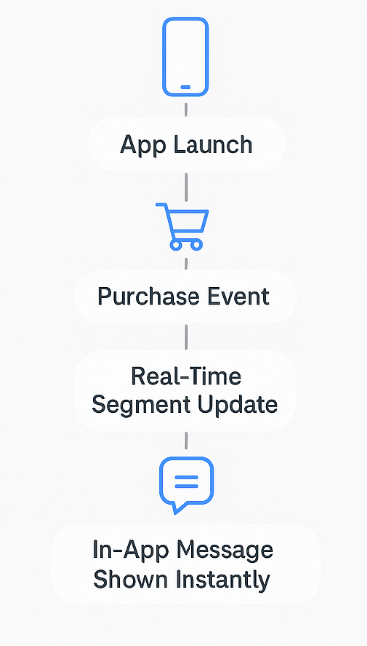
With the SDK flush, segment updates happen in real time.
This means users will instantly see the in-app message in the same session when they make a purchase, and they will not need to restart the app.
For example, the user will launch the app and purchase an item. Meanwhile, the purchase information will be updated on the user’s profile and the in-app message will be instantly displayed to the user.
This improvement helps deliver timely messages and can increase user engagement.
Another use case of the SDK Flush mechanism is targeting new users who install and open the app for the first time. The SDK Flush enables Architect journeys to recognize new users in the same session and evaluate journey conditions immediately.
This makes it possible to:
Deliver onboarding in-app messages.
Show welcome offers and incentives.
Engage users at the very first app open.