If you invite a user, but they do not receive their invitation, these topics will help you find out what is wrong and resend the invitation accordingly:
Basic Check
Before you go for a support ticket and contact the Insider One team, we highly suggest you check whether;
The Administrator role types the email address correctly while sending the invitation.
The invitation email is in your junk, spam, or trash folder.
You have enabled filters, sorting, or rules for your inbox.
Your email forwarding setting is active.
Your email inbox has available storage to receive new emails.
Issues with Mail Servers or Firewalls
Check your blocked and safe sender list in your email provider's settings, and enter the “http://insiderone.com" email address as a safe sender.
Check whether your mail servers block emails from the “http://insiderone.com” domain, and whitelist (allowlist) Insider email server hostnames and IP addresses so the invitation won't be recognized as spam.
Check if the company network has firewalls for the external IPs. If it does, it might block traffic except for certain domains or IPs, so access to “http://insiderone.com” needs to be granted.
If you use a corporate email account, you might need to work with your IT department or administrator to complete these processes.
Issues with your inbox
Make sure your emails aren't kept in another folder.
The invitation might be in the junk or spam folder.
You might have accidentally deleted the email, so check your trash folder.
The email might have been forwarded to one of your tabs outside of your main folder (Others, Updates, Social, etc.).
Resend Invitation
If you still cannot find the invitation email or it has expired, the Administrator can resend it from the InOne panel.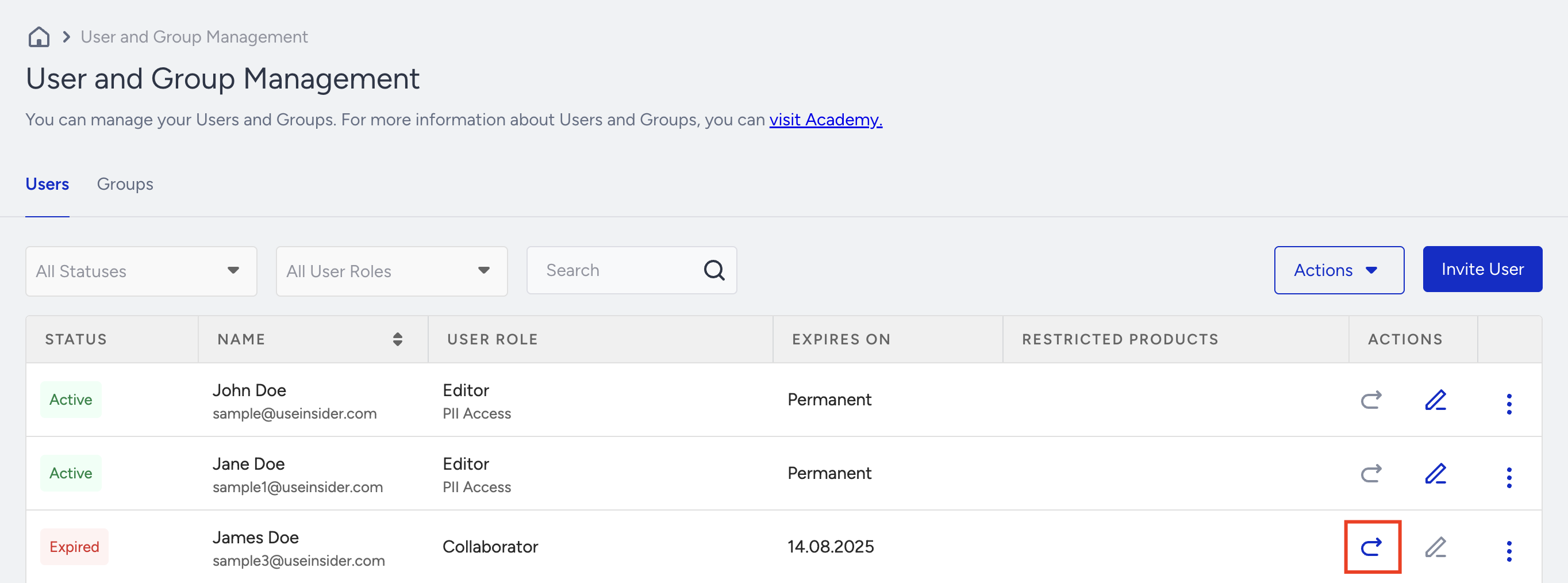
If you receive the email but still have trouble registering for Insider One's InOne panel, please note that the old invitation links will expire once a new one is sent. Therefore, you need to register using the last invitation link. If your invitation link has expired, contact your account admin, who has the Administrator role. They can send you a new invitation.
If you still have issues with the registration process, we highly suggest you open a ticket to get help from the Insider One team.