The Metadata Export feature lets you download your Attributes, Events, and Event Parameters from the Attributes and Events page as a CSV file.
Use it to audit your data setup, share metadata with teammates who do not have panel access, or review current usage to plan cleanup and limit increases.
Each export is delivered to your registered email address as a CSV file when it is ready.
Only users with the Administrator role can export metadata.
How to export
Navigate to the Attributes and Events page.
Switch to the tab you want to export: Attributes, Events, or Event Parameters. Each tab is exported independently.
(Optional) Apply filters or use the search bar to narrow the list. Active filters are reflected in the export selection.
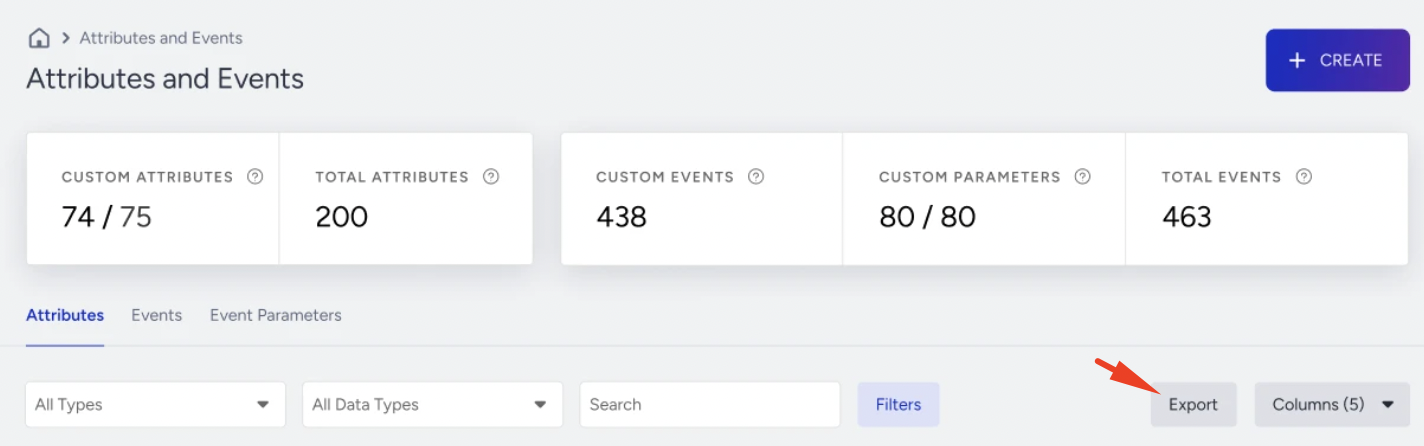
Click the Export button next to the Columns selector.
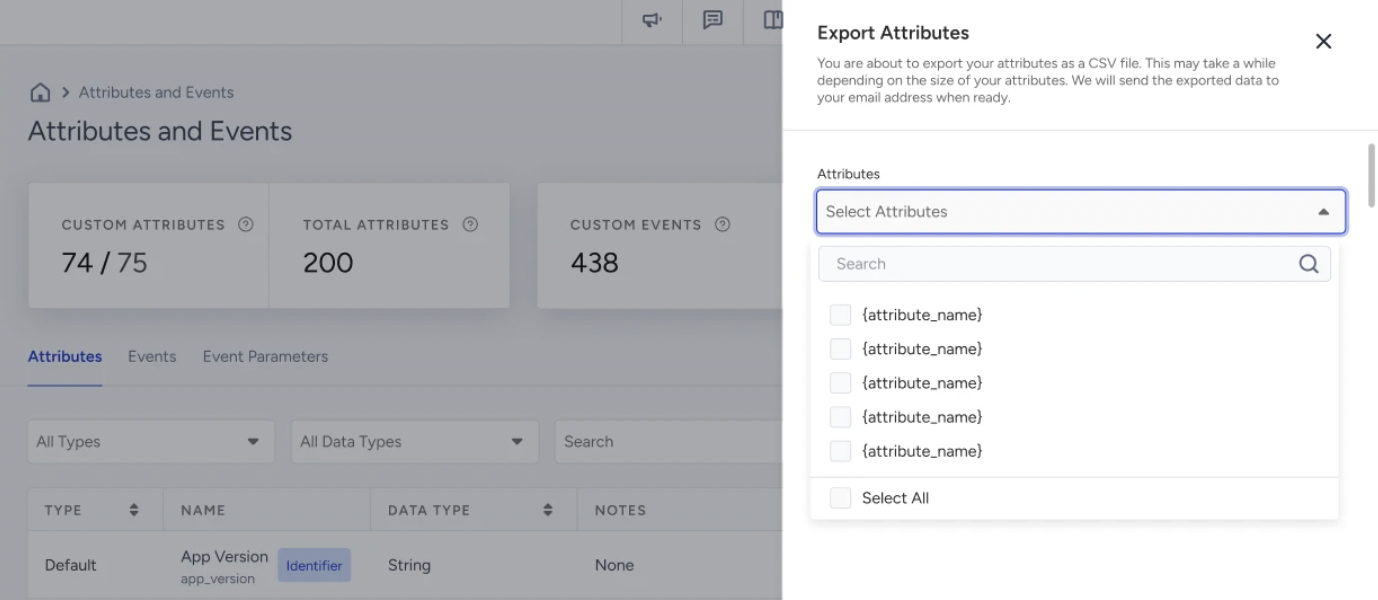
In the side panel, review and adjust the items selected for export.
Click Export.
A confirmation notification confirms your export request has been received. The file is delivered to your email address when it is ready.
Filter behavior in the export modal
Exporting without filters
If you click Export without any filter or search applied, the modal opens with no items pre-selected. Use the dropdown to search for and select items individually, or click Select All to include the full list.
Exporting with filters applied
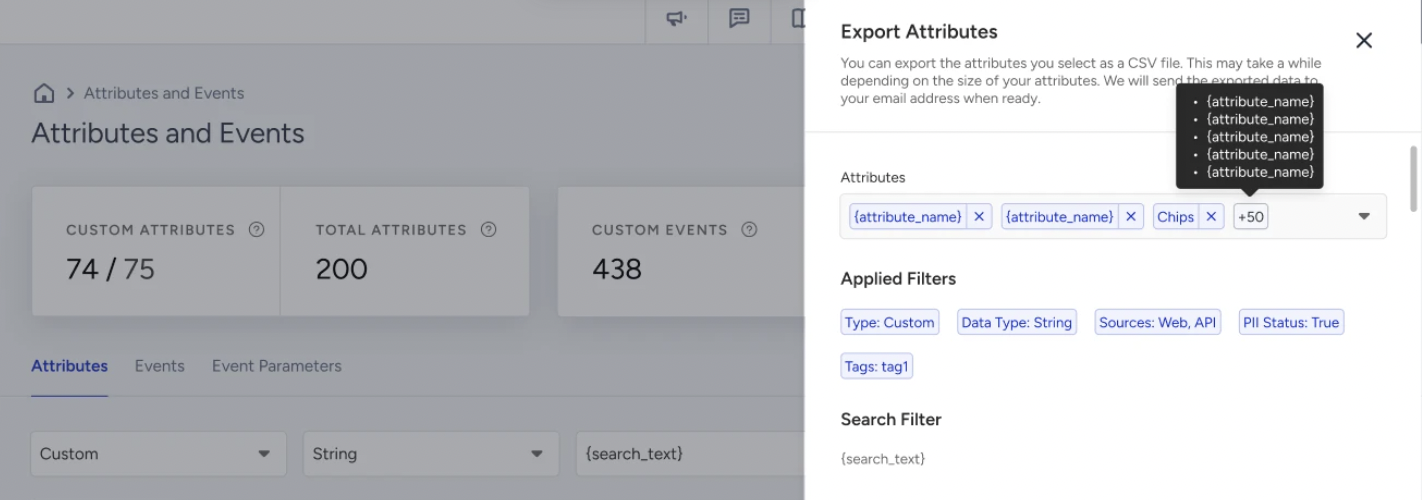
If filters or a search term are active on the listing page when you click Export, the modal opens with the matching items pre-selected. The active filters and search term are displayed inside the modal so you can confirm what is included before proceeding.
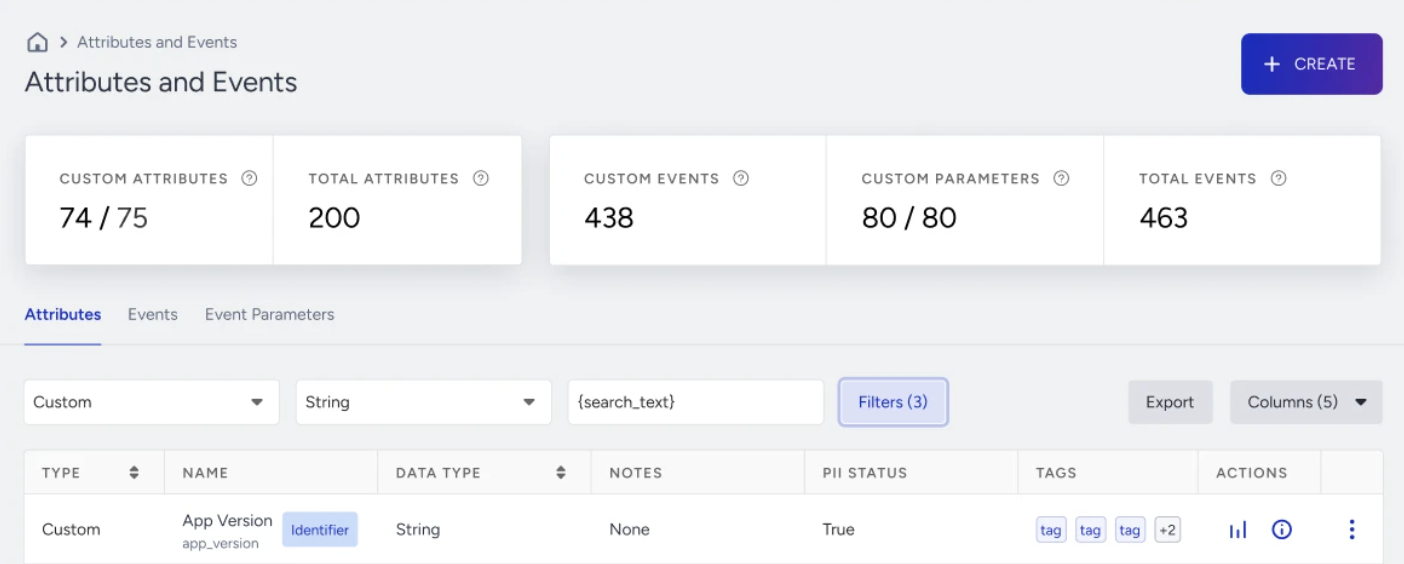
The following filters are reflected in the export selection:
Type (Default / Custom)
Data Type
Source
PII Status
Tags
Search term
You can still add or remove individual items from the pre-selected list using the dropdown before exporting.
What the export file contains
The exported CSV contains columns specific to the tab you exported. Each row corresponds to one attribute, event, or event parameter.
Note on "Yes/No" values:
Some usage columns show the count (number of campaigns or integrations that use the data point). For Boolean data types, these columns show Yes or No instead of a count.
Attributes export
Column | Description |
|---|---|
Attribute name | The name of the attribute as defined in the platform |
Type | Whether the attribute is Default (system-provided) or Custom (user-defined) |
Data Type | The format of the data, for example String, Number, Boolean, or Date |
PII Status | Whether the attribute is classified as Personally Identifiable Information (True / False) |
# of Users | Count of unique users for whom this attribute has a recorded value |
API | Number of times this attribute was collected via Insider One APIs, including the Attribute Upsert API and Event API |
Number of times this attribute was collected via Email, Newsletter, or CRM file uploads | |
Web | Number of times this attribute was collected via Insider One Web integrations |
Mobile SDK | Number of times this attribute was collected via Insider One Mobile SDK (iOS and Android) |
Collected | Total number of times this attribute has been recorded across all sources |
Used in Segments | Number of dynamic segments that reference this attribute |
Used in Architect Journeys | Number of Architect Journey campaigns using this attribute |
Used in Email Campaigns | Number of Email campaigns using this attribute |
Used in SMS Campaigns | Number of SMS campaigns using this attribute |
Used in Web Push Campaigns | Number of Web Push campaigns using this attribute |
Used in WhatsApp Campaigns | Number of WhatsApp campaigns using this attribute |
Used in App Push Campaigns | Number of App Push campaigns using this attribute |
Used in Integrations | Number of integrations where this attribute is used |
Events and Event Parameters export
Column | Description |
|---|---|
Event name | The name of the event as defined in the platform |
Type | Whether the event is Default (system-provided) or Custom (user-defined) |
Event Parameter Type | Number of event parameters defined for this event |
PII Status | Whether the event is classified as Personally Identifiable Information (True / False) |
Event TTL (Days) | Retention period in days for this event in the UCD, calculated from the event timestamp |
# of Users | Count of unique users for whom this event has been recorded |
API | Number of times this event was collected via Insider One APIs, including the Attribute Upsert API and Event API |
Number of times this event was collected via Email, Newsletter, or CRM file uploads | |
Web | Number of times this event was collected via Insider One Web integrations |
Mobile SDK | Number of times this event was collected via Insider One Mobile SDK (iOS and Android) |
Collected | Total number of times this event has been recorded across all sources |
Used in Segments | Number of dynamic segments that reference this event |
Used in Email Campaigns | Number of Email campaigns using this event |
Used in Integrations | Number of integrations where this event is used |
Limits and behavior
Daily export limit: Each tab can be exported up to 3 times per day (Attributes ×3, Events ×3, Event Parameters ×3). The counters reset the following day.
Cooldown between exports: After each export request, the Export button is disabled for 20 minutes.
Cached # of Users values: The first export of the day for each tab reflects the current live data. The second and third exports on the same day return the cached # of Users value from the first export of that day. All other columns continue to reflect the latest data in all exports.
Processing time: Exports are not delivered instantly. Processing time varies depending on data volume. The file is sent to your email address when it is ready.
Receiving your export
When your export is ready, you receive an email from Insider One with one of the following subject lines, where the ID number identifies your specific export request:
Your Attributes List (ID: 12345) is Ready
Your Events List (ID: 12345) is Ready
Your Event Parameters List (ID: 12345) is Ready
Click Download List in the email to download your CSV file.
If the email does not arrive after a reasonable wait, check your spam folder. If it has still not arrived, you can request a new export on your next available daily slot.