You will receive a summary email if you create a static segment by uploading a CSV file.
After your file is uploaded and processed, you will receive an upload summary email with an attachment detailing users or attributes that were not uploaded or that have conflicts, which helps you understand why your CSV upload had errors and what to fix.
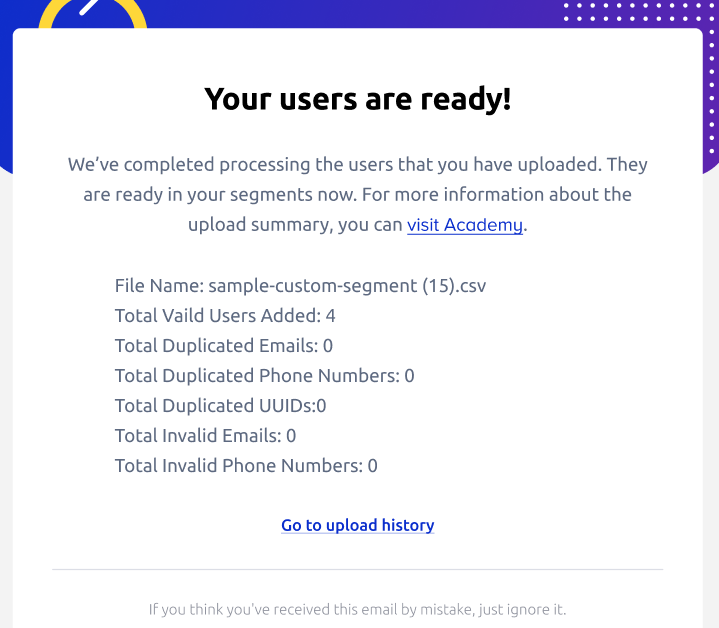
You can find the sample Excel file enclosed in the email from Insider One.
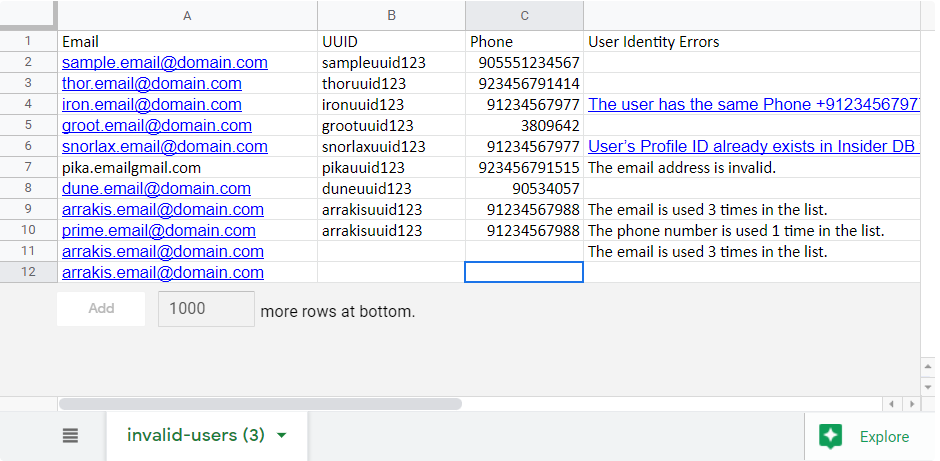
In the attached Excel file, you may encounter rows that state errors. Refer to the table below to review the issues in your uploaded file and address problems with users or data types.
Error Message | Explanation | Action |
|---|---|---|
{{attribute}} value must be Boolean: TRUE or FALSE. | Data type only accepts values as TRUE or FALSE | Value should be changed to either TRUE or FALSE |
{{attribute}} value format must be | Data type accepts values only in the YYYY-MM-DD format | Value should be changed to YYYY-MM-DD format |
{{attribute}} value must be a number. | Data type accepts values only in the Number format | Value type should be changed to Number |
The user has the same Profile ID as {Profile ID}. | User’s Profile ID already exists in the Unified Customer Database with another {Identifier} | Contact the Insider One team for further investigation |
The user has the same {identifier} as another user in the list. | One of the identifiers imported for this user is also assigned to another user in the list | Make sure all rows have a unique {identifier} |
The {identifier} is used X times in the list. | There are duplicate {identifiers} in the same list | Make sure all rows have a unique {identifier} |
The database returned an error. | Error occurred during data insertion for this user | Upload the user once more. If the problem occurs again, please contact the Insider One team. |
The value must be an email address. | Email needs to be present on the contact list you upload | Make sure you have an email address on all rows |
The email address is invalid. | Email address format is not valid | Make sure the email address includes “@” and a domain” |
The phone number is invalid. | Phone number format accepts data only in E.164 format | Make sure your phone number value is in E.164 format |
The user identifier limit has been exceeded. | The value limits assigned to a user profile per identifier type vary | Refer to Identity Resolution Management for the value limits |