Insider One AI can remember useful context across conversations, keep your chat history tidy, and let you adjust how the assistant works for you. This guide covers three related but separate controls: memory, archiving, and settings.
User memory
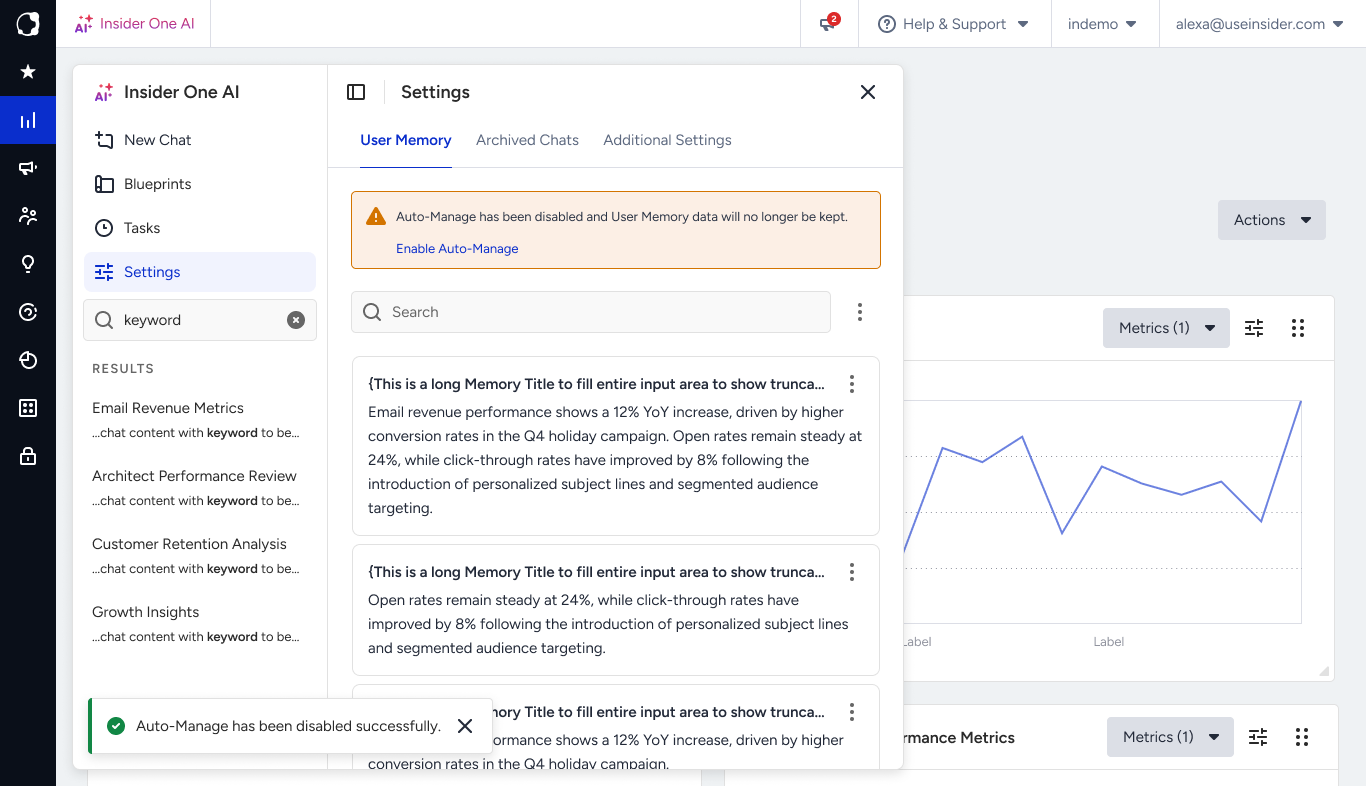
Memory lets the assistant carry useful context from one conversation to the next, so you don't have to repeat yourself every time.
Memory is personal: it's tied to your individual login, not shared with other teammates on the same Insider One account.

The assistant remembers durable things, such as:
Your preferences for tone, format, and language
The way you like to work (for example, how you prefer results presented)
Recurring product preferences and a stable business context that help future conversations
It deliberately does not remember:
One-off details, temporary state, or a single approval
Secrets, credentials, or payment information
Sensitive personal data
Anything you ask it not to remember
Controlling memory
You're in control of what's remembered. Ask the assistant to remember a preference (“always answer in English”), update it, or forget something specific. Stable preferences are kept; passing details from a single conversation are not. You can also turn memory off entirely from settings if you'd rather start fresh each time.
Archived chats
Archiving helps you keep your conversation list focused without losing anything. When you archive a conversation, it moves out of your active list but stays available; you can find it, reopen it, and pick up where you left off.
Archiving is different from deleting: archived chats are kept and remain searchable, whereas deleting permanently removes a conversation and the context it provided from memory.
Additional settings
Settings let you tailor the assistant to the way you work. From here, you can manage preferences such as your default language and what the assistant remembers about you, and review the options available for your account.
Available settings can vary depending on your account and which agents are enabled for you.