Suggested readings: App Smart Recommender, Requirements for App Smart Recommender, Use Cases for App Smart Recommender
ID is a crucial item for recommendation campaigns. You need to use an ID for your recommendation area during the integration process. Each recommendation campaign works with this specific ID.
For example, if you want to display recommended items on your home page, you should use one of the IDs in the panel (from 1 to 10). Let's say you give 1 as the ID. All campaign changes with ID 1 will affect your home page recommendations.
Requirements
Data ingestion
If you want to recommend products based on your web data, web data source ingestion must be enabled for Smart Recommender, and all requirements for the web should be completed. If you want to recommend products based only on app data, then it's enough to select only app user actions data source from the Algorithm Management Panel. Also, your product IDs in the app and on the web should match so the products align.
SDK integration
Your SDK version should be 10.0.0 or higher.
You should use Smart Recommendation methods based on your use cases and recommendation strategies. You can get recommendation data in the SDK via three different methods:
Get Smart Recommendation (getSmartRecommendationWithID)
Get Smart Recommendation with Product (getSmartRecommendationWithProduct)
Get Recommendation with Product IDs (getSmartRecommendationWithProductIDs)
See Android, iOS, React Native, Cordova, or Flutter for Smart Recommender method details.
You should integrate all Insider SDK product methods to gather product information (e.g., color, taxonomy, size, etc.).
See Android, iOS, React Native, Cordova, or Flutter for product objects.
Your app should include dedicated spots in the layout to show the results of the recommendation engine.
Integrate the Smart Recommender campaign IDs into the integration process.
Get started with editing your App Smart Recommender campaigns.
Applications have dedicated areas for recommended items. Once you integrate the Insider SDK, developers can request recommended items from Insider’s recommendation engine. The application sends the item ID to the Insider recommendation engine and gets back a set of recommended items for that item. This data will match the customer's XML. Then the application inserts the recommended items into their dedicated space.
The application should handle all of this. Our SDK only provides communication with the recommendation engine.
Due to the nature of the platform, apps do’t allow Insider to create a recommendation area and insert it as we do on web platforms. Insider provides only the product data for your recommendation area based on the selected algorithm. Customers are responsible for creating and designing proposition spaces.
Access to App Smart Recommender
Once the integration is completed, you can configure your Smart Recommender campaigns from your mobile panel.
You can access Smart Recommender through Campaigns > Recommendation > App Smart Recommender. 10 predefined campaigns are available, listed by name, recommendation strategy, status, and last updated date. You can edit these existing campaigns. 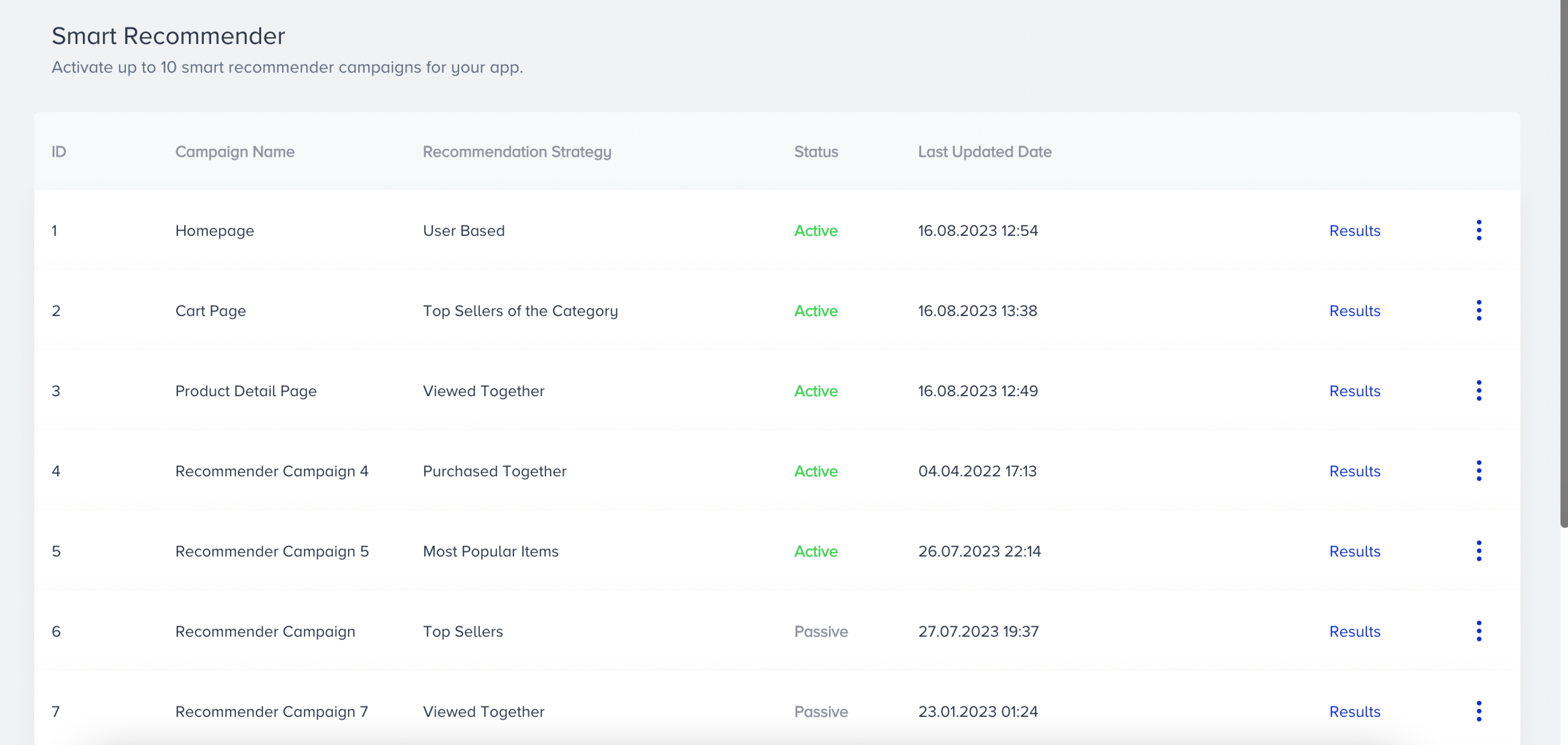
Get started with Editing App Smart Recommender campaigns.