Before calling the SMS APIs, create an OAuth 2.0 credential for your InOne account.
An OAuth credential consists of a Client ID and Client Secret that identify your application and authorize access to the selected SMS API scopes.
To create an OAuth 2.0 credential:
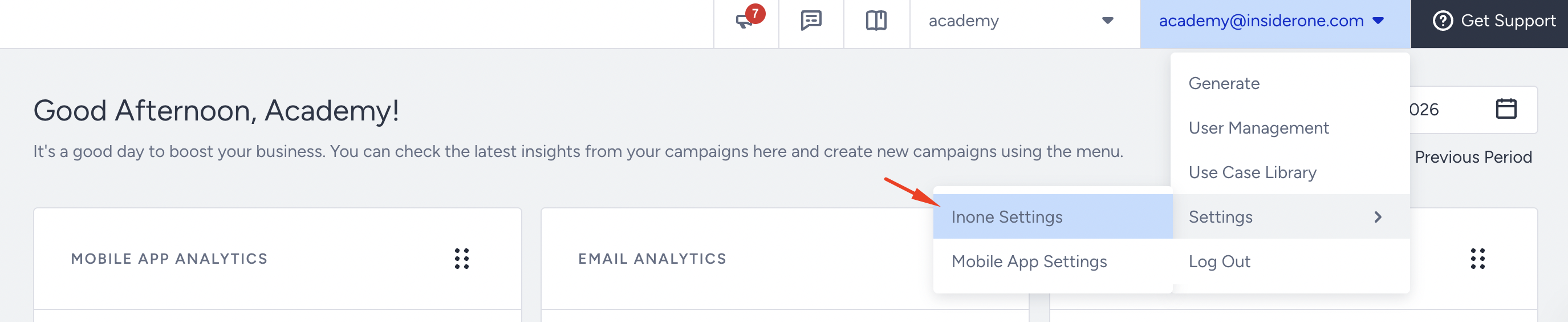
Navigate to InOne > your username> Settings > InOne Settings > Integration Settings.
Scroll to the OAuth 2.0 Credentials section and select Generate OAuth 2.0 Credential.
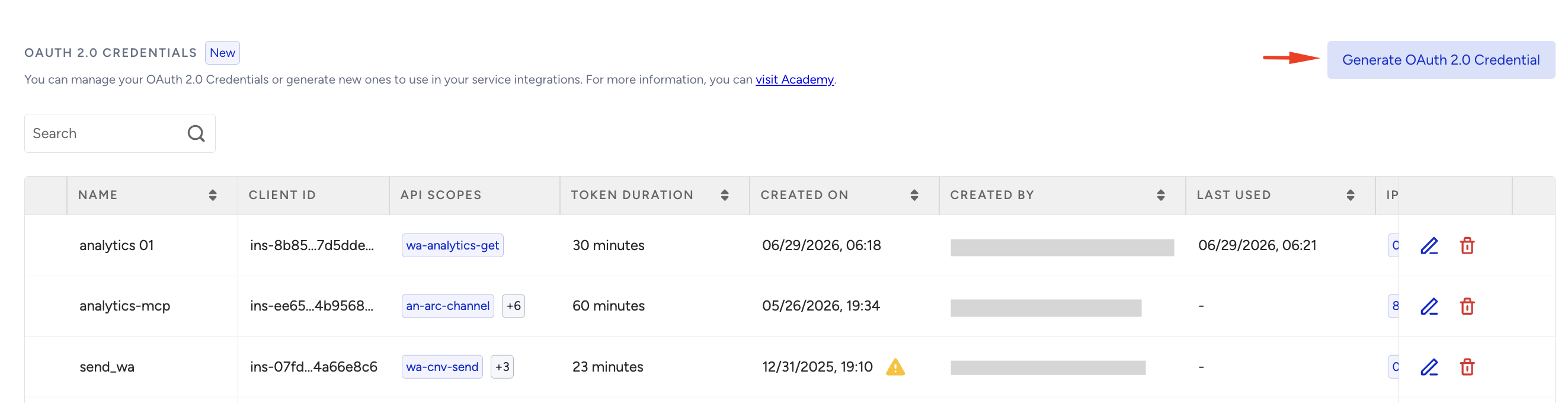
Enter a name for the credential and specify the token duration.
Select the required API scopes:
sms-transactional
sms-analytics
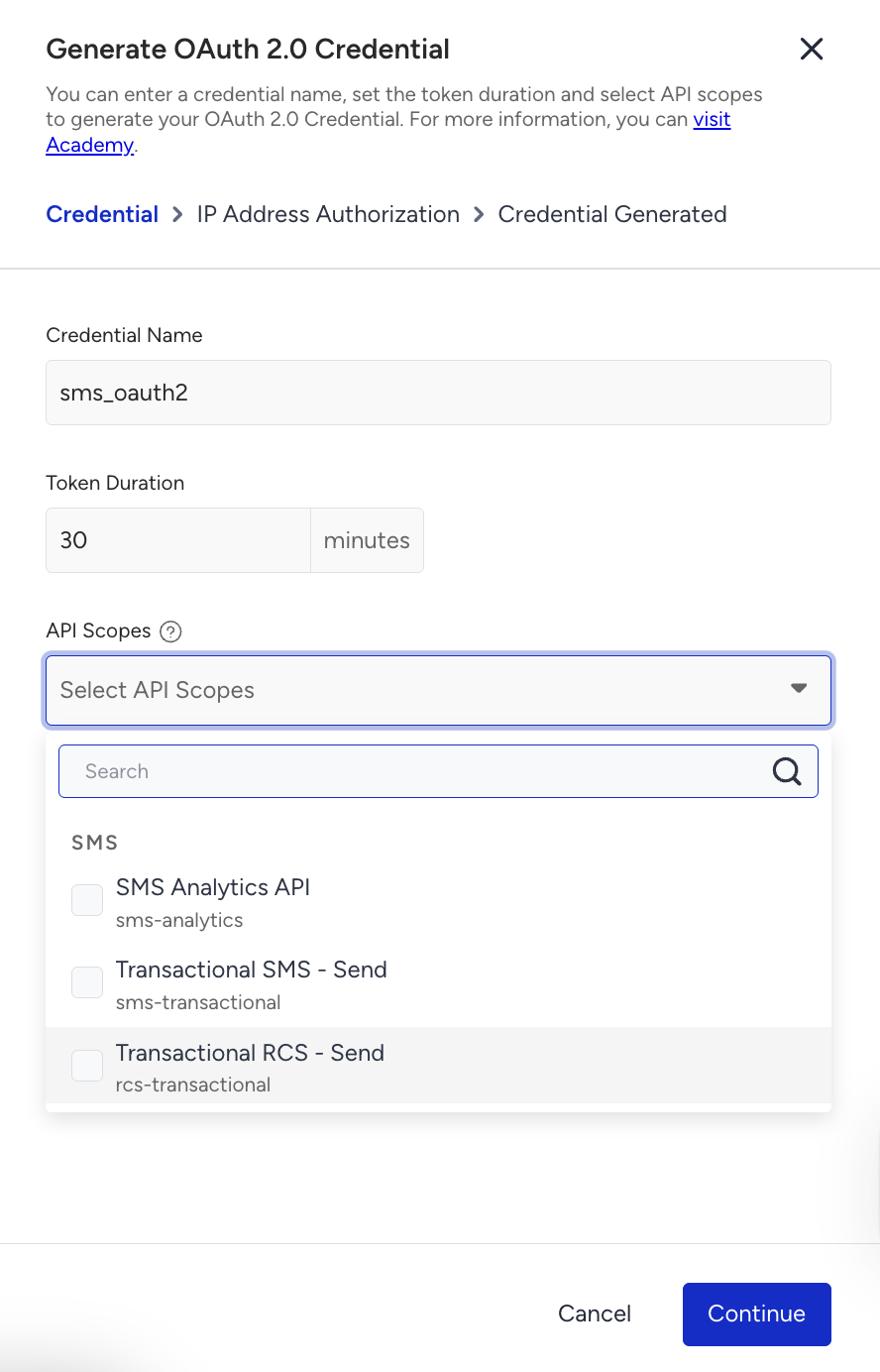
Select Continue.
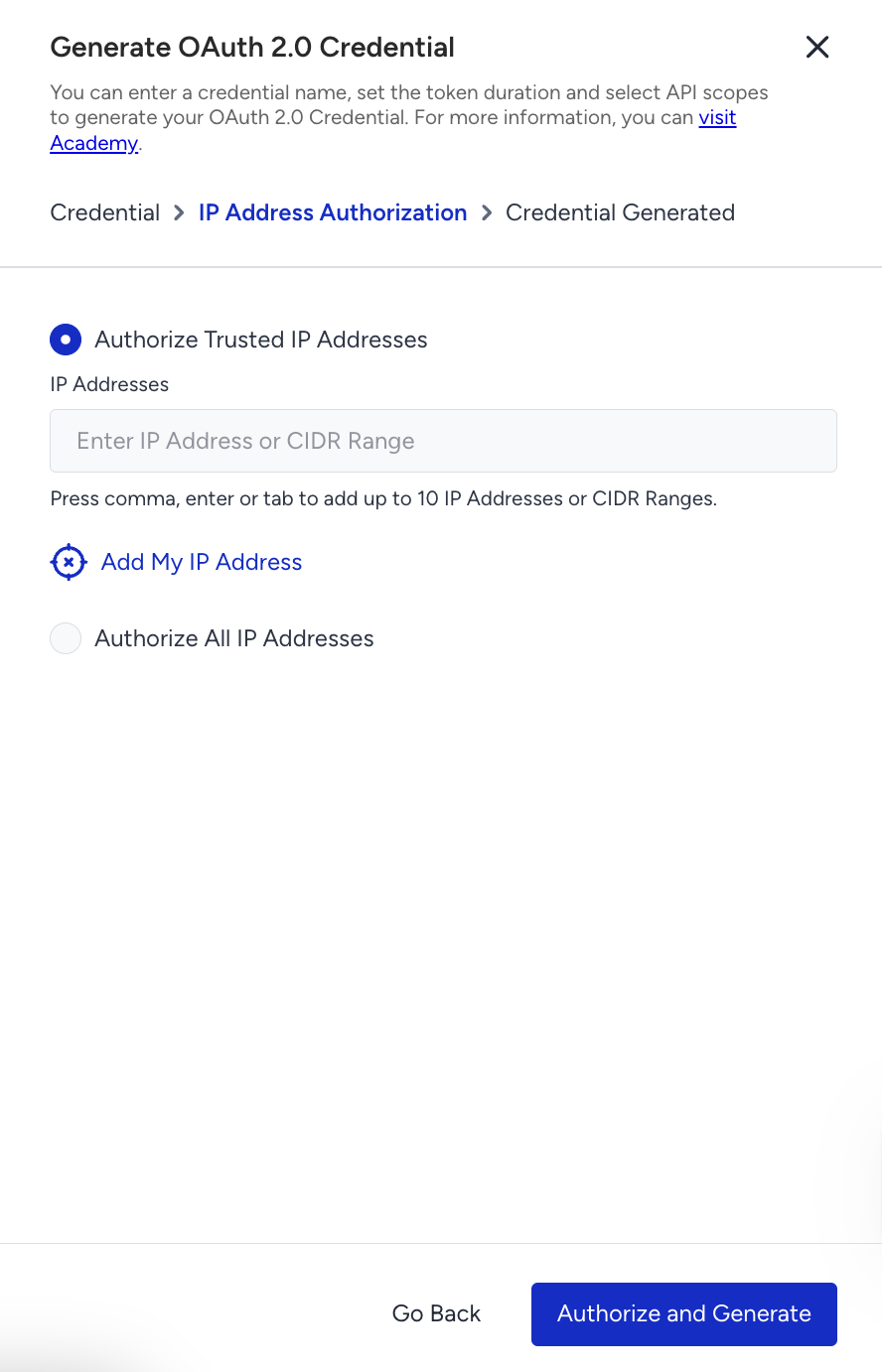
Enter the IP addresses authorized to use the credential.
Select Authorize and Generate.
Copy and securely store the Client ID and Client Secret. The Client Secret is displayed only once and cannot be viewed again after the dialog is closed.
You can manage or revoke OAuth credentials at any time from the Integration Settings page on InOne.
Generate a Gateway Access Token
All SMS API requests must include a Bearer access token. Access tokens are issued by the Insider Gateway and remain valid for the duration configured when the OAuth credential is created.
Endpoint and Headers
Visit our Postman collection to test this request.
Headers
Header | Sample Value | Description |
|---|---|---|
Content-Type | application/json | Specifies that the request body is sent in JSON format. |
Body Parameters
The token endpoint uses snake_case field names, such as client_id and client_secret. SMS API request bodies use camelCase field names, such as to, content, and uniqueArgs.
Parameter | Description | Data Type | Required |
|---|---|---|---|
client_id | The OAuth 2.0 Client ID generated from Integration Settings. | String | Yes |
client_secret | The OAuth 2.0 Client Secret generated from Integration Settings. Treat this value as confidential. | String | Yes |
scopes | A subset of the scopes assigned to the credential. Include the scope required for the API you intend to call (for example, sms-transactional or sms-analytics). | Array[String] | Yes |
Sample Request
curl --location 'https://gw.useinsider.com/auth/token' \
  --header 'Content-Type: application/json' \
  --data '{
    "client_id": "your-client-id",
    "client_secret": "your-client-secret",
    "scopes": ["sms-transactional", "sms-analytics"]
  }'
Sample Responses
200 OK
{
  "access_token": "eyJhbGciOiJIUzI1NiIsInR5cCI6IkpXVCJ9...",
  "token_type": "Bearer",
  "expires_in_sec": 3600
}
The expires_in_sec value indicates the token lifetime in seconds. Cache and reuse the token until it is close to expiration, then request a new one.
400 Bad Request
Missing or invalid request parameters.
{
  "message": "invalid request"
}
401 Unauthorized
Invalid credentials, unauthorized scope, or the request originates from an IP address not on the allowlist.
{
  "message": "invalid client or secret"
}
HTTP Status | Response Body | Description |
|---|---|---|
401 Unauthorized | { "message": "unauthorized" } | The Bearer token is missing, expired, malformed, or has an invalid signature. Generate a new access token and retry the request. |
403 Forbidden | { "message": "forbidden" } | The access token is valid, but it does not include the scope required to access the endpoint. |
429 Too Many Requests | Retry-After header returned | The rate limit or burst limit for the client and scope has been exceeded. Wait for the duration specified in the “Retry-After” header before retrying the request. |
Token handling best practices
Generate access tokens on the server side only. Do not expose the Client ID or Client Secret in browser-based or mobile applications.
Cache and reuse access tokens until they are close to expiration. Avoid requesting a new token for every API call. A common approach is to refresh the token shortly before the expires_in_sec value is reached.
Store the Client Secret securely and treat it as confidential. If the secret is exposed or ownership changes, generate a new credential from Integration Settings.
Use the IP allowlist configured on the OAuth credential to restrict where access tokens can be generated from.
FAQ
Q: Can I use the same OAuth credentials for both SMS Analytics and SMS Transactional APIs?
A: Yes. When creating the OAuth credential, select both sms-analytics and sms-transactional scopes. You can then request an access token that includes one or both scopes, depending on your use case.
Q: Do access tokens refresh automatically?
A: No. OAuth access tokens do not support automatic refresh. Cache the access token in your application and request a new one before it expires.
Q: What should I do if I receive a 401 Unauthorized response?
A: Verify that:
The access token is included in the Authorization header.
The token has not expired.
The client_id and client_secret are valid.
The request originates from an IP address included in the credential allowlist.
Q: What should I do if I receive a 403 Forbidden response?
A: A 403 response indicates that the access token is valid, but it does not include the scope required by the endpoint. Ensure that the required scope is assigned to the OAuth credential and included when requesting the access token.
Q: Can I continue using API-key authentication?
A: Yes. Existing API-key authentication continues to be supported. You can migrate to OAuth 2.0 at your own pace and use both authentication methods during the transition period.