Suggested reading: Global Unsubscribe & Preference Center
Q: I was using the unsubscribe links from the default modules section in the drag & drop editor and want to continue using the same. Are they still supported?
A: Yes, the unsubscribe links from the default modules section are supported. You can use either of them. However, we strongly recommend you use the new unsubscribe feature to increase your deliverability and ROI.
If you want to use the capabilities of the new unsubscribe pages, you can ask Insider One team for access.
Q: I was using the unsubscribe links in default modules and want to switch to the new Custom Unsubscribe pages. Do I have to change those links for each campaign, or is there a shortcut?
A: Currently we don’t support the custom module’s synchronization.
Q: I want to use the “add reason” option to understand why my users unsubscribe. Is it available inside the drag & drop editor?
A: We currently do not support this option, but we are planning its improvement for the feature. If you think this improvement is significant and want to see it inside the panel, you can send a request from the panel as below.
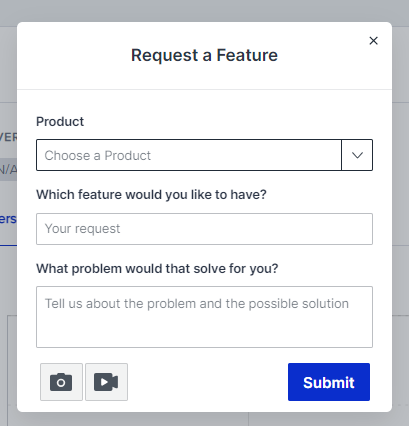
Q: Is multi-language content supported for the Custom Unsubscribe pages?
A: No, we don’t support multi-language content. However, you can create custom unsubscribe pages in different languages.
Q: If I start using the new version of Unsubscribe and Preference Center, will the unintentional unsubscribe clicks of security programs be prevented?
A: Yes, this feature resolves the one-click unsubscribe problem that is caused by security programs clicking the unsubscribe links on behalf of the recipient. The unsubscription flow will be extended with a confirmation page and optional selection will be enabled with preference center templates.
Q: Can we duplicate Unsubscribe pages from one account to another?
A: No, it is not supported currently. However, if you want to see it inside the panel and believe that it is important, you can send a request from the panel.
Q: How can we remove a user from the global unsubscribe?
A: You can remove a user from the global unsubscribe, both on Insider's database and the email service provider. To do this, click the Remove from unsubscribe button against the user you want to remove.
Q: How can we unsubscribe from test emails?
A: You cannot unsubscribe from a test message that is sent via Custom Unsubscribe pages. However, you can unsubscribe from a test message that includes a default unsubscribe link (<%unsub%>).
If the user seems opt-out but is not in either the global unsubscribe list or does not have any events, it means they unsubscribed through a test message.
Q: How can we use custom unsubscribe pages?
A: To use custom unsubscribe pages, you need to create all respective custom unsubscribe pages. For global unsubscribe, you need to create the global unsubscribe, global unsubscribe confirmation, and resubscribe pages. For unsubscribe preferences, you need to have the subscription preferences center and subscription preferences confirmation. The custom unsubscribe pages become active once used in an email campaign.
Q: We're seeing different unsubscribe numbers in Global Unsubscription vs. Email Subscriber Analytics. Why don't they match?
A: The difference comes from how the data is counted. Email Subscriber Analytics deduplicates unsubscribe data by profile, so each user is counted only once. Global Unsubscription records each unsubscribe received. Therefore, if the same user unsubscribes multiple times, Email Subscriber Analytics still shows one unique user, while Global Unsubscription can contain multiple unsubscribe records for that user.
Q: Does a global email unsubscribe apply to all senders and domains in the same panel?
A: Yes. Global email unsubscribe is managed at the panel level, not separately for each sender address or sending domain. When a recipient globally unsubscribes from an email sent by one sender, they are suppressed from email campaigns sent by all senders and domains configured in that same panel. This applies to global email unsubscribe, not to unsubscribing from a specific group.