How can I configure our sender email address?
You can manage your sender email addresses with Sender Management.
How can I segment users?
You segment your users with the advanced Email Segments.
How can our contacts add themselves to our contact lists?
They can join Insider's lead collection templates. Read more on building a Subscriber Base.
How can I add a form to our email design?
You can use the AMP Form block to create a form in your email design.
How can I add a countdown to our email design?
You can use the timer block to create a countdown in your email. Read more on Building Countdown Timers in an Email.
How can I store email addresses collected by Insider's lead collection templates in a contact list?
You should configure this with your lead collection campaign. On the Launch step of your lead collection campaign, go to Advanced Settings to check the “Add collected leads to a contact list” box and select the contact list.
Can I add emojis to our email design?
No, emojis are not supported in the email design. You can use them only in the subject line and email preheader.
Is it possible to show today’s date inside the email design?
Yes, using the following syntax, you can use a custom field for today’s date inside your email designs. You should use the same numbers for the date since those numbers are allocated as placeholders (01 - month, 02 - days, 2006 - year). You can also change the date formatting to the following example variations:
{%now "2006-01-02" %}
{% now “02.01.2006” %}
{%now "02 Jan 2006" %}
{%now "02 January 2006" %}
{%now "2006 Jan 02" %}
{%now "Jan 02 2006" %}
Why cannot I upload contacts with only one column in the CSV file?
For the file to be CSV (comma-separated values), two values must be separated by commas. That's why you need two columns in the file. Read more on Importing Contacts.
My contact list is not fully uploaded. Should I upload it again?
No, you do not need to. Another try would add up to the existing queue. Uploading lists might take a while, depending on the process time.
An image in our email is replaced with another image. What could be the reason?
If the two images have the same name, the editor will replace the old image with the new one. Make sure to have unique names on the images you upload to your email design.
Why is the number of contacts in our list different from the count bubble on the Recipients step or the count on the Launch step?
The displayed count is an estimated number of users that come from CSV uploads. It does not reflect the users who fall into the segment from our sources, such as web, predictive, CRM, app, etc.
Can I get the HTML of an email campaign I created with the Drag & Drop Editor?
Yes, you can download the HTML code of an email campaign created with the Drag & Drop Editor. To see how, refer to Exporting Email HTML.
How can a user receive a click event without opening the email campaign?
Every promotional email has a tracking pixel, which is downloaded when a user opens the email. Some email clients disable the "show image by default" option. In such cases, if a user clicks on a link without clicking any display images, we can get a click event without an open event. Some email service providers update the open rate when they receive a click but no open.
Our contacts that include special characters have the � character instead of the special character. What could be the reason?
If you have uploaded your CSV without UTF-8 encoding, special characters will be displayed as �. Make sure that your file is using UTF-8 encoding.
What is the size limit for file uploads?
The maximum supported file size is 100 MB for CSV files and 5 MB for XLS and XLSX files.
Why is my email being clipped?
If you send an email campaign exceeding a certain size, your email might be clipped in Gmail inboxes. To prevent clipping, you can apply some best practices:
- Make sure that your email does not have any unnecessary content.
- Make sure your copied and pasted content has no extra hidden formatting code.
- Make sure to change the subjects of test emails, as Gmail usually combines them in threads and clips them as the content gets larger.
- Try using shortened URLs with Insider's link shortener feature that enables you to minimize the email size by reducing the URLs. You can contact the Insider One team to activate this feature to minimize the clipping effect.
Does Insider count opens in the open rate generated by IOS 15?
Yes, it does. Open rate calculation in Email and Architect Email count machine opens inside the open rate. The unique opens are calculated by summing the unique user and machine opens. Since machine opens are included in the open rate, you might see a significant increase (up to 2x-3x) in your open rate.
Is it normal to see one user with many clicks that belong to a single campaign?
Yes, it might happen if they have anti-spam software that automatically clicks all links generated for them. This might even lead a user to get unsubscribed without even clicking on the unsubscribe button. You can avoid those unsubscription events:
- Your domain(s) can be whitelisted on SendGrid. You can reach your assigned deliverability expert for this case.
- You can ask your IT team to whitelist your domains in your security software.
How can we make use of the Email At attribute?
You can use this attribute for the send time-optimized emails. When you send a send time-optimized email campaign, the recipients get the email in their inboxes at their optimum times. This time is based on the "email at" value. If a recipient has no assigned value to this attribute, the email is sent to them at the first launch time.
There might be several reasons for a user not having any value assigned to the "email at" attribute:
- They might have been added to the contact list recently, and there may not be enough data to assign a value.
- If users open their emails randomly, the system cannot generate a common open time value.
A user is expected to open their emails approximately 10 times in the same time range for a value to be assigned to the "email at" attribute.
How can we show the images in one line on mobile view?
If you design an email and want the same preview on mobile, the responsive structure toggle for the block should be off. When the toggle is on, the images, texts, or any block you add will be placed under each other on mobile. For further details, refer to How can we format our email for mobile view page.
How can we stop a running email campaign?
If your campaign is in the running status, you cannot make any changes until the running batch is completed.
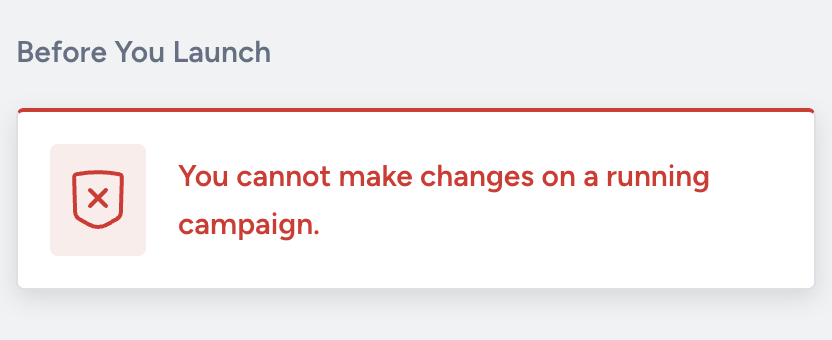
If you want to temporarily pause a recurring campaign in the Awaiting Next Run status, they will be in "Paused" status. You can click the Resume button to keep running your paused campaigns.
Can we save the Recommendation Block as a module?
Modules help you create email campaigns much faster. You can create modules for elements that do not change often, such as logo, header, menu, contact information, etc., to use later in your other email campaigns. It is not possible to save a recommendation block as a module. However, you can save the design with the Email Recommendation block and its configurations as a template and reuse it in other campaigns.
How can we see the size of our email?
You can see the estimated size. When it exceeds 80KB, there is a warning that it may get clipped on the launch step of email.
You can see the size when you download the template from the email editor, you can see the size of the file as well.