Conflict Resolution ensures that when multiple Merchandising Rules are triggered for the same query, Eureka applies them consistently and predictably.
Since you can create multiple rules with overlapping conditions, conflicts may occur. Eureka automatically evaluates these situations and determines which rule to apply.
When do conflicts occur?
A conflict occurs when multiple rules are created with the same search query trigger within a strategy.
This can happen in the following cases:
Multiple product actions target the same product with different actions (e.g., Hide, Pin, Boost, Bury)
Different products are assigned to the same pin position by product actions
Multiple product attribute actions target the same attribute condition (same attribute + operator + value)
Multiple rules target the same facet
Multiple merchandising rules target the same banner slot (Desktop or Mobile)
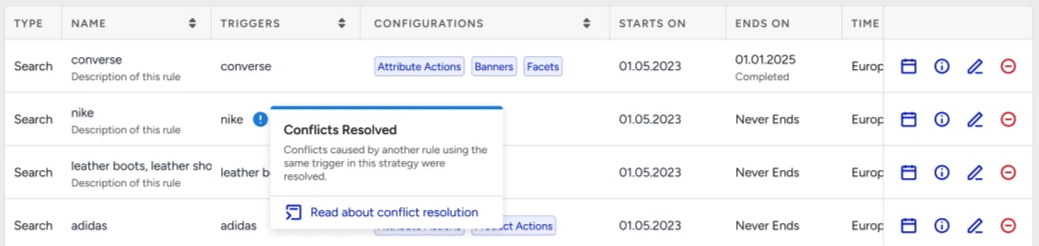
When a conflict occurs between two rules, only one rule from the conflicting rules is applied to the results. You see an information icon with the " Conflicts Resolved” message.
How are conflicts resolved?
Eureka resolves conflicts in three steps:
1. Dominance
When there are product actions for the same product, dominance order: Hide > Pin > Significantly Bury > Bury > Significantly Boost > Boost is applied.
Example:
If two rules are created for the same query in the same strategy, both rules affect the same product:
Rule 1: Hide product A
Rule 2: Bury product A
In this case, Hide has a higher priority than Bury, so Rule 1 will be applied, and Product A will not appear in the results.
Where there are product attribute actions with the same attribute, operator, value, dominance order: Hide > Boost & Bury.
Example:
If two rules are created for the same query in the same strategy, both rules affect the same product:
Rule 1: Hide red products
Rule 2: Boost red products
In this case, Hide has a higher priority than Boost, so Rule 1 will be applied, and red products will not appear in the results.
2. Precedence Score
If dominance does not resolve the conflict (for example, when actions are the same), Eureka calculates a precedence score for each rule.
A rule gets a higher score when:
The keyword matches earlier in the query
It is a Conditional Rule (instead of a Global Rule)
It uses Exact Match (instead of Contains)
It targets a more specific (longer) query
Example:
Rule 1: Pin product A to position 3 for “sneakers”
Rule 2: Pin product A to position 1 for “running sneakers”
Both rules apply the same action (Pin), so dominance does not apply.
Since “running sneakers” is more specific, Rule 2 is applied, and Product A is pinned to position 1.
3. Last Update Wins
If multiple rules have the same precedence score, the most recently updated rule is applied.
Example:
Rule 1: Boost product A
Rule 2: Boost product A
Both rules have identical conditions, so the rule that was updated last will be applied.
Conflict resolution by type
Product actions
When rules target the same product, dominance is applied first. If actions are the same, the precedence score is used.
Example:
Rule 1: Pin product A to position 5
Rule 2: Pin product A to position 2
Same action (Pin) → so precedence decides. The rule with higher precedence determines the final position.
When rules target the same position, dominance is applied first. If actions are the same, the precedence score is used.
Example:
Rule 1: Pin product A to position 5
Rule 2: Pin product B to position 5
Same action (Pin) → so precedence decides. The rule with higher precedence determines the final position.
Product attribute actions
When rules target the same attribute, operator, and value condition, dominance is applied first. If actions are the same, the precedence score is used.
Example:
Rule 1: Boost products where color = red (strength 1)
Rule 2: Boost products where color = red (strength 3)
Same condition and action → The rule with higher precedence is applied.
Banner rules
When multiple rules target the same banner slot, the rule with the higher precedence score is applied.
Example:
Rule 1: Desktop banner = “summer-sale.png”
Rule 2: Desktop banner = “clearance.png”
Only one banner can be shown → The rule with higher precedence is applied.
Facet rules
When multiple rules target the same facet, the rule with the higher precedence score is applied.
Example:
Rule 1: Pin “red” in the Color facet
Rule 2: Hide “red” in the Color facet
Both rules target the same facet value (Color = red). Since Hide has a higher priority than Pin, the “red” option will be hidden from the facet. It will not appear, even though another rule tries to pin it.
When is it not a conflict?
In the following scenarios, conflict resolution rules do not conflict and are applied together:
Different products
Rule 1: Boost product A
Rule 2: Bury product B
Each rule affects a different product. Both rules are applied.
Product action + Product attribute action
Rule 1: Pin product A to position 1
Rule 2: Boost products where color = red
One rule affects a specific product, the other affects a group. Both rules are applied.
Same attribute, different values
Rule 1: Boost red products
Rule 2: Bury green products
Different conditions are targeted. Both rules are applied.
Same attribute, different operators
Rule 1: Boost products where price > 100
Rule 2: Bury products where price < 50
Different ranges are targeted. Both rules are applied.
Different attributes
Rule 1: Boost products where price > 100
Rule 2: Bury products where rating > 4
Different attributes are used. Both rules are applied.
Different banner slots
Rule 1: Desktop banner = “sale.png”
Rule 2: Mobile banner = “mobile-sale.png”
Different placements are targeted. Both banners are shown.
Independent rule types
Item actions, attribute actions, facets, and banners are handled independently.
Example:
Rule 1: Pin product A + Hide “Color” facet
Rule 2: Boost brand = Nike + Show Desktop banner
All actions are applied together
Different facet attributes
Example:
Rule 1: Hide Black value in “Color” facet (attribute: color)
Rule 2: Pin Nike value in “Brand” facet (attribute: brand)
These rules target different facet attributes. Both facets (“Color” and “Brand”) are displayed as configured.
In short:
Conflicts occur when rules target the same products in the same way.
Eureka resolves conflicts using dominance and precedence score.
If there is no direct overlap, rules are applied together without conflict.