Spam: It’s one of the most dreaded words in the email marketing industry.
We mentioned the importance of testing your email’s design, but running spam tests to check your email’s deliverability potential is also essential. Will your email make it into your subscribers’ inboxes? Or will spam filters flag your message and send it straight to a spam folder?
A spam test checks your email to see whether specific filters will flag it and move it out of a subscriber’s inbox. The test looks at the content of your email and the domain from which you send it.
Let’s look at the following concepts to understand the spam basics:
Spam Test
The spam test checks business-to-business (B2B) and business-to-consumer (B2C) spam filters.
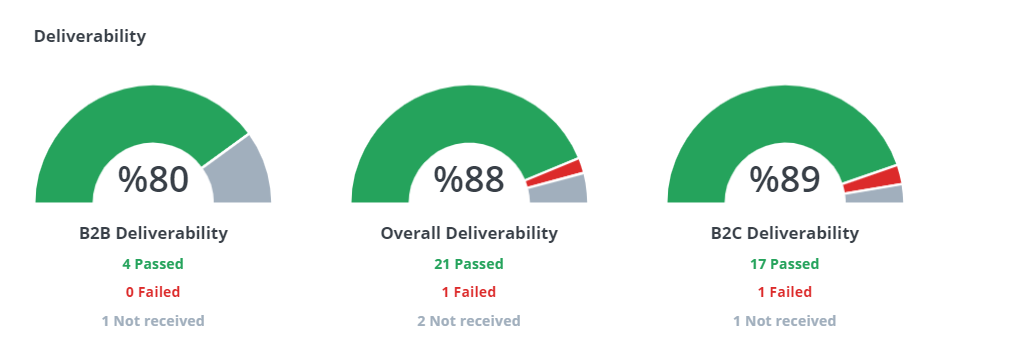
As you can see here, B2B filters can be more challenging.
What will flag my email as spam?
There may be a few reasons why your email is failing spam tests. It could be the content, your IP address, or the domain from which you send the email.
Sometimes, too many subscribers may mark your emails as spam, which can also trigger spam filters. This is why it’s crucial to segment your subscriber lists when possible and ensure you are sending content relevant to those audiences.
Spammy Content
Certain words and email styles can trigger a red flag for spam filters. This is not a complete list, but in general, it’s a good idea to avoid:
- Long, wordy emails,
- Words with all capital letters (i.e., “SIGN UP NOW”),
- Lots of exclamation points,
- Too many words that sound like a scam or spam, such as “call now” or “sale” (think telemarketer language).
- All-image emails. Try to have a balance between images and text.
- Content that is not personalized, such as addressing the email to “user” instead of the recipient’s name,
- Using “lorem ipsum",
- Subject lines that are too short or too long (consider running an A/B test to see what subject lines work for you).
IP Address Reputation
Sometimes, your IP address may be the reason behind your spam problems. If a filter flags your IP address as a risk or potential risk, you might end up on a blacklist. If so, spam filters can send your email straight to the spam folder.
A blacklist is a sort of “watchdog” for email providers; it keeps an eye out for senders that could be a potential threat. Your IP address may be blacklisted due to a virus or malware on your computer, or because of spam emails previously sent from that IP address.
Domain Reputation
As with your IP address, if you’re sending your email from a flagged or blacklisted domain, it will likely go straight to the spam folder. You may also want to look at your DomainKeys Identified Mail (DKIM), which allows senders to associate a domain name with an email, thereby vouching for its authenticity.
What do we do with the spam test results?
You may get your spam test results back and think, “Okay, now what?”
Unfortunately, spam filters don’t often explain why an email fails a spam test. Spam filters do this to prevent spammers from getting around their checks. If they decide to keep their filter specifics secret, you’ll just see a “pass” or “fail” result. If that’s the case, take some time to look at the content of your email, your IP address reputation, or your domain reputation.
Because spam filter details are often not available, we recommend sticking to email best practices as much as possible:
- Balance your text and images,
- Personalize where you can,
- Watch for spammy language,
- Keep your content concise and,
- Make sure you have a DomainKeys Identified Mail (DKIM) signature.
If you’re using a spam test and receive a spam score from SpamAssassin, they have a handy wiki with information on their spam scores, so you can look up your results, find out what they mean, and adjust your email to help it pass their spam test.