This article explains the new email open-tracking regional consent requirements, what they mean for you as a customer, when they apply, and how Insider One supports compliance. Kindly note that our customers remain responsible for assessing whether these requirements apply to their activities, users, and jurisdictions.
In this article, you will learn what is changing and how Insider One helps you comply.
What does CNIL Recommendation/Guidance require?
The French Data Protection Authority (Commission Nationale de l'Informatique et des Libertés or “CNIL") adopted a “CNIL Recommendation” or “Guideline” on the use of email tracking pixels. As this Guideline is based on the ePrivacy Directive framework, which applies across the EU, this approach may also extend and influence regulatory approaches in other EU Member States and the UK in the future.
The Guideline clarifies that tracking pixels used to measure email opens, personalize communications, optimize campaigns, or build user profiles generally require the user's prior consent. Certain limited uses, such as security-related authentication measures and specific deliverability purposes linked to requested services, may be exempt. Customers should assess and, where necessary, implement appropriate technical measures to prevent the continued operation or use of tracking pixels embedded in previously sent emails. Customers remain responsible for assessing whether tracking pixels used in their specific categories of emails require consent under applicable laws and Guideline.
As a practical approach, organizations may consider collecting email tracking preferences when collecting email addresses. For users whose email addresses were collected before the recommendation, CNIL provides for a limited transitional implementation period during which organizations may continue using consent-requiring tracking pixels, provided that users are given clear and accessible information and an easy way to object to tracking in future emails. After this transitional period ends, organizations should ensure that any continued use of tracking pixels for consent-based purposes is supported by valid consent obtained through a positive user action. In practice, users who have not actively opted in, including those who do not respond, should be treated as not consenting to email open tracking.
The CNIL recommendation applies in France. Similar guidance has also been issued in Italy under separate regulatory initiatives. They are both grounded in the EU ePrivacy Directive, so other European regulators may adopt similar guidance over time. If you run email marketing in multiple countries, keep track of the regional laws in each market where you send until 14 July 2026 in France, and expected around late October 2026 in Italy (based on separate Italian guidance, not the CNIL recommendation). The local rules and deadlines may differ. Many brands choose to apply one consistent approach across all EU sending.
Impact on your campaigns and metrics
Open rates will look lower and less reliable. Once open tracking depends on consent, only users who opted in are measured, so open-rate metrics drop and no longer reflect the full audience.
Consent, disclosure, and opt-out become part of the standard flow. Lead-collection templates and preference centers may need to explicitly capture tracking consent, including adding pixel-tracking consent to those templates. Email footers and privacy notices also need updating so that disclosure of pixel use and the opt-out option become standard parts of the template. At the same time, users need a simple way to refuse or withdraw tracking, with requests honored promptly, so that consent management and easy opt-out become routine parts of list management.
Anything built on open data becomes weaker. Journeys, re-engagement flows, and triggers based on "opened/didn't open" only fire for consented users, so those audiences shrink. Similarly, A/B tests that rely on open rate, like subject-line tests and send-time optimization, will have less data to work with, so teams may need to lean more on clicks and conversions.
How does Insider One help you comply?
Collect each user's preferences on pixel tracking
You can host your own templates/links or use Insider One’s suggested method below:
The new email_pixel_tracking_optin attribute comes into play to record each user's open-tracking choice. Its default value is null, but it can also be set to true or false via the Upsert User Data API, bulk import, the Insider Object, or Web SDK. A null value, and any case where the user has not taken a positive action to opt in, is treated as a refusal; no open-tracking pixel will be injected for those users. Make sure that you update your users' attributes, which are under Guideline's effect, or you can create a new custom attribute of your own and utilize this instead of Insider One's default attribute.
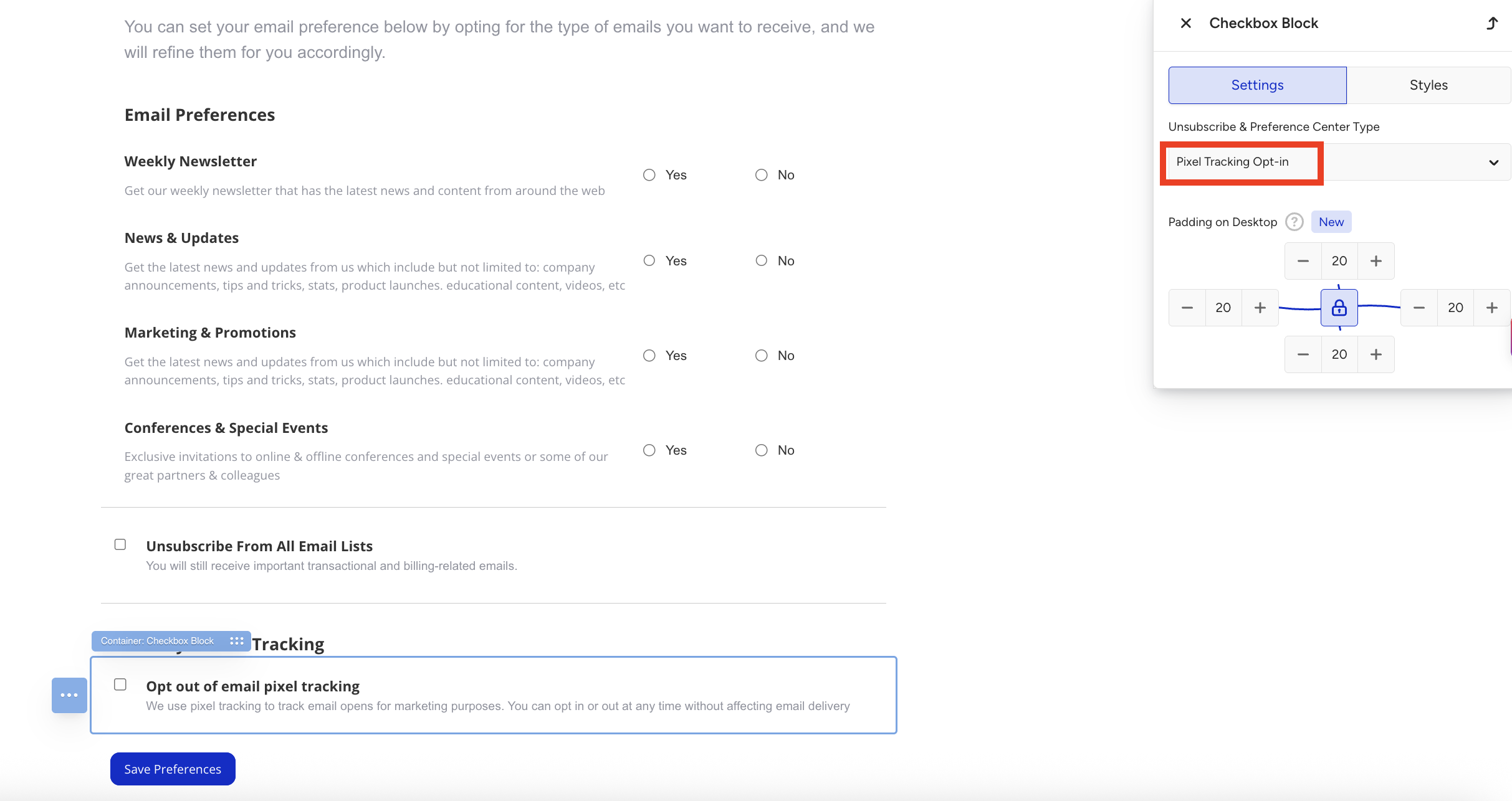
Create a Preference Center page and add radio buttons to collect the user's consent for pixel tracking. Make sure the Yes radio button is connected to "I agree to having my marketing email opens tracked to personalize and optimize communications" and the No radio button is connected to "I decline to have my marketing email opens tracked to personalize and optimize communications." The radio button solution is only available in the latest version of the Drag & Drop Editor. If you are not using this editor and would like to collect pixel-tracking consent through Insider's native Preference Center solution, contact the Insider Support team to request a migration to the latest Drag & Drop Editor. When using radio buttons for pixel tracking, select the radio buttons and choose Pixel Tracking Opt-in under Unsubscribe & Preference Center Type. With this selection, the user's choice (yes or no) is sent directly as data to email_pixel_tracking_optin, the default attribute in Insider One.
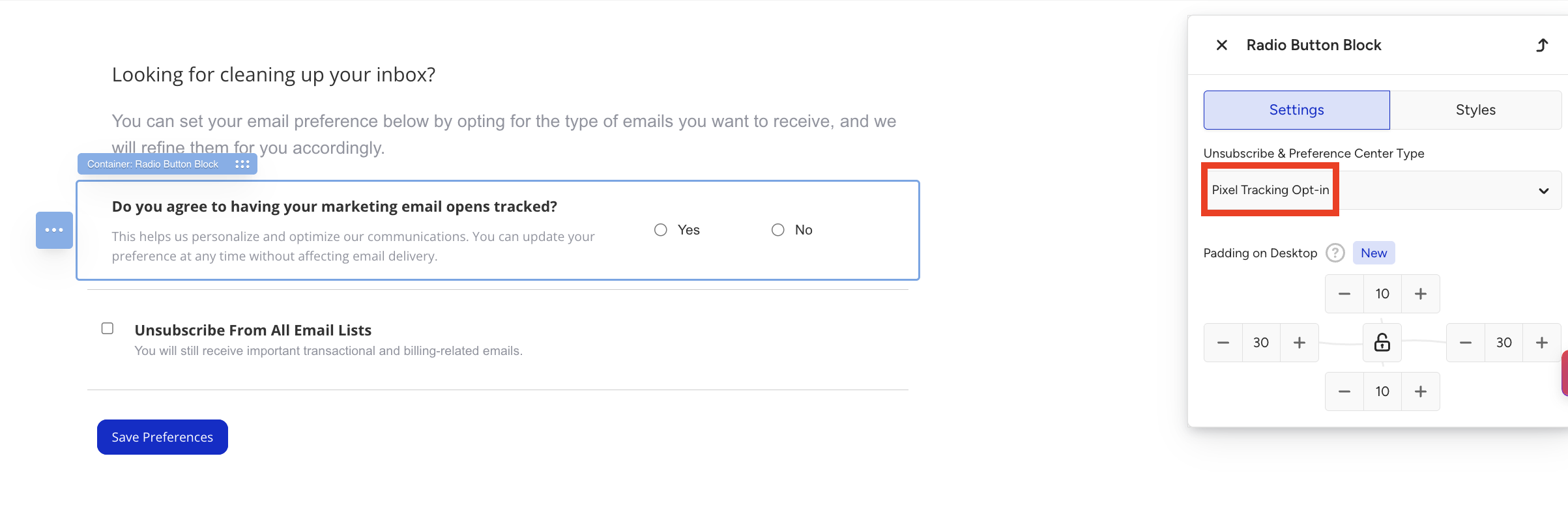
Make sure to add this Preference Center page with pixel tracking to the email templates you send in regions where pixel-tracking regulations apply.
If Insider One’s upcoming native solution is used, when users click "Yes," the email_pixel_tracking_optin attribute will be set to True; when they click "No," it will be set to False. The default value of the attribute is null. Otherwise, the customer is responsible for managing this opt-in value on their own.
Add pixel tracking opt-in information into Lead Collection and Preference Center templates
You can host your own templates/links, or use Insider One’s suggested method below:
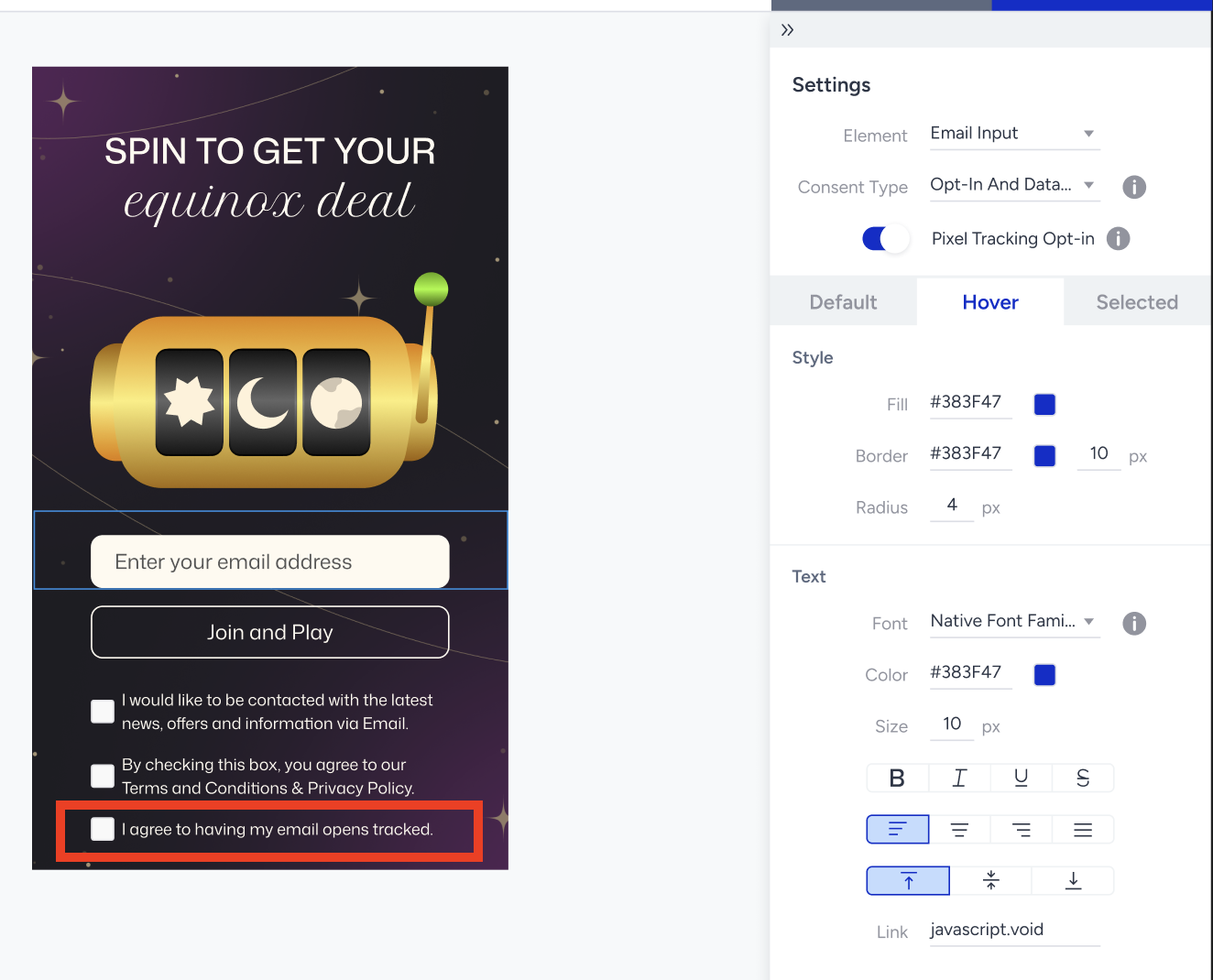
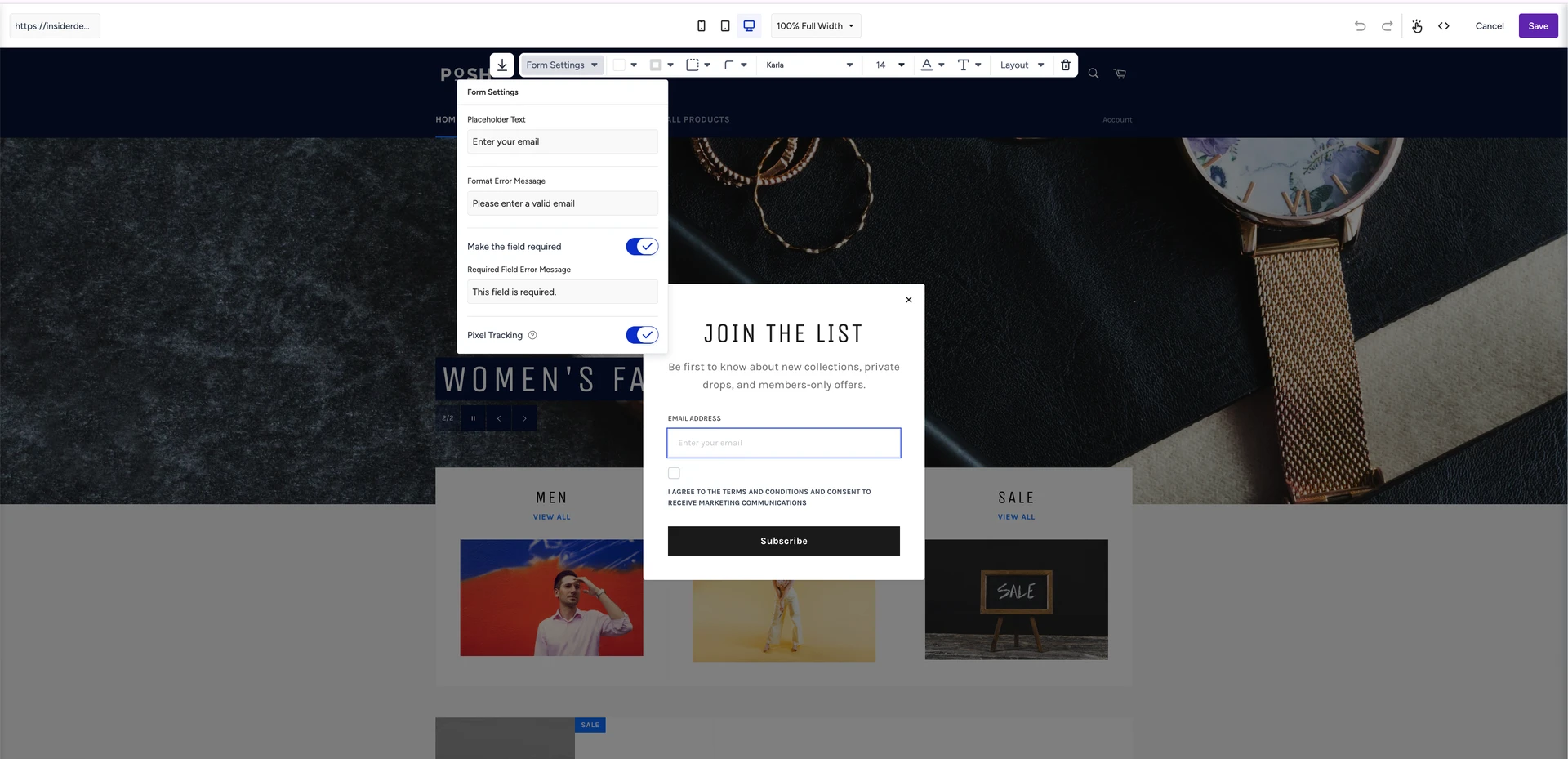
Turn on the Pixel Tracking Opt-in toggle in the element's Settings panel to add a consent checkbox to your lead collection form, so you capture each new user’s tracking preference at signup. The checkbox is intentionally pre-unchecked. For consent to be valid, users must tick it themselves. When they do, their email_pixel_tracking_optin attribute is set to true. You can customize the label text (e.g., "I agree to having my marketing email opens tracked to personalize and optimize communications"); keep it clear and accurately describe that they're consenting to email open tracking.
To meet ePrivacy and CNIL informed-consent requirements, the label (or the information displayed at the point of consent) should also clearly state the purpose(s) of the tracking, identify the sender or data controller (and any third parties involved in the tracking), and include a link to more detailed information or Privacy Policy so that consent is properly informed.
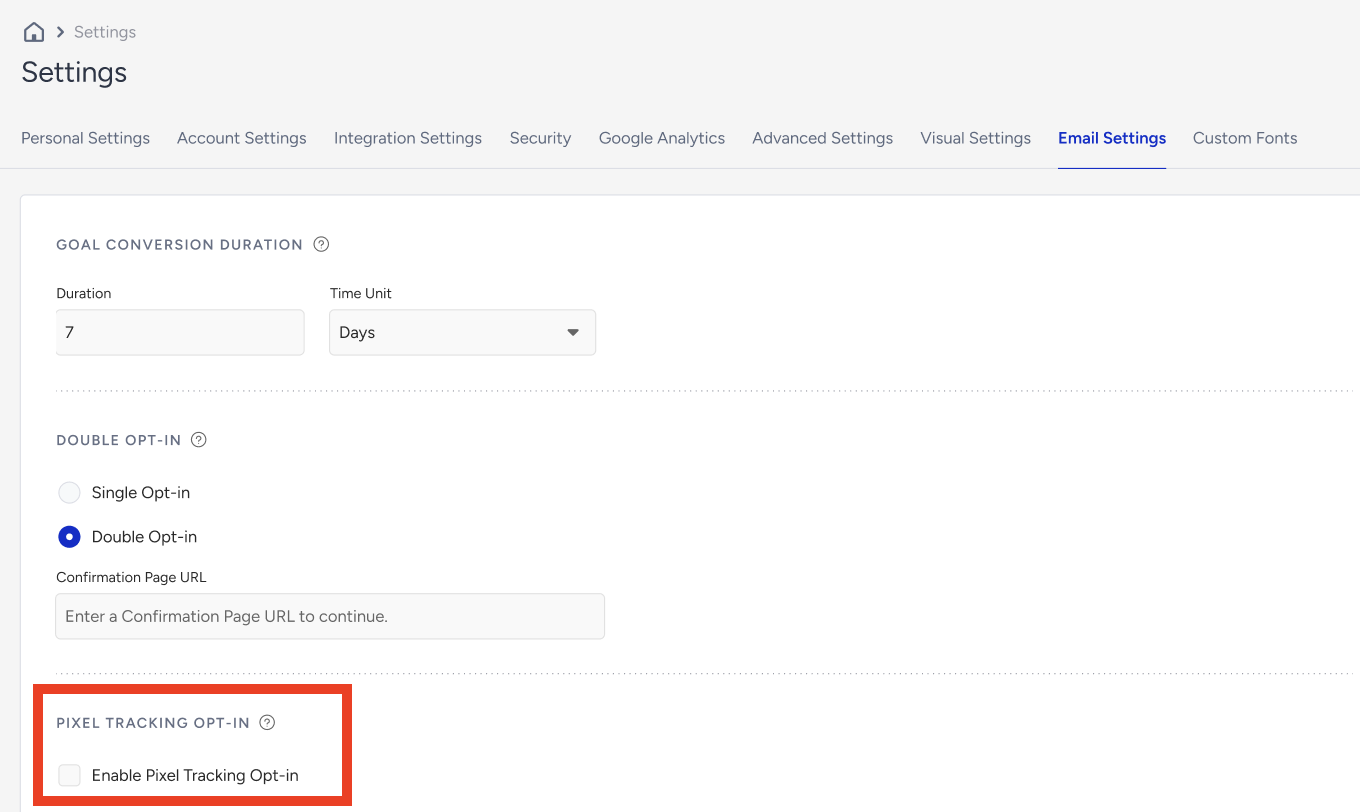
The Pixel Tracking Opt-in setting is an account-level control in Email Settings that turns on send-time enforcement of each user's open-tracking consent. It is off by default, so pixels are injected for everyone until the customer deliberately enables it. Once on, every promotional email, both standalone and Architect Email, respects the user's email_pixel_tracking_optin value: users set to false or null still receive the email (and their clicks are still tracked), but no open-tracking pixel is added, so their opens aren't recorded. This is currently available.
You can also add a pixel tracking checkbox to your Preference Center templates. Add a checkbox such as "Do not track my email opens" or "I decline to have my marketing email opens tracked to personalize and optimize communications." The checkbox should be unchecked by default. When a user checks it and saves their preference, email_pixel_tracking_optin is set to false directly. In this case, their future email opens will no longer be tracked; they'll still receive all your emails as usual, only the open-tracking pixel won't be injected in the upcoming emails. You can customize the label text, but make sure it clearly describes that ticking the box opts them out of email open tracking. This will be available soon. The checkbox solution is only available in the latest version of the Drag & Drop Editor. If you are not using this editor and would like to collect pixel-tracking consent through Insider One's native Preference Center solution, contact the Insider One Support team to request a migration to the latest Drag & Drop Editor. When using the pixel tracking checkbox, select it and choose Pixel Tracking Opt-in under Unsubscribe & Preference Center Type. With this selection, the user's choice (yes or no) is sent directly as data to email_pixel_tracking_optin, the default attribute in Insider One.
This article is for general informational purposes and does not constitute legal advice. Application of ePrivacy and GDPR rules depends on your specific circumstances and jurisdictions. Consult qualified legal counsel before changing tracking practices or consent flows.