Imagine Sporzy, a popular online retailer, preparing for its largest holiday sale of the year. The marketing team had carefully planned special offers, audience segments, and conversion tracking, all powered by detailed user data flowing into their central data platform. Their goal was to re-engage users who viewed products but did not complete a purchase by sending targeted emails and notifications with personalized discounts.
However, an unnoticed issue occurred during a recent mobile app update. The price attribute of the Purchase event, expected to always be a numeric value, began arriving in incorrect formats. Instead of numbers, some price values were sent as text strings or empty values.
This seemingly small data issue quickly caused widespread problems:
Incorrect Audiences
The segment targeting “users who purchased items over $100” suddenly expanded far beyond its intended size. Because the system could not properly interpret malformed price values, thousands of users were incorrectly included in the segment.
Ineffective Personalization
Users received promotions for products they had already purchased or offers that did not align with their actual purchase behavior. This resulted in confusion, frustration, and decreased engagement.
Campaign Failures
Critical campaigns, such as cart abandonment recovery, failed to execute correctly. Events like add_to_cart were missing, duplicated, or malformed across certain data sources, preventing the campaigns from triggering as designed.
Lost Revenue
Marketing spend was misallocated to the wrong audiences, producing low returns. Teams spent valuable time manually inspecting individual user profiles in an attempt to diagnose the issue—an inefficient process that failed to reveal the full scope of the problem. By the time the root cause was identified, revenue had already been impacted.
This scenario highlights a common and costly challenge: without a reliable system to validate data quality, configuration issues can silently disrupt campaigns, delay execution, and lead to significant financial loss.
Data Validation: Protection against Data Errors
Critical user data from multiple sources, such as websites, mobile apps, internal systems, and third-party platforms, is continuously sent into the central data layer. This data powers segmentation, personalization, campaign execution, and performance measurement across all products.
When data is malformed, missing, or misconfigured, these systems cannot function reliably. To address this, Insider One has the Data Validation system, an automated mechanism designed to proactively detect data quality issues. Data Validation continuously inspects incoming data for correctness and consistency, identifying problems early and eliminating the need for manual troubleshooting.
By surfacing issues as soon as they occur, Data Validation helps ensure stable campaign performance, accurate targeting, and trustworthy analytics, protecting both revenue and customer experience.
Why does Data Validation matter?
The Data Validation system is designed to help customers easily and confidently set up and verify their data.
Issues in data formats, missing details, or differences across sources can sometimes affect campaign performance, making it difficult to pinpoint the underlying data issue.
Customers currently have to check different tools individually (like user profiles, test lab, and integration wizard), which can make finding problems slow and inefficient.
It can be challenging for customers to get a clear view of how data is flowing across all their different sources, like web, mobile, or API.
Customers are typically made aware of data issues only after campaign results are impacted, rather than being notified right away.
Marketing and technical teams may find it difficult to track setup progress together, which can occasionally result in configuration inconsistencies and slower resolution times.
The data validation system checks and monitors the data to avoid mistakes that might lead to wasted effort and delays in getting started.
How does Data Validation work?
The data validation system offers a full set of features to help.
Automatic detection and checking
The system will automatically check the data to detect any data errors. This includes spotting wrong data types, incorrect value formats, empty values, and missing required event parameters.
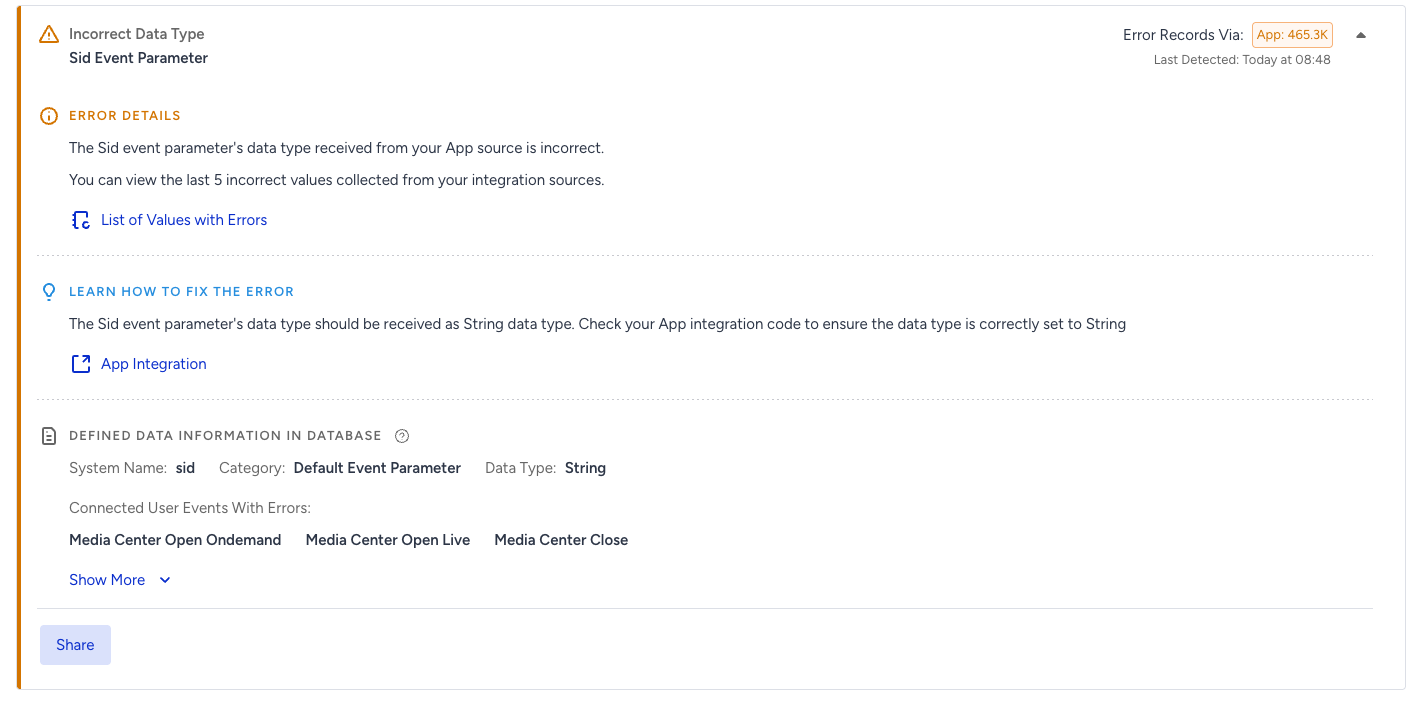
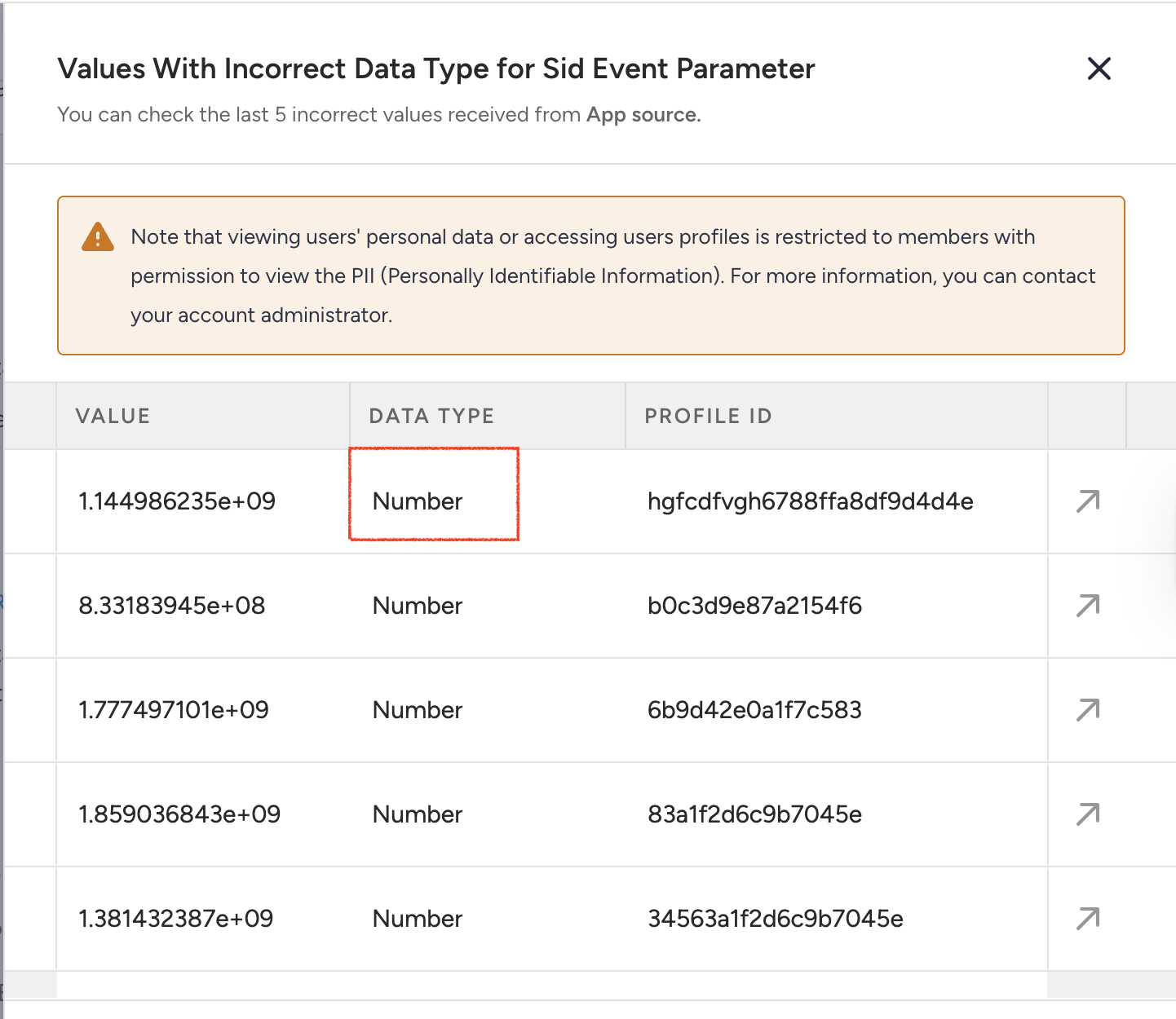
Incorrect data type
The image below shows an example of an incorrectly sent Session ID event parameter. It should be sent as a string, but the customers sent it as a number in this sample case.
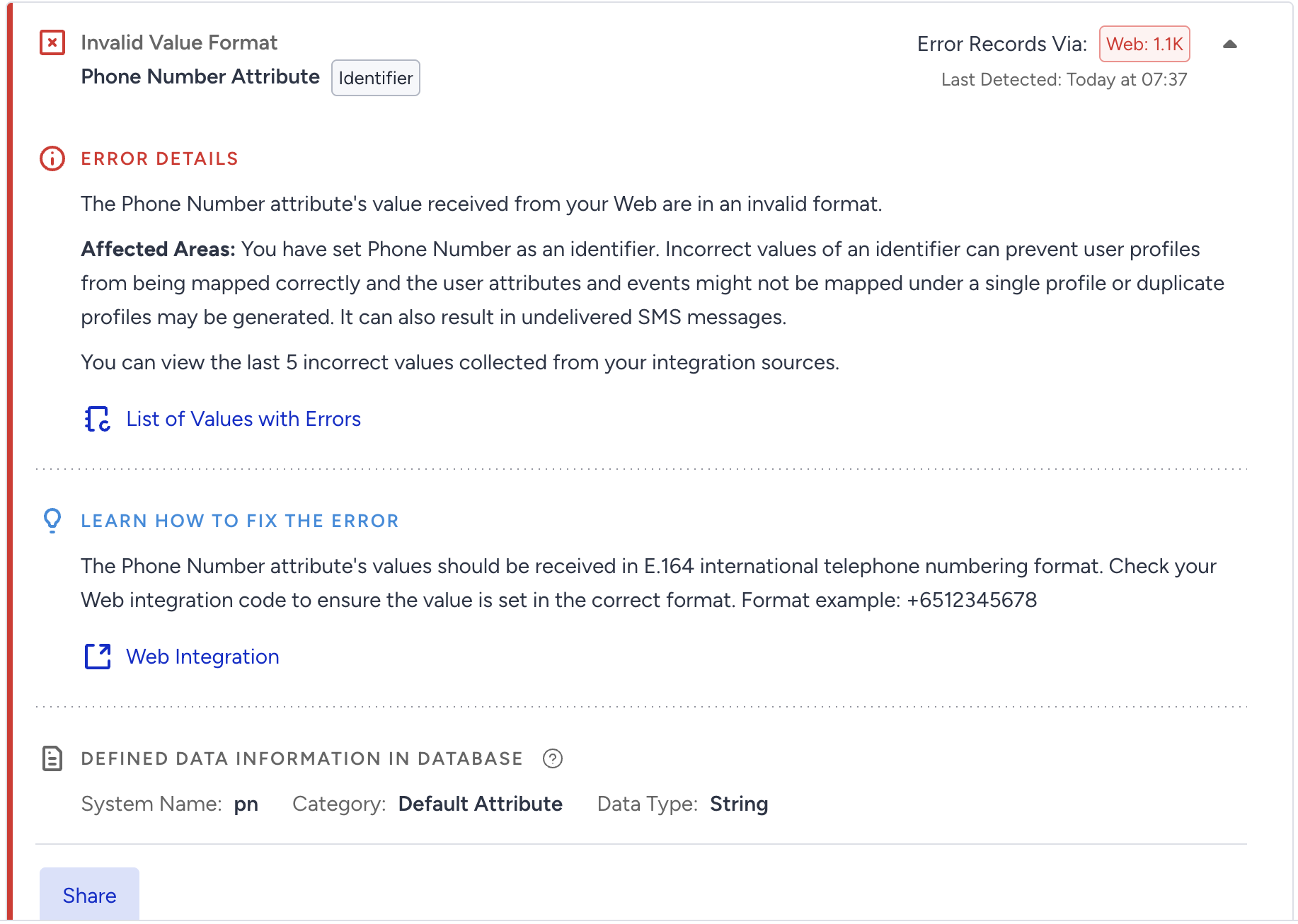
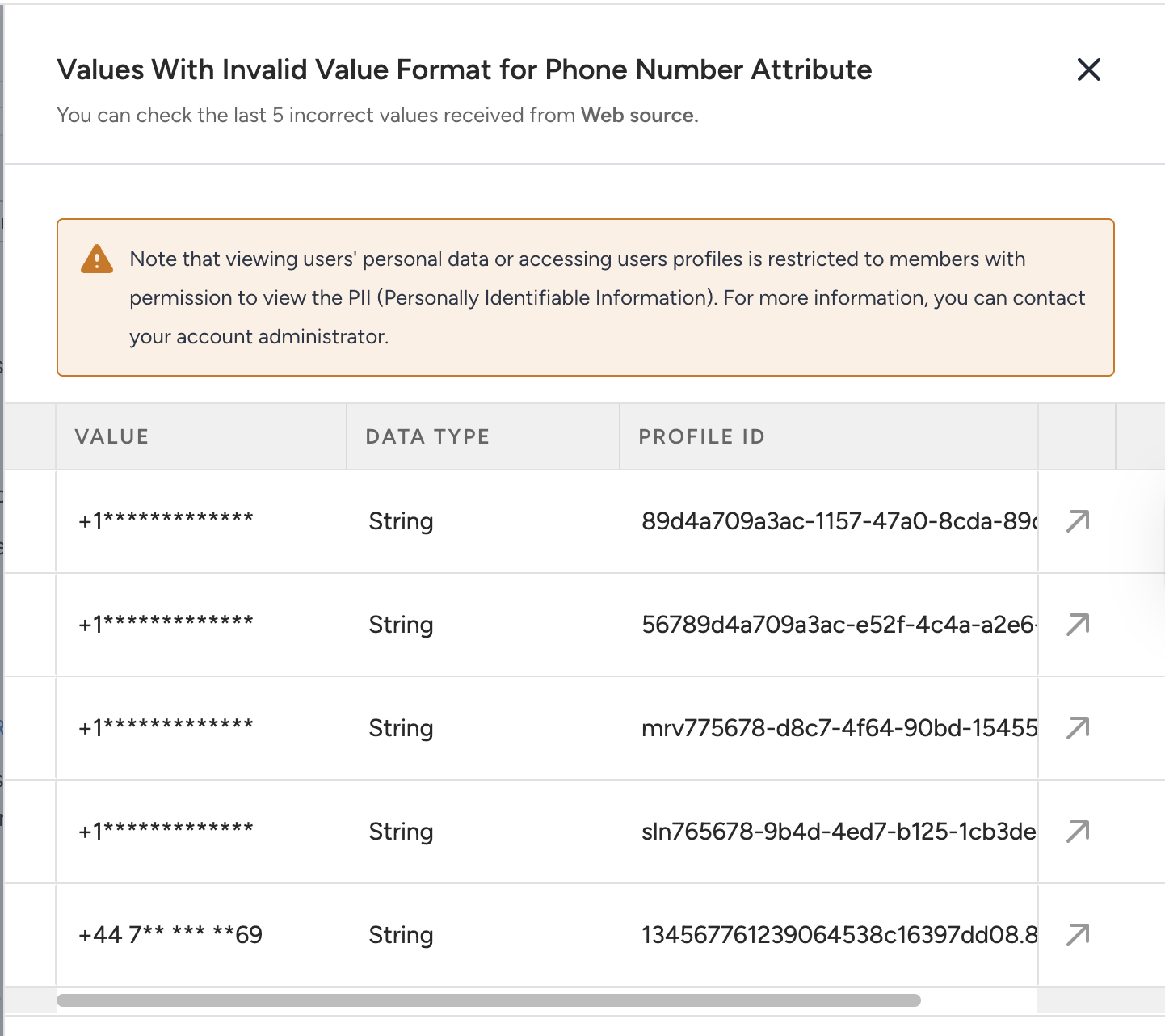
Invalid value format example
The customer sent the email address in the wrong format. It cannot start with an underscore (_).
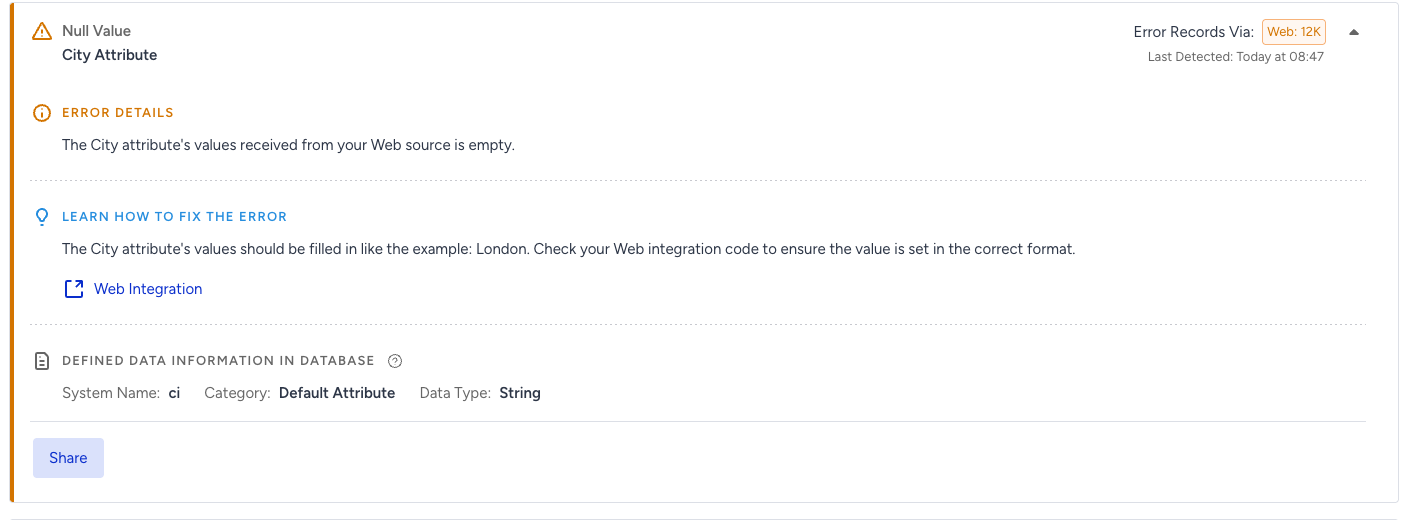
Null values
The customer was supposed to send the city attribute; however, the system received this attribute empty.
Required event parameters
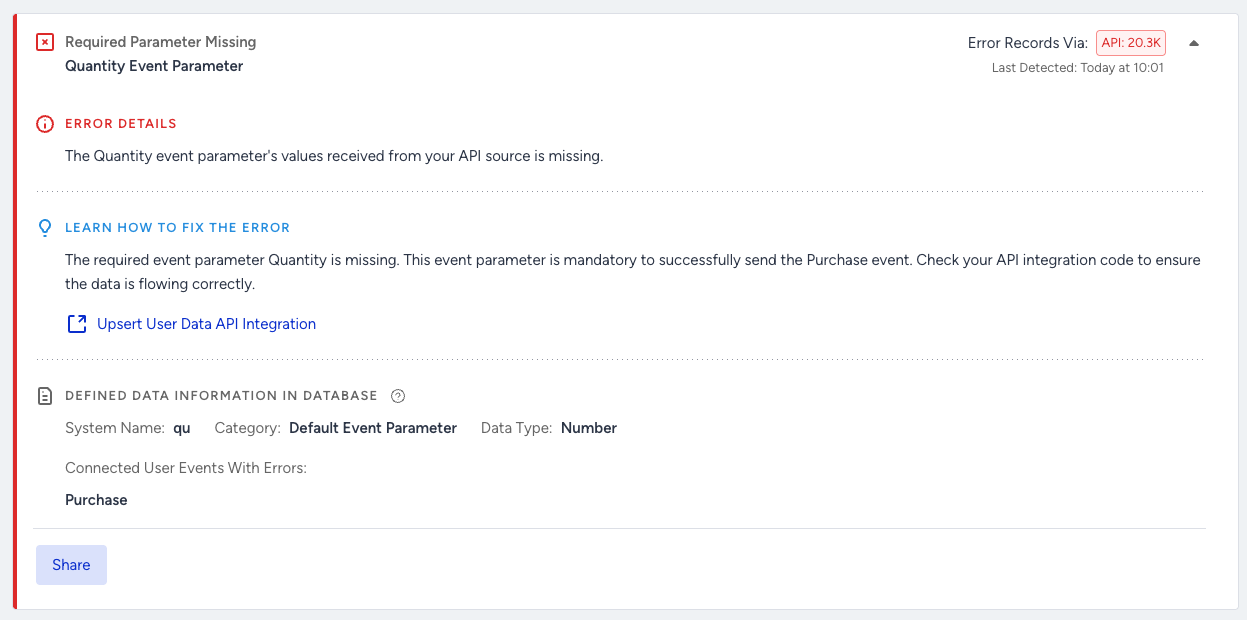
The system verifies the required event parameters for specific default events to ensure customers send them along with the event. For example, the quantity is a mandatory parameter for the purchase event. Without it, segmentation and analytics will fail.
Guided help
When a problem is found, the system clearly explains it and suggests how to fix it, making it easier to solve.
Filtering options
Customers can filter errors by data source (e.g., web, app, API), user data category, error types, and error severity to easily find and focus on specific issues. This helps manage reported issues more effectively and address problems across different data sources.
Insider ID information
For each sample error, customers can see the Insider ID of the affected user. This allows them to quickly navigate to the user's profile page to investigate and debug the specific issue for that individual user.
Recent error listing
The system will specifically list errors detected in the last three days. This provides a focused view of the most current data issues, ensuring that recent problems are prioritized and addressed promptly.
Ability to share error details
Customers can share the error details through email.
What are the benefits of Data Validation?
Implementing the data validation system brings significant advantages directly to customers:
More successful campaigns: Finding and fixing data errors early helps campaigns run correctly and perform better. This means better results for your marketing efforts and less wasted money.
Faster and easier problem solving: Instead of spending hours manually searching for data mistakes, you'll get automatic alerts and clear guidance on how to fix issues. This saves valuable time for your teams.
Prevention of campaign issues: You'll be notified of critical data problems as soon as they occur, allowing you to fix them before they cause campaigns to fail or underperform. Pre-campaign checks also ensure your data is ready to go.
Smoother and quicker onboarding: Setting up your data with Insider becomes much easier, as the system helps quickly identify and resolve any integration problems.
Increased confidence in your data: You can trust that the data used for personalizing messages and segmenting users is accurate and reliable, leading to more effective strategies.
Better team alignment: Both your marketing and technical teams will have a clear, shared view of data health, making it simpler to work together and ensure everything is set up correctly.
The data validation system provides immediate alerts and validation directly within the platform, greatly reducing your reliance on other tools and helping you ensure the quality of your data before problems arise.