Before you can send and activate structured event data, you must first define the Array of Objects event parameter in the Attributes and Events section.
Array of Objects event parameters cannot be used in ingestion or segmentation unless they are registered first.
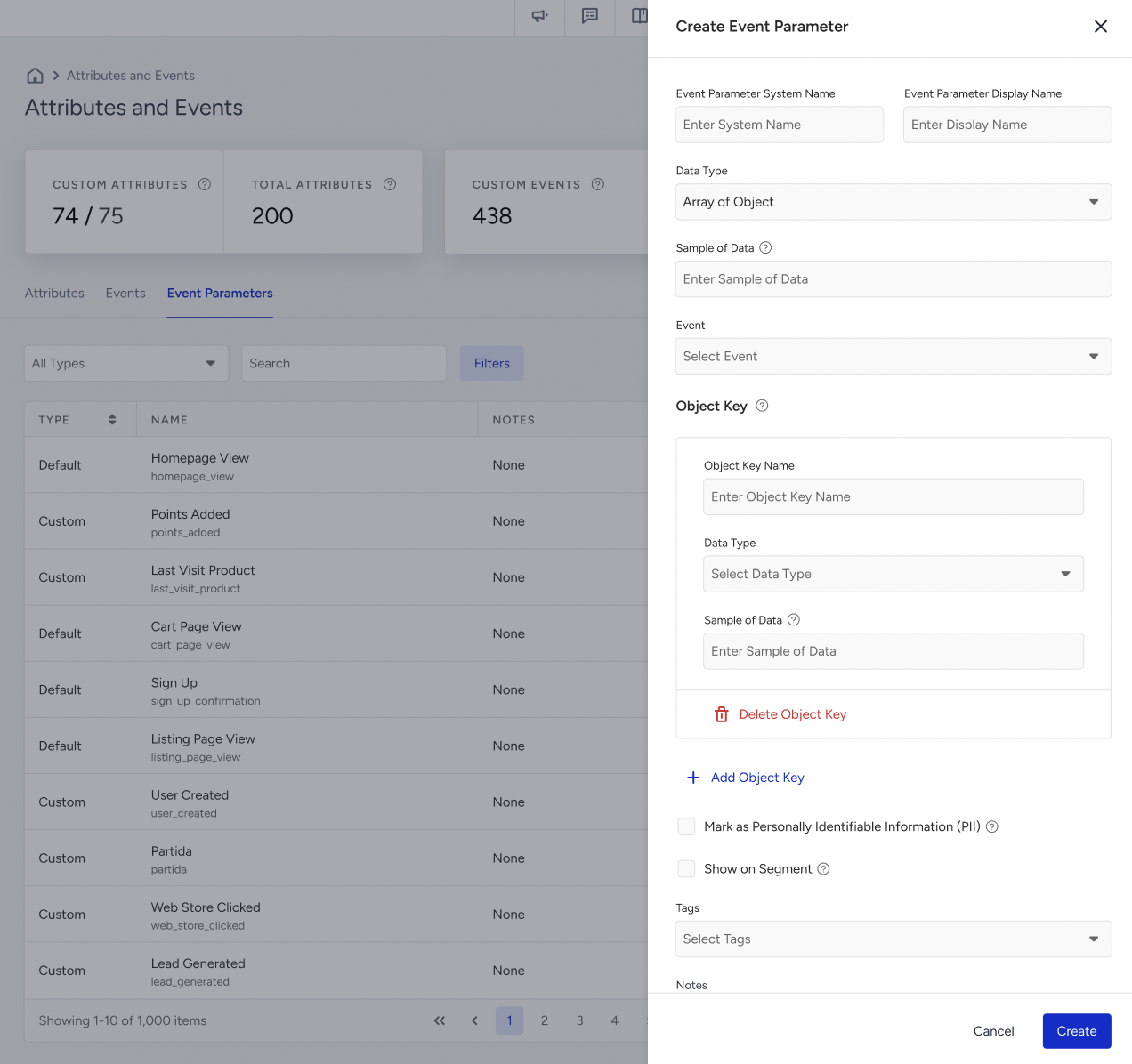
In the Attributes and Events page, on the Event Parameters tab,
Click Create.
Enter the Event Parameter System Name and Display Name.
Select Data Type: Array of Objects.
Select the event(s) the parameter belongs to.
Add object keys such as:
Key Name | Type |
product_id | String |
product_name | String |
category | String |
unit_price | Number |
quantity | Number |
purchase_date | Date |
is_discounted | Boolean |
When Array of Objects is selected, the form changes:
The Object Key section appears.
Mark as PII and Show on Segment move below the Object Key section.
Object Keys
Each Object Key block contains:
Object Key Name
Data Type
Sample of Data (optional)
Delete Object Key
Use + Add Object Key to add more keys.
Supported Data Types
When defining object keys for an Array of Objects event parameter, the following data types are supported:
Data Type | Description | Purchase Example |
String | Text values | product_name: "Nike Air Max" |
Number | Numeric values | unit_price: 2499 |
Date | ISO-8601 datetime | purchase_date: "2026-04-01T14:30:00Z" |
Boolean | True/False values | is_discounted: true |
URL | Valid web link | product_image: "https://cdn.example.com/img.jpg" |
String Array | List of text values | tags: ["sale", "new"] |
Number Array | List of numeric values | available_sizes: [38, 39, 40] |
Object | Nested structured object | charges: { total: 10, tax: 1 } |
Object-Type Keys
If you select Object as the data type:
A Sub-Object Key creation area appears under that key
You may add multiple sub-object keys, each with its own Name, Data Type, and (optional) Sample of Data
Sub-object keys support the same data types except Object, because a maximum of 2 nesting levels is supported.
Sub-object keys are stored as parent.child, for example shipping.weight. Only one level of nesting is allowed, so a key name can contain at most one dot. An array inside an array is not supported and is rejected during ingestion.
Naming Rules
Object Key and Sub-Object Key names must start with a lowercase letter and can contain letters, numbers, and underscores.
Spaces are automatically converted to underscores, and names are lowercased while typing (for example, Unit Price becomes unit_price).
Names must be at least 3 characters.
Object Key names must be unique within the same parameter. Sub-Object Key names must be unique within the same Object Key. The same name can be reused in a different parameter.
Limit Behavior
Condition | Behavior |
Panel has reached the Array of Objects parameter limit | The Array of Objects option is disabled with the tooltip: "You have already added the maximum of 20 Array of Objects event parameters." |
Panel has reached the total custom parameter limit but not the Array of Objects limit | All non-AoO data types are disabled with the tooltip: "You have already added the maximum of [X] Custom Parameters." |
Parameter has reached the object key limit | + Add Object Key and + Add Sub-Object Key are disabled with the tooltip: "You have already added the maximum of 20 Object and Sub-Object Keys. Remove one or more of them to add new ones." |
The Array of Objects limit is tracked separately from the general Custom Parameters limit. You can follow both from the Key Metrics section at the top of the Attributes and Events page, where Array of Object appears as a sub-metric under Custom Parameters.
Default and Configurable Limits
Two of the limits are configured per parameter and can be raised by the Insider One team on request:
Limit | Default | Configurable range |
Maximum objects inside one array | 50 | 1–1000 |
Maximum keys inside one object | 20 | 1–100 |
Array of Objects event parameters per panel | 20 | Not configurable |
Nesting levels | 2 | Not configurable |
The panel enforces the currently configured values, so the object key counter and its tooltip always reflect your own limits, not the defaults.
Create the parameter inside an event
Array of Objects parameters can also be defined while creating a custom event, from Events tab > Create Event > Parameters:
+ Add Custom Parameter renders an inline parameter block. Selecting Array of Objects as the data type opens the same Object Key builder described above.
Select Existing Parameter attaches a previously created parameter. If it is an Array of Objects parameter, its object keys and sub-object keys are displayed read-only.
Delete Parameter detaches the parameter from that event only. It does not delete the parameter from the panel.
You can use both flows together on the same event.
View an Array of Objects Event Parameter
On the Event Parameters listing:
Array of Objects parameters display Array of Objects in the Data Type column.
Array of Objects is available as an option in the Data Type filter.
Opening a parameter's details drawer shows three tabs: Details, Object Keys, and Events.
The Object Keys tab renders a read-only tree of the parameter's structure. Each key shows its name and data type, and object-type keys can be expanded to show their sub-object keys. Show Details expands every level at once, and the button turns into Hide Details.
Edit an Array of Objects Event Parameter
After an Array of Objects event parameter is created, its structure is locked. The following rules apply:
Editable | Not Editable |
Display Name Sample of Data Event selection Adding new Object Keys Adding new Sub-Object Keys to existing keys Mark as PII Tags Notes | System Name Data Type Existing Object Key names Existing Object Key data types Existing Sub-Object Key names Existing Sub-Object Key data types |
Deletion of existing object keys and sub-object keys is not allowed. Newly added object keys follow the same rules and validations as the create flow, including the total key limit.
Show on Segment becomes non-editable once the parameter is used in a segment or campaign.
The Array of Objects data type cannot be selected while editing an existing parameter of another type. The option is disabled with the info message: "Array of Objects data type can only be selected when creating a new parameter."
Limitations
Structure
Each panel can have a maximum of 20 Array of Objects event parameters, tracked separately from the general Custom Parameters limit. The pool is shared across all event types, so the same parameter name should be reused when several events carry the same structure.
Each array can contain up to 50 objects by default, configurable between 1 and 1000 per parameter.
Each object can contain up to 20 keys by default.
A maximum of 2 nesting levels is supported. A key name can contain at most one dot, for example, shipping.weight.
Nested Array of Objects is not supported. Object-type keys are allowed, but an array cannot be placed inside another array.
String values cannot exceed 500 characters.
Payload size is limited to 5 MB per request.
Object order inside the array is not guaranteed and may differ from the ingestion order.
Lifecycle
Array of Objects event parameters must be registered in the panel before ingestion. Auto-detection from incoming traffic is not supported.
Object key and sub-object key names and data types cannot be renamed or deleted after creation. New keys can be appended.
Array of Objects event data is insert-only. There is no update, merge, or remove action after the event is written, and there is no way to modify a single object inside a stored array.
Array of Objects data can only be sent through the object_event_params field. Values sent inline in event_params are ignored.
Array of Objects event parameters cannot be updated via CSV import.