ChatGPT apps provide a powerful way to deliver AI-driven conversational experiences. When you connect your ChatGPT app to Insider One, activity inside these conversations becomes part of the whole customer journey, not a separate data silo. You can see how users engage with the chat, which features they use, and what questions they ask.
This data can then be used to personalize communication and activate campaigns based on real conversational behavior.
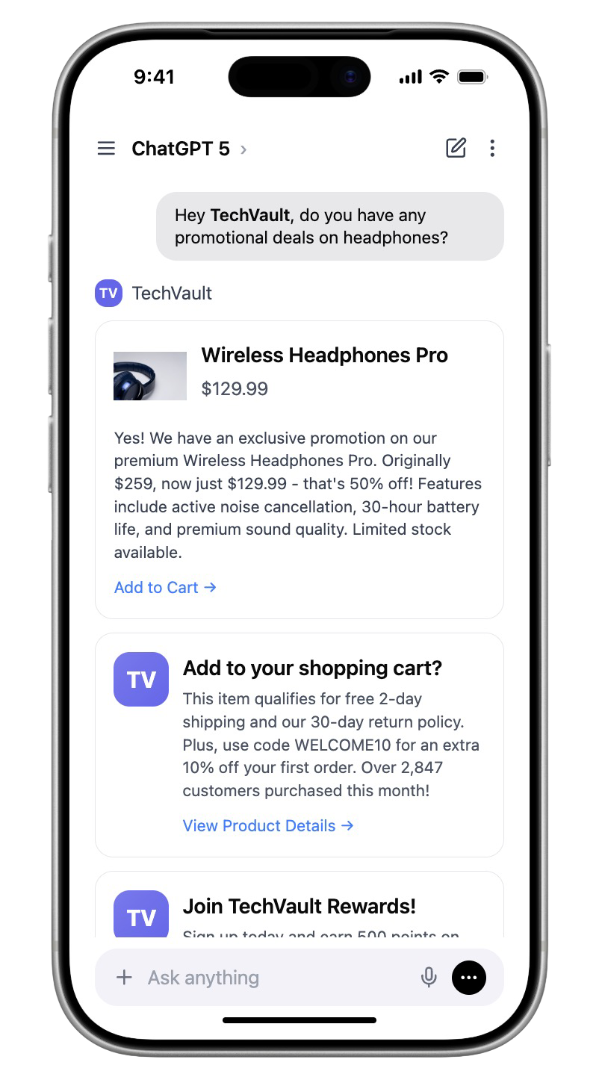
What this integration enables
Maintain full visibility of the customer journey
ChatGPT interactions flow directly into Insider One user profiles, so AI conversations appear alongside activity from your other digital channels.
Trigger cross-channel communication
Events from your ChatGPT app can start personalized messages across your owned channels, such as templates.
Deliver personalized content inside ChatGPT
Offers, messages, and content from Insider One can be displayed directly within your ChatGPT experience through your custom conversational UI.
Attribute revenue and conversions
Track purchases and outcomes that originate from ChatGPT interactions and understand how AI usage contributes to business results.
How to integrate the ChatGPT app
Bring your Insider One campaigns into your ChatGPT app experience and deliver contextual, personalized content directly within conversations.
Step 1: Create your ChatGPT app
Before integrating, you must have a ChatGPT app created by the app owner in the OpenAI platform.
Follow the OpenAI documentation to create and configure your app.
Step 2: Add your ChatGPT app domain to multi-domain list
Insider Tag works with domain validation to ensure secure and controlled delivery of experiences.
To use the Insider Web SDK inside your ChatGPT UI component, the ChatGPT app domain must be added to your Insider One multi-domain list. Otherwise, the Insider Tag will not initialize inside the UI component.
You can find your ChatGPT-generated domain by:
Inspecting the UI component element inside your ChatGPT app
Sharing the domain with the Insider One team, who will help you add it to the multi-domain configuration
This step ensures Insider One campaigns can be safely rendered inside your ChatGPT app UI component.
Step 3: Integrate Insider One into your ChatGPT App UI component
Once the domain is validated, integrate Insider One via Web SDK into your ChatGPT app UI component.
This integration allows you to:
Display Insider campaigns inside the ChatGPT app
Track user interactions generated within the ChatGPT app UI component during conversations
Trigger campaigns based on user prompts and in-UI component actions
To ensure a smooth setup, follow the integration steps provided in our sample ChatGPT app repository, which demonstrates:
How to initialize the Web SDK
How to connect the ChatGPT app UI component lifecycle with Insider
How to handle basic events and interactions
Step 4: Display campaigns inside the ChatGPT app
After the SDK integration is complete, you can start delivering content.
Create a campaign in the Insider One panel.
Activate the campaign.
Define the keywords or conditions that should trigger the campaign.
When a user prompt matches the conditions defined in your ChatGPT app, your campaign is displayed inside the ChatGPT app UI component.
The sample repository also includes example user prompts, tools and trigger logic that you can use inside the ChatGPT app.
Step 5: Track user interactions and custom events generated within the ChatGPT app
All campaigns created and delivered through Insider One are automatically tracked via the Insider Web SDK. This includes impressions, clicks, and standard engagement metrics.
If you need to track additional actions specific to your ChatGPT app experience, you can send custom events manually to Insider One:
window.InsiderQueue.push({
    type: 'custom_events',
    value: [{
        event_type: 'any_custom_event',
        event_parameters: {
            any_custom_event_parameter: 'any_custom_event_parameter_value',
        },
    }],
);
This enables deeper analysis of:
Conversation-driven engagement
Custom in-app behaviors
Advanced campaign performance
If you require assistance at any stage of the integration, please submit a support ticket and Insider One team will provide guidance.