Converting new visitors into leads has always been a challenge for many marketers. You can nurture these leads and eventually convert them into paying customers. But this is easier said than done, as not every user who lands on your website is looking to register or give out information.
Most of these users are in the consideration stage of the funnel and are conducting research. As a marketer, your added value at this stage is to understand their intent and deliver relevant, personalized engagement. Also, one of the most effective ways to collect visitor data is to ask them directly for their basic information. To do this, you can build a New User Registration journey and drive them to register on your platform.
To address this challenge, you can create a New User Registration journey designed to encourage users to register on your platform. You can provide clear incentives to guide users through the registration process, demonstrate the value of registration, and deliver a seamless, user-friendly experience. You can effectively capture valuable user data and establish a foundation for ongoing engagement and conversion efforts
This article provides details about:
Strategies to tackle registration drop-offs
To effectively address registration drop-offs, you can implement a range of strategies to encourage new visitors to complete registration. Some of these strategies include:
Personalized assistance: Provide tailored support to potential users to explain the benefits of registration and guide them through the process. This can include live chat support, personalized emails, or dedicated customer service representatives.
Recovery journeys: Implement recovery journeys using web push notifications to retarget users who have abandoned the registration process. These messages can offer incentives, remind users of the benefits of registration, and provide clear instructions for completing the process.
Web templates: Create visually appealing, user-friendly templates that highlight the registration process and encourage sign-ups. Utilize compelling visuals, persuasive copy, and clear calls-to-action to drive registrations.
Lead collection on other pages: Offer registration or lead collection forms on other pages of the website as an alternative to the main registration page. This allows users to sign up for an account or provide their contact information without necessarily completing the full registration process.
Cross-channel journeys: Implement cross-channel journeys that span multiple touchpoints, including email, SMS, and social media, to encourage users to complete the registration process. You can reach users across various channels and increase the likelihood of engagement and conversion.
Continuous A/B testing: Run A/B tests on the registration page to identify areas for improvement and optimize the user experience. Test elements such as form fields, layout, messaging, and incentives to determine which resonate most with users and drive higher registration rates.
Goals
A New User Registration journey can help you achieve several important goals that contribute to the growth and success of your business:
Increase registration rate: The New User Registration journey is designed to drive more users to complete registration and create an account on your platform. It helps you optimize the registration experience and incentivize users to sign up to increase the overall registration rate.
Grow the known user base: Encouraging new users to register on your platform helps grow your known-user base. Registered users provide valuable data and insights that can be used to personalize their experience, target them with relevant offers and promotions, and drive engagement and conversion.
Activate users: Registering on your platform is often the first step toward becoming an active, engaged user. You can successfully convert new visitors into registered users and increase the number of active users who regularly interact with your platform, thereby driving overall engagement and usage metrics.
Increase retention: Building a strong base of registered users is essential for long-term customer retention. Registered users are more likely to return to your platform, make repeat purchases, and engage with your content over time. You can increase the number of registered users, improve overall retention rates, and foster long-term relationships with your audience.
Increase website page visits: Registering users often leads to increased engagement with your website or app. Registered users are more likely to explore different sections of your platform, visit additional pages, and interact with various features and functionalities. You can grow your registered user base, drive higher website page visits, and overall user engagement.
Increase lifecycle value of users: Registered users have the potential to generate more value for your business over their lifetime. You can provide a seamless registration experience, deliver ongoing value through personalized interactions and targeted marketing campaigns, increase the lifetime value of your users, and maximize their impact on your business metrics.
Requirements
You should have Insider Tag integration completed.
Before starting to use any channel in your journeys, integrations for the respective channels should be completed. Depending on the channels you want to use in your journeys, additional integrations might be required.
In case you need to have some custom events, you need to create them and pass them to Insider.
If you have a mobile app, you must have the SDK Integration implemented.
For further information, refer to Advanced Architect Integration Guide.
Create a New User Registration Journey
To create an effective New User Registration journey and encourage users to register on your website or app, you can follow these steps:
1. Personalized lead generation templates: When a new user lands on your website, greet them with personalized lead generation templates that prompt them to register. These templates can include compelling messaging, attractive visuals, and clear calls-to-action to entice users to create an account.
2. Follow up with web push notifications: For users who visit your website but do not register on the first visit, follow up with personalized offers and reminders through web push notifications. These notifications can highlight the benefits of registration, offer incentives such as discounts or exclusive content, and provide a direct link to the registration page.
3. Engage with loyalty programs: To further incentivize registration, consider offering users a loyalty program or rewards program. Promote the benefits of joining the program, including earning points on purchases, receiving exclusive discounts, and unlocking VIP perks. Use targeted messaging and personalized offers to encourage users to sign up and start earning rewards.
4. Convert registration abandoners with mobile app push notifications: For users who download your mobile app but do not complete the registration process, implement a mobile app push journey to re-engage them. Send a push notification after a certain period, such as one day or three days, reminding them to complete their registration. Use persuasive messaging and appealing visuals to encourage action and drive users back to the app to finalize their registration.
Example for ecommerce, fashion, retailers
Lisa lands on your website through a campaign, browses several product and category pages, but leaves without creating an account. She is interested but hesitant to register immediately.
You create a new user registration journey to highlight personalized benefits, reduce friction, and convert anonymous visitors into registered users.
You wait for 15 minutes to give Lisa time to keep browsing or register on her own. If she signs up during this time, the journey ends.
After the wait, you check her registration status. If she is still unregistered, you check her reachability across Web Push, On-Site, or Email to select the most effective one.
If she is reachable via Web Push, you highlight early access to sales, wishlists, and order tracking. If not, you show an on-site banner or pop-up that encourages quick registration with minimal required fields.
You wait for one day. If Lisa still hasn’t registered, you send a follow-up email reminding her of saved items, personalized recommendations, or a first-purchase incentive.
Example for consumer electronics, home appliances
Mark visits your website to compare high-value products such as laptops or smart TVs. He spends time on comparison pages but avoids creating an account.
You can position registration as a helpful utility rather than a marketing step and encourage it.
You wait for 30 minutes to let Mark continue researching or return naturally. If he registers during this time, the journey ends.
After the wait, you check his registration status. If he is still unregistered, you check his reachability across channels and select the next best one.
If he is reachable via App Push or Web Push, you highlight benefits such as saved comparisons, price alerts, and warranty tracking. If he is not reachable through push, you display an on-site inline registration call-to-action on the product comparison pages.
You wait for one day. If Mark still has not registered, you send a follow-up email or SMS explaining how registration helps him track price drops and availability for his shortlisted products.
You can implement these strategies, leverage various communication channels and create a comprehensive New User Registration journey that effectively nudges users to register on your platform and maximize your registration rate.
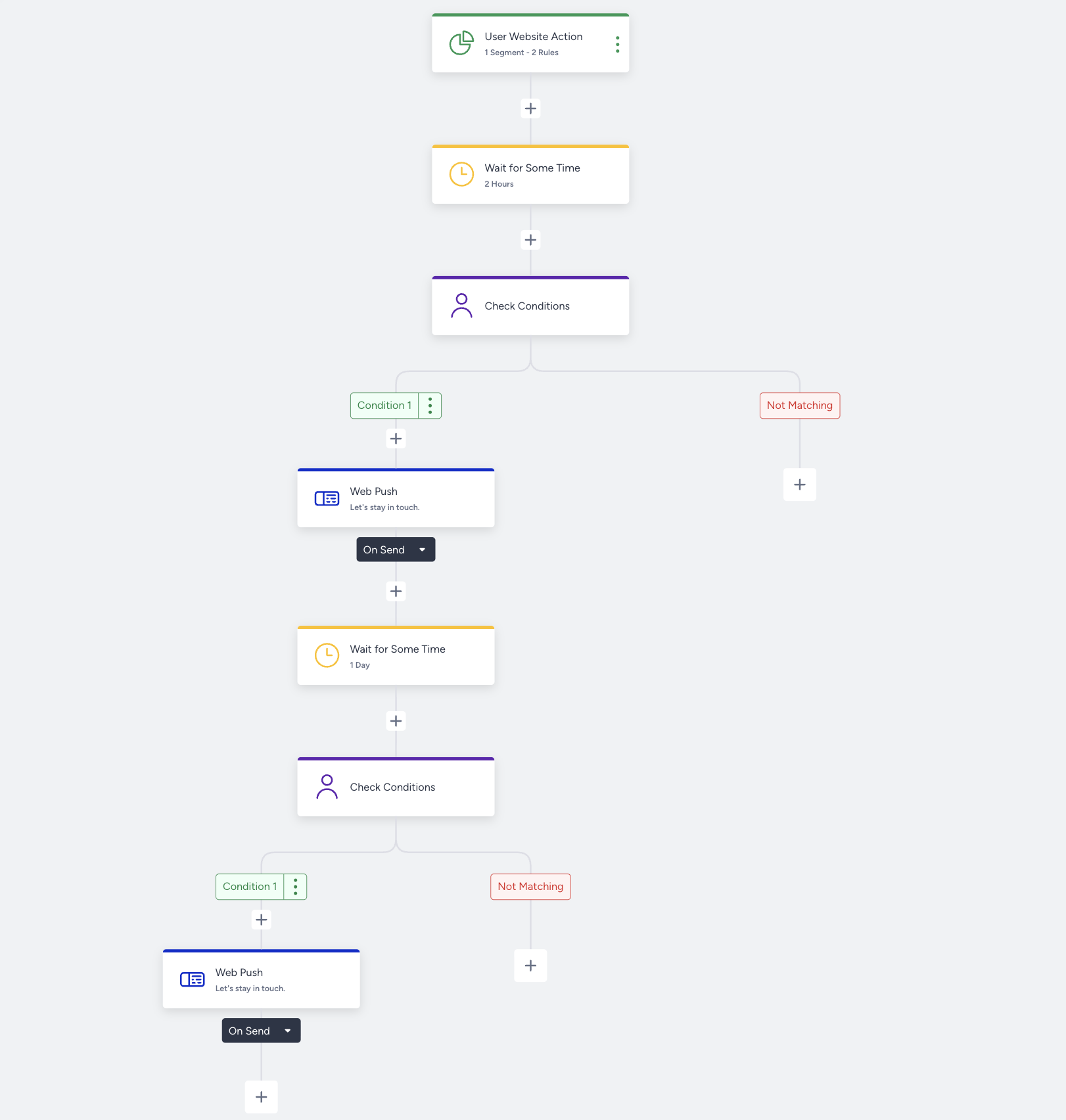
1. Select a starter
You can use the ready-to-use New User Registration journey template and customize it, or you can create it from scratch.
User Website Action starter tracks the segments and rules on the website. To target only website users, you can use this starter.
Select Visit History > New/Returning Visitor and New User for visitor type. 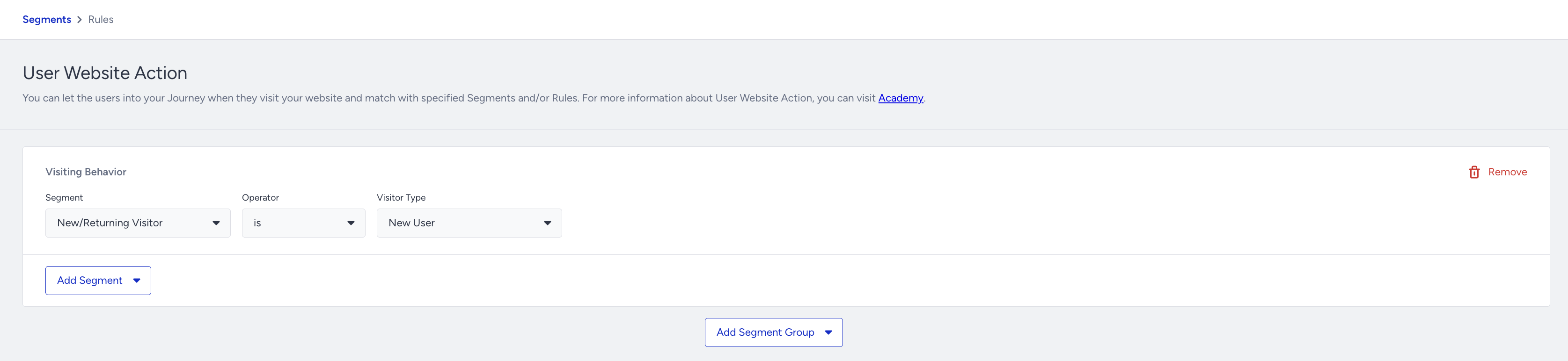
If you want to consider your mobile app users, use the First/Last Time Open segment to take your mobile app users into the journey.
If you have or plan to have app download journeys, you may exclude mobile app users from the New User Registration journey.
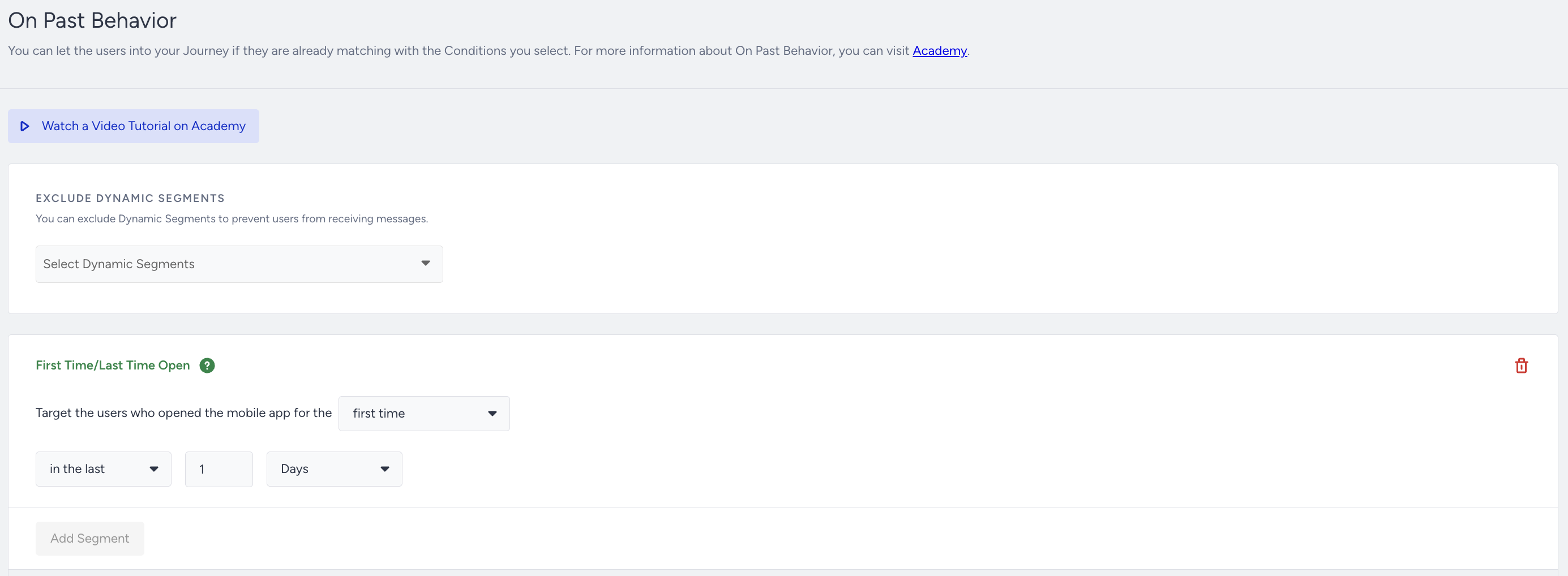
Read more on On Past Behavior.
2. Build your journey
To build your new user registration journey, follow the steps below:
2.1. Filter your users
Before nudging users to register, you can wait for a while and then, check if the users sign up to your website or not. Based on the action, you can continue with the message step.
You can use Check Conditions > Predefined Segments > User Sign-Up. 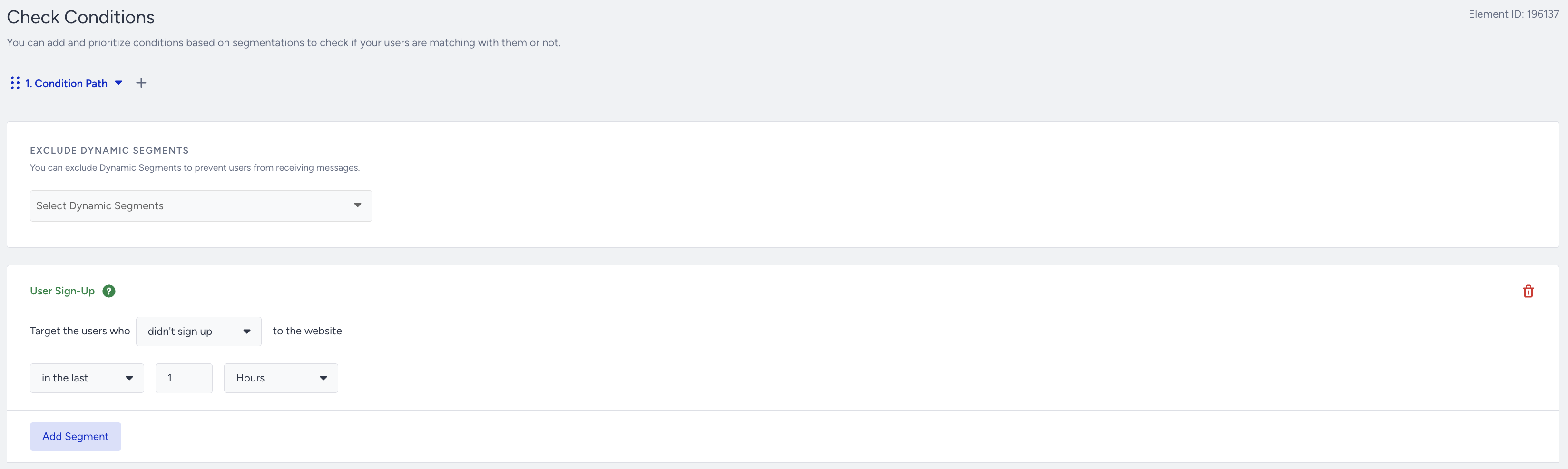
Read more about the Wait elements and Check Conditions.
2.2. Check Reachability
Before sending the initial message, you can also check if the users are reachable on that channel. If not, you can try another channel on another path. With Check Reachability, you can:
You can assess users' reachability on selected channels, and they receive your messages from the prioritized channels if they are reachable.
You can ensure that they are directed to the appropriate path based on their reachability and prevent users from dropping out of the journey.
You can optimize your budget and resources to the correct channels

2.3. Select your channels
Channel selection is a crucial step to reach your targets. When selecting your channel, you should consider the following factors.
User preferences: Users have diverse channel preferences; some prefer email for promotions, while others prefer push notifications or texts. This is where Architect steps in to help with the Next Best Channel element.
Channel effectiveness: Each communication channel has its strengths and limitations in terms of reach, engagement, and conversion rates. For example, email may be effective for delivering detailed and personalized messages, while push notifications may be more suitable for time-sensitive reminders.
Audience segmentation: Different segments of users may respond differently to messages delivered via various channels.
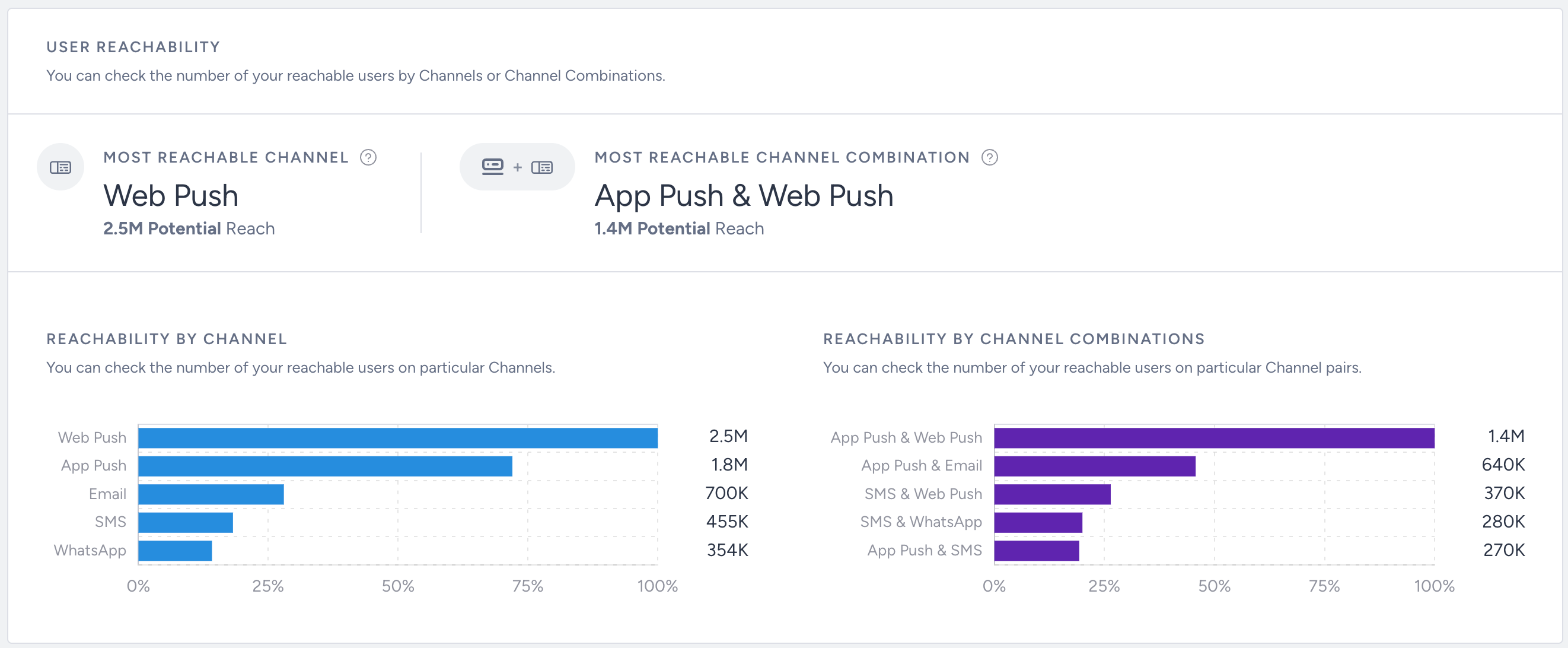
Reachability: You can review your User Reachability data on the Overall Analytics Page to assess the number of reachable users across individual channels or channel combinations. You can design journeys that capitalize on the best-performing channels and leverage insights on user reachability, ensuring optimal engagement and outcomes.
2.4. Create content
Web push, app push, on-site, and in-app channels are recommended for new user registration journeys. Define which channel you want to use and prepare the content for the channel accordingly. You can see some tips below for your message:
Offer special promotions or discounts with coupon codes to encourage new users to register.
Use a conversion trigger to drive users to register via the on-site channel in the journey.
Ensure the content design is consistent with the design of your website and mobile app.
Make sure images and GIFs are high-resolution.
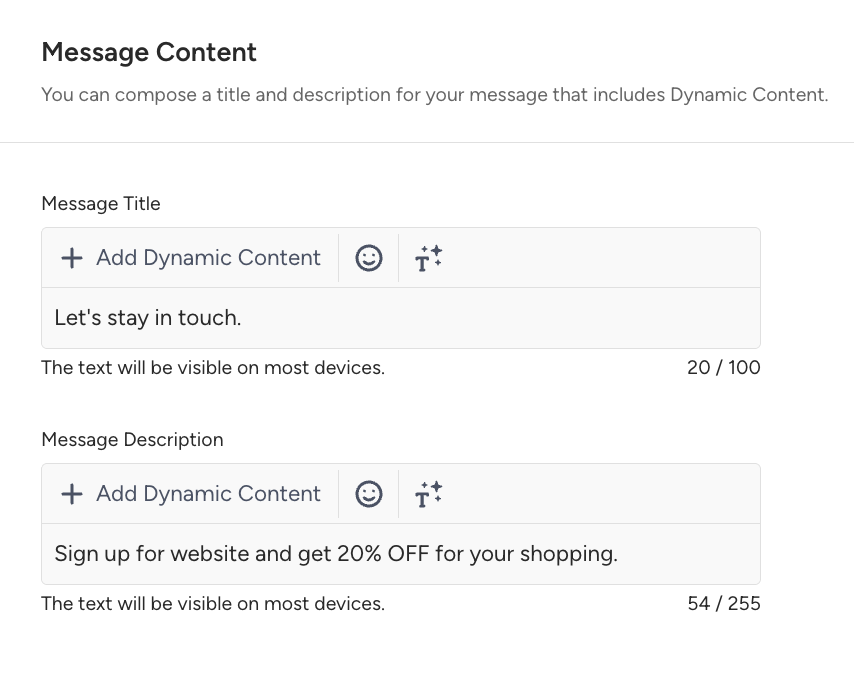
Web Push
Below is a sample web push that you can create for your journey.
On-Site
You can see an on-site campaign example below.

Follow-up Messages and Best Practices
After sending the initial message, you can control if the users complete your desired goal such as purchasing the item, adding the item to the cart, etc. after a while.
You can add a Wait element to give time to users, then you can add the Check Conditions element to check if the users perform the specified action.
Wait elements allow you to avoid overwhelming users with excessive messages, since this may lead to disengagement or unsubscribes. Check the user behavior and interactions deeply to move your journey to an advanced level.
Below you can see some common practices for messaging frequency for new user registration use cases:
Initial registration prompt
You can send a prompt when a new user first lands on your website or app. This prompt should be timely and informative, encouraging users to create an account without overwhelming them with excessive detail.
Follow-up reminder
If a user visits your platform but does not register, consider sending a follow-up reminder after a set period, such as 24 hours. This reminder should gently encourage users to complete the registration process and highlight the benefits of creating an account.
Subsequent reminders
Depending on user behavior and response to previous messages, you may send additional reminders at strategic intervals. You should space out these subsequent reminders appropriately to avoid appearing spammy or intrusive and should provide additional incentives or reasons to register.
Opt-out options
You can offer users the option to opt out of registration-related messages. Respect user preferences and avoid sending excessive reminders if they are not interested in registering.
Personalized communication
Personalize messaging based on user behavior, preferences, and demographics to make the registration process more relevant and engaging for each user. You can use dynamic content and segmentation to tailor messages to specific user segments and increase registration likelihood.
You can create your new user registration use cases following these best practices:
Simplify the registration process
Make the registration process as simple and streamlined as possible to minimize friction for users. Avoid asking for unnecessary information and use clear, intuitive form fields to collect essential details.
Offer incentives
Provide incentives or rewards to encourage users to register, such as discounts, exclusive offers, or access to premium content. Highlight the benefits of registration to motivate users to complete the process.
Use clear call-to-action
Use clear and compelling calls-to-action (CTAs) to prompt users to register. Place registration buttons prominently on your website or app, and use persuasive language to encourage action.
Leverage social proof
Showcase testimonials, reviews, or user success stories to build trust and credibility with new users. Highlight the positive experiences of existing users to reassure new users about the value of registration.
Optimize for mobile
Ensure that the registration process is mobile-friendly and optimized for users accessing your platform from smartphones and tablets. Use responsive design principles to create a seamless registration experience across all devices.
Provide assistance
Offer personalized assistance to users who may encounter difficulties during the registration process. Use live chat support, chatbots, or FAQ sections to address common questions and concerns in real time.
Implement progress indicators
Use progress indicators or step-by-step guides to visually communicate the registration process and reassure users about their progress. Breaking down the registration process into manageable steps can make it less daunting for users.
Follow up with abandoners
Implement follow-up campaigns to re-engage users who start but do not complete the registration process. Send reminders or incentives to encourage users to return and finish registering.
Test and iterate
Continuously test different registration strategies, messaging approaches, and incentives to identify what resonates best with your target audience. Use A/B testing to experiment with variations and optimize your registration process over time.
Monitor performance metrics
Track key performance metrics such as registration rates, conversion rates, and user engagement to evaluate the effectiveness of your registration efforts. Use data-driven insights to refine your strategies and improve results over time.
3. Launch your journey
Before launching your journey, complete your launch settings:
You can set journey entry capping to not send too many messages to the same users. In this way, you can optimize your messaging frequency.
You can also use the User Eligibility setting to prevent users from entering the Wishlist journey too frequently and receiving the same type of messages.
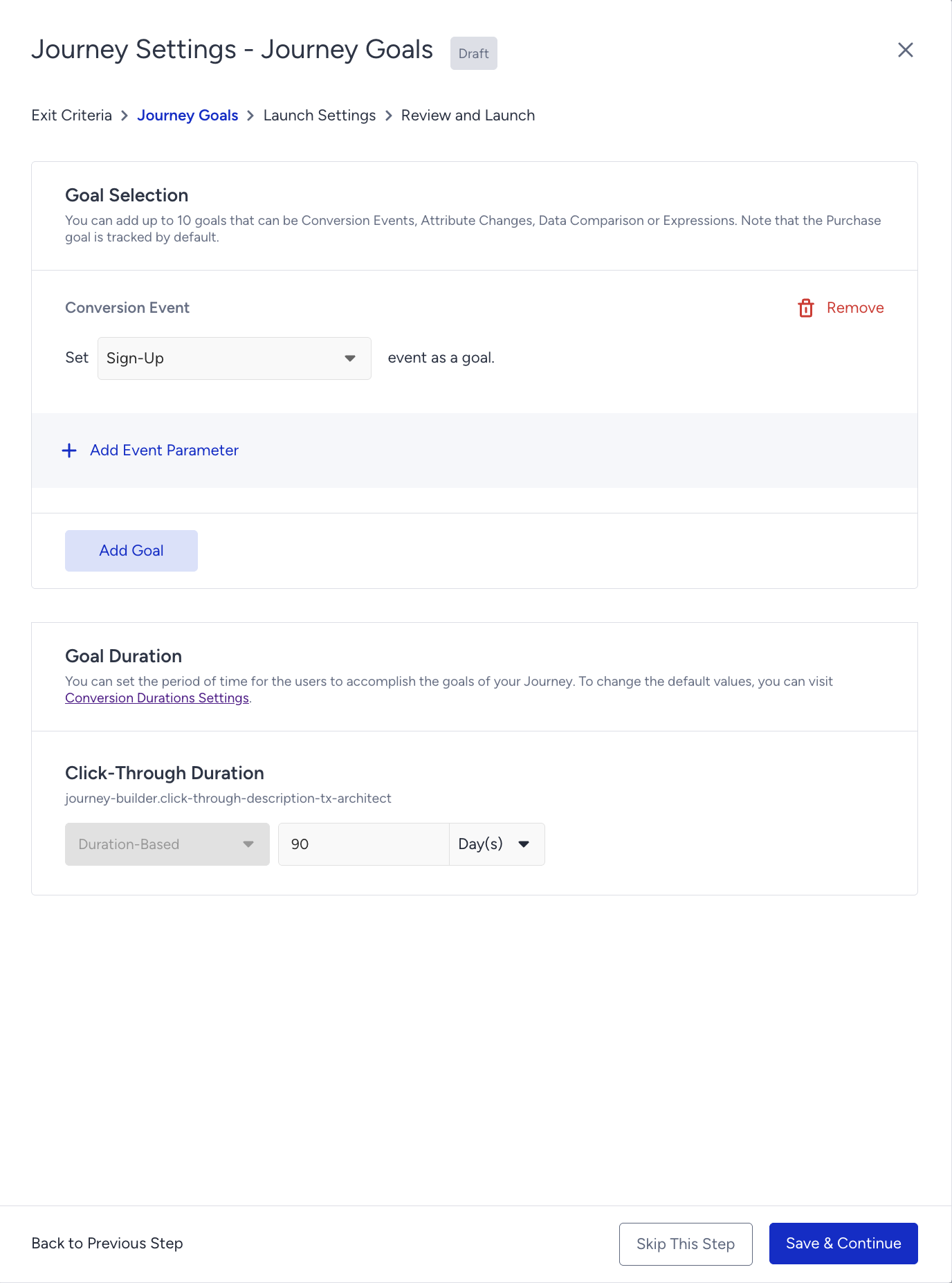
You can set Sign Up event as a goal for your journey.
Example Flow
Here you can take a look at one of the new user registration journey flow examples.