You cannot make any changes to External Platform Integrations without having either an Administrator or an Editor with PII access in InOne. Refer to User Roles for further information.
Following the steps below, you can easily integrate Insider Object on your website via Google Tag Manager (GTM).
This guide aims to answer these questions:
- How can I create a custom HTML tag for the Insider Object?
- How can I create variables to be assigned in the Insider Object?
Create a custom HTML Tag for the Insider Object
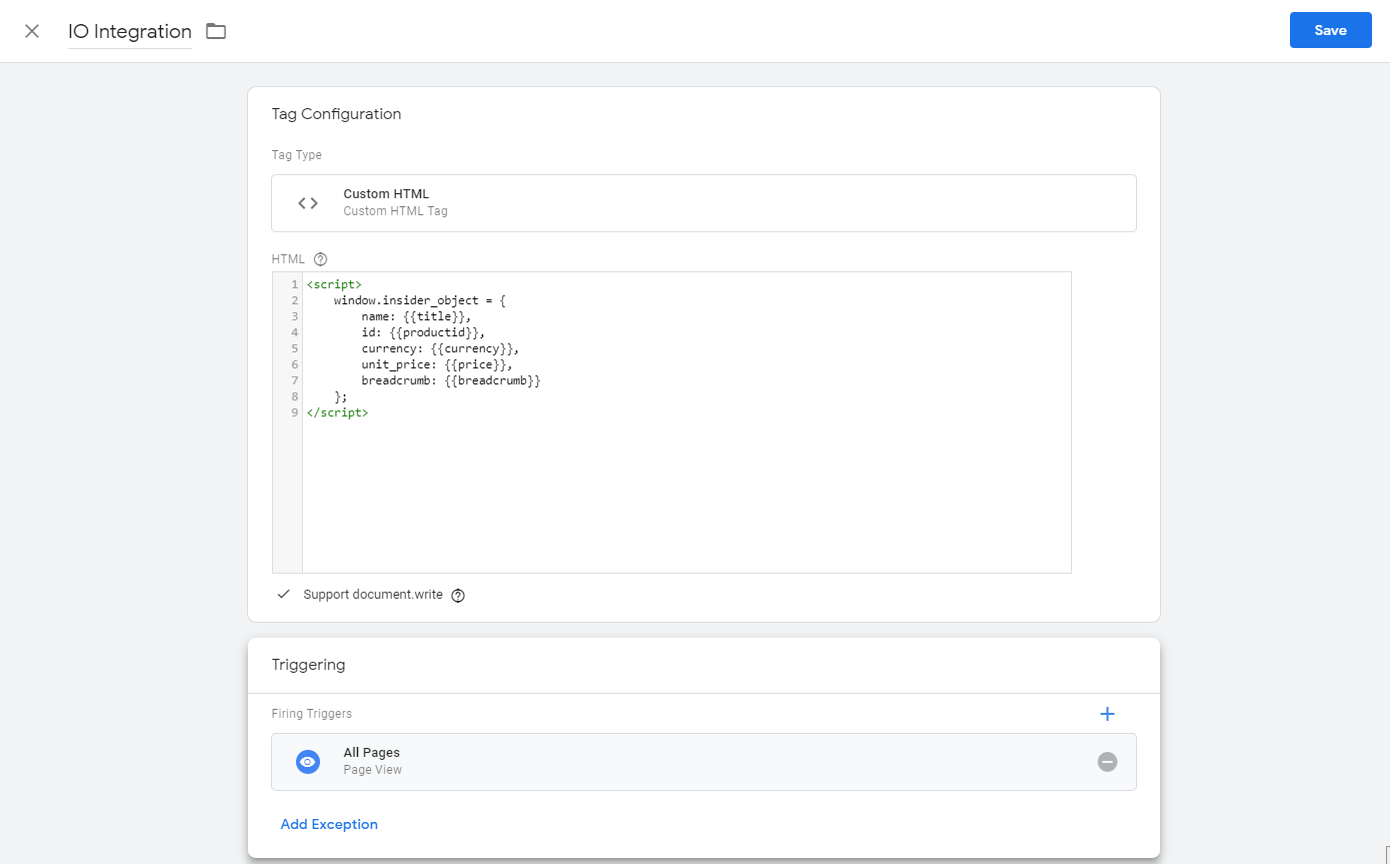
- From the Tag section of Google Tag Manager (GTM), you can create custom HTML tags for all the objects required for any integration type you're implementing, then fire them from All Pages.
- The Insider object must be added within the <script></script> tag.
- To fill in all properties, create a variable for each and assign those variables between double curly brackets — { } — as shown below.
Create variables to be assigned in the Insider Object
Create variable(s) from the Variables section.
Best practices show that creating a Custom JavaScript Variable is one of the best ways to get information from any page on the website.
- In the Custom JavaScript section, please add a function to get the necessary information from the page and return that. For instance, if the product name is the page title, you can write the function below.
- You need to create variables for each value that will be added to the Insider Object.
