Insider One helps you configure Identity Resolution Management (IRM) settings during onboarding.
After the onboarding process, when you need to change configured settings, corresponding assistance will be provided by Insider One.
If an attribute in the IRM is added as an identifier, it is written to the profile only during the identity flow, preventing duplicate users. If you make changes to the settings, the identity associations of existing users will not be affected.
Insider One supports multiple identifiers for you to use. These identifiers can be Email, Phone number, or UUID as default ones, and/or any custom identifiers that you wish to use.
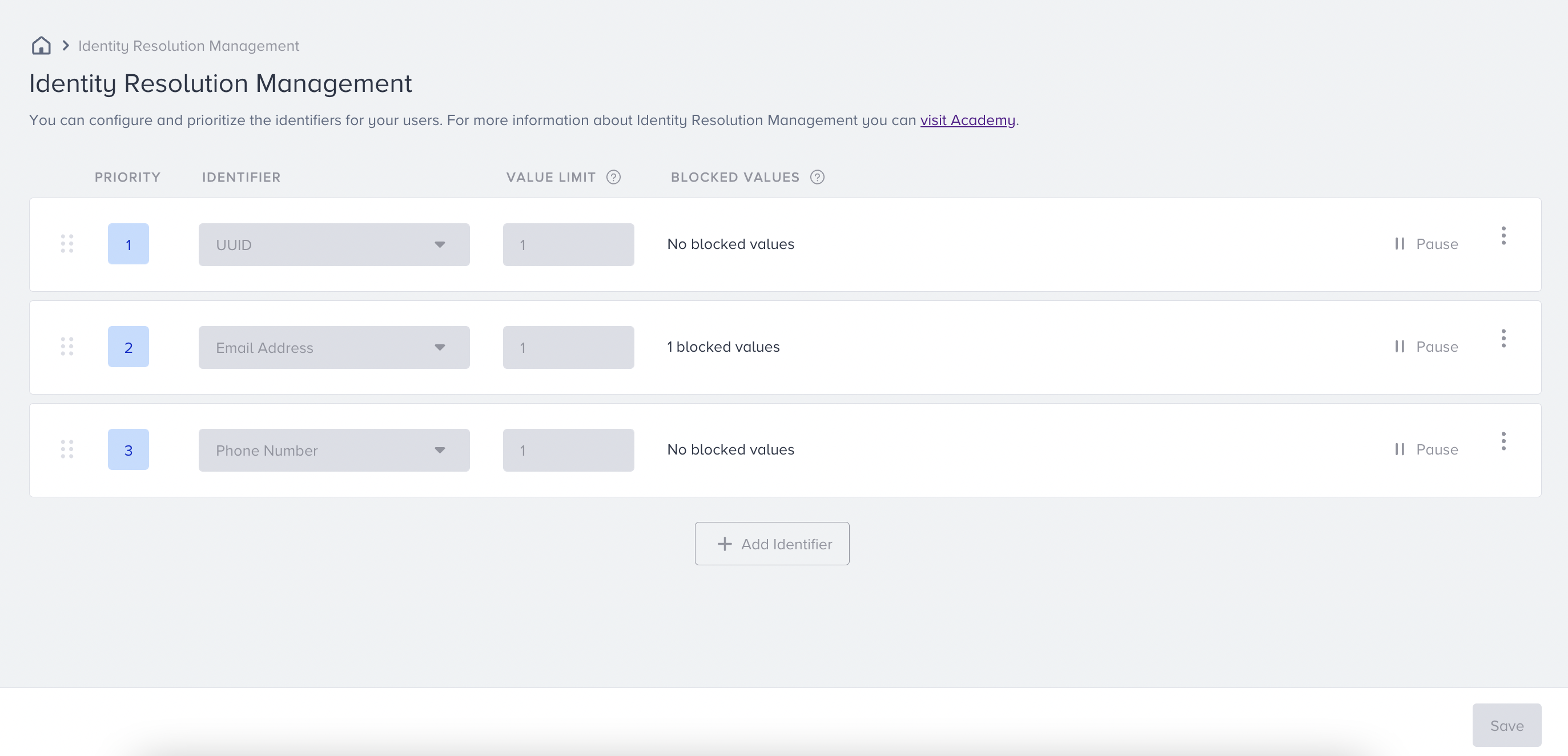
The Identity Resolution Management page displays the corresponding settings that shape your identification and unification flow, allowing you to configure and prioritize identifiers for your users.
To start with, navigate to Components > Identity Resolution.
Identifier
Under Identifiers, the identifiers to be used are selected. The identifiers added here are those that can be considered in identification requests. It will be ignored if an identifier is not added to this list but is used in requests. For example, you set UUID as the only identifier on the Identity Resolution page and upload email addresses. Then, UUID acts as an identifier, while the email address remains as an attribute.
The attributes selected on the Identity Resolution page are used as identifiers. Otherwise, they remain as attributes and do not act as identifiers.
When selecting an identifier for user profiles, it's crucial to avoid predictable patterns that could compromise data integrity or user privacy. For example, using sequential values such as 1, 2, 3, etc., as identifiers (even when applying formats like UUID) can make profiles more vulnerable to manipulation. Similarly, using client-side values such as email or phone number as external identifiers may expose the system to risk, as these values can be guessed or altered.
To reduce such risks, we recommend using a unique, non-guessable identifier as the external ID, ideally one generated by your own system, such as a person ID issued by your CRM or CDP, set as the top-priority identifier with a value limit of 1, and treating values like email and phone number as profile attributes instead. This ensures both reliable identity management and a safer user experience.
Best practices for consistent identifier formatting
Use the same identifier format across all data sources. Phone numbers should follow E.164 format, including the + sign and country code (for example, +905551234567).
Different formats of the same number, such as 505... and +905..., might be treated as different identifier values. If no other identifier connects the data, separate user profiles can be created.
Value Limit
Limit represents the number of values that can be stored per identifier type for a user profile. For example, you can set a limit of 2 for email identifiers but 1 for phone number identifiers, meaning a user can be associated with up to two email addresses and one phone number.
We recommend setting the limit to 1 in most cases. Before raising it, understand the behavioral distinction between active and non-active values:
A profile holds one active value per identifier type. This is always the most recently set value. Only the active value is indexed for segmentation and visible in the panel.
Any additional stored values are inactive. They are used exclusively during the identification phase: if an incoming request carries a non-active value, it still resolves to the correct profile. They are not available for segmentation or targeting.
In other words, a higher limit does not give you multiple usable identifier values for segmentation. It only broadens the range of historical values that can resolve to the same profile. If you need to update a user's identifier, use Insider One's Update User Identifiers API or Delete User Identifiers API instead.
The Value Limit controls how many values can belong to one profile; it does not standardize or match differently formatted values.
Priority
Thanks to priority, you can define which identifier is more critical. If the result of the incoming identification request violates the value limit rules, priority settings will be applied, and the request will be handled accordingly.
For example, the following limit and priority settings are configured;
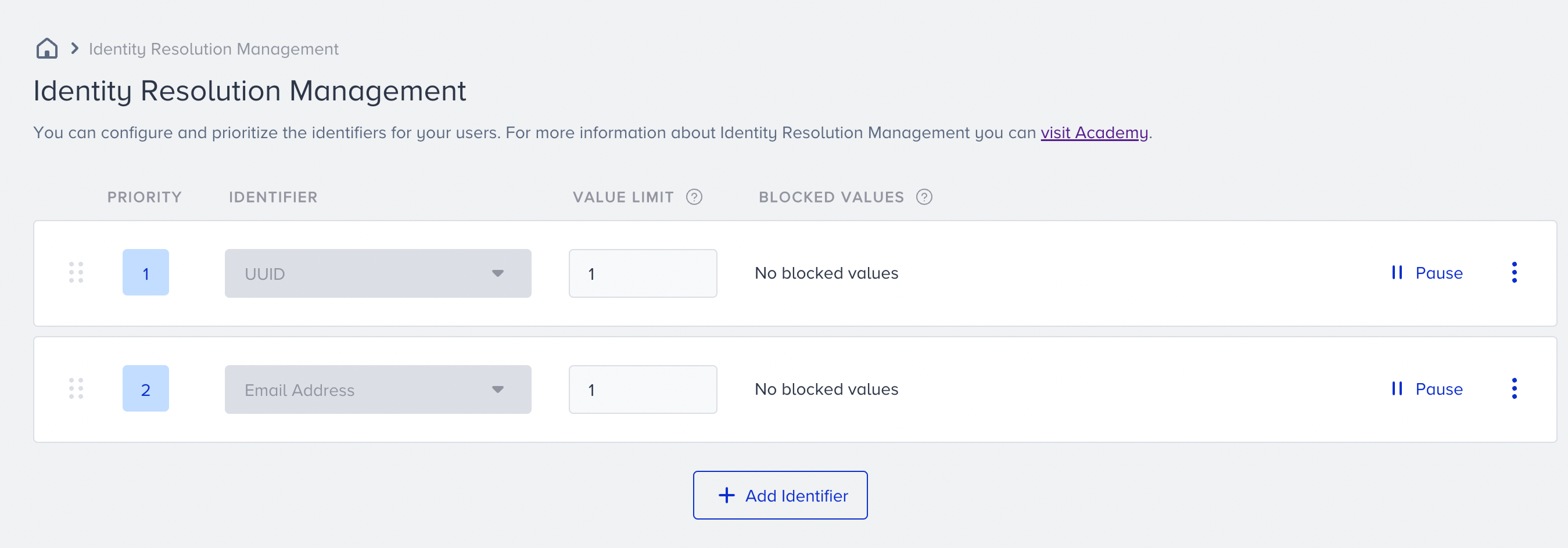
Assume that Insider One has the following profile in the database already:
Profile with Insider ID 1
Email: john.doe@mail.com
UUID: xyz123
Then, Insider One receives an identification request as follows;
Email: john.doe@mail.com
UUID: abc456
Because the same email address is used, if these incoming identifiers are attached to Profile ID 1, the profile will contain two uuid values and one email.
As seen in the image, since the limit set for UUID is 1, this overrides the configured limit rule. In this case, Insider One checks the priority of the incoming identifiers.
Since uuid has a higher priority than email, Insider One ignores email as an identifier on the identification request and searches for uuid in UCD. Since no existing profiles exist with this identifier, Insider One creates a new user with UUID: abc456.
Assume that the given limits are the same, but priorities are vice versa as follows;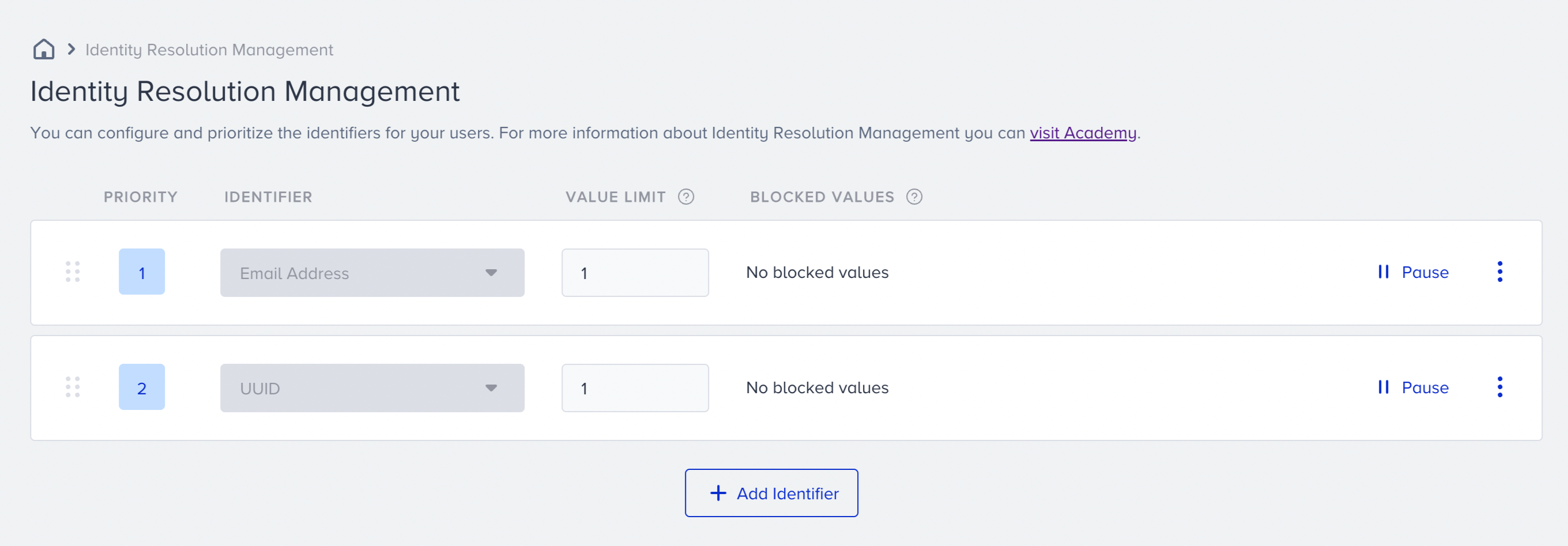
In this case, Insider One ignores the UUID in the incoming payload and only searches for existing users by email identifier.
As a result, the Insider One finds Profile ID 1 and recognizes the incoming request for the existing user.
You can also refer to the video below to better understand how priority and limit work:
Blocked Values
We highly recommend using blocked values to prevent unwanted merges caused by erroneous integrations, the use of default values, or faulty deployments.
Since identifier values are unique, using the same value for all users, such as anonymous@mywebsite.com, as an email address value will result in faulty merging, and all your users will be considered one. To avoid this, add blocked values so that requests containing these values will be rejected.
We highly recommend that you check the hard-coded values added by your technical team and add them to the blocked values accordingly to prevent any unwanted merge cases.
You can always add/remove blocked values at any time. Contact the Insider One team.
Pause
The pause function temporarily stops the use of an identifier, so Insider One ignores the paused identifier in identification requests. If you notice a malfunction in an identifier (such as sending the wrong data type) or no longer want to process it, pausing the identifier will prevent further unwanted occurrences. After fixing the issue, you might unpause the identifier for use in identification requests.
Limitations
You can add a maximum of 10 unique identifiers to the list.
The limit per identifier can be a maximum of 100.