Insider One uses identifiers and their values to identify and unify user data, which means merging duplicate customer profiles across devices (identity resolution). For example, if the email address is your business's identifier and a user visits your website and leaves their email address, Insider One creates a user profile with it. When you provide the relevant identifiers, such as email addresses, Insider One can use them to differentiate users from other profiles across platforms. As long as the user logs in to your website with the registered email address, Insider One counts them as the same user.
Users often browse anonymously and identify themselves later, for example by logging in at checkout. When they do, Insider One merges the anonymous browsing data into the known profile, preserving the earlier events and attributes in the unified record. If a single device is used by several people and identifiers are not properly limited and prioritized, distinct users can be merged into a single profile. The Priority, Value Limit, and Blocked Values settings exist to prevent this.
You can also refer to the video below to better understand identifiers and how they help:
User profiles are managed in three ways upon receiving an identification request:
Create a new user profile
If Insider One cannot find an existing user profile for the identifiers in the request, a new user profile will be created and a profile ID assigned to the user.
For example, the user visits your website on a desktop and registers with their email address for the first time. Then, Insider One will create a user profile ID for them, including the data stored when they were anonymous, and associate it with their email address, regardless of the platform.
Add to an existing user profile
If Insider One finds an existing user profile that matches the identifiers, the incoming request will attempt to be associated with it. If the final user profile overrides the identity management rules, the limit and priority configurations will be applied accordingly.
For example, the user registers on your website on a desktop and later visits it on a mobile. Since they already have a profile ID, the data will be inserted into the same profile ID.
Merge existing profiles
Insider One allows you to use multiple identifiers for a user. If Insider One finds multiple existing profiles associated with the incoming identification request, it will attempt to merge them based on the configured limits and priorities.
For example, you use an email address and a phone number as identifiers, and you might not receive both at the same time. You collect the user’s email address on your website and their phone number in your brick-and-mortar store and share this offline information with Insider One, too. Two user profiles are created for that user: one associated with the email address and the other with the phone number. Then, the user visits your website and leaves their phone number on their account. In this case, the identity request, including both the email address and phone number, is received. Even though there are two different profiles on Insider One that share the same identifiers, they are merged.
Set up your identifiers carefully before go-live, because identification and merges cannot be undone. Once an identifier is tied to a profile's insider_id, it stays tied, and once two profiles are merged, they become one profile and cannot be split back into separate users. The Priority, Value Limit, and Blocked Values settings are what prevent unintended merges, so they are worth getting right up front.
If you need to correct identifier values on a profile later, use the Update Identifiers and Delete Identifiers APIs. These edit the identifiers on a profile. They do not reverse a merge.
When two profiles are merged, the merged-away profile's events are carried onto the surviving profile with their original timestamps, so the unified profile keeps the full behavioral history.
Two limits apply:
Retention window. Only events within their event's retention period (90 days by default) are carried. Events that have already expired are not restored by a merge.
Event cap. Up to 10,000 events are carried per merge. If the profile holds more, these four are carried first: confirmation_page_view, item_added_to_cart, cart_page_view, and product_detail_page_view, and the remaining capacity is filled with the most recent events.
Merged events do not re-trigger campaigns: they do not fire webhooks or journey starters, and they are not counted again in your event totals.
Merging is near real-time but not instantaneous; the events appear on the surviving profile shortly after the profiles are unified.
How attribute values are combined in a merge
When profiles are merged, one profile survives and receives data from the merged-away profile. The resulting profile can contain attribute values from both profiles. For ordinary single-value attributes, Insider One compares each attribute’s update timestamp rather than choosing all values from one profile.
For String, Number, Boolean, Date, and URL attributes, the value with the more recent update timestamp is generally kept. If only one profile has a value, that value is generally retained. These rules have exceptions, including attributes configured as write-once and the Web Push fields described below.
For example, suppose the surviving profile holds the loyalty tier “Silver,” updated on 2 March, and the merged-away profile holds “Gold,” updated on 9 March. After the merge, the unified profile shows “Gold,” provided the attribute is not configured as write-once.
Web Push subscription fields have separate merge rules. When the merged-away profile is opted in to Web Push, its associated Web Push fields take precedence over those on the surviving profile. When both profiles have a valid subscription date, the earlier date is kept.
Different data types are combined as follows:
Identifiers: Whether profiles can merge depends on the configured identifier priorities and value limits.
String, Number, Boolean, Date, and URL attributes: The value with the more recent update timestamp is generally kept. The same timestamp comparison applies to ordinary default and custom attributes, subject to exceptions such as write-once attributes.
String Array and Number Array attributes: Values from both lists are combined, and duplicates are removed. Value order is not preserved. If an applicable combined-size restriction would be exceeded, the surviving profile keeps its existing list without the incoming addition.
Object Type attributes: The whole object with the more recent attribute update timestamp is kept. Keys from the two profiles’ objects are not combined during a profile merge.
Array of Objects attributes: Objects from both profiles are combined. If the result exceeds the attribute’s object limit, the most recently updated objects are retained up to that limit.
Events: Events are carried onto the surviving profile with their original timestamps, subject to their retention periods and a cap of 10,000 events per merge.
How merges start
Insider One handles profile merging automatically during identity resolution. When the identifiers in an incoming identification request match more than one existing profile, Insider One attempts to merge those profiles according to your configured identifier priorities and value limits. A match does not always result in a merge.
Identifiers can be supplied through identification requests from your website or app, or through the identifiers object in an Upsert User Data API request. Only send identifiers that belong to the same person.
How matching works
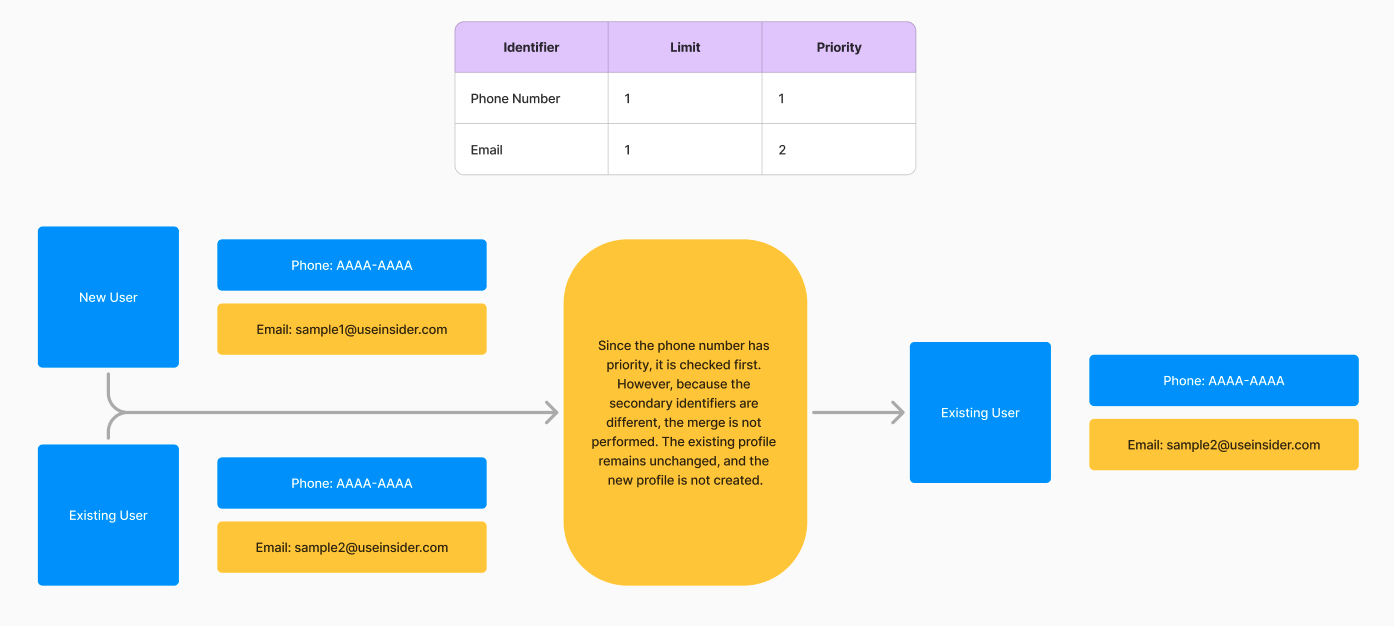
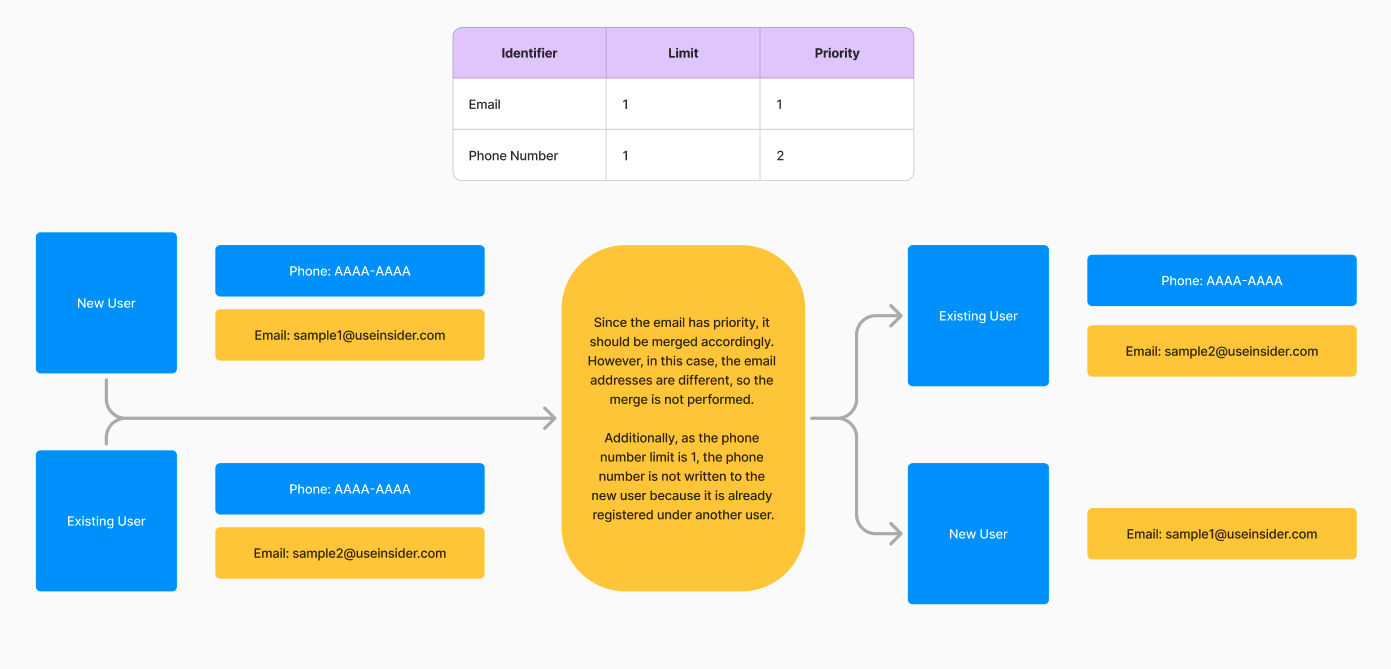
Insider One uses a deterministic matching engine that unifies users based on matching identifier values and your configured identifier priorities; no statistical or probabilistic matching is applied. It means two records are merged only when they share a value on an identifier you have configured. You control the behavior with two settings per identifier:
Priority: A strict hierarchy that decides which identifier is checked first (for example, UUID > email > phone number). Higher-priority identifiers govern the merge decision.
Value limit: How many values of that identifier type a single profile may hold (for example, up to 2 emails but only 1 phone number). For most businesses, a limit of 1 is recommended.
Example: if the phone number is priority 1 and a new sign-up arrives with a different phone number but the same email as an existing profile, the profiles are not merged because the top-priority identifier does not match. If the email limit is 1, that email is stored on the new profile as an attribute rather than a second identifier, so you may see the same email on two profiles without them being merged.
You can also refer to the video below to better understand how a profile is created, updated, and merged:
The video below further illustrates the user journey with practical, real-life examples: