The Event Collection API has established a set of common data types for event properties. This approach ensures consistency and clarity across various event payloads. These shared data types are standardized structures that can be reused in different contexts, promoting consistent data representation.
Attribution Window
The Attribution Window is the time frame during which a user's action can be traced back to the source that led them to take that action. For example, if a user searches for a product on Eureka, clicks on it, adds it to their cart, and then makes a purchase, the attribution window is the time frame during which the search engine can trace the user's actions back to the initial search query.
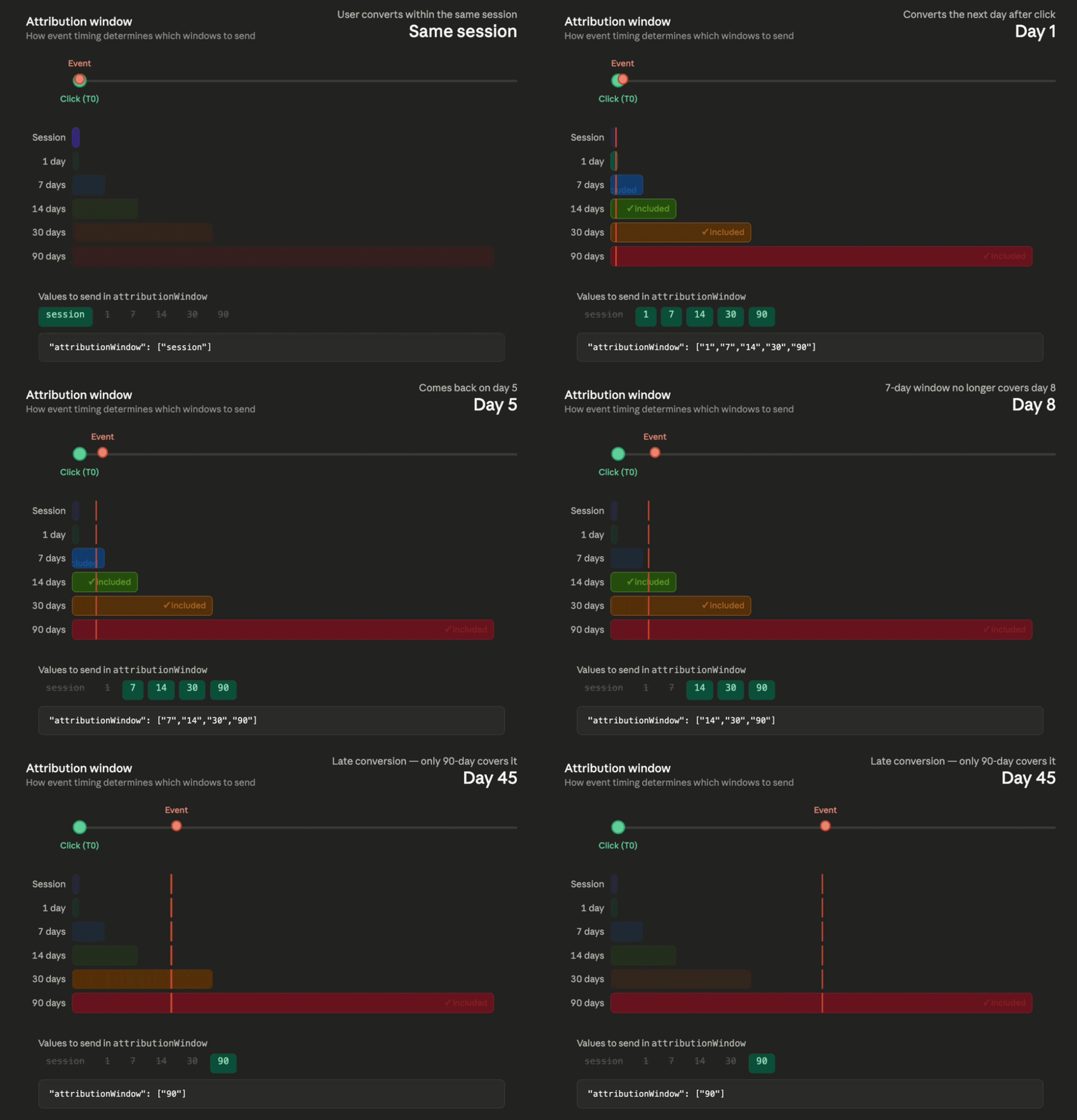
Predefined Values: ["session", "1", "7", "14", "30", "90"]
Each value must be either a numeric string (e.g. "1", "7", "14", "30", "90") or "session". The array must contain at least 1 value for add-to-cart and purchase events. Each value must not contain spaces.
When sending data for events like adding items to carts or purchases, consider the time window your event falls within. Only include values from the predefined windows that encompass the event timeframe. For instance, if an item was added to the cart on the eighth day, you would only send the values for "14", "30", and "90" because those windows include the eighth day.
If you want to incorporate session-based attribution into metric calculations, include "session" in the attribution window field.
Session definition: A session is a group of user interactions with your website that take place within a given time frame. A session ends after:
30 minutes of inactivity
Find Locale
The locale (e.g. tr_TR, en_US, en_GB) identifies the language and region for your integration. It is used as part of the X-PARTNER-CONFIG-KEY header: {PARTNER_ID}-{LOCALE}.
To retrieve the locale:
Open your website in a browser, then run the following in the browser console (F12 > Console):
Insider.systemRules.call('getLocale')
Output example: 'tr_TR' or 'en_US'
The Insider JavaScript object must be loaded on the page for this to work. If it is not available, check with your Insider One team for the correct locale value.
For you available locales you can also check Catalog Locales.
Event Payload Properties
userId
Every user must be assigned a unique identifier, tailored to your specific criteria and definitions. If you can obtain the value using the Insider JavaScript object, please provide that value. If it's not retrievable, send a userId using characters from the base64 scheme without any symbols.
It is available in local storage with the name spUID, or you can use Insider.getUserId() method on the console.
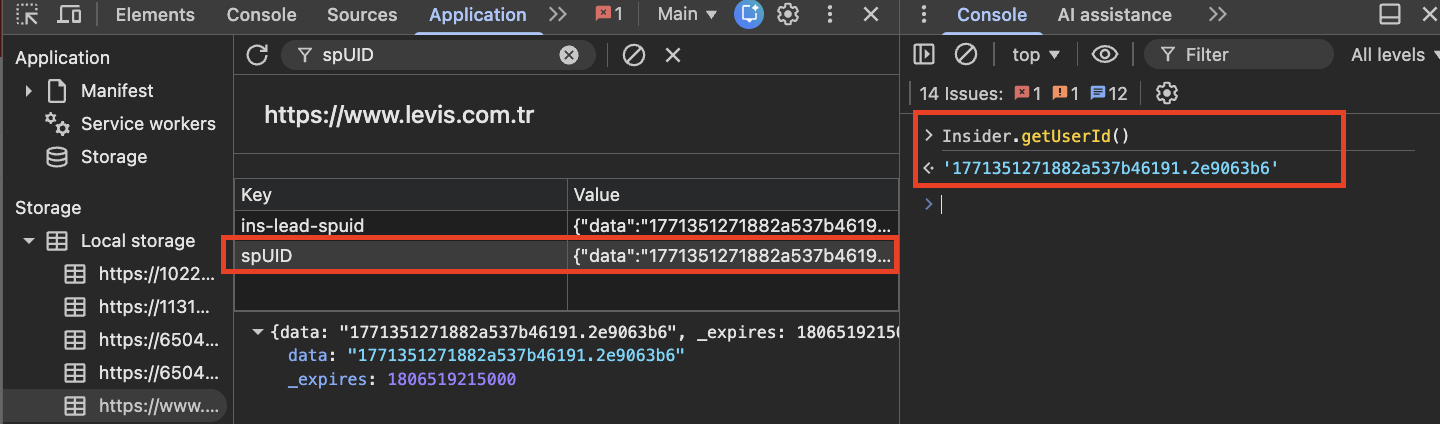
You can retrieve the Insider ID in mobile apps via the Insider SDK using the following methods:
JavaScript (Hybrid / WebView):
insider.getUserId();
// Returns short-formatted ID, e.g. 'df0307392228d7eb'
Android (Kotlin):
val insiderID = Insider.Instance.getInsiderID()iOS (Swift):
let insiderID = Insider.getInsiderID()Mobile IDs are short-formatted (e.g. df0307392228d7eb), which is different from the web's longer dot-separated format.
campId
The campId serves as a unique identifier.
By default, it is set to 999999. If you want to use a different value, contact the Insider One team.
variantId
The variationId represents the unique identifier for a specific campaign variation.
By default, it is set to 999999. If you want to use a different value, contact the Insider One team.
TraceId
TraceId definition changes by leveraging Search Analytics, Category Analytics, and Brand Analytics data.
Search Analytics TraceId
What traceId does:
The traceId is used to uniquely identify a single search or listing interaction in the Eureka Analytics dashboard. When events are written to the database, each product in the event becomes a separate row. All rows sharing the same traceId are grouped and counted as one interaction.
For example, if a search event contains 10 products, all 10 rows have the same traceId, and they count as 1 search in analytics. If the user changes sorting and 3 new products are sent (still with the same traceId), the total is now 13 rows but still 1 search in analytics.
This uniquification applies to search, product-list-view, and product-click events.
This does NOT apply to add-to-cart and purchase events, these are counted directly by quantity, not uniquified by traceId.
Rules:
A new traceId is generated only when the user performs a new search or navigates to a different listing page.
Sorting changes, filter changes, and pagination do not generate a new traceId.
Store the traceId with the products and reuse it for all events within the same search or listing session. For example, you can store it in your local storage for your web application.
It's important to distinguish between web sessions and traceId. Unlike a web session which encompasses your entire browsing activity, a traceId focuses on a single search or listing page view.
Recommended format: Base64-encoded form of {userid}+{~}+{search query}+{~}+{ISO 8601 Date and time in UTC}
For example:
Recommended value: YXBwbGV+MjAyMy0xMi0xNFQxMToyMDoyOFo= (base64 encoded form of query and time combination)
Not recommended value: pear~2023-12-14T11:20:28Z (not base64 encoded)
To retrieve the unique identifier associated with a particular user, use Insider.getUserId() method.
Even if query text and timestamp match, search sessions are generated uniquely per user, ensuring that analytics, personalization, or tracking don't mix results between different users.
Uniqueness Example:
Time | User ID | Event | Query | Raw traceId | traceId (base64) |
|---|---|---|---|---|---|
2025-08-20T11:30:00Z | userA | Search | "queryA" | userA+queryA+2025-08-20T11:30:00Z | dXNlckErcXVlcnlBKzIwMjUtMDgtMjBUMTE6MzA6MDBa |
2025-08-20T11:30:00Z | userB | Search | "queryA" | userB+queryA+2025-08-20T11:30:00Z | dXNlckIrcXVlcnlBKzIwMjUtMDgtMjBUMTE6MzA6MDBa |
Deduplication example:
Suppose userA searches for "queryA" (traceId: dXNlckErcXVlcnlBKzIwMjUtMDgtMjBUMTE6MzA6MDBa).
The search returns 10 products → 10 rows in the database, all with the same traceId → counted as 1 search in analytics.
userA changes sorting → 3 new products sent with the same traceId → now 13 rows total → still 1 search in analytics.
userA searches for "queryB" → a new traceId is generated → this becomes a separate search in analytics.
Category and Brand Analytics TraceId
A unique traceId must be generated for every new Category or Brand page visit. This traceId should remain the same across sorting changes, filter changes, pagination, and facet applications within the same page.
Deduplication example:
User visits "categoryA > categoryB" (traceId: trace-cat-456).
Page shows 24 products → 24 rows in the database, all with the same traceId → counted as 1 page view in analytics.
User changes sorting → 5 new products sent with the same traceId → now 29 rows → still 1 page view in analytics.
User navigates to a different category → a new traceId is generated → this becomes a separate page view in analytics.
The traceId for category/brand pages does not need to follow the base64 encoding convention used for search traceIds. It can be any unique string identifier.
Fallback Mechanism:
Scenario | Behavior |
|---|---|
traceId sent, searchSessionId not sent | searchSessionId automatically takes the traceId value |
searchSessionId sent, traceId not sent | traceId automatically takes the searchSessionId value |
Both sent | Both are used as provided |
Neither sent (click/add-to-cart/purchase) | Validation |
SessionId
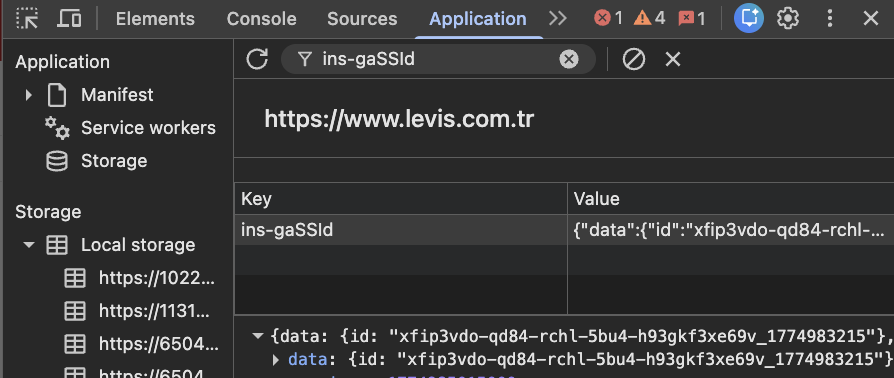
The gassid value is used as the web session identifier. It tracks user sessions at 30-minute intervals and renews them based on continued user activity. The gassid remains consistent across all requests within the same session and is primarily used for session-based campaign tracking on the Insider One’s InOne platform. If the gassid is not present, it must generate and provide a new one.
SessionId for Mobile Apps
A publicly accessible, pre-built session ID is not available from the Insider SDK for Mobile Apps. For Mobile integrations, you need to generate and manage the session ID on your client side.
The sessionId is used to analyze consecutive user sessions and understand user behavior across search and category result pages. Define a session concept in your app, for example, based on a 30-minute inactivity timeout (similar to the web gassid behavior), and generate a unique sessionId accordingly.
Guidelines:
Generate a new sessionId when a new session starts (e.g., app launch, or after 30 minutes of inactivity).
Reuse the same sessionId for all events within the same session.
The format is a free-form string without spaces.
StrategyId
strategyId is an optional field used to track which merchandising strategy was shown to the user.
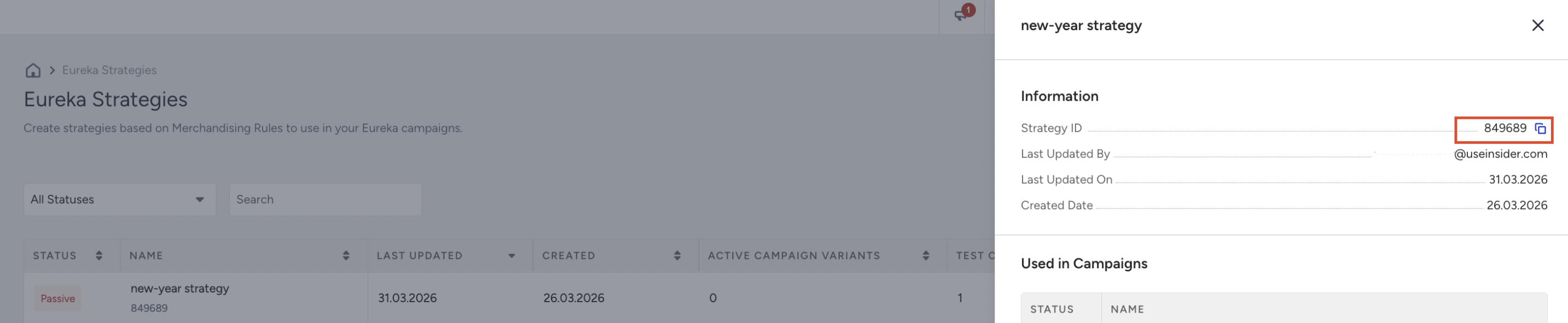
When to use strategyId:
Scenario | Description |
|---|---|
Eureka SDK Campaign A/B Testing | When different variations are created through SDK campaigns, strategyId is used to measure each variation's performance separately. |
Different Search/Sorting Strategies | If you are testing different search algorithms or sorting strategies, you can tag each strategy with a unique strategyId to compare performance. |
Category Merchandising Variations | When applying different product ordering or merchandising rules through the Category Merchandising API, you can distinguish these strategies with strategyId. |
strategyId Format:
Free-form string without spaces. Examples: "strategy-relevance-v2", "ab-test-price-sort".
Where to send strategyId:
Event Type | Where to include strategyId |
|---|---|
search | Top-level field |
product-list-view | Top-level field |
product-click | Inside product object |
add-to-cart | Inside product object |
purchase | Inside each products[] object |
If strategyId is not sent, the event is recorded without strategy association. Sending it enables strategy-based analysis in the Analytics dashboard.
Integration Type
Every event request requires the integrationType field. This field indicates through which integration method the event is being sent.
Value | Description | When to use |
|---|---|---|
api | Events are sent directly through the Event Collection API | Use this if you have your own search interface and send events from your backend or frontend directly to the API. Use this value for API integrations. |
web | Events are sent by the Eureka Web (Pop-up) widget | For events automatically sent by the Eureka Search Pop-up widget when active. |
sdk | Events are sent through the Eureka SDK | When events are sent using the Eureka SDK (JavaScript). Automatically set in SDK integrations. |
app | Events are sent from a mobile application | Used for mobile app (iOS/Android) integrations. |
If you are performing an API integration, you should send "api" as the integrationType value. This ensures events are correctly categorized in the Analytics dashboard.
Platform
This field specifies the platform on which the application is running.
Value | Description |
|---|---|
desktop-web | Desktop browser |
mobile-web | Mobile browser |
tablet-web | Tablet browser |
ios | iOS native app |
android | Android native app |
other | Other platforms |
If your use case does not fit into these predefined values, you may provide a custom standardized value. Use as few distinct values as possible. Consistency is essential; arbitrary or inconsistent custom values can fragment analytics and inflate reporting dimensions.
Source Field
Indicates the component in which the search engine is used. This field helps identify the context of the search interaction.
Value | Description | Applicable Event Types |
|---|---|---|
search-popup | Instant search overlay widget | |
search-listing | Full search results page | |
category-listing | Category listing page | |
brand-listing | Brand listing page |
Source-dependent required fields (for click, add-to-cart, purchase):
Source | Required Fields | Description |
|---|---|---|
search-popup, search-listing | query | The user's search query |
category-listing, brand-listing | listValue | Category/brand hierarchy (tilde ~ separated) |
Legacy source mapping:
Deprecated Value | Converted to |
|---|---|
collection-listing | category-listing |
other | search-listing |
product-detail | search-listing |
Source-Dependent Product Field Validation:
The API enforces strict rules on which product fields are allowed based on the source value:
When the source is search-popup or search-listing: query is expected in the product, listValue should not be provided.
When the source is category-listing or brand-listing: listValue is expected in the product; the query should not be provided.
Sending the wrong combination will result in a validation error.
Created At
Timestamp indicating when the event was created.
Must follow RFC 3339 date-time format.
Includes date, time, and time zone offset (Z) for UTC.
Sample Value: 2025-08-20T14:30:00+03:00 or 2025-08-20T11:30:00Z
Both values represent the same moment. Z is always UTC+0, while +03:00 explicitly indicates the offset.
Event Type
This field specifies the type of event that is being tracked. The possible values are:
Value | Description |
|---|---|
search | Search results page view |
product-list-view | Category/brand listing page view |
product-click | Product click from search or listing |
add-to-cart | Product added to cart from search or listing |
purchase | Purchase of products from search or listing |
Pagination & Result Fields
The following fields describe the search or listing result set and pagination state. They are sent at the event level (not inside the product object).
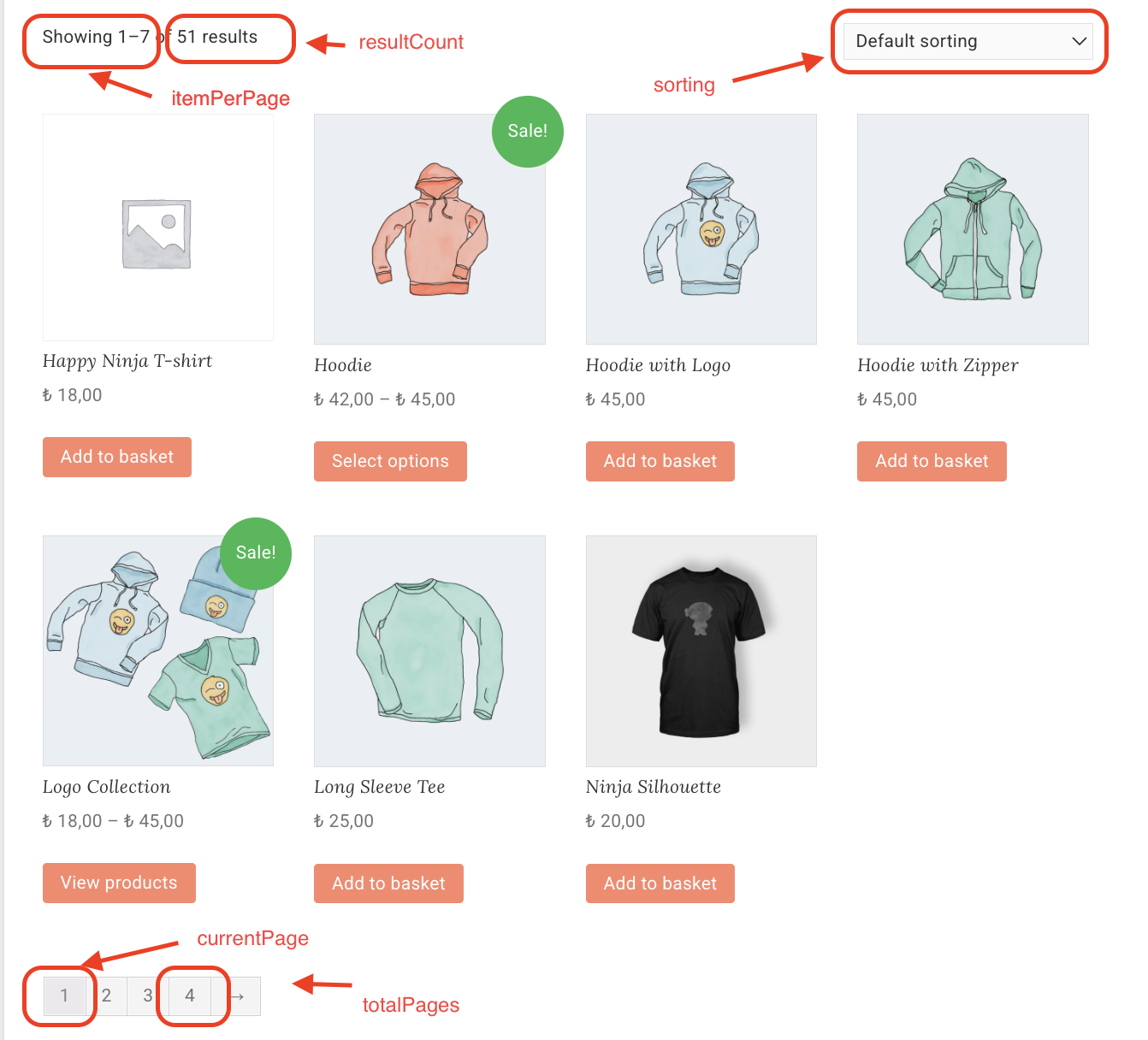
Field | Type | Description | Used in |
|---|---|---|---|
resultCount | Integer | Total number of results returned by the search or listing query. Set to 0 if no results. For search events, must be >= 1 if products are included. | search, product-list-view |
itemsPerPage | Integer | Number of products displayed per page. Reflects your pagination configuration (e.g., 24, 48). | search, product-list-view |
totalPages | Integer | Total number of pages available for the current result set. Calculated as ceil(resultCount / itemsPerPage). | search, product-list-view |
currentPage | Integer | The page number currently being viewed (1-indexed). Starts at 1 for the first page. | search, product-list-view |
sorting | String | The sorting method applied to the results. Case-sensitive. Default: "Relevancy". | search, product-list-view, product-click, add-to-cart, purchase |
referrer | String | The source URL of the referring page. Must be a valid URL. | all events |
For product-click, add-to-cart, and purchase events, resultCount, itemsPerPage, totalPages, and currentPage are sent inside the product object rather than at the event level.
Product Properties
Display Position
Specifies the product's position on the current page when it is first displayed.
Do not update the position after facets or filters are applied. Always send the product’s position from when it was first displayed within the same traceId. This ensures consistent and accurate tracking across the session.
Click Position
Specifies the position of the product on the current page when it is clicked.
List Value
The listValue field uses a tilde (~) as a separator to indicate hierarchical categories. Flat categories and brand values can be sent as plain text, without separators.
Examples:
listValue | Description |
|---|---|
"categoryA~categoryB~categoryC" | Hierarchical: categoryA > categoryB > categoryC |
"flat category example" | Flat category |
The API internally splits this into an array for analytics processing:
Input: "categoryA~categoryB~categoryC"
Output: ["categoryA", "categoryB", "categoryC"]
An empty listValue results in the field being omitted from internal analytics output.
The listValue must be consistent across all events in the same flow. The value used in the product-list-view event should match the value sent in subsequent product-click and add-to-cart events.
Preferred Currency
The main currency of your website/app. This is the base (reference) currency used for analytics and reporting. Although product prices may exist in multiple currencies, the preferredCurrency ensures consistency by defining the single currency in which all analytics are presented.
You can find the default currency on the Account Settings page. In addition, you can also find it with this method on console:

Converted Price
Represents the product price converted from its original source currency into the preferredCurrency. This provides a single unified value, regardless of the original currency.

Sorting
The sorting parameter can only be one of the predefined sorting types. It needs to be added to the event payload based on the current search result selection.
Value | Description |
|---|---|
Relevancy | Default. AI-powered relevance algorithm. Merchandising rules are only active with this sorting type. |
PriceAsc | Sort by price ascending |
PriceDesc | Sort by price descending |
MostPopularFirst | Sort by most popular |
BestRatedFirst | Sort by best rated |
MostRatedFirst | Sort by most rated |
NewestFirst | Sort by newest |
MostFavoriteFirst | Sort by most favorited |
MostDiscountedFirst | Sort by highest discount |
Sorting values are case-sensitive and must not contain spaces. If the user changes the sorting type to a value other than "Relevancy", merchandising rules are disabled.
Empty string is also accepted and defaults to Relevancy. Any value not in this list will result in a validation error.
Facet
The facet field has the following properties:
Parameter | Data Type | Validation | Description | Sample Value |
|---|---|---|---|---|
field | String | Required | Name of the facet field as stated in the product catalog | price, category |
label | String | Required | Displayed name of the facet field in the user interface | Price, Category |
values | List of String | Required | Filtered values of the facet | ["valueA", "valueB"] |
"facets": [
  { "label": "Color", "field": "color_en", "values": ["Red", "Blue"] },
  { "label": "Size", "field": "size_en", "values": ["M", "L"] },
  { "label": "Price", "field": "price_en", "values": ["100", "500"] }
]
If the price is filtered, please send a list with a maximum of two values (min and max).
Default Values
The API applies the following defaults when fields are missing or empty:
Field | Default Value | Condition |
|---|---|---|
campId | 999999 | If 0 or not provided |
variationId | 999999 | If 0 or not provided |
userId | default | If empty |
sorting | "Relevancy" | If empty (for click, add-to-cart, purchase product-level) |
quantity | 1 | If 0 or negative (for click, add-to-cart, purchase) |
createdAt | Current UTC time (RFC 3339) | If empty or invalid format |
convertedPrice | Same as price | If 0 or not provided |
preferredCurrency | Same as currency | If empty |
The integrationType value "app" is automatically normalized to "api" by the server.
Field Fallback Behavior
TraceId and SearchSessionId (Bidirectional Fallback):
For all event types, the API applies a bidirectional fallback between traceId and searchSessionId:
If traceId is provided but searchSessionId is empty → searchSessionId is set to traceId.
If searchSessionId is provided but traceId is empty → traceId is set to searchSessionId.
For click, add-to-cart, and purchase events, this fallback works in three layers:
Product-level traceId → Product-level searchSessionId
Product-level searchSessionId → Product-level traceId
Event-level searchSessionId → Product-level traceId and searchSessionId
Position Fallback Chain:
searchPosition: If 0 → falls back to displayPosition → falls back to position
displayPosition: If 0 → falls back to searchPosition chain
clickPosition: If 0 → falls back to searchPosition → falls back to position
Product Object
The full product object with all possible fields across event types:
Parameter | Data Type | Validation | Default | Description |
|---|---|---|---|---|
source | String | oneof: search-popup, search-listing, category-listing, brand-listing, product-detail, other | search-listing | Component where the search engine is used |
traceId | String | Required | - | Unique session id created with search event |
sessionId | String | - | - | Browser/app session identifier |
strategyId | String | - | - | Optional strategy identifier |
id | String | Required | - | Unique ID of the product |
groupCode | String | - | - | Unique group code. Without it, group analytics cannot be calculated. |
query | String | Required if source is search-popup, search-listing, product-detail, other | default | Query the user searched with |
listValue | String | Required if source is category-listing, brand-listing | - | Category/brand path (e.g., "categoryA~categoryB") |
sorting | String | Required | Relavancy | Sorting method |
facets | List of facets | - | - | Applied filters |
quantity | Integer | Required | - | Quantity |
price | Double | Required | - | Price of the product |
convertedPrice | Double | - | Price used if not provided | Converted price in preferred currency |
currency | String | Required | - | Currency of the price |
preferredCurrency | String | - | Currency used if not specified | Preferred currency for analytics |
displayPosition | Integer | Required, min=1 | - | Position when first displayed |
clickPosition | Integer | Required unless no result, min=1 | - | Position when clicked |
resultCount | Integer | Required unless no result, min=1 | - | Number of search results returned |
itemsPerPage | Integer | Required unless no result, min=1 | - | Number of items per page |
totalPages | Integer | Required unless no result, min=1 | - | Total number of pages |
currentPage | Integer | Required unless no result, min=1 | - | Current page number |
attributionWindow | List of string | Required | - | Attribution time intervals |
If catalog supports a groupCode, you must provide it. Without groupCode, group-level analytics will not be available in your analytics page.
Event Support Matrix
This table provides a structured reference for all product parameters across different event types. Check marks indicate whether a parameter is included in a given event type.
Parameter | Product List View Event | Search Event | Product Click Event | Add to Cart Event | Purchase Event |
|---|---|---|---|---|---|
id | ✓ | ✓ | ✓ | ✓ | ✓ |
groupCode | ✓ | ✓ | ✓ | ✓ | ✓ |
price | ✓ | ✓ | ✓ | ✓ | ✓ |
convertedPrice | ✓ | ✓ | ✓ | ✓ | ✓ |
currency | ✓ | ✓ | ✓ | ✓ | ✓ |
preferredCurrency | ✓ | ✓ | ✓ | ✓ | ✓ |
displayPosition | ✓ | ✓ | ✓ | ✓ | ✓ |
clickPosition | ✓ | ✓ | ✓ | ||
traceId | ✓ | ✓ | ✓ | ||
sessionId | ✓ | ✓ | ✓ | ||
strategyId | ✓ | ✓ | ✓ | ||
query | ✓ | ✓ | ✓ | ||
listValue | ✓ | ✓ | ✓ | ||
facets | ✓ | ✓ | ✓ | ||
sorting | ✓ | ✓ | ✓ | ||
resultCount | ✓ | ✓ | ✓ | ||
itemsPerPage | ✓ | ✓ | ✓ | ||
totalPages | ✓ | ✓ | ✓ | ||
currentPage | ✓ | ✓ | ✓ | ||
quantity | ✓ | ✓ | |||
attributionWindow | ✓ | ✓ | |||
source | ✓ |
Advanced Analytics – Updates Introduced in the September 01, 2025, Release
The updates listed below are now available. Review and adopt these changes to improve the completeness and accuracy of analytics. Event-level values remain supported for backward compatibility.
Field | Changes |
|---|---|
groupCode | Newly created field introduced in this release. It must be sent under the product object. If the catalog supports a groupCode, you must provide it. Without groupCode, group-level analytics will not be available in your analytics page. |
position | The position value is split into two separate fields: displayPosition (position when first displayed) and clickPosition (position when clicked) |
currentPage | The field has been relocated to the products object, and is now available for product click, add-to-cart, and purchase event types |
preferredCurrency | Newly created field introduced in this release |
convertedPrice | Newly created field introduced in this release |
New product fields by event type:
Event Type | New Fields |
|---|---|
groupCode, convertedPrice, preferredCurrency, displayPosition | |
groupCode, convertedPrice, preferredCurrency, displayPosition, clickPosition, query, facets, sorting, resultCount, itemsPerPage, totalPages, currentPage | |
groupCode, convertedPrice, preferredCurrency, displayPosition, clickPosition, query, facets, sorting, resultCount, itemsPerPage, totalPages, currentPage, attributionWindow | |
groupCode, convertedPrice, preferredCurrency, displayPosition, clickPosition, query, facets, sorting, resultCount, itemsPerPage, totalPages, currentPage, attributionWindow, source |