The WhatsApp Transactional Analytics page offers detailed insights into your campaign performance. It displays key metrics and highlights reasons for unsuccessful messages. These analytics help optimize WhatsApp campaigns for improved engagement and delivery.
In this guide, you will learn about:
Navigate to the WhatsApp Transactional Analytics
To reach the WhatsApp Transactional and OTP Analytics, navigate to Reports > WhatsApp Analytics > WhatsApp Transactional and OTP Analytics.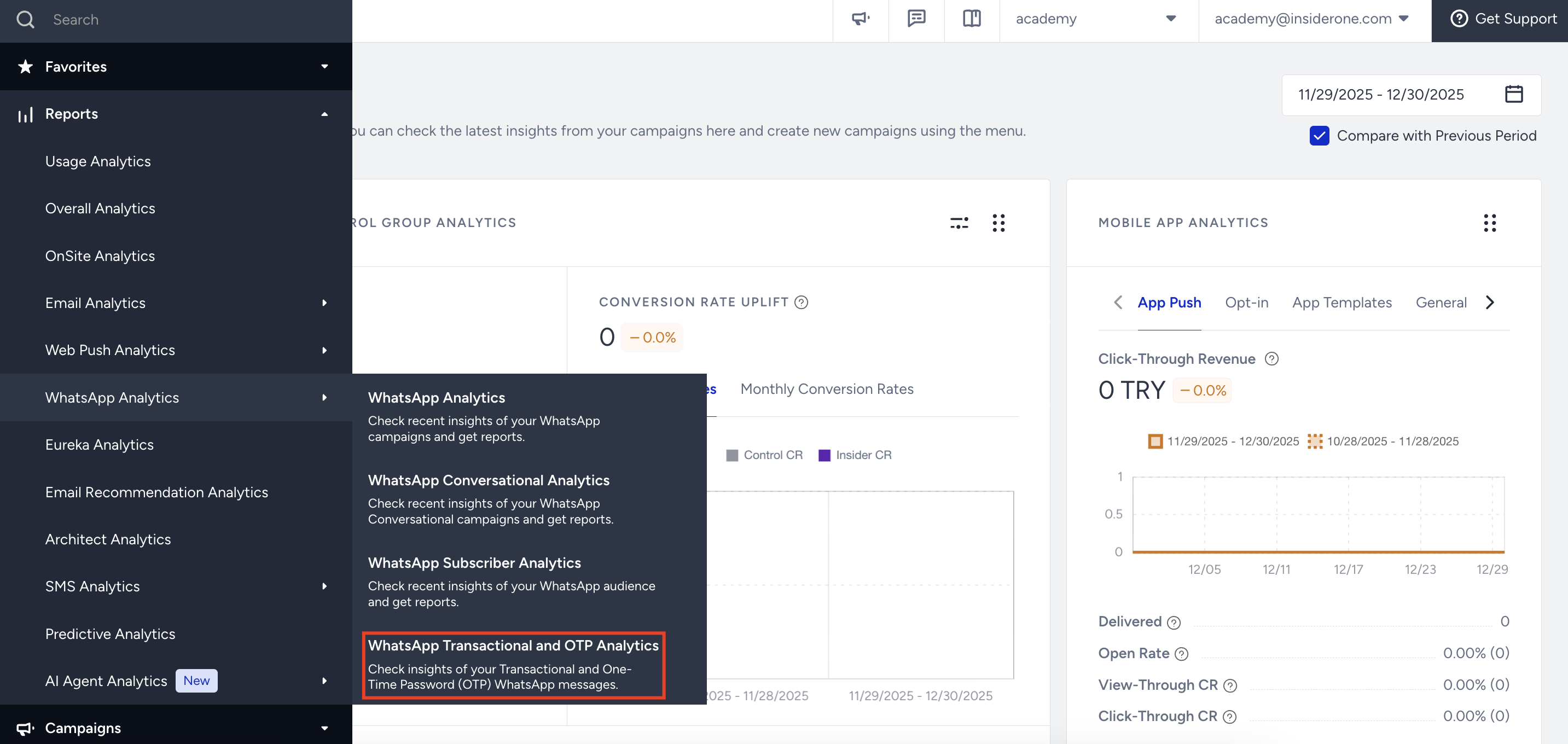
You can use the date picker in the top right corner of the page to filter the performance metrics. 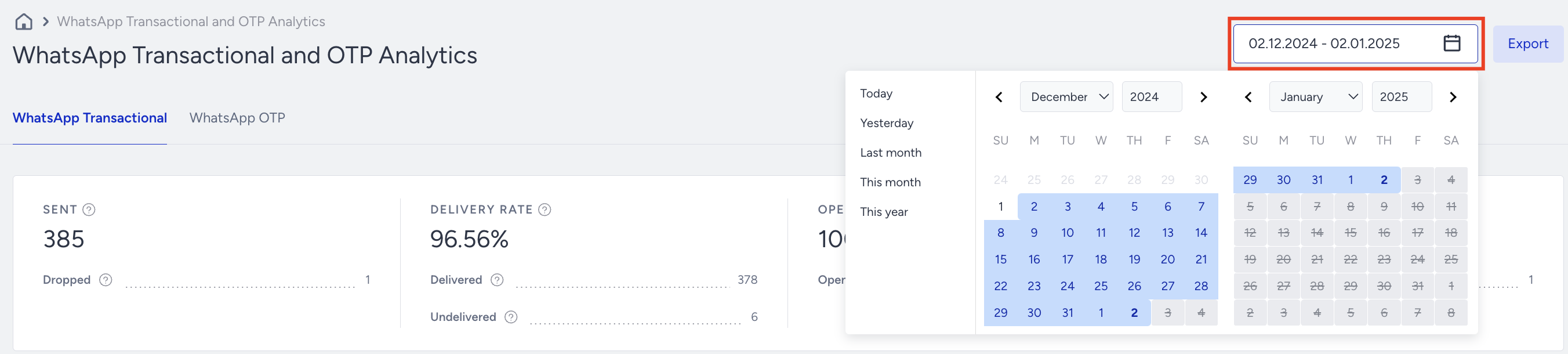
Introduction and Metrics
On the WhatsApp Transactional Analytics page, you will find the metrics below:
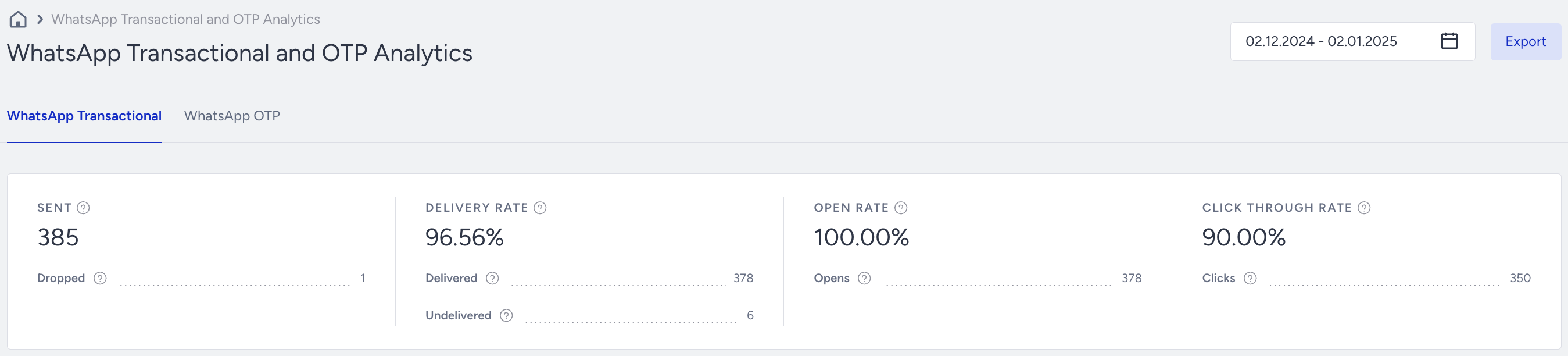
Sent: The number of WhatsApp messages successfully transferred to the service provider to be addressed to the recipients.
Dropped: The number of messages that weren’t transferred to the service provider to be addressed to the recipients.
Delivery Rate: The percentage of the Delivered to the Sent messages.
Delivered: The number of messages successfully transferred to the recipients.
Undelivered: The number of messages that weren’t addressed to the recipients by the service provider.
Open Rate: The percentage of the Opens to the Delivered messages.
Opens: The number of Delivered messages opened by recipients with the Read Receipts enabled.
Click-Through Rate: The percentage of the total Clicks to the Delivered WhatsApp messages.
Clicks: The number of unique clicks on links in your WhatsApp messages. Each recipient is counted once per link, per campaign variation, regardless of how many times they click within 24 hours; clicks after 24 hours are counted as new.
The 24-hour window resets per link visit. If a recipient clicks the same link again after 24 hours, that click is counted as a new unique interaction.
Unsuccessful Messages
Many different reasons might lead to unsuccessful messages. Under Unsuccessful Messages, you can visualize and analyze the main reasons for the Dropped and the Undelivered messages.
Dropped Messages
Dropped messages are the total number of WhatsApp messages that weren’t transferred to the service provider to be addressed to the recipients.
.jpg)
Dropped Message Reasons | Description | Possible Solutions |
|---|---|---|
Account Registration Errors | The percentage (and number) of dropped messages due to your phone number registration issues at Meta. | You can: |
Country Code Drops | The percentage (and number) of dropped messages due to phone numbers with country codes other than those specified in your contract. | If you want to send messages to non-contracted countries, contact the Insider One team. |
Coupon List Drops | The percentage (and the number) of the dropped messages due to the use-up or expiration of coupon lists. | -Review the current coupon list for validity and remaining coupons. -Create a new coupon list if the existing one has expired or is fully used. |
Duplicates | The percentage (and the number) of the dropped messages due to duplicate recipients in the audience. | |
Frequency Capped | The percentage (and the number) of the dropped messages due to the Channel Frequency Capping settings. | You can: |
Internal Errors | The percentage (and the number) of dropped messages due to various internal system issues (bugs, server problems, technical malfunctions). | |
Invalid Phone Numbers | The percentage (and the number) of dropped messages due to the phone numbers not being in a standard format (E.164). | You can: |
Meta Temporary Errors | The percentage (and number) of dropped messages due to temporary issues at Meta. | |
Paused Templates | The percentage (and number) of messages that couldn’t be sent since Meta had paused their message templates due to receiving too many low-quality ratings from the recipients. | You can duplicate or create a new template and send it to engaged users to avoid getting this error and segment these users while sending new messages. |
Policy Failures | The percentage (and number) of dropped messages due to violating Meta policies. | |
Rate Limits | The percentage and number of dropped messages due to your account exceeding various Meta limits. | |
Recipient-Related Errors | The percentage (and number) of dropped messages due to various issues with the recipient's WhatsApp account. | You can try these actions: If you need any assistance, contact the Insider One team. |
Template Failures | The percentage (and the number) of messages dropped due to issues with message templates, including errors, policy violations, and approval delays. | You can check the WhatsApp Manager to verify that your template has been translated. See Quality Rating and Template Status. |
Tier Limitation | The percentage (and the number) of dropped messages due to the daily messaging limit per unique recipient via WhatsApp. | You can segment these users and send the message for the next day. |
 - If an end user wants to contact the business independently, they cannot send a message without first accepting the
 Undelivered Messages
Undelivered Messages are the total number of WhatsApp messages that the service provider did not deliver to the recipients.
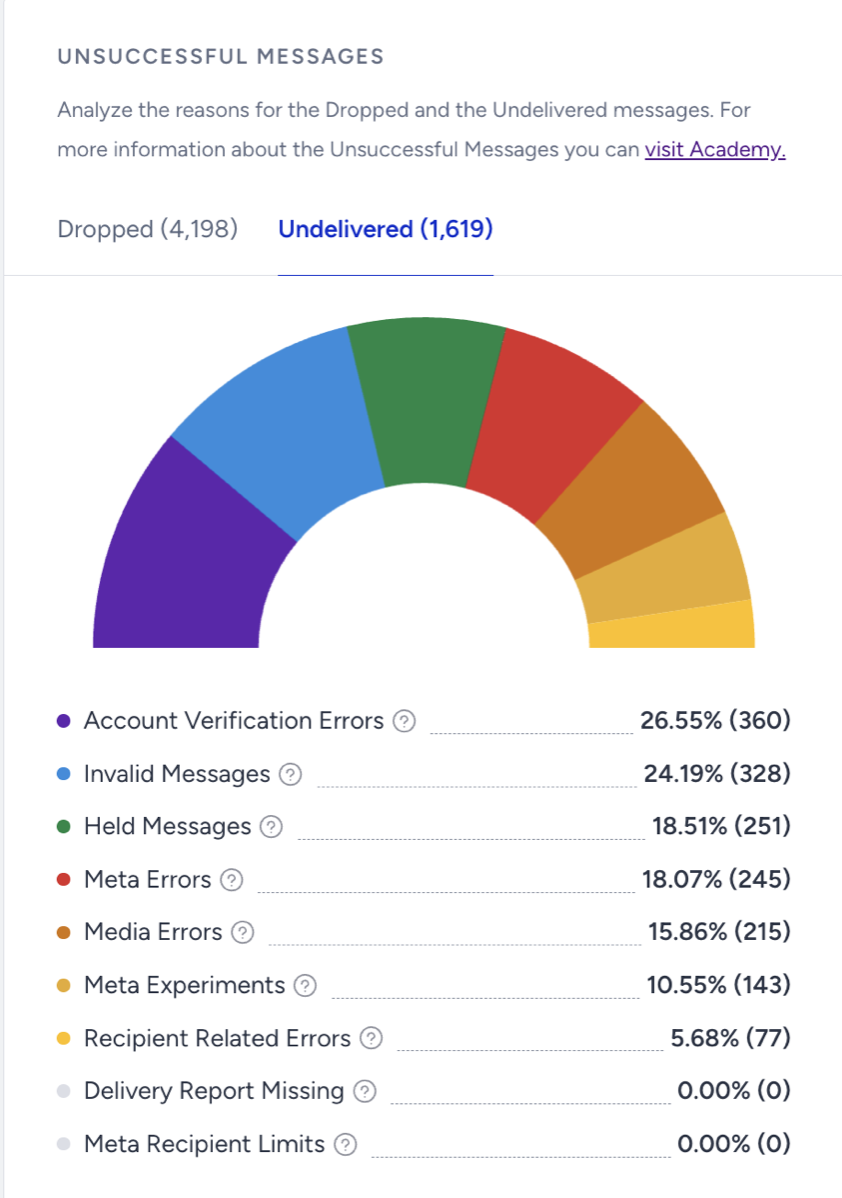
Undelivered Message Reasons | Description | Possible Solutions |
|---|---|---|
Account Verification Errors | The percentage (and the number) of undelivered messages due to verification issues with your phone number at Meta. This error is related to the must-do steps for account verification. Check the reasons in detail and take the necessary actions. | If you need assistance, reach out to the Insider One team. |
Delivery Report Missing | The percentage (and the number) of undelivered messages is due to the fact that no delivery reports were received from Meta. Meta allows a 30-day window for messages without status updates. If no status is received within this window, the messages are marked as Failed. Messages still under “Delivery Pending” status after 30 days are automatically marked as Undelivered and classified as “Delivery Report Missing.” | Use an alternative communication method, such as SMS or Email, to request the WhatsApp user to confirm that they can send a message to your WhatsApp Business phone number and ensure that your number is not included in their blocked contacts list (Settings > Privacy > Blocked or Blocked Contacts). |
Held Messages | The percentage (and number) of messages waiting to be delivered or not, according to the quality ratings the recipients give to the message template. | You can duplicate or create a new template and send it to engaged users to avoid getting this error. You can segment these users while sending new messages. |
Invalid Messages | The percentage (and the number) of undelivered messages due to uncertain issues with your message content or unsupported message type. | |
Media Errors | The percentage (and the number) of undelivered messages due to issues with the media elements of your message templates. | You can check your dynamic attributes/variables' media types supported by Meta, export the users who faced this issue, and re-segment them. |
Meta Errors | The percentage (and the number) of undelivered messages due to unexpected rejections by Meta. | You can segment these users who faced this error and try again to send a campaign to them. |
Meta Experiments | The percentage (and the number) of undelivered messages due to experimental features tested by Meta on specific WhatsApp users. | You can try sending a message to the end-user at a later time. |
Meta Recipient Limit | It operates like frequency capping by restricting the number of marketing messages users can receive, depending on their engagement level. The limit applies only to marketing template messages that typically initiate a new marketing conversation. | If you want to avoid this issue, you should follow Meta’s rules on the Meta Recipient Limits below: |
Recipient-Related Errors | The percentage (and the number) of undelivered messages due to various issues with the recipient's WhatsApp account. | You can try these actions: If you need any assistance, contact the Insider One team. |
Performance by Metrics
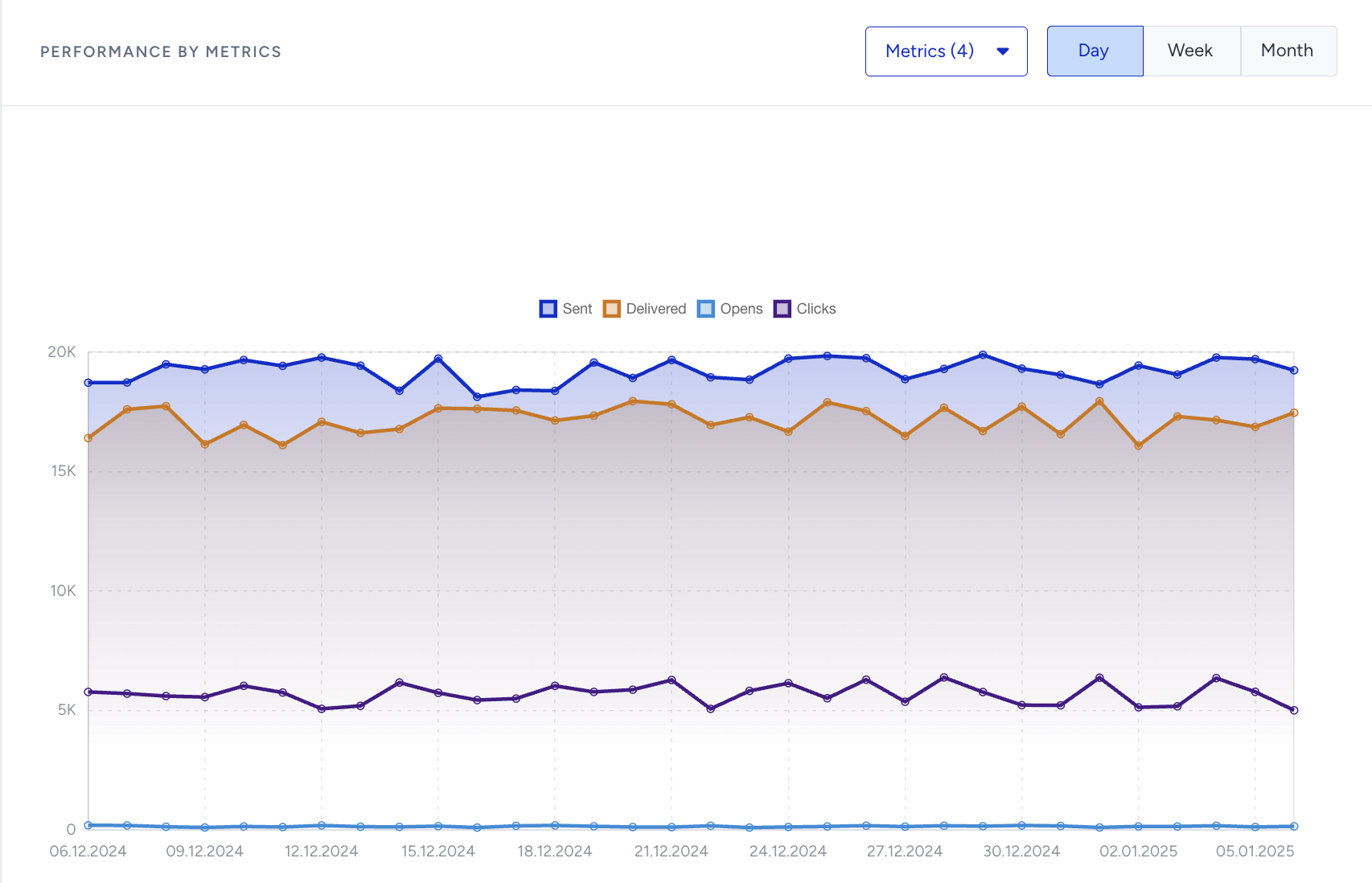
You can evaluate the performance of your Transactional WhatsApp campaigns on a Daily, Weekly, or Monthly basis with your selected metrics.