Sending Web Push notifications with personalized product recommendations helps drive conversions by delivering relevant content to users based’ browsing behavior. This approach not only improves conversion rates but also boosts key engagement metrics such as:
Click-through rate (CTR)
Time spent on site
Return visits
(3).png)
Smart Recommender for Web Push is only available for Single Web Push.
To enable Smart Recommender for Web Push, contact the Insider One team.
How Smart Recommender for Web Push works
When enabled, Smart Recommender for Web Push utilizes Insider’s User-based algorithm to display personalized product recommendations within the notification content.
If user-specific data is available, recommendations are generated based on the user’s browsing history.
If no personalized data is available, fallback recommendations are pulled using the Most Popular Items algorithm.
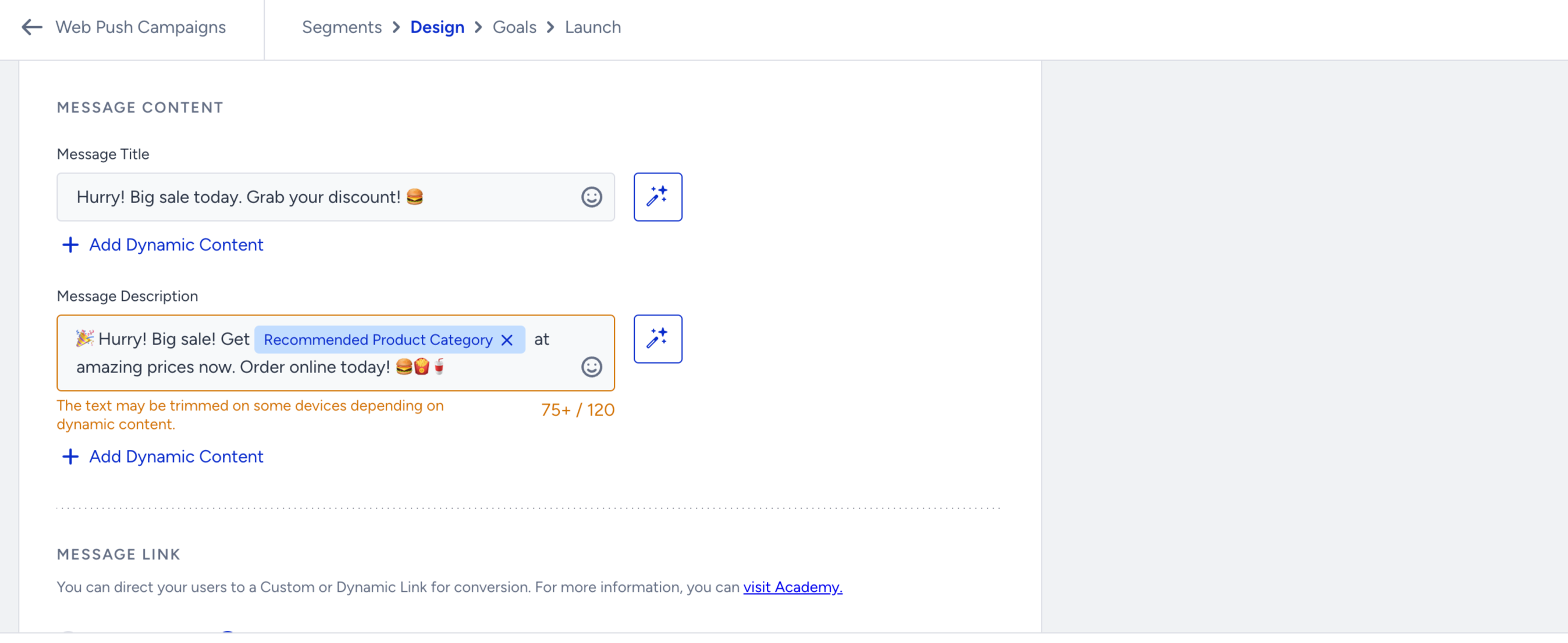
Use Dynamic Recommendation Attributes
Once Smart Recommender is enabled, you can insert dynamic product attributes into the title, description, link, and image fields of your Web Push notification.
In the title and description, you can use Recommended Product Name and Category.
You can direct your users to this recommended product using the Recommended Product URL in the link.
The logo and rich image (if any) can also be the Recommended Product Image for the image content.
These dynamic values will be automatically replaced with personalized product data at send time.
After customizing your message with dynamic recommendation attributes:
Save your Web Push notification.
Launch your campaign as usual.
Your users will receive a personalized message with product suggestions tailored to their behavior, or fallback recommendations when needed.