This guide helps you understand the required dependencies and permissions for Android and iOS.
Android
To configure the required dependencies and permissions for Android, follow these steps:
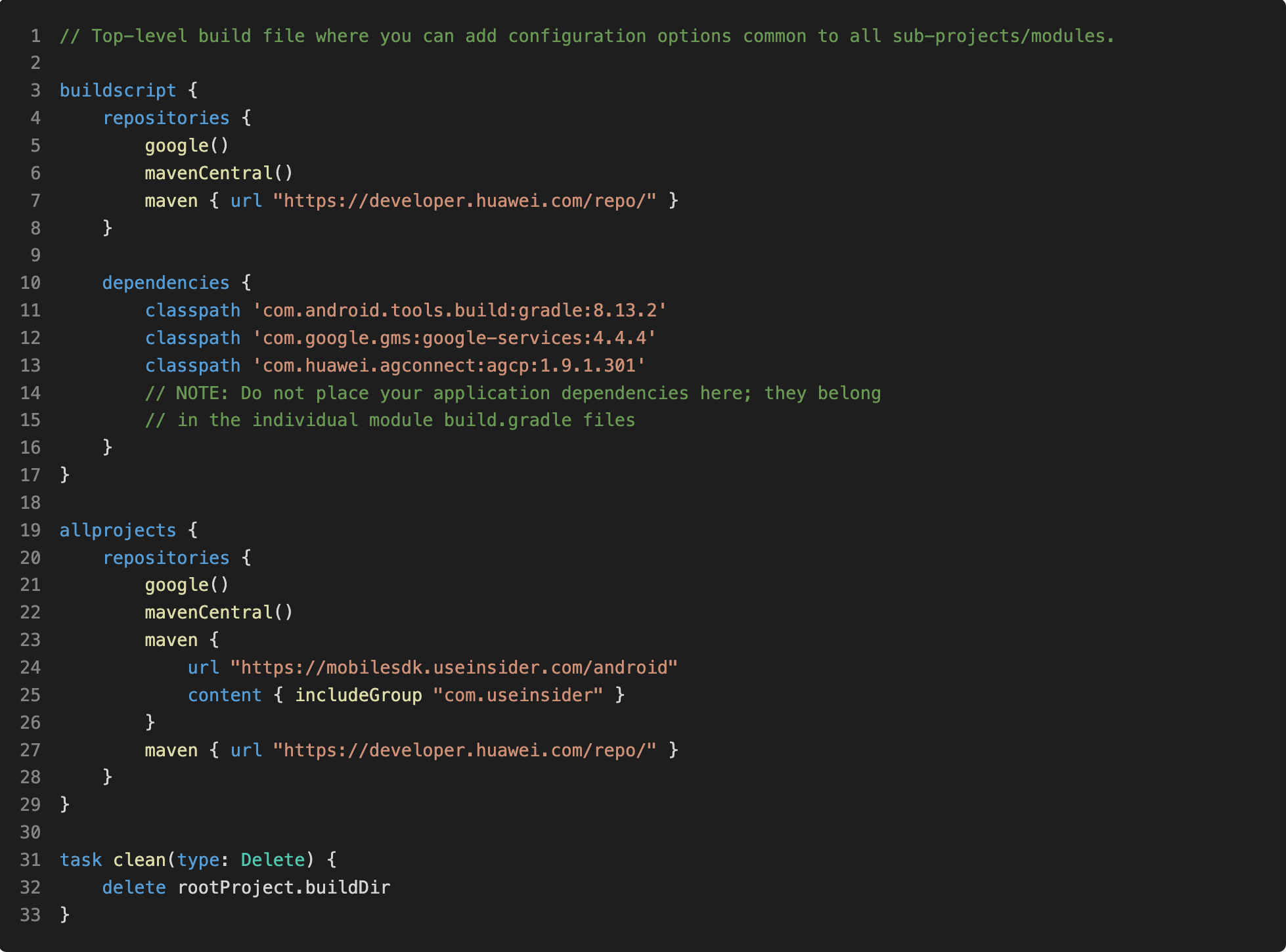
1. Open your project level build.gradle file.
2. Add google-services inside of your project dependencies.
3. Add https://mobilesdk.useinsider.com/android inside the repositories for all projects.
buildscript {
    repositories {
        google()
        mavenCentral()
        maven { url "https://developer.huawei.com/repo/" }
    }
    dependencies {
        classpath 'com.android.tools.build:gradle:8.13.2'
        classpath 'com.google.gms:google-services:4.4.4'
        classpath 'com.huawei.agconnect:agcp:1.9.1.301'
    }
}

allprojects {
    repositories {
        google()
        mavenCentral()
        maven {
            url "https://mobilesdk.useinsider.com/android"
            content { includeGroup "com.useinsider" }
        }
        maven { url "https://developer.huawei.com/repo/" }
    }
}
4. Open your app/build.gradle file.
5. Declare manifestPlaceholders inside android > defaultConfig with your Insider partner name.

android {
...
   defaultConfig {
       // DO NOT FORGET to change your_partner_name.
       // Use only lowercase and your_partner_name is provided by Insider.
       manifestPlaceholders = [partner:"your_partner_name"]
...
   }
...
}
6. If you are using proguard, add the following lines to your proguard-rules.pro file.
-keep class com.useinsider.insider.Insider { *; }

-keep interface com.useinsider.insider.InsiderCallback { *; }
-keep class com.useinsider.insider.InsiderUser { *; }
-keep class com.useinsider.insider.InsiderProduct { *; }
-keep class com.useinsider.insider.InsiderEvent { *; }
-keep class com.useinsider.insider.InsiderCallbackType { *; }
-keep class com.useinsider.insider.InsiderGender { *; }
-keep class com.useinsider.insider.InsiderIdentifiers { *; }

-keep interface com.useinsider.insider.RecommendationEngine$SmartRecommendation { *; }
-keep interface com.useinsider.insider.MessageCenterData { *; }
-keep class com.useinsider.insider.Geofence { *; }
-keep class com.useinsider.insider.ContentOptimizerDataType { *; }
-keep class org.openudid.** { *; }
-keep class com.useinsider.insider.OpenUDID_manager { *; }
7. Remove android:allowBackup="false" from your AndroidManifest.xml file, and add the below permissions to your AndroidManifest.xml file.
<uses-permission android:name="android.permission.INTERNET"/>

//Optional for Geofence
<uses-permission android:name="android.permission.ACCESS_FINE_LOCATION" />
<uses-permission android:name="android.permission.ACCESS_COARSE_LOCATION"/>
<uses-permission android:name="android.permission.ACCESS_BACKGROUND_LOCATION" />
Downloading SDK artifacts manually (optional)
The Insider Android SDK is served from a public Maven repository. You can download artifacts directly by replacing the version number in the URL.
Base URL: https://mobilesdk.useinsider.com/android/com/useinsider/insider/{version}/insider-{version}.aar
https://mobilesdk.useinsider.com/android/com/useinsider/insider/{version}/insider-{version}.pom
Below are artifacts and paths to append:
- Standard: insider/16.0.9/insider-16.0.9.aar
- Non-Huawei (-nh): insider/16.0.9-nh/insider-16.0.9-nh.aar
- Hybrid module: insiderhybrid/1.3.4/insiderhybrid-1.3.4.aar
- Version list: insider/maven-metadata.xml
iOS
To configure the required dependencies and permissions for iOS, follow these steps:
1. Add notification targets to your project.
2. Add capabilities and URL types to your project.
3. Configure Cocoapods Installation
If you do not have CocoaPods on your system, follow these steps to set them up:
3.1. Import Insider into your Xcode project.
3.2. Make sure your current Xcode project is closed.
3.3. Run pod init from the terminal in your project director if you do not already have the Podfile.
3.4. Open the Podfile with any code editor.
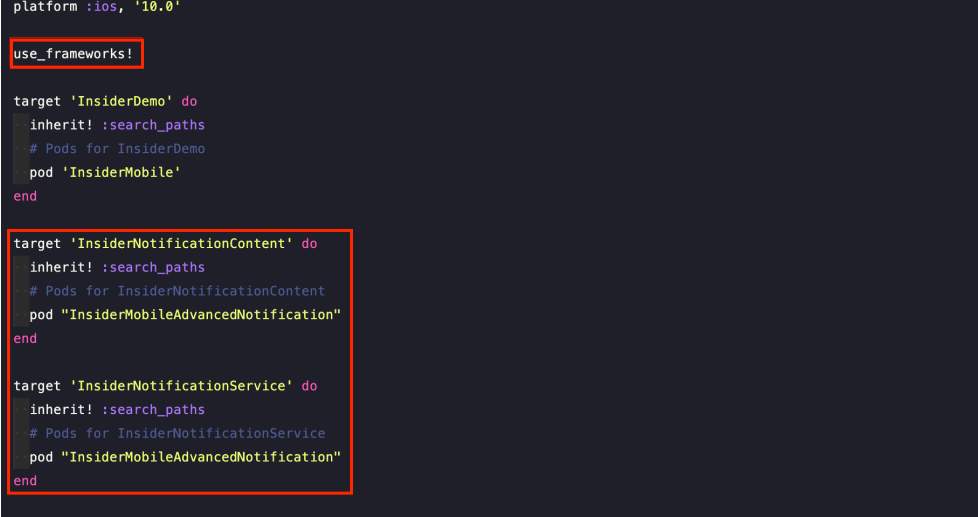
3.5. Add InsiderMobileAdvancedNotification under InsiderNotificationService and InsiderNotificationContent targets.
platform :ios, '10.0'
use_frameworks!

...
...

target 'InsiderNotificationContent' do
  inherit! :search_paths

  # Pods for InsiderNotificationContent
  pod "InsiderMobileAdvancedNotification"
end

target 'InsiderNotificationService' do
  inherit! :search_paths

  # Pods for InsiderNotificationService
  pod "InsiderMobileAdvancedNotification"
end- Your `pod --version` has to be equal to or higher than 1.8.4.
- Make sure that you have implemented `use_frameworks!`
- Make sure that you have implemented `inherit! :search_pa ths`.
- Make sure that your project deployment targets are equal to or higher than iOS 10.0
3.6. Run pod repo update and pod install from the terminal in your project directory. (If you already have the PodFile in your project, you can skip this step.) Always open the .xcworkspace file from now on.
4. Configure Targets
You need to get Notification Service and paste it into your own Notification Service. You can find the Notification Service detail below:
//
// NotificationViewController.swift
// InsiderNotificationContent
//
// Created by Insider on 17.08.2020.
// Copyright © 2020 Insider. All rights reserved.
//

#import "NotificationService.h"
#import <InsiderMobileAdvancedNotification/InsiderPushNotification.h>

@interface NotificationService ()

@property (nonatomic, strong) void (^contentHandler)(UNNotificationContent *contentToDeliver);
@property (nonatomic, strong) UNMutableNotificationContent *bestAttemptContent;

@end

// FIXME: Please change with your app group.
static NSString *APP_GROUP = @"group.com.company.app";

@implementation NotificationService

-(void)didReceiveNotificationRequest:(UNNotificationRequest *)request withContentHandler:(void (^)(UNNotificationContent * _Nonnull))contentHandler {
    self.contentHandler = contentHandler;
    self.bestAttemptContent = [request.content mutableCopy];

    // MARK: You can customize these.
    NSString *nextButtonText = @">>";
    NSString *goToAppText = @"Launch App";

    [InsiderPushNotification showInsiderRichPush:request appGroup:APP_GROUP nextButtonText:nextButtonText goToAppText:goToAppText success:^(UNNotificationAttachment *attachment) {
        if (attachment) {
            self.bestAttemptContent.attachments = [NSArray arrayWithObject:attachment];
        }

        self.contentHandler(self.bestAttemptContent);
    }];
}

-(void)serviceExtensionTimeWillExpire {
    self.contentHandler(self.bestAttemptContent);
}

@end
//
// NotificationService.swift
// InsiderNotificationService
//
// Created by Insider on 17.08.2020.
// Copyright © 2020 Insider. All rights reserved.
//
import UserNotifications
// FIXME: Please change with your app group.
let APP_GROUP = "group.com.useinsider.InsiderDemo"
class NotificationService: UNNotificationServiceExtension {
var contentHandler: ((UNNotificationContent) -> Void)?
var bestAttemptContent: UNMutableNotificationContent?
override func didReceive(_ request: UNNotificationRequest, withContentHandler contentHandler: @escaping (UNNotificationContent) -> Void) {
self.contentHandler = contentHandler
bestAttemptContent = (request.content.mutableCopy() as? UNMutableNotificationContent)
if let bestAttemptContent = bestAttemptContent {
// Modify the notification content here...
let nextButtonText = ">>"
let goToAppText = "Launch App"
InsiderPushNotification.showInsiderRichPush(
bestAttemptContent,
appGroup: APP_GROUP as String,
nextButtonText: nextButtonText,
goToAppText: goToAppText,
success: { attachment in
if let attachment = attachment {
bestAttemptContent.attachments = bestAttemptContent.attachments + [attachment as UNNotificationAttachment]
print(bestAttemptContent.attachments)
}
print(bestAttemptContent.attachments)
contentHandler(bestAttemptContent)
print(bestAttemptContent.attachments)
})
print(bestAttemptContent.attachments)
}
}
override func serviceExtensionTimeWillExpire() {
// Called just before the extension will be terminated by the system.
// Use this as an opportunity to deliver your "best attempt" at modified content, otherwise the original push payload will be used.
if let contentHandler = contentHandler, let bestAttemptContent = bestAttemptContent {
contentHandler(bestAttemptContent)
}
}
}5. Notification Content Extension
5.1 You need to get Notification View Controller and paste it to your own Notification View Controller. The following is the NotificationViewController:
#import "NotificationViewController.h"
#import <UserNotificationsUI/UserNotificationsUI.h>
#import <InsiderMobileAdvancedNotification/iCarousel.h>
#import <InsiderMobileAdvancedNotification/InsiderPushNotification.h>

@interface NotificationViewController () <UNNotificationContentExtension, iCarouselDelegate, iCarouselDataSource>
@property (nonatomic, weak) IBOutlet iCarousel *carousel;
@end

// FIXME: Please change with your app group.
static NSString *APP_GROUP = @"group.com.company.app";

@implementation NotificationViewController

@synthesize carousel;

-(void)viewDidLoad {
    [super viewDidLoad];
}

-(void)viewWillDisappear:(BOOL)animated {
    [InsiderPushNotification setTimeAttribution];
}

-(void)didReceiveNotification:(UNNotification *)notification {
    [InsiderPushNotification interactivePushLoad:APP_GROUP superView:self.view notification:notification];

    carousel.type = iCarouselTypeRotary;
    [carousel reloadData];

    [InsiderPushNotification interactivePushDidReceiveNotification];
}

-(NSInteger)numberOfItemsInCarousel:(iCarousel *)carousel {
    return [InsiderPushNotification getNumberOfSlide];
}

-(UIView *)carousel:(iCarousel *)carousel viewForItemAtIndex:(NSInteger)index reusingView:(UIView *)view {
    return [InsiderPushNotification getSlide:index reusingView:view superView:self.view];
}

-(void)dealloc {
    carousel.delegate = nil;
    carousel.dataSource = nil;
}

-(CGFloat)carouselItemWidth:(iCarousel *)carousel {
    return [InsiderPushNotification getItemWidth];
}

-(void)didReceiveNotificationResponse:(UNNotificationResponse *)response
                     completionHandler:(void (^)(UNNotificationContentExtensionResponseOption option))completion {
    if ([response.actionIdentifier isEqualToString:@"insider_int_push_next"]){
        [carousel scrollToItemAtIndex:[InsiderPushNotification didReceiveNotificationResponse:[carousel currentItemIndex]] animated:true];

        completion(UNNotificationContentExtensionResponseOptionDoNotDismiss);
    } else {
        [InsiderPushNotification logPlaceholderClick:response];

        completion(UNNotificationContentExtensionResponseOptionDismissAndForwardAction);
    }
}

@end
//
// NotificationViewController.swift
// InsiderNotificationContent
//
// Created by Insider on 17.08.2020.
// Copyright © 2020 Insider. All rights reserved.
//
import UIKit
import UserNotifications
import UserNotificationsUI
// FIXME: Please change with your app group.
let APP_GROUP = "group.com.useinsider.InsiderDemo"
@objc(NotificationViewController)
class NotificationViewController: UIViewController, UNNotificationContentExtension, iCarouselDelegate, iCarouselDataSource {
@IBOutlet weak var carousel: iCarousel!
deinit {
carousel.delegate = nil
carousel.dataSource = nil
}
func numberOfItems(in carousel: iCarousel) -> Int {
return InsiderPushNotification.getNumberOfSlide()
}
func carousel(_ carousel: iCarousel, viewForItemAt index: Int, reusing view: UIView?) -> UIView {
return InsiderPushNotification.getSlide(index, reusing: view, superView: self.view)
}
func carouselItemWidth(_ carousel: iCarousel) -> CGFloat {
return InsiderPushNotification.getItemWidth()
}
override func viewDidLoad() {
super.viewDidLoad()
}
override func viewWillDisappear(_ animated: Bool) {
InsiderPushNotification.setTimeAttribution()
}
func didReceive(_ notification: UNNotification) {
InsiderPushNotification.interactivePushLoad(APP_GROUP, superView:self.view, notification: notification)
carousel.type = .rotary
carousel.reloadData()
InsiderPushNotification.interactivePushDidReceive()
}
func didReceive(_ response: UNNotificationResponse, completionHandler completion: @escaping (UNNotificationContentExtensionResponseOption) -> Void) {
if (response.actionIdentifier == "insider_int_push_next") {
carousel.scrollToItem(at: InsiderPushNotification.didReceiveResponse(carousel.currentItemIndex), animated: true)
completion(.doNotDismiss)
} else {
InsiderPushNotification.logPlaceholderClick(response)
completion(.dismissAndForwardAction)
}
}
}Here is the Bridging Header for Swift:
#import <InsiderMobileAdvancedNotification/InsiderPushNotification.h>
#import <InsiderMobileAdvancedNotification/iCarousel.h>
5.2 Navigate to InsiderNotificationContent>Info.plist and open it as source code.
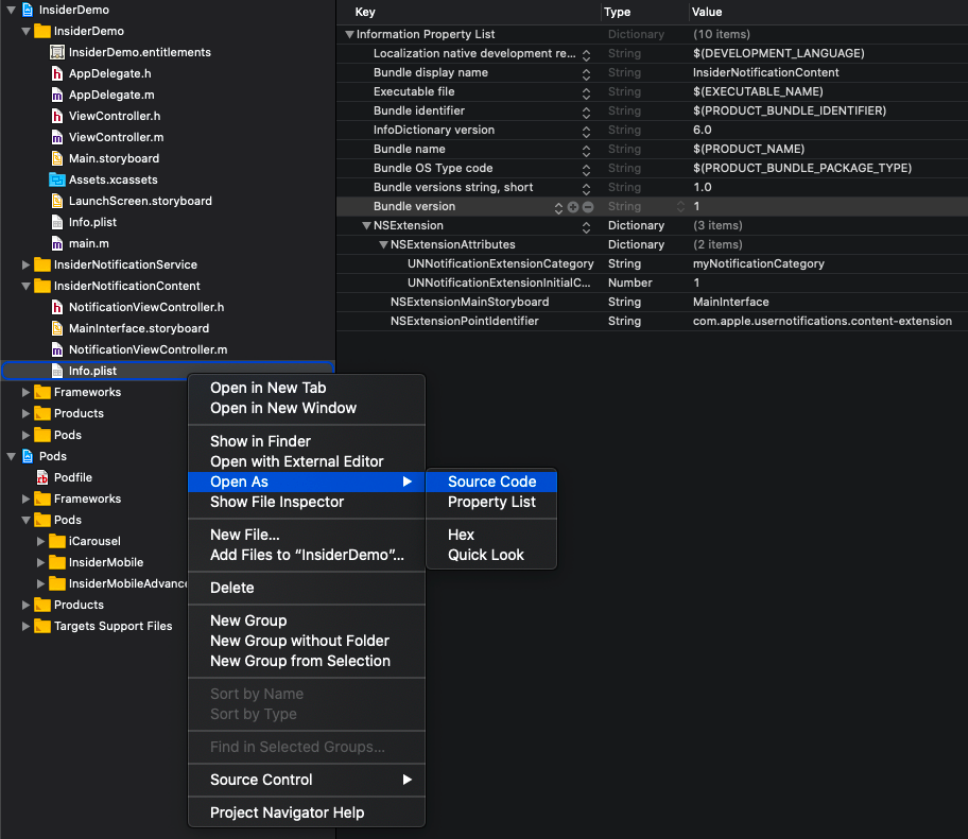
5.3. Edit the key NSExtension. You can copy and paste the code below.
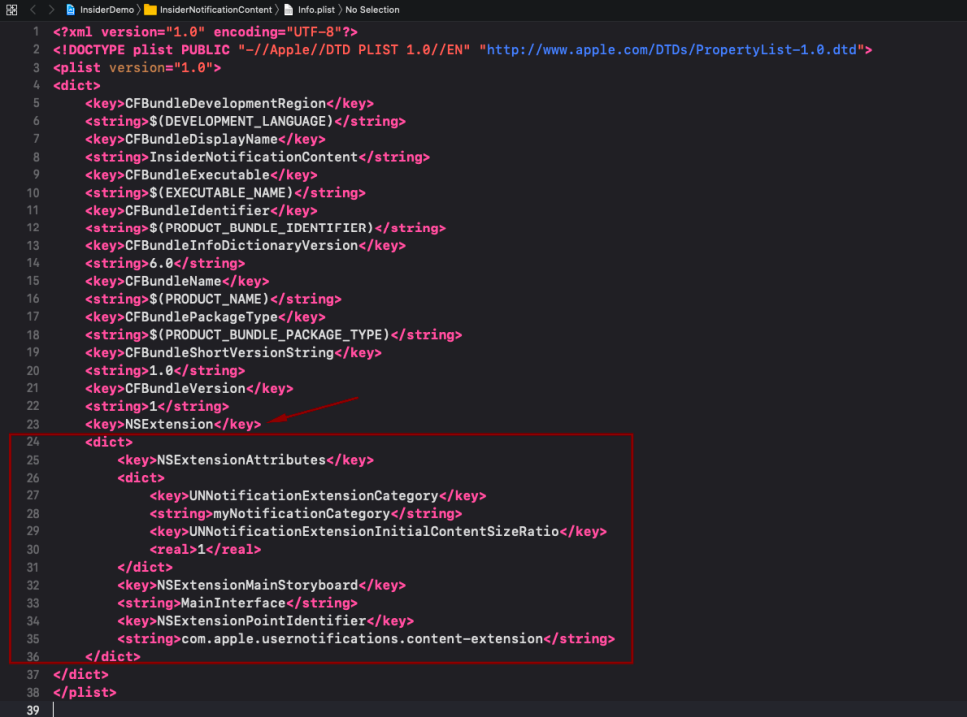 The following is the Info.plist:
<dict>
<key>NSExtensionAttributes</key>
<dict>
<key>UNNotificationExtensionCategory</key>
<string>insider_int_push</string>
<key>UNNotificationExtensionDefaultContentHidden</key>
<string>FALSE</string>
<key>UNNotificationExtensionInitialContentSizeRatio</key>
<real>0.5</real>
</dict>
<key>NSExtensionMainStoryboard</key>
<string>InsiderInterface</string>
<key>NSExtensionPointIdentifier</key>
<string>com.apple.usernotifications.content-extension</string>
</dict>
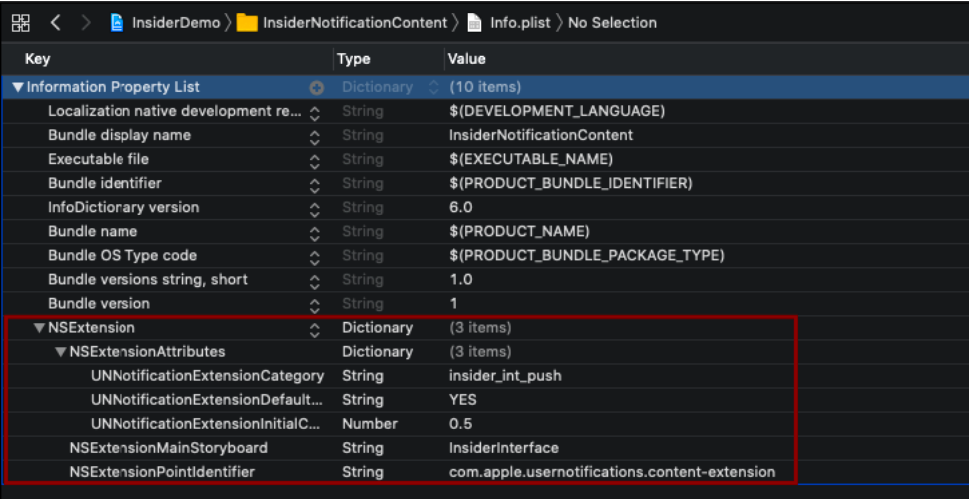
Your Info.plist should look like as follows: