MindBehind supports online payment through the payment action. For each succeeded payment MindBehind generates a transaction and stores it inside its database. To access the Transactions Report, follow the steps below:
- Navigate to Transactions Report from the left side of MindBehind's main panel menu.
- You can filter this page through the date range, company name, or the customer phone number.
The report will show the following information for each transaction:
- ID: A unique identifier for the transaction "The transaction ID".
- Company: The company name the transaction is related to.
- Gateway: The name of the payment gateway is defined in the integrations section of the company profile page.
- Conversation ID: Conversation ID where payment or refund operation happened.
- Customer: The name of the customer who made the payment through the bot.
- Payment type: The type of payment gateway (e.g. MASTERPASS etc.).
- Payment result: The result of the payment transaction to the bank. It can be "SUCCESS," "FAILED," or "PENDING" when the payment is initialized but the customer did not complete it yet.
- Payment currency: The currency of the payment transaction.
- Payment amount: This parameter can be seen in 2 forms: positive and negative. A positive amount indicates that it is a payment transaction, while a negative amount shows that it is a refund operation.
- Order number: The payment action will read this number from the live parameters of the bot and use it to point to the order. This number also will be sent to the bank to be stored within the transaction. Your title goes hereMindBehind will auto-generate the order number if it is not given during the processing of the payment.
- Reference number: Unique identifier generated by MindBehind to point to this transaction. This number also will be sent to the bank to be stored with the bank transaction.
- Related payment ID: This parameter is used only when there is a refund operation. It is filled with the ID of the payment that is requested payback.
- User email: This parameter is used only when there is a refund operation, and this operation is done through our panel. It demonstrates the user email that performs refund operations.
Mindbehind allows you to fetch these transaction data through an API call with a JSON response. The HTTP request details are:
- End point: https://func.mindbehind.com/payments/transactions
- HTTP Method: POST
- Required Header: “mgmtToken” to authorize the call.
Refer to Payment Gateways APIs Authorization for further information.
- Query string parameters:
- startDate: (Required) The start date-time for the needed report.
- endDate:(Required) The end date-time for the needed report.
- companyId: (Optional) The company ID to fetch only the transactions related to that company.
- phone: (Optional) The customer's phone number to fetch only the transactions related to that customer.
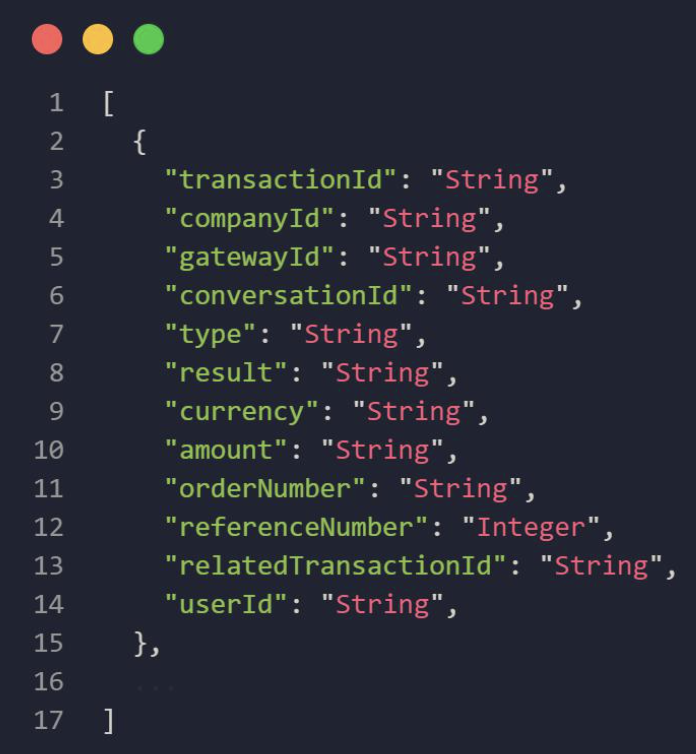
The response will be an array of JSON objects with the following schema: