The waiting time for the agent and the client represents the average time each has to wait in between messages. This guide aims to explain how the waiting time calculation can be made for both the client and the agent.
How does the waiting time work?
You can see an example of a waiting time calculation below:
(Message order timeline): C = Client message, A = Agent message
C1→ C2→ A1→ C3
In this case, the client wait time is calculated as the difference between C1→A1; this is the time the client waited to receive a message from the agent, and the agent wait time will be A1→C3.
You can take a look at the calculation rules below:
- The duration between the agent's assignment time and the agent's first response is added to the client's wait time.
- You should consider the number of responses, not the message numbers (after a response from the agent or client, they can continue to send messages to explain situations, but all will be considered as a single response, and the time of the first message will be considered.
- Who ended the conversation is important to calculate the waiting time, as explained below.
You can calculate the waiting time under the conditions below:
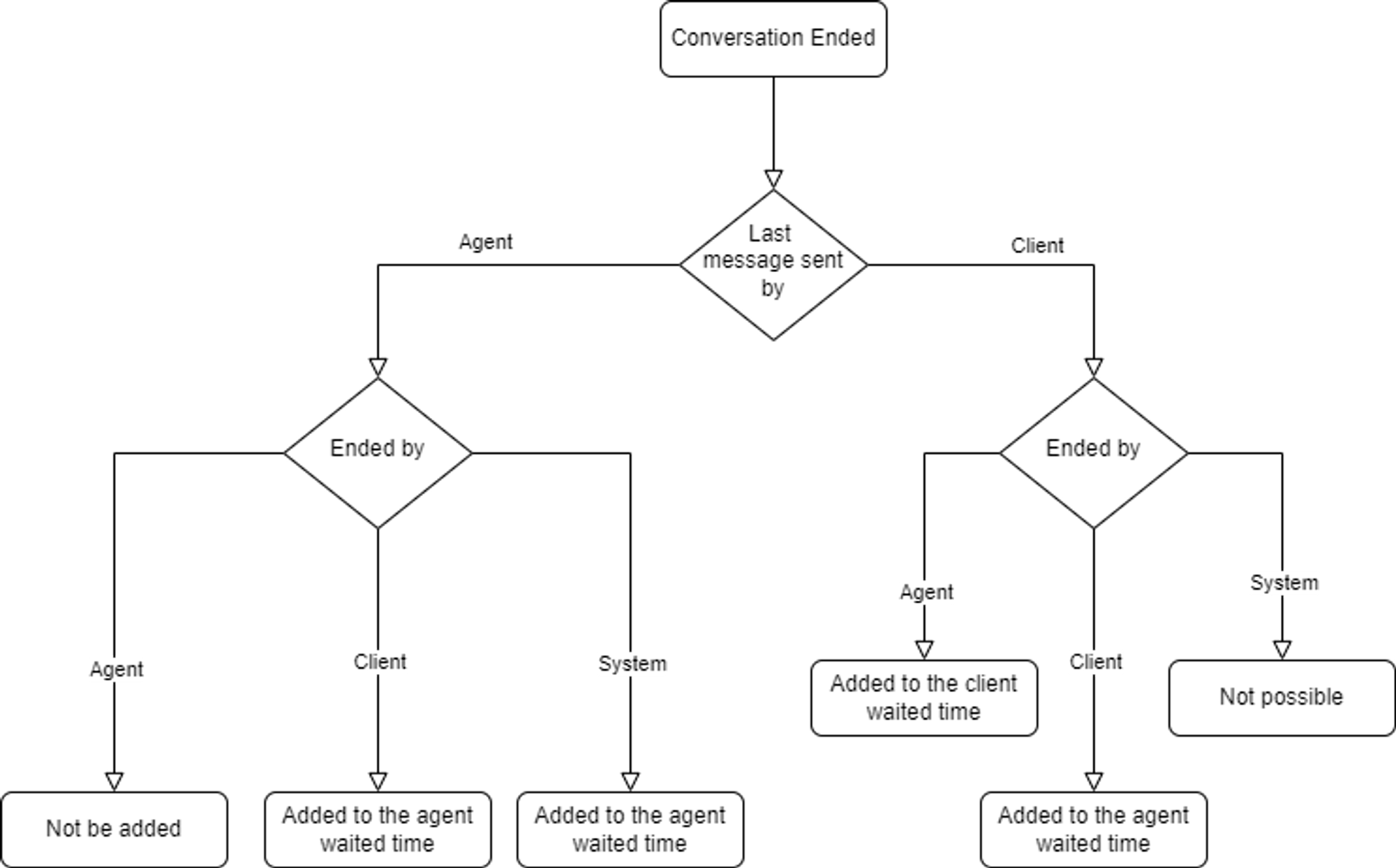
- If the last message was sent by the agent and
- If the last message was sent by the client.
Prerequisites for calculations
- The client and agent wait times are not calculated for bot conversations.
- An agent should be assigned to the conversation.
- The conversation should be ended.
You can see a calculation example below:
C1→A1→C2→A2→C3
For this case, the total client wait time will be: C1→A1 + C2→A2, as C3 is still waiting for the agent to respond, and the conversation has closed on the agent. So, only the previous two are considered. The agent wait time will be A1→C2 + A2→C3, and the agent is not waiting for a client response at this stage.
Technical details
On the backend side, the rules and calculations that we have implemented and the additional variables that are created are as follows:
- totalClientWaitTimeInSeconds
- totalAgentWaitTimeInSeconds
- timesClientWaited
- timesAgentWaited
- isAgentWaiting
- lastClientResponseTime
- lastAgentResponseTime
Using the total wait time and dividing them by the count/times waited count, you can calculate the average wait times that are stored as: averageAgentWaitTime, averageClientWaitTime in the conversation table.
- isAgentWaiting is a boolean value representing the state of the agent. Is the agent currently waiting for a message from the client = true, and if not, then false. The false value also suggests that the client is waiting for the agent to respond.
- lastClientResponseTime and lastAgentResponseTime are used to keep track of when the last message was sent. This previous message will be C1 in this flow:
C1→C2→C3→C4→A1: This means it is the time of the last message sent by the client or agent after which they have been waiting for a response.
You can see a flow chart that explains the calculation when ending the conversation: