Instead of calling Insider One APIs directly, you can interact with an AI assistant using natural language. Insider One MCP translates your requests into the appropriate API calls while respecting your OAuth permissions and approval requirements.
Insider One MCP provides 38 tools that allow AI assistants to retrieve analytics, browse campaigns and templates, and create campaign or template drafts. Of these, 30 are read-only, and 8 are write tools for human review.
Every tool is controlled by OAuth 2.0 scopes. A tool is available only if your OAuth credential includes the required scope.
Write tools never send messages, schedule campaigns, or publish content. They only create drafts in your Insider One panel. Every write action also requires your approval in Claude before it runs. After approval, your team can review and launch the draft from the Insider One panel.
Prerequisites
Before using Insider One MCP API functions, ensure the following requirements are met:
Insider One MCP is configured successfully.
You have valid OAuth 2.0 credentials.
You have your Partner ID available.
Your account has access to the relevant channels.
Insider One recommends creating a dedicated OAuth credential specifically for your MCP client instead of reusing existing credentials. This reduces the impact if an AI client performs unintended actions.
What you can do with Insider One MCP
Insider One MCP provides:
Analytics and reporting across Email, SMS, WhatsApp, Web Push, Mobile App, and Architect
Campaign and template browsing (campaign lists, email template library)
Content creation as drafts: email campaigns, email templates, and WhatsApp templates
Write functions create drafts only. Every draft lands in the Insider One panel for review; publishing is always done by a human in the panel.
The following actions are not supported:
Sending, scheduling, or triggering messages
Launching campaigns
Creating or modifying journeys
Updating customer data
Insider One MCP uses OAuth 2.0 authentication. All functions on this page are available with an OAuth credential carrying the matching scopes. On-site is currently unsupported.
Tool References
Email tools
Use the following tools to retrieve email analytics, manage templates, and create campaign drafts.
Tool | What it does | Type |
|---|---|---|
List Email Campaigns | Lists email campaigns. | Read-only |
Get Email Campaign Analytics | Retrieves analytics for a specific email campaign. | Read-only |
Get Email Overall Analytics | Retrieves overall email analytics. | Read-only |
Get Email Template | Retrieves the content of an email template. | Read-only |
Search Email Templates | Searches the email template library. | Read-only |
List Email Template Categories | Lists email template categories. | Read-only |
Create Email Campaign | Creates an email campaign draft in the Insider One panel. | Write (creates draft) |
Create Email Template | Creates an email template draft. | Write (creates draft) |
Update Email Template | Updates an existing email template. | Write (needs approval) |
Duplicate Email Template | Duplicates an existing email template. | Write (needs approval) |
Delete Email Template | Deletes an email template. | Write (needs approval) |
SMS tools
Use the following tools to retrieve SMS campaign, overall, transactional, and OTP/Verify analytics.
Tool | What it does | Type |
|---|---|---|
List SMS Campaigns | Lists SMS campaigns. | Read-only |
Get SMS Campaign Analytics | Retrieves analytics for a specific SMS campaign. | Read-only |
Get SMS Overall Analytics | Retrieves overall SMS analytics. | Read-only |
Get SMS Transactional Analytics | Retrieves transactional SMS analytics. | Read-only |
Get SMS OTP/Verify Analytics | Retrieves SMS OTP and Verify analytics. | Read-only |
WhatsApp tools
Use the following tools to retrieve WhatsApp analytics and create or manage WhatsApp template drafts.
Tool | What it does | Type |
|---|---|---|
List WhatsApp Campaigns | Lists WhatsApp campaigns. | Read-only |
Get WhatsApp Campaign Analytics | Retrieves analytics for a specific WhatsApp campaign. | Read-only |
Get WhatsApp Overall Analytics | Retrieves overall WhatsApp analytics. | Read-only |
Get WhatsApp Transactional Analytics | Retrieves transactional WhatsApp analytics. | Read-only |
Get WhatsApp OTP/Verify Analytics | Retrieves WhatsApp OTP and Verify analytics. | Read-only |
Create WhatsApp Template | Creates a WhatsApp template draft that goes through the standard approval flow. | Write (creates draft) |
Delete WhatsApp Template | Deletes a WhatsApp template. | Write (needs approval) |
List WhatsApp Templates | Lists WhatsApp templates with pagination, filtering, and sorting options. | Read-only |
Get WhatsApp Template | Retrieves detailed information about a WhatsApp template using its Insider One template ID. | Read-only |
Update WhatsApp Template | Updates an existing WhatsApp template’s content and submits it for WhatsApp review.
| Write (needs approval) |
Mobile App tools
Use the following tools to retrieve mobile app campaign and push notification analytics.
Tool | What it does | Type |
|---|---|---|
Get App Push Overall Analytics | Retrieves overall app push analytics. | Read-only |
Get InApp Details | Retrieves details for an InApp campaign. | Read-only |
Get Message Center Messages | Retrieves Message Center messages. | Read-only |
Web Push tools
Use the following tools to retrieve Web Push campaign analytics and performance metrics.
Tool | What it does | Type |
|---|---|---|
Get Web Push Campaign Analytics | Retrieves analytics for a specific Web Push campaign. | Read-only |
Get Web Push Overall Analytics | Retrieves overall Web Push analytics. | Read-only |
Get Web Push Top Metrics | Retrieves top Web Push metrics with breakdowns. | Read-only |
Architect tools
Use the following tools to retrieve journey, goal, and element analytics for Architect.
Tool | What it does | Type |
|---|---|---|
Get Architect Journeys | Lists Architect journeys. | Read-only |
Get Architect Journey Analytics | Retrieves analytics for a specific Architect journey. | Read-only |
Get Architect Overall Analytics | Retrieves overall Architect journey analytics. | Read-only |
Get Architect Element Analytics | Retrieves analytics for Architect elements and channels. | Read-only |
Get Architect Goals Information | Lists configured conversion goals. | Read-only |
Get Architect Goals Analytics | Retrieves conversion goal analytics. | Read-only |
Example prompts
The following examples show how you can interact with Insider One MCP using natural language.
"Which of my email campaigns had the highest open rate in June?"
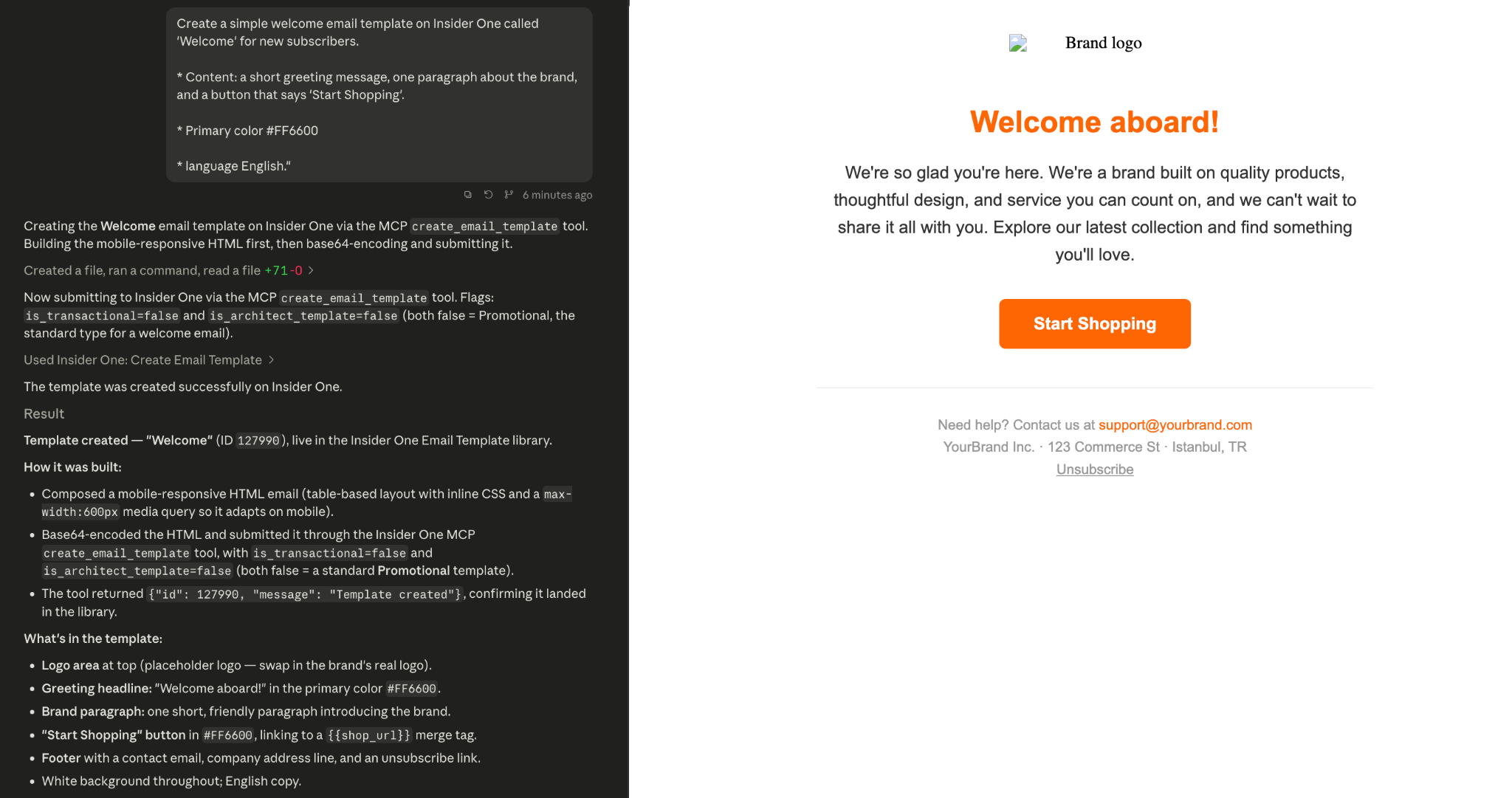
"Draft a welcome email template for new subscribers using the tone of our summer campaign."
SMS
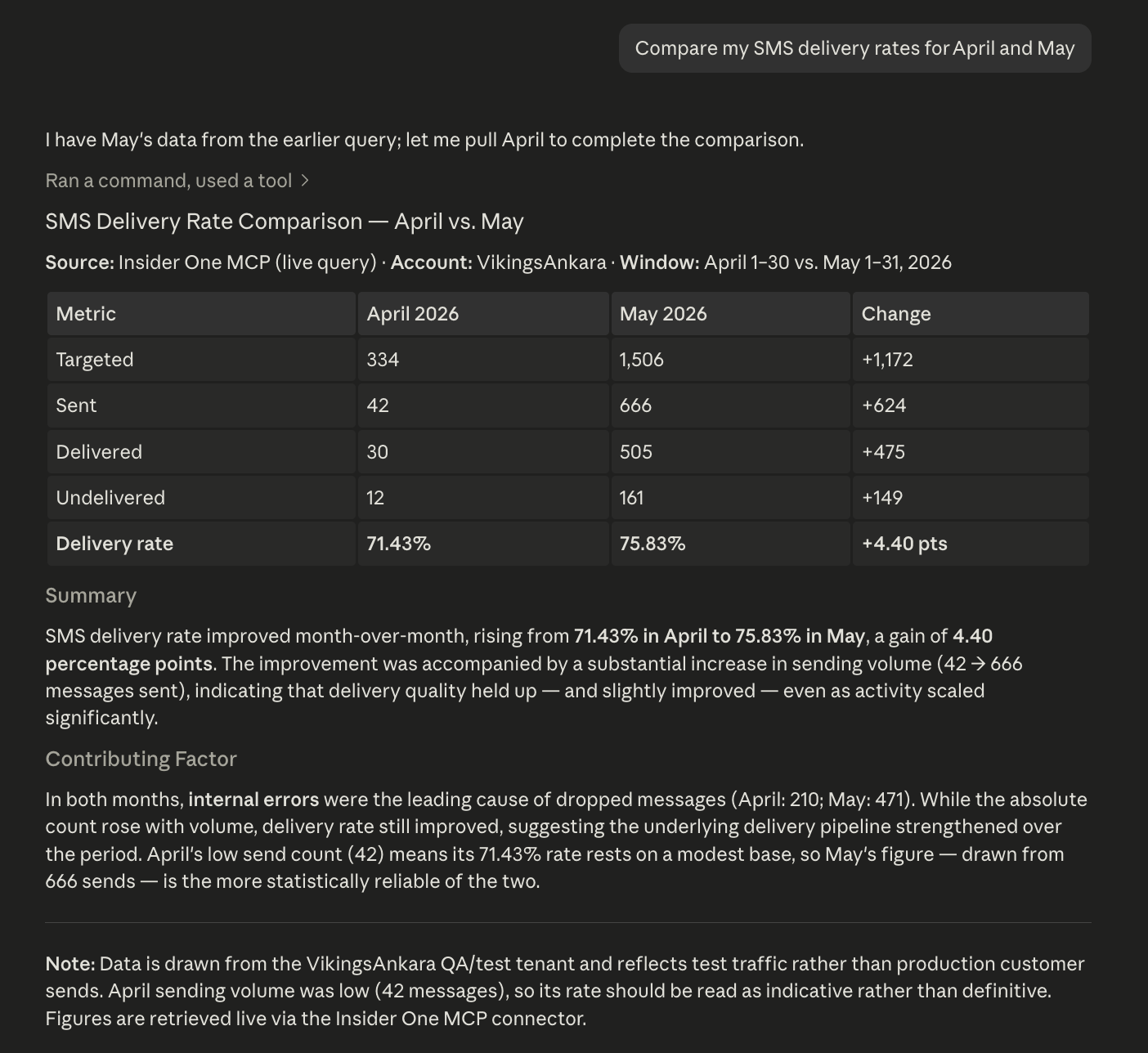
"Compare my SMS delivery rates over the last two months."
"Which SMS campaign had the highest click-through rate this quarter?"
"Which of my WhatsApp campaigns had the highest read rate in June?"
"Create a WhatsApp template draft announcing our summer sale."
Web Push
"Show my Web Push top metrics for this quarter, broken down by campaign type."
"Which Web Push campaign had the highest click rate last month?"
Mobile App
"How did my App Push campaigns perform today?"
"Show my Message Center messages and their performance."
Architect
"List my active journeys and show which one converts best."
"Which journey element has the highest drop-off rate?"
How MCP uses these functions
When a user submits a prompt:
The AI client maps the prompt to one or more functions listed on this page.
Insider One MCP validates the credential's permissions and scopes.
Read functions run as read-only API calls.
Write functions require explicit user approval before they run. When approved, they create drafts in the Insider One panel. The AI never sends or publishes content.
Your OAuth Client Secret is sensitive. Treat it like a password: do not share it in screenshots or documents, use a dedicated credential with least-privilege scopes for MCP only, and regenerate it immediately if you suspect exposure.
Limitations
Only documented tools are available through MCP.
Available tools depend on your OAuth scopes and licensed channels.
Write functions create drafts only.
Rate limits apply based on existing Insider One API policies.
All access is logged and permission-based.
Model Context Protocol (MCP) is a newly introduced open protocol and may be susceptible to security issues or vulnerabilities. Follow your organization’s security policies and review configurations carefully.