Lookup Tables store shared reference data, such as store details, flight amenities, plan specifications, and event metadata, separately from user profiles and events. Once stored, a Lookup Table is joined to users or events via a primary key, making its columns directly available for segmentation.
The core problem Lookup Tables solve:
Some data belongs to your business, not to individual users. A store's opening hours apply to everyone who shops there. A flight's Wi-Fi availability applies to every passenger on that flight. A plan's data limit applies to every subscriber on that plan. Storing this data in each user profile creates duplication, a risk of staleness, and maintenance overhead. Lookup Tables hold reference data in one place, update it once, and apply it everywhere it is referenced.
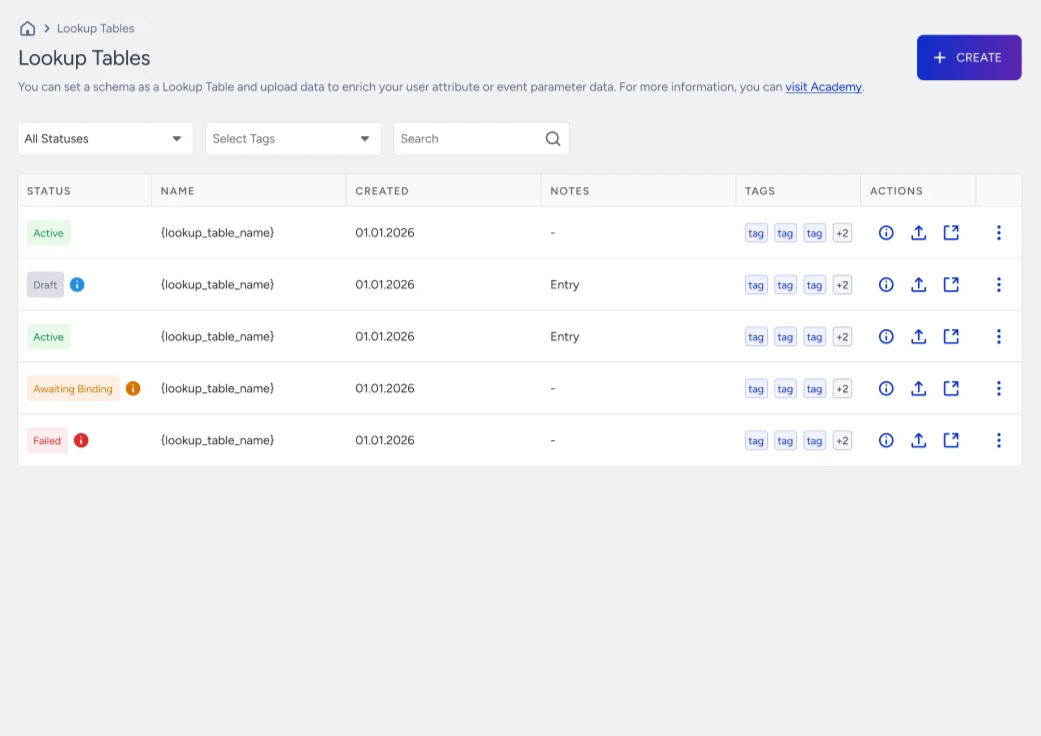
Marketing and growth teams routinely build campaigns that depend on shared reference data. A few examples:
A retailer wants to greet customers with the opening hours of their nearest store and the current local promo.
An airline wants pre-flight messages to mention amenities specific to the booked flight: Wi-Fi, power outlets, seat screens, and cabin configuration.
A telco wants to upsell users on plans that lack 5G or have lower data limits than the latest tier.
A hotel group wants pre-arrival emails to reference property-specific check-in times, concierge contact details, and amenities.
A ticketing platform wants to notify only the users registered for a specific event whose status has just changed.
Reference data lives in one place, updates once, and applies everywhere it is referenced.
How Lookup Tables work
Lookup Tables are designed to keep shared reference data centralized and ready for activation. The structure ensures that you do not duplicate metadata across every user profile and that segmentation always reflects the latest version of the data.
1. Schema is defined first
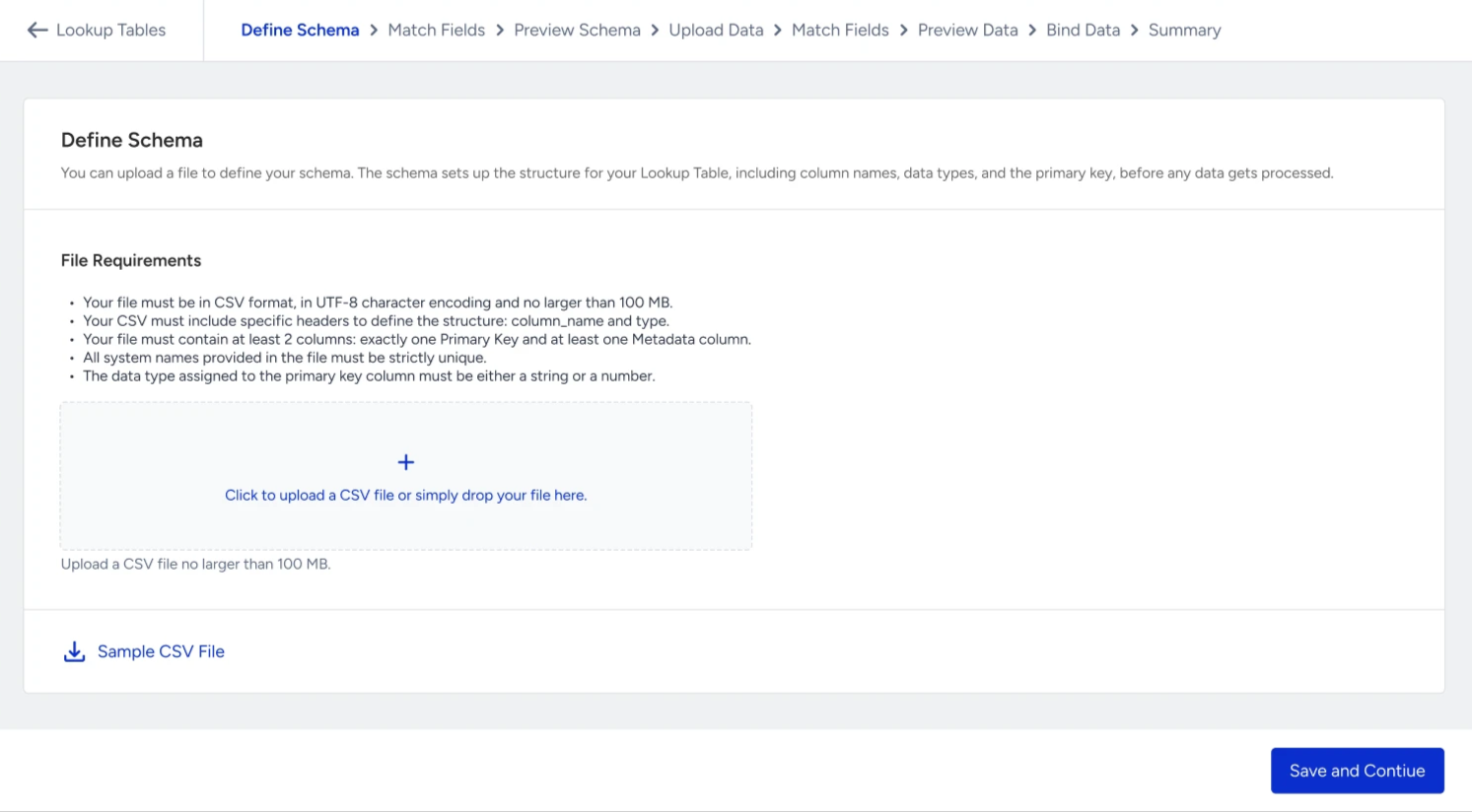
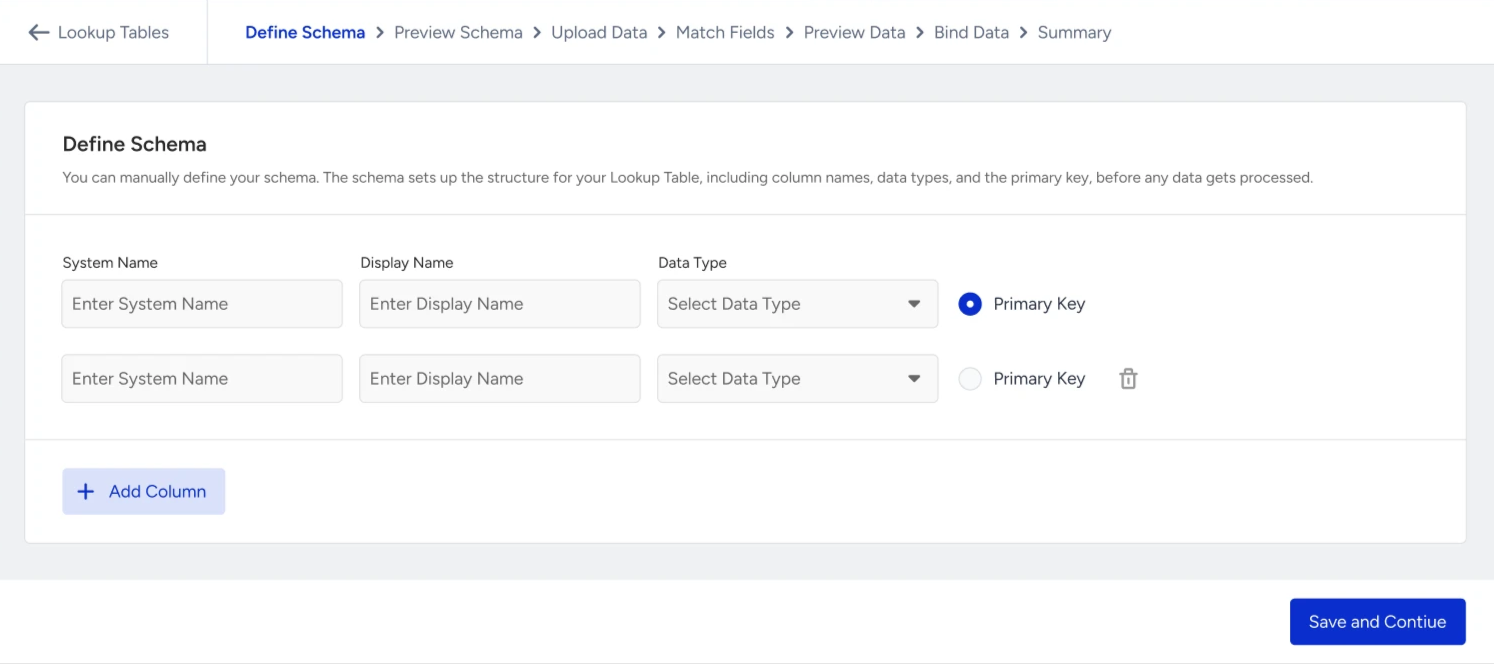
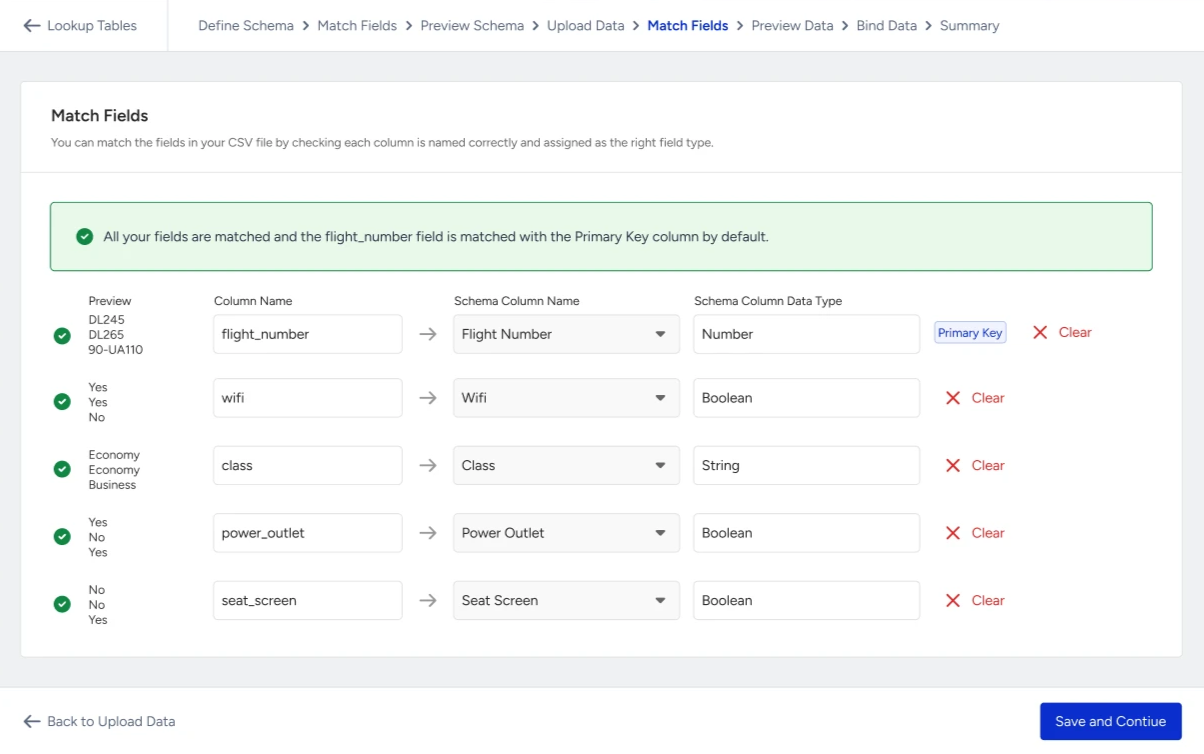
The table, its column schema, and the primary key must be created in the InOne panel or via API before any data is uploaded. This ensures all incoming rows follow a predefined structure and prevents invalid uploads.
2. Primary key uniquely identifies each row
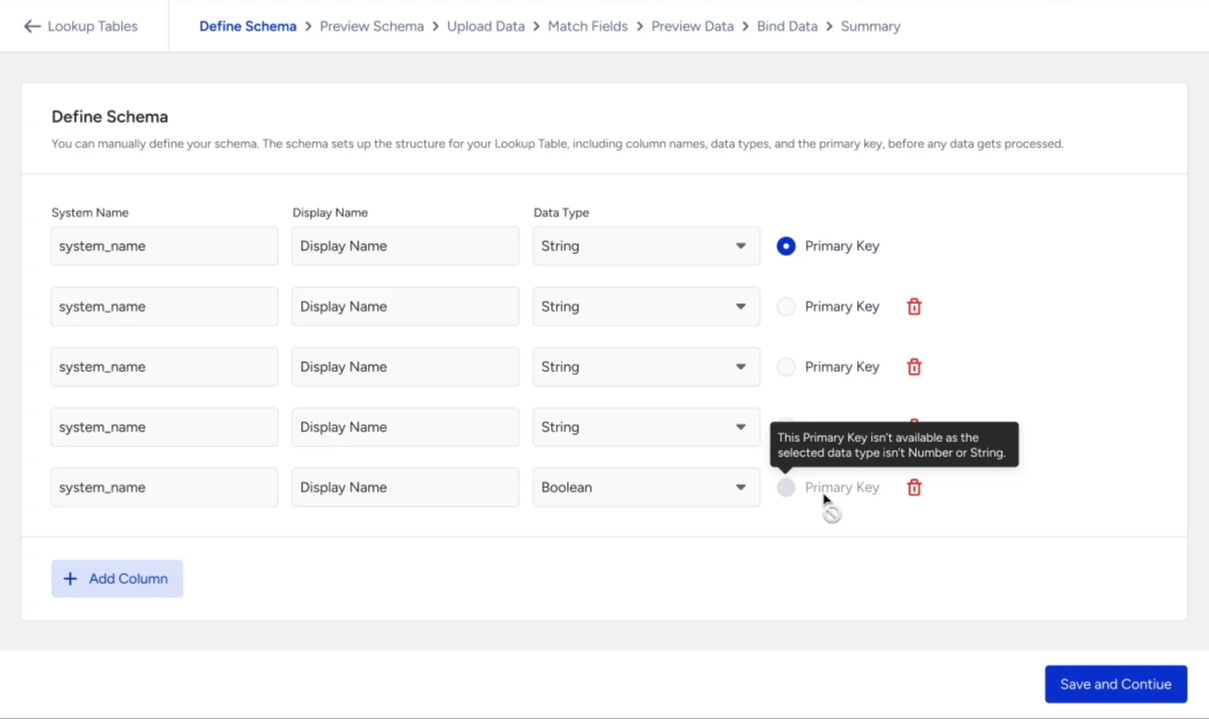
Each table has exactly one primary key column, defined at creation time. The primary key:
Uniquely identifies each row in the table.
Must be of type String or Number.
Must be unique across all rows.
Cannot be null or empty.
3. Data is ingested via CSV upload or API
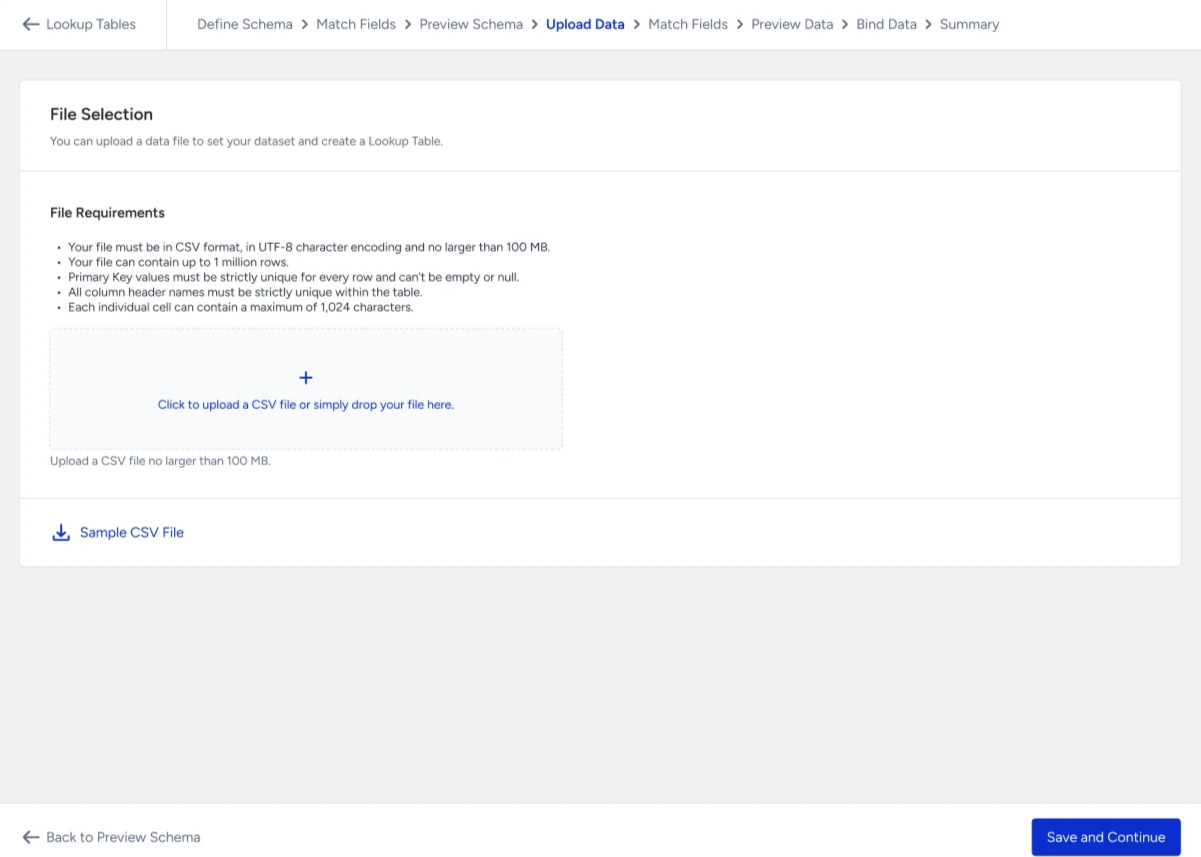
Two ingestion methods are available. Both apply the same schema validation and the same primary-key based upsert model.
CSV Upload (InOne panel): Manual upload for initial setup and occasional updates
API: Programmatic upsert for technical teams managing frequently updated datasets
All ingested rows are validated against the defined schema. Valid rows are processed and applied successfully, while invalid rows are skipped.
4. Primary key is bound to a user attribute or event parameter
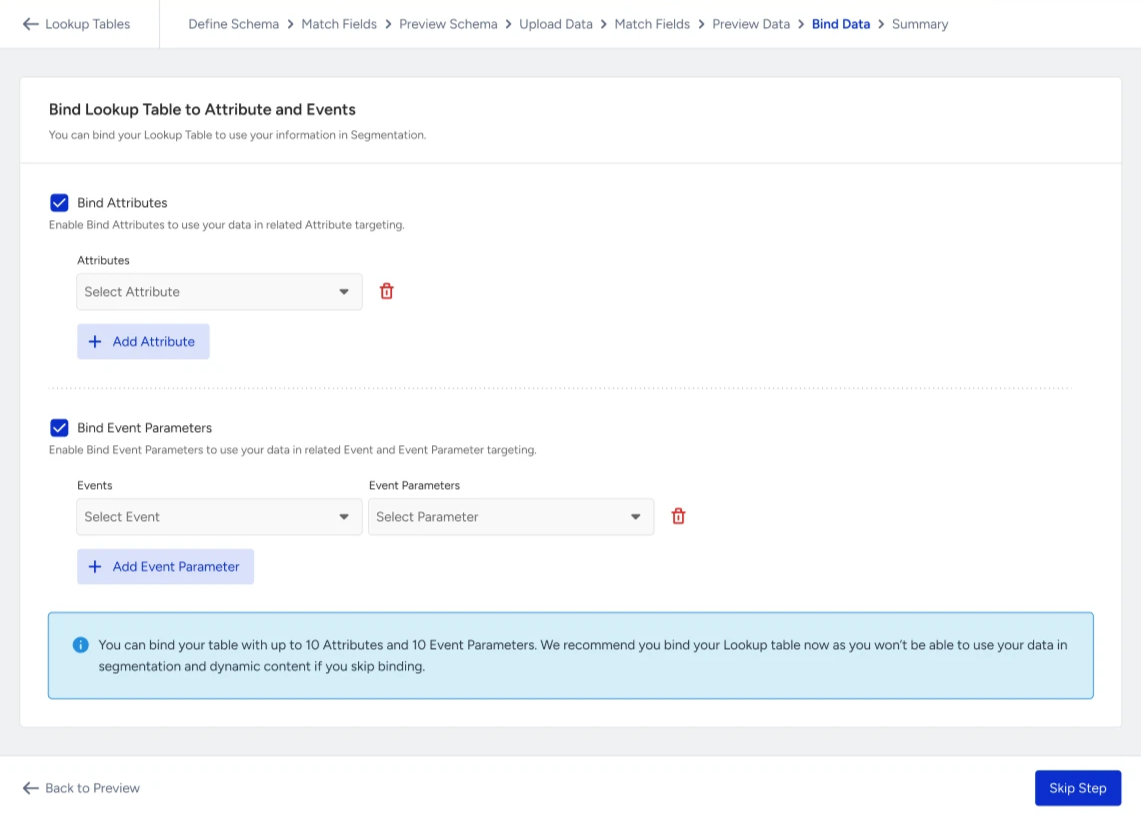
A Lookup Table cannot be used in segmentation until its primary key is mapped to at least one user attribute or event parameter. A binding defines how lookup rows are connected to user data.
The bound attribute or event parameter must already exist in your metadata.
The data type of the bound field must match the primary key type.
Each table supports up to 10 attribute bindings and up to 10 event parameter bindings.
If a bound attribute or event parameter is later deleted or its type changes, the binding becomes invalid. The table cannot be used in segmentation or enrichment until a new valid binding is created.
5. Data becomes available after upload
Once a Lookup Table is published, its columns are available across segmentation. You are notified in the InOne panel and by email when the table is ready to activate.
6. Activation runs on the join, deterministically
At activation, the system joins each user or event record to the matching lookup table row using the bound key:
Segmentation: filters reference lookup table columns directly, for example, "users whose preferred_store.city equals London."
Use cases
Lookup Tables apply to any business that depends on shared reference data. The examples below show how different verticals activate the same building block across segmentation and personalization.
E-commerce: voucher and promo code reference
A retailer manages active voucher and promo codes, each with its own discount value, validity window, category restriction, and terms. The same voucher code can be held by many users simultaneously.
What Lookup Tables enable:
Store voucher details (value, expiry date, category restriction, minimum basket, terms) in a single shared table, joined by voucher code.
Update discount values, expiry dates, or restrictions independently without touching user profiles.
Segment users by the attributes of the voucher they hold or last received.
Personalize messages with the current value and expiry of the assigned voucher.
Example use cases:
Send reminder emails with the user's voucher code, current value, and expiry date.
Target users holding vouchers expiring within 7 days for last-chance campaigns.
Promote category-specific offers using vouchers tied to that category.
Aviation: flight amenities
A flight has shared amenities (Wi-Fi, power outlets, seat screens) that apply to every passenger booked on it.
What Lookup Tables enable:
Store flight amenity details in one shared table joined by flight number.
Update amenities centrally when fleets change without updating individual booking events.
Segment users by their booked flight's attributes.
Personalize pre-flight messages using cabin and aircraft details.
Example use cases:
Send a Wi-Fi voucher to passengers booked on flights without Wi-Fi.
Personalize pre-flight emails with seat amenities for the booked aircraft.
Trigger upsell campaigns for premium-cabin amenities.
Notify passengers when their flight's amenities change.
Aviation: flight status and gate updates
A flight's operational details (gate, terminal, boarding time, departure time, status) change throughout the day and apply to every passenger on that flight.
What Lookup Tables enable:
Store flight operational details in a single shared table, joined by flight number.
Update the gate, status, or boarding time as soon as operations change them.
Segment passengers by current flight status (on-time, delayed, boarding, canceled).
Personalize notifications with the current gate and timing for the booked flight.
Example use cases:
Notify passengers when their flight's gate changes, with the new gate and terminal.
Send "Your flight is now boarding at gate {{gate}}" messages at boarding time.
Push updated departure times when a flight is delayed.
Retail: store hours and local offers
A retail chain operates hundreds of stores with their own opening hours, store types, and local promotions.
What Lookup Tables enable:
Store details for every location in one shared table joined by store ID.
Update store hours and promotions without touching user profiles.
Segment users by their nearest store's attributes.
Personalize messages with store-specific information.
Example use cases:
Greet customers with their nearest store's current opening hours.
Promote local offers tied to the user's preferred store.
Target users near flagship stores for in-store events.
Telco: plan details for upsell
A telco maintains a list of plans with attributes such as data limit, 5G availability, and hotspot allowance.
What Lookup Tables enable:
Store plan attributes once and reuse them across all campaigns that share the same plan ID.
Update plan details (data limit, 5G, monthly fee) on their own cadence.
Segment users by the attributes of their current plan.
Personalize upsell messaging using the details of the recommended plan.
Example use cases:
Pitch 5G upgrades to users on plans without 5G.
Promote higher data tiers to users on low-data plans.
Notify users when their plan's specifications change.
Hospitality: hotel and resort property amenities
A hotel group operates properties with different amenities such as spa access, kids club, ski access, and check-in times.
What Lookup Tables enable:
Store property amenity details centrally, joined by property ID.
Update amenities and check-in times without touching individual booking events.
Segment guests by the amenities of their booked property.
Personalize pre-arrival messages with property-specific information.
Example use cases:
Send pre-arrival emails with the correct check-in time and concierge contact.
Promote spa packages only to guests at properties with spa access.
Highlight family-friendly amenities to guests booking those properties.
Ticketing: event metadata for notifications
A ticketing platform runs events whose metadata (venue, artist, status, replacement event) changes independently of users.
What Lookup Tables enable:
Example use cases:
Notify registrants of event cancellations or reschedules.
Promote replacement events to holders of canceled tickets.
Send genre-specific recommendations based on registered events.
Rules
The rules below apply to every Lookup Table you create, whether you upload data through the InOne panel (CSV) or send it through the API. Knowing these upfront helps you design a clean schema, avoid rejected rows, and keep activation predictable.
Naming rules
Table name and column name (system name):
Must be lowercase.
Must start with a letter.
Can contain only lowercase letters, numbers, and underscores.
Maximum length: 40 characters.
Must be unique within your partner setup.
Cannot be renamed after creation.
Table and column system names cannot use reserved system names (iid, partner, crea, upta, actv, writ, source, event_name, inserted_at, and any name starting with an underscore). If a name is reserved, choose another name.
Display name (table or column):
Must start with a letter.
Can contain letters, numbers, and spaces.
Minimum length: 3 characters. Maximum length: 40 characters.
Case-insensitive unique within your partner (for tables) or within the same table (for columns).
Display names can be edited at any time without affecting stored data.
Binding rules
A Lookup Table must have at least one binding before you can use it.
The bound attribute or event parameter must already exist in your partner setup.
The data type of the bound field must match the primary key type. A String primary key requires a String attribute or event parameter. A Number primary key requires a Number attribute or event parameter.
The same attribute can be bound only once per table. The same event-parameter pair can be bound only once per table.
Each table supports up to 10 attribute bindings and up to 10 event parameter bindings.
If the bound attribute or event parameter is later deleted from your partner setup, the binding becomes invalid, and activation may pause until a new valid binding is added.
Row data rules
Cell value rules:
Each cell value can be at most 1,024 characters long.
Each value must match the declared column type.
Empty string and empty array values are silently skipped (not treated as errors).
Column names that are not in the schema are silently skipped (not treated as errors).
A row is rejected when:
The row object is empty or null.
A cell value exceeds 1,024 characters.
A cell value does not match its declared type.
A URL-typed column receives an invalid URL.
A DateTime-typed column receives an unparseable value.
The same primary key value appears twice in the same bulk request (the second occurrence is rejected).
The same primary key has already received an update or delete within the past minute (per-key rate limit).
Update rules
Adding columns
New columns can be added to an active table without rebuilding it.
Total columns must stay within the table-level limit (100 columns by default).
New column names must follow the same naming rules as the original columns.
Updating columns
Display names can always be edited.
Column types can be changed.
System names cannot be edited.
Deleting columns
A column schema can be deleted only if it is not used in any active campaign or segment.
The primary key column cannot be deleted.
A table must always keep at least 2 columns (1 primary key plus 1 data column).
Deleting rows vs clearing column values
Deleting a row removes the entire row, including the primary key value.
Clearing column values keeps the row and removes only the values of the columns you specify.
The primary key column cannot be cleared.
Deleting a Lookup Table
A Lookup Table can be deleted only if it is not used in any active campaign or segment.
If it is used, the list of dependencies is shown so you can pause or replace those references first.
When deletion is allowed, the table is removed immediately.
Limitations
You can have a maximum of 5 Lookup Tables by default. Contact the Insider One team to request a limit increase.
Each Lookup Table supports a maximum of 1,000,000 rows by default.
Each Lookup Table can have a maximum of 100 columns.
Each Lookup Table supports a maximum of 10 attribute bindings and 10 event parameter bindings.
A maximum of 5 lookup filters can be used in a single segment, counted across all filter groups.
String cell values cannot exceed 1,024 characters (UTF-8 rune count).
Each Lookup Table can be exported a maximum of 1 time per day. Export download URLs are valid for 24 hours.
The table must keep at least 1 primary key column and 1 data column.
Lookup Tables must be registered (schema defined in the panel) before any data can be ingested.
The primary key column cannot be renamed, deleted, or its type changed after table creation.
Existing column system names cannot be renamed.
Lookup Tables cannot be nested. There is no lookup-of-lookup; a Lookup Table column cannot reference another Lookup Table.
Lookup Tables cannot be used as a user database or to store user-specific records. Use profile attributes or Array of Objects for user-owned data.
Lookup Tables in active campaigns or segments cannot be deleted. Active references must be removed before deletion is allowed.