Insider One is a unified customer engagement platform that connects your data, predicts user behavior with AI, and delivers personalized experiences across web, mobile apps, and every digital channel, all from a single platform.
Platform architecture
The table below maps every layer of the Insider One platform, from data sources through to engagement channels.
Layer | Components | Purpose |
|---|---|---|
Data sources | Website, Mobile Apps, DWH/Database, CDP, Loyalty System, POS/Offline, Product Catalog | All customer touchpoints and backend data feeds that flow into Insider One |
Integration layer | Web SDK, App SDKs (iOS & Android), Native Connectors, REST API, REST API/CSV, Product API/XML | Normalizes and routes data from any source into the core platform |
Data processing | Data Validation → Data Unification (Identity Resolution) → Data Transformation | Cleans, merges, and enriches all incoming data into unified user profiles |
Unified profiles | User Attributes, Events, Segmentations, Predictive Groups, Engagement Data, Recommendations | Single 360° customer record powering all personalization and AI decisions |
Personalization & orchestration | AI Decision Engine, Dynamic Content, Real-time Triggers, User Journeys (Architect), Audience Sync | Determines the optimal experience for every user across every channel in real time |
Agent One | Support Agent, Shopping Agent | AI-powered conversational agents deployed in your channels |
Analytics | Insights Agent, Campaign & Journey Performance, Behavior Analytics, Predictive Analytics, Revenue Dashboard | Measures and optimizes performance across all channels and campaigns |
Engagement channels | App Push (APNs/FCM), Web Push, Web & App Personalization, Email (ESP), SMS/MMS (SSP), WhatsApp (Meta), Retargeting Ads | Every digital touchpoint where Insider One delivers personalized experiences |
Data export | AWS S3, GCP, Batch Export API/CSV, Webhook Stream, Snowflake Data Sharing | Pushes processed data back into your data warehouse and downstream tools |
Every layer shares the same unified user profile. Data collected from the mobile SDK, the web tag, or a server-side API call all resolves to the same customer identity through Insider One's identity resolution engine.
Data sources and integration layer
Insider One ingests data from any source, client-side, server-side, or batch, through a flexible integration layer that normalizes and routes data into the core platform.
Client-side sources
Website: Instrumented via the Insider Web SDK (Tag). Embedded directly in your HTML or loaded via a tag manager (GTM, Tealium) or plugin (Shopify, Magento).
Mobile apps: Instrumented via the Insider App SDKs for iOS (Swift / Objective-C) and Android (Kotlin / Java).
Server-side sources
Data warehouse/database: Connect via Native Connector (Snowflake, BigQuery, Redshift, etc.)
CDP (Customer data platform): Sync user profiles from an existing CDP via Native Connector or REST API.
Loyalty system: Bring in loyalty tier, points, and reward data via REST API.
POS / offline transactions: Import in-store purchase history via REST API or CSV batch upload.
Product catalog: Sync product feed via Product API / XML for recommendation engines and dynamic content.
Web channel
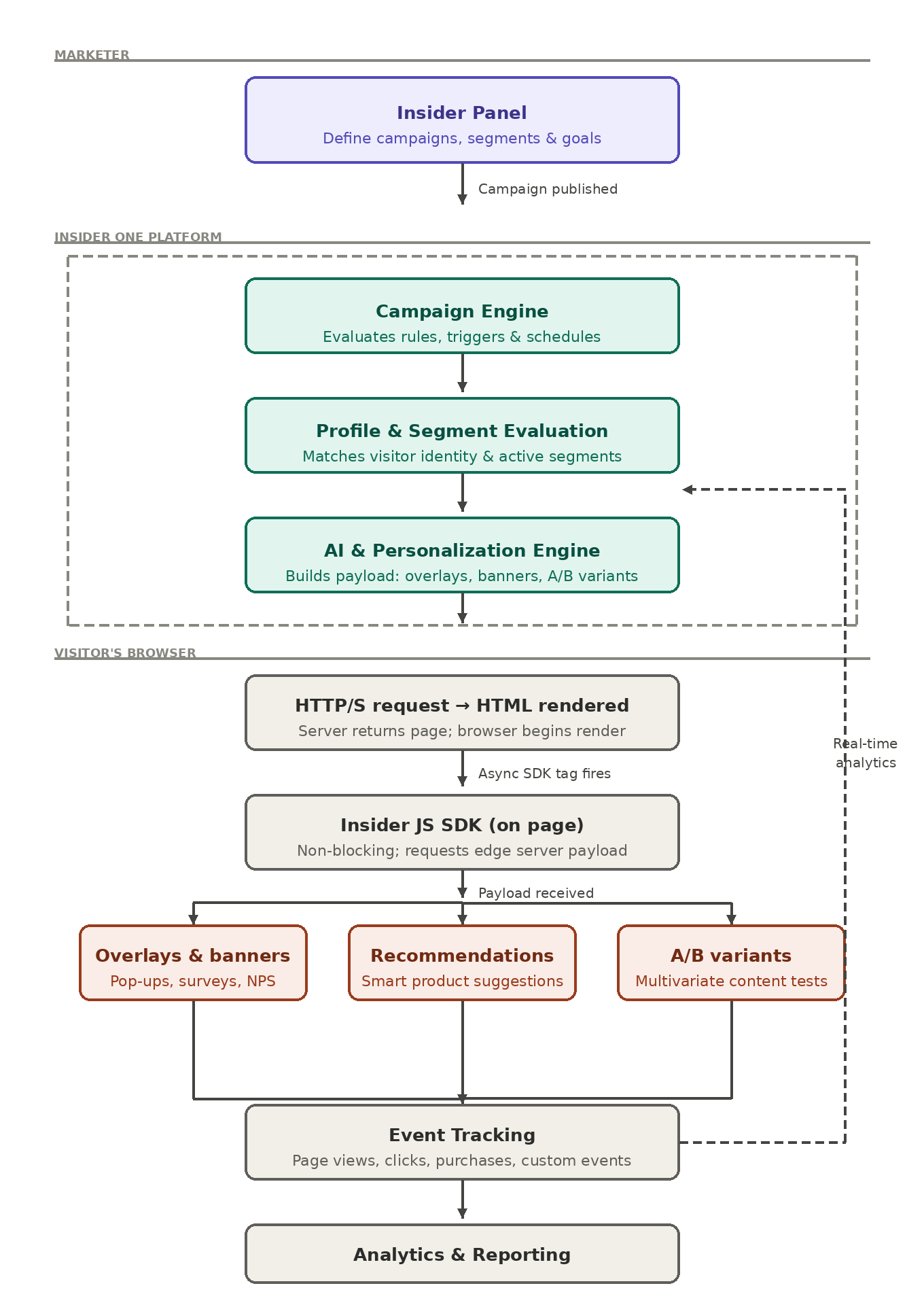
When a visitor lands on your website, Insider One delivers real-time personalization without impacting page load speed. Here is the step-by-step sequence:
Step 1: User opens a browser and navigates to your website's URL.
Step 2: Browser sends an HTTP/S request to your web server.
Step 3: Server responds with the HTML document, which the browser begins rendering.
Step 4: The Insider Web SDK tag fires an asynchronous request to Insider One's edge servers.
Step 5: Insider One evaluates the user's profile, active segments, and personalization rules.
Step 6: Personalization payload (overlays, banners, recommendations, A/B variants) is returned to the browser.
Step 7: The SDK renders personalizations as the page loads — seamlessly, without blocking the critical path.
Embedding the Web integration
Add the following snippet to your <head> or load it via your tag manager. Always load the Insider Web code as an asynchronous tag. This prevents any Insider-related latency from affecting your Core Web Vitals scores.
<script async src="//{partnerName}.api.useinsider.com/ins.js?id={partnerId}"></script>Mobile channel
Insider One simplifies your lives by helping you connect your mobile app data, understand how your app users behave, and predict what they'll do next with the help of AI. You can create captivating in-app experiences, deliver timely push notifications, and build brand love at scale. Then, how does Insider One do it on your mobile app? How does it help you engage with your app audience and, therefore, raise your ROI?
The logic behind
Below are the steps in sequence showing how Insider One works in your mobile app.
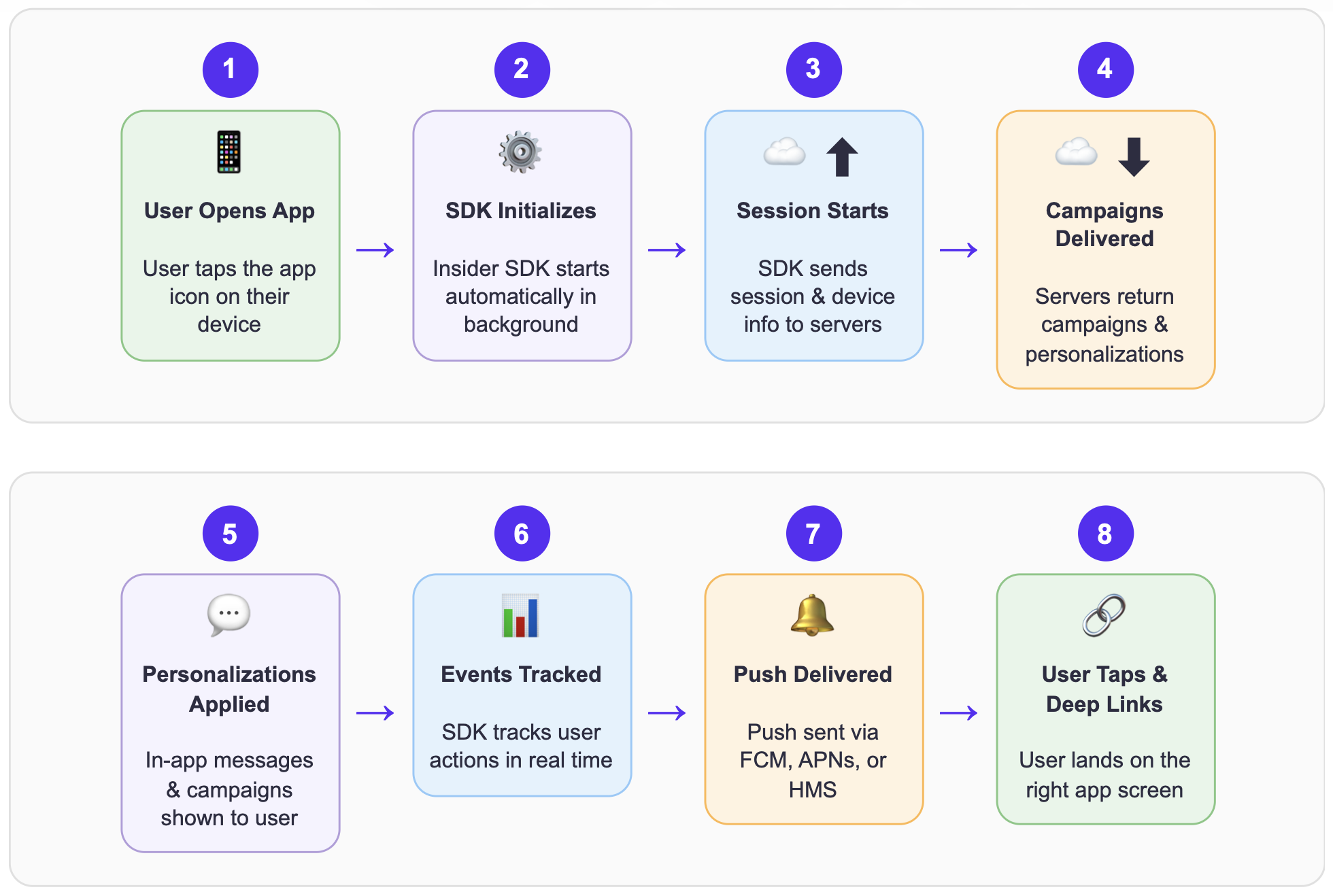
Step 1: The user opens the mobile app on their device (iOS, Android, or Huawei).
Step 2: The Insider SDK initializes automatically in the background as the app launches. This happens seamlessly without affecting the app's loading speed.
Step 3: The SDK creates a new session and sends a session start request to Insider One's servers, including device information and user attributes.
Step 4: Insider One's servers check the request and return active campaigns, in-app messages, and personalization settings configured for that app.
Step 5: The SDK applies the retrieved personalizations, displaying in-app messages, updating content, and activating targeted campaigns, while the user interacts with the app.
Step 6: As the user navigates through the app, the SDK tracks events (page views, product interactions, purchases) and sends them to Insider One's servers for real-time analytics.
Step 7: When a push notification campaign is triggered, Insider One's servers deliver the notification through the appropriate platform service (Firebase for Android, APNs for iOS, HMS for Huawei) directly to the user's device.
Step 8: The user receives the push notification and can tap it to deep-link back into a specific screen within the app.
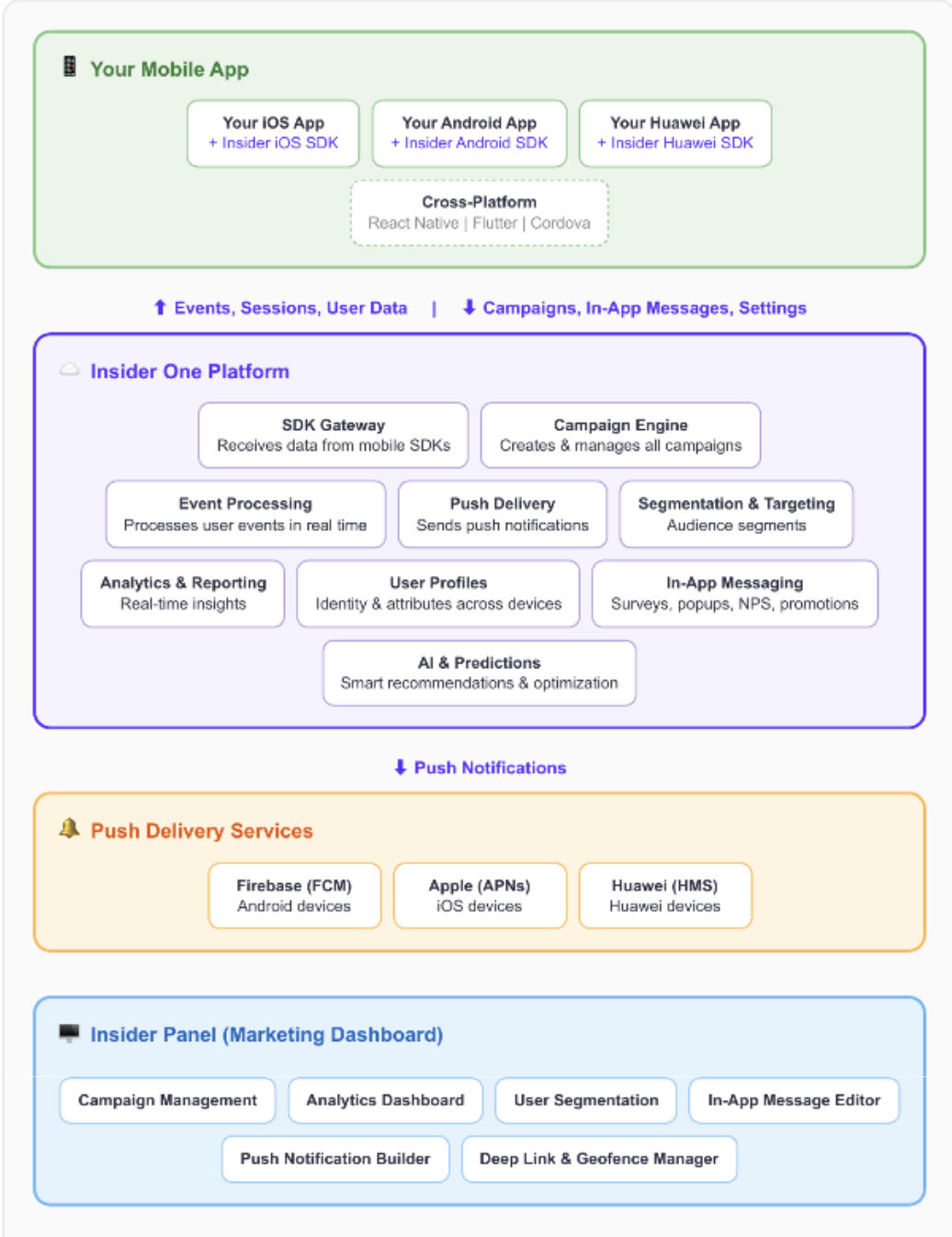
Architecture overview
The Insider Mobile SDK architecture provides a seamless bridge between your mobile application and a powerful suite of engagement tools, enabling real-time data collection and automated marketing actions. By integrating localized SDKs with a centralized processing hub, the platform ensures that user behaviors are instantly transformed into personalized experiences across iOS, Android, and Huawei devices.
Integration
You need to integrate the Insider SDK into your mobile app, which can be easily done using various methods depending on your
platform:
Android: Add the Insider SDK as a Gradle dependency in your app's build configuration.
iOS: Install the Insider SDK via CocoaPods or Swift Package Manager.
Cross-platform: Use the Insider plugins for React Native, Flutter, or Cordova to integrate once and deploy across platforms.
Then, you can start using Insider One's mobile engagement services.
The following code snippets show how to initialize the Insider SDK in your mobile app:
Insider.Instance.init(application,
"partnerName");
Insider.init(launchOptions: launchOptions, partnerName: "partnerName")partnerName is your partner name written on the InOne panel.
The Insider SDK initializes asynchronously by default. This means the SDK loads independently of your app, so Insider One
cannot affect your app's loading speed. Your app doesn't wait for the SDK to load, and users can access the app regardless of the SDK's connection status.
Key capabilities
Once the Insider SDK is integrated into your mobile app, the following capabilities become available:
Push notifications
Deliver personalized push notifications to your users across all platforms, Firebase Cloud Messaging (FCM) for Android, Apple Push Notification service (APNs) for iOS, and Huawei Mobile Services (HMS) for Huawei devices. Schedule campaigns, set up recurring messages, and trigger notifications based on user behavior.
InApp messaging
Display contextual messages, surveys, NPS prompts, and promotional content to users while they are actively using your app. In-app messages support rich media, action buttons, and deep links.
Event tracking
Track user behavior automatically and with custom events. Monitor page views, product interactions, add-to-cart actions, purchases, and any custom events relevant to your business. All data flows to Insider One's analytics in real time.
User identification
Recognize users across devices and sessions. The SDK supports multiple identifiers (email, phone number, user ID, custom identifiers) to unify user profiles and enable personalized experiences.
Smart recommendations
Leverage AI-powered product recommendations tailored to each user's browsing and purchase history, delivered directly within your app.
Geofencing
Trigger location-based campaigns when users enter or leave defined geographic areas. Engage users with relevant messages based on their physical location.
App cards
Create persistent, swipeable card-based messages within your app that users can browse at their convenience — similar to an in-app notification center.
Content optimizer
Run A/B tests on your mobile content to find what resonates best wit st with your audience. Optimize push notification copy, in-app messages, and campaign creatives for maximum engagement.
Push notification delivery
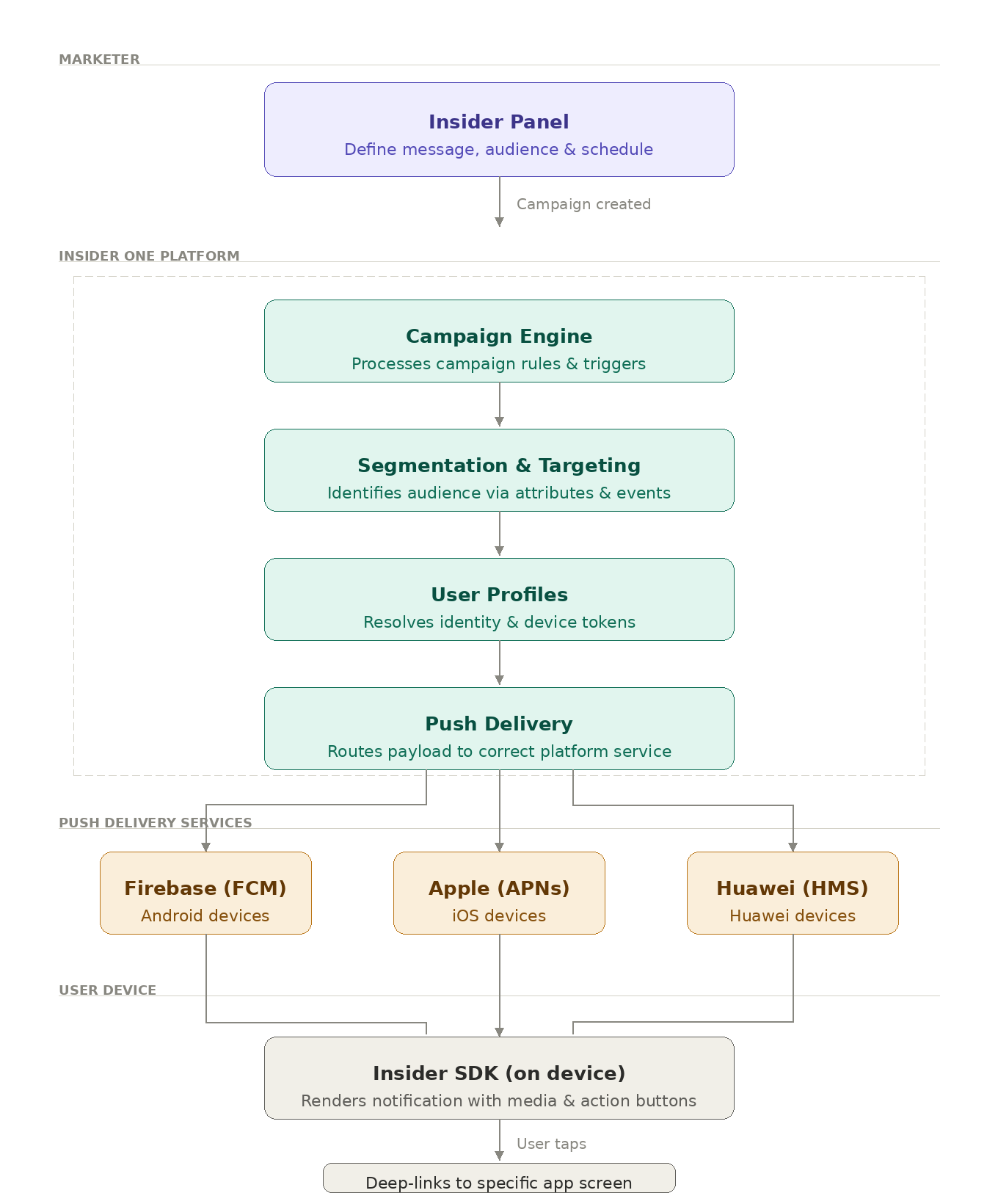
Push notification delivery follows a simple flow:
1. Campaign creation: A marketer creates a push notification campaign in the Insider panel, defining the message content,
target audience, and delivery schedule.
2. Audience segmentation: Insider One's servers identify the target audience based on the configured segments, user
attributes, behaviors, events, and more.
3. Platform delivery: The notification is delivered through the appropriate platform service:
Firebase Cloud Messaging (FCM) for Android devices
Apple Push Notification service (APNs) for iOS devices
Huawei Mobile Services (HMS) for Huawei devices
4. Device display: The Insider SDK on the user's device handles the notification display, including rich media, action buttons,
and sound.
5. Deep linking: When the user taps the notification, the SDK navigates them to the specific screen within the app as
configured in the campaign.
Engagement channels
All channels share the same unified profile, AI engine, and campaign builder, enabling seamless orchestration across every digital touchpoint.
Channel | Via | Description | Use cases |
|---|---|---|---|
App push | APNs, FCM | iOS & Android push notifications. Supports rich media, action buttons, and deep links | Cart abandonment, order updates, flash sales |
Web push | Service worker | Browser push delivered even when the user is not on your site | Price drops, back-in-stock, breaking news |
ESP | Lifecycle and campaign emails. Dynamic content blocks adapt per user | Onboarding, re-engagement, promotions | |
SMS & MMS and RCS | SSP | Transactional and promotional messaging personalized with profile and behavioral data. | Order updates, appointment reminders |
Meta | Conversational messaging via Meta Business API. Order updates, support flows, campaigns. | Support, receipts, campaign flows | |
Retargeting ads | Native connector | Sync Insider One segments to Meta, Google, and other ad platforms. | Lookalike audiences, retargeting, suppression |
Web personalization | Web SDK | Overlays, banners, sticky bars, exit-intent, smart recommenders rendered via the Web SDK. | Homepage, PDP, checkout personalization |
InApp | App SDK | Native in-app messages, stories, NPS surveys, tooltips triggered in real time. | Feature discovery, loyalty nudges, surveys |
Data processing & unified profiles
All data ingested by Insider One, regardless of source, passes through a three-stage processing pipeline before being stored in the unified user profile.
Data validation: Schema enforcement and type checking of incoming events and attributes.
Data unification (Identity Resolution): Merges anonymous and known user records across devices and sessions into a single, persistent profile using deterministic and probabilistic matching.
Each unified profile stores:
User attributes (demographics, preferences, custom fields)
Behavioral events (page views, product interactions, purchases)
Predictive group memberships (e.g. likely to churn, high purchase intent)
Engagement data (channel interactions, campaign responses)
AI-generated recommendations (next best product, next best channel, next best action)
AI decision engine & orchestration
The AI Decision Engine evaluates every user interaction in real time and determines the optimal experience to deliver across any channel.
Core capabilities
Dynamic content & liquid logic: Render personalized content blocks using user attributes, behavioral data, and predictive signals, no code required.
Real-time event / API triggers: Fire campaigns or in-app experiences the moment a user performs a specific action (e.g., views a product 3 times, abandons a cart).
User journeys (Architect): Visual drag-and-drop journey builder that orchestrates multi-step, cross-channel flows with branching logic, A/B splits, and wait conditions.
Audience sync: Push Insider One segments to ad platforms and ESPs in real time for consistent targeting across paid and owned channels.
Agent One
Agent One extends the platform with AI-powered conversational agents:
Support agent: Handles customer service inquiries, order lookups, and FAQs, contextually aware of each user's profile and history.
Shopping agent: Guides users through product discovery, comparisons, and purchase, powered by your product catalog and user preferences.
Data export
Insider One can push processed data and engagement signals back into your data stack, keeping your warehouse and BI tools in sync.
Export Method | Use Case |
|---|---|
Direct export to AWS S3 | Scheduled or event-driven file drops of user profiles, events, or campaign data into your S3 bucket. |
Direct export to GCP | Same as above, targeting Google Cloud Storage or BigQuery. |
Batch Export API / CSV | Pull exports programmatically or download as CSV from the Insider One panel. |
Data stream via Webhook | Real-time event streaming to any endpoint, CRMs, data pipelines, custom services. |
Snowflake Data Sharing | Zero-copy data sharing directly into your Snowflake account via Snowflake's secure sharing protocol. |
Data export pipelines must be configured by your Insider One implementation team. Contact the Insider One team or refer to the Data Export guide for setup instructions.