Where are the integration steps for Template Store?
Template Store products do not require any extra integration. Template Store is fully usable after the basic integration is completed.
Can we give out coupon codes without asking users to leave their email addresses on Wheel of Fortune?
Yes, you can. When Lead Collection is toggled off, Wheel of Fortune does not ask users to leave their email addresses.
Can we assign the winner slice on Wheel of Fortune randomly?
No, you must assign one winner slice for each wheel.
How does Wheel of Fortune work? Are the coupon codes considered as used when users click the Copy button?
The flow functions the same way In-Apps do. You can either display Wheel of Fortune when a session starts or when a particular event is performed. When no coupon code is left, the campaign stops displaying. Coupon codes are considered as used when the campaign receives an impression, whether they are actually applied or not. Refer to Coupon Management on App Templates for further information.
Is it possible to assign multiple winner slices and set their probability ratio?
Only one slice can be assigned as the winner.
Why isn't our social proof campaign visible?
If your social proof campaigns are not visible on all product pages, make sure to have integrated the Social Proof method correctly in your app. Refer to Android, iOS, React Native, Cordova, and Flutter pages for further details.
Why cannot we see our app template?
If you cannot see your app template campaign, you can check the following:
1. Confirm that the Insider SDK version is up to date.
2. Ensure the correct conditions are chosen for the respective segment.
3. Verify that time zone settings are set within Mobile App Settings.
4. Check campaign rules.
Ensure that the mobile app open event (session_start) is triggered properly. If this event is not triggered when the app is opened, Insider system cannot collect data from the user or determine whether the app is opened or not. Also, check whether your application can disable/override in-app campaigns due to any kind of delay defined on your end, if any, and whether the priority of the campaign is set to 1.
Ensure that the event integration is completed properly. You can test your integration on the Test Lab.
Check the re-eligibility to understand the frequency conditions for displaying the template.
5. Check the campaign segment to ensure that the events and attributes integration is within the segment criteria. You can check it on the Test Lab or segment the related attributes and/or events to see whether the audience is available for the selected attributes and events.
6. Check the Global Frequency Capping for In-App and Template Store to understand if some of the users are not able to see the campaign. Also, check if the campaign is displayed to users multiple times.
7. Parameters with string array type don’t work in app templates and app surveys.
8. Campaigns with coupon lists inside may not be visible due to the uploaded coupon codes’ content. If any invalid characters are present, the app templates may not be visible. Also, if the coupon codes expire or are used in the respective variation, not only this variation but the entire campaign will be changed to the passive status. You can use the "Use Up All Coupons in All Variants" option to redirect users from variants where all coupon codes are used to different variants.
9. If the template width is larger than the device screen width, the template is not displayed and is dismissed. In this case, a warning is displayed at the Design step indicating that the template dimensions may not be compatible with some users' device. We recommend checking the template preview across different app device models to ensure compatibility.
What does the "processing" status indicate?
The "processing" status is visible during the creation of the enhanced templates.
How can we duplicate an app template campaign?
You can duplicate the campaigns that has a selected app template.
Click the three-dot menu, then click Duplicate.
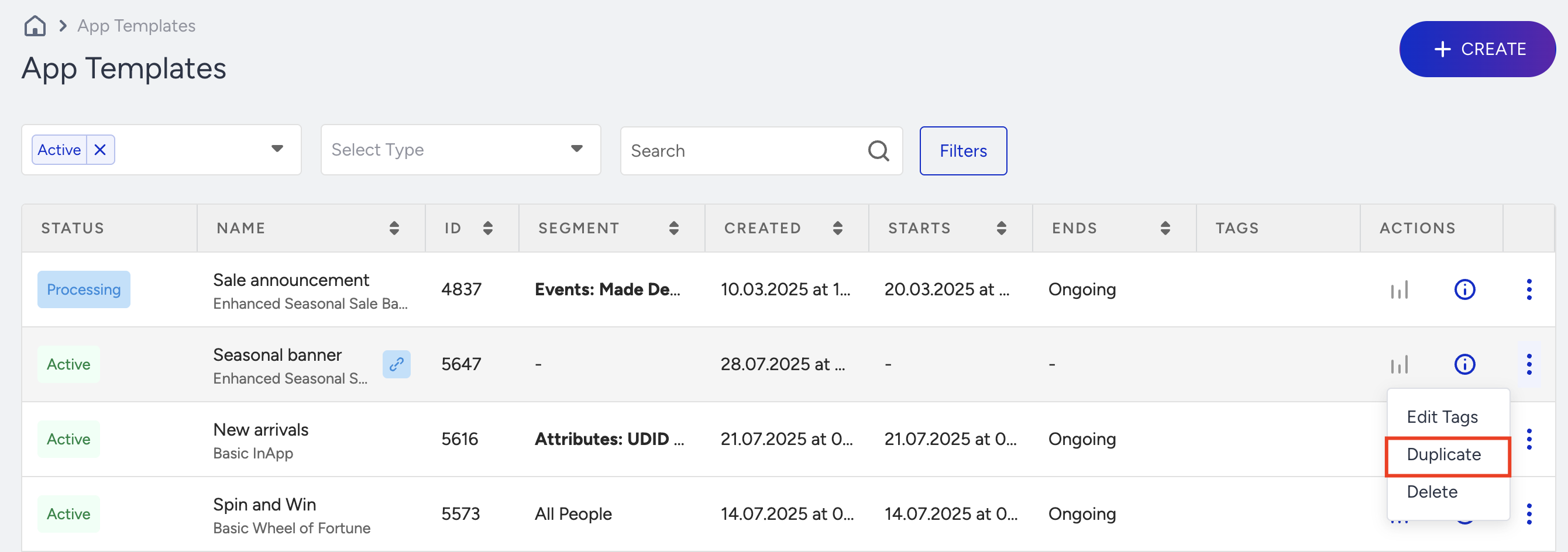
The Duplicate button will be unavailable if there is no template selected in the respective campaign.