Eureka SDK Campaign Implementation

Prev Next

Eureka SDK campaigns allow you to integrate Insider One's AI-driven product recommendations and search engine into your listing pages. This integration enables side-by-side A/B testing between Insider One’s predictive data and your existing internal data sources.

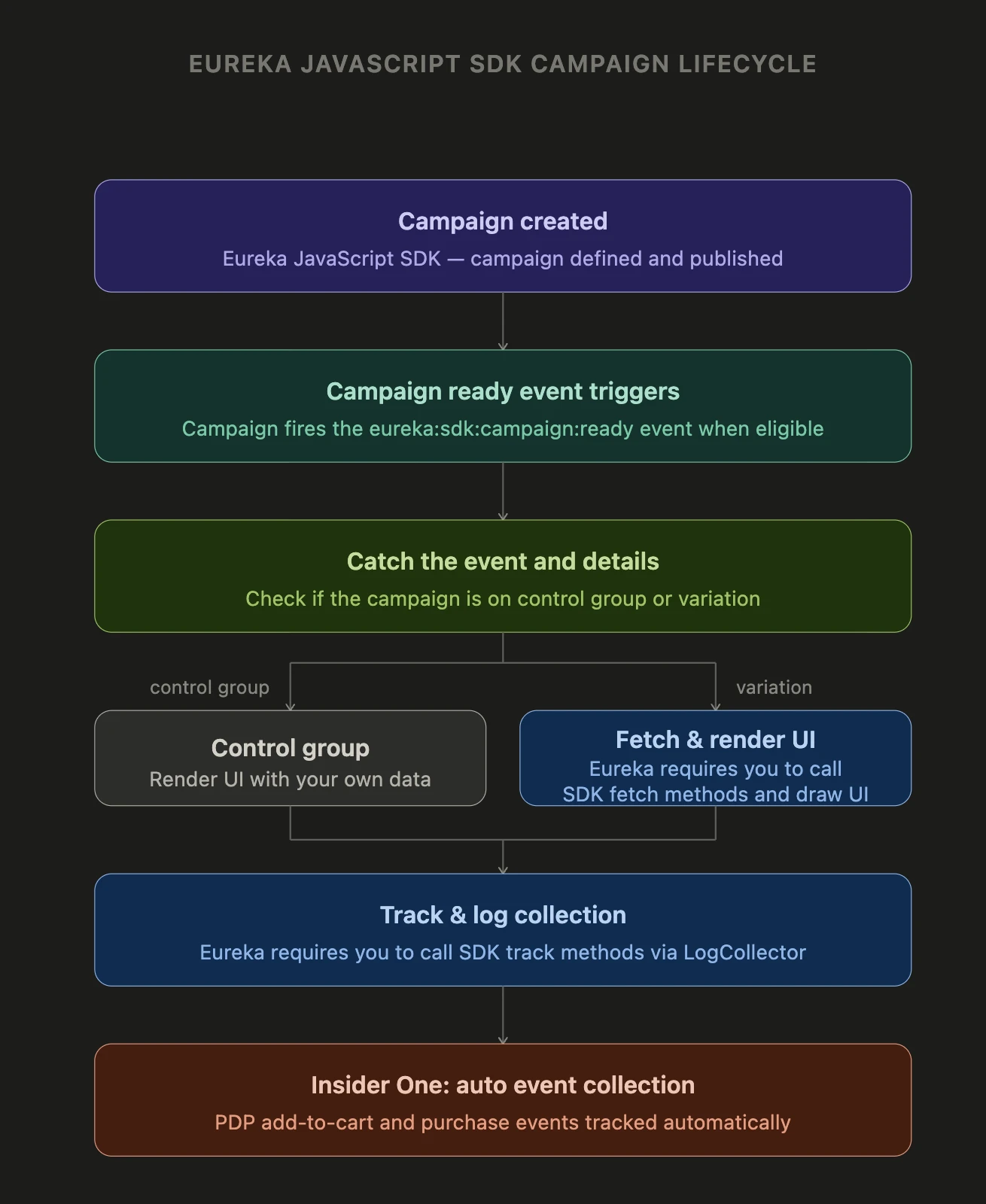
The following sequence outlines the end-to-end technical implementation of a Eureka SDK campaign:

Campaign Created (Insider One's InOne Panel)
                ↓
User visits page → Segment check → Rule check
                ↓
eureka:sdk:campaign:ready event fired
                ↓
You call track methods to log listing views, clicks
                ↓
Insider One auto-collects PDP add to carts and purchases

Eureka SDK Campaign Overview

The new SDK campaign type, JavaScript SDK, is available for Eureka. Within this campaign, you can choose multiple platforms: Tablet, Mobile, and Desktop.

For the selected platforms, with a single campaign, you manage your listing pages.

After selecting the Campaign Type and Platform, you access the Design step, where you create variations based on your use cases. Variations are used to fetch products from the SDK and draw listing pages. The Control Group is used for your own data source.

In the Segments and Rules steps, you choose the audience and the trigger conditions for the campaign.

Finally, you use the launch step to initialize the campaign.

High Level Flow

The Eureka SDK implementation follows a structured lifecycle from configuration to event collection:

  • Design step: Create variations and assign strategies to each variation. A default control group uses the partner's own data source for A/B comparison.

  • Segments step: Define which users will be eligible (e.g., all users, specific segments).

  • Rules step: Define which pages and conditions trigger the campaign (e.g., category pages, search pages).

  • When the page/rule condition is met, the eureka:sdk:campaign:ready event is dispatched.

  • The event data contains campId, the variation/campaign ID to use in all subsequent SDK calls.

  • You perform a control group check in this event; if not in the control group, you fetch product data using the SDK fetch methods and render the search-listing, category-listing, and brand-listing pages in your own UI.

  • Logs sent from these pages are collected via LogCollector methods; both static fields (filled by you) and dynamic fields (added by the SDK) are converted into an event-API-compatible payload.

Log collection for popup campaign is already handled by the InOne platform; logs should not be triggered via the SDK for popup variations.

Event Listening Example

For an SDK campaign, Insider One loads no content (HTML/CSS); only the eureka:sdk:campaign:ready event is fired, and you draw your listing pages using SDK fetch and your own UI.

You listen for the campaign-ready moment as follows:

Insider.eventManager.once('eureka:sdk:campaign:ready', function (event, data) {
    const variationId = data.id;
    const isControlGroup = Insider.campaign.isControlGroup(campId);

    if (!isControlGroup) {
        // Variation: fetch product data via SDK and draw the page
        Insider.eureka.fetch.search(campId, 'iphone 11', {}).then(function (response) {
            response.items.forEach(function (item) {
              /* draw page with data */
            });
        });
    } else {
      //Control group: you draw the page with their own data source
    }

    // Log: page view (if needed for both control and variation)
    Insider.eureka.track.productListingView(campId, 'Women~Shoes~Trainers', { /* payload */ });
});

Alternatively, check control group first and then listen for the event:

const campId = 123; // From panel
const isControlGroup = Insider.eureka.isControlGroup(campId);

if (isControlGroup) {
    // Draw listing page with your own data source
} else {
    Insider.eventManager.once('eureka:sdk:campaign:ready', function (event, data) {
        const id = data.campId != null ? data.campId : data.id;
      
        Insider.eureka.fetch.search(id, 'iphone 11', {}).then(function (response) {
            response.items.forEach(function (item) {
              /* draw page with data */
            });
        });
      
        Insider.eureka.track.productListingView(id, 'man', { /* payload */ });
    });
}

Control Group Check

To choose the data source when drawing the listing page or pop-up (for A/B testing):

  • Control group: You use your own data source.

  • Variation: You use Insider One data via SDK fetch methods.

Method:

Insider.eureka.isControlGroup(campId); //with the builderId of the campaign
Insider.campaign.isControlGroup(variationId); //with the variationId of the campaign
  • Parameter: campId/variationId (from event payload or config).

  • Returns: true → control group, false → variation or not in segment.

SDK Fetch Methods

All Eureka SDK methods for fetching items are accessible under Insider.eureka.fetch namespace:

All fetch methods return a Promise. Use the campaign/builder identifier from the event as campId.

Search Method

  • Usage: This method fetches data from the search popup or the search listing page.

  • Method: Insider.eureka.fetch.search(campId, query, options)

    • campId: Campaign/builder id.

    • query: Search text.

    • options (optional): pagination: { from, size }, sorting, facets (EurekaSearchFacet[]).

Example:

Insider.eureka.fetch.search(999999, 'iphone 11', {
    pagination: { from: 0, size: 10 },
    sorting: 'Relevancy',
    facets: [{ field: 'price_en', values: ['500', '2000'] }]
}).then(function (response) {
    // Draw search-listing page with response.data.items
});

Product Listing (Category / Brand / All Products) Methods

  • Usage: This method will be used to fetch data of category and brand listing pages or all products.

  • Method: Insider.eureka.fetch.productListing(campId, collectionType, listingPageName, options)

    • campId: Campaign/builder id.

    • collectionType: 'Category' | 'Brand' | 'AllProducts'.

    • listingPageName: Category or brand hierarchy (e.g., 'Women~Shoes~Trainers' ). Can be empty for AllProducts.

    • options (optional): pagination, sorting, onlyId, facets.

Example – Category listing:

Insider.eureka.fetch.productListing(470, 'Category', 'Women~Shoes~Trainers', {
    pagination: { from: 0, size: 25 },
    sorting: 'Relevancy'
}).then(function (response) {
    // Draw category-listing page with response
});

Example – Brand listing:

Insider.eureka.fetch.productListing(470, 'Brand', 'Nike', {}).then(function (response) {
    // Draw brand-listing page
});

Example – All products:

Insider.eureka.fetch.productListing(470, 'AllProducts', '', {}).then(function (response) {
    // Draw listing page
});

Other Fetch Methods

  • Suggestion: Insider.eureka.fetch.suggestion(campId, query) – suggestion query.

  • Popular search: Insider.eureka.fetch.popularSearch(campId).

  • Recent search: Insider.eureka.fetch.recentSearch(campId).

  • Clear recent search: Insider.eureka.fetch.clearRecentSearch(campId, queryId) (queryId optional).

For invalid parameters (e.g. campId/query), the Validator logs a warning and the method returns Promise.reject(); the app should handle errors (e.g. .catch()).

While giving listingPageName as parameter, format must be like 'Women~Shoes~Trainers' that categories will be separated with a Tilde character.

Eureka SDK Log Collection

All Eureka SDK log collection methods are accessible under the Insider.eureka.track namespace:

Insider.eureka.track.productListingView(campId, listingPageName, payload)
Insider.eureka.track.search(campId, query, payload)
Insider.eureka.track.productClickAfterListing(campId, listingPageName, payload)
Insider.eureka.track.productClickAfterSearch(campId, query, payload)
Insider.eureka.track.productAddToCartAfterListing(campId, listingPageName, payload)
Insider.eureka.track.productAddToCartAfterSearch(campId, query, payload)

Two types of logs are available. Logs you send, like search and click, and auto-collected logs, like addToCart and purchase.

Logs you send

You call Insider.eureka.track methods for the events below and fill static fields in the payload. The SDK adds dynamic fields (traceId, sessionId, integrationType, platform, variationId, currency conversion, etc.) and sends an event-API-compatible payload to the Event Collection API.

For category and brand listing pages, you use those methods:

Event / logType

Track Method

Description

Page view (listing)

productListingView

Listing page view

Product click (listing)

productClickAfterListing

Product click from listing

Add to cart (listing)

productAddToCartAfterListing

Add to cart from listing

For search pop-up and search listing pages, you use those methods:

Event / logType

Track Method

Description

Search (search)

search

Search performed

Product click (search)

productClickAfterSearch

Product click from search results

Add to cart (search)

productAddToCartAfterSearch

Add to cart from search results

Automatically Collected Logs

For addToCart and purchase, the InOne platform automatically collects logs; the partner does not need to call Insider.eureka.track.*.

logType

Meaning

Where / how collected

3

addToCart

When the user adds to cart on the PDP (product detail page)

4

purchase

When the sale is completed on the after-payment-page (success) page

logType 3 – Add to Cart (on PDP)

  • When: User clicks Add to cart on the product detail page (PDP).

  • How: When you call SDK track methods for click or add-to-cart on listing pages (search/category/brand), the SDK writes the product to the referred products storage. When the user adds the same product to the cart from the PDP:

  • Code Base:

    • Your page triggers the add-to-cart action (e.g. Insider.utils.product.setCategory() or integration-specific callback).

    • The platform runs ProductDetailPageLogs.store('addedToCart').

    • The AddToCart module matches the current PDP product (product id / groupCode) with referred products storage (StorageFinder).

    • If there is a match and a product page (click) log has already been sent for that product, the logType 3 (addToCart) log is created and sent automatically, and the referred product record is updated.

Click/add-to-cart from listing is marked as referred via SDK track; add-to-cart on PDP is collected automatically; you don’t make an extra track call.

logType 4 – Purchase

  • When: User lands on the post-payment (thank you / success) page and the standard sales log flow runs.

  • How: SalesLog.send() is triggered on the post-payment page (e.g., isOnAfterPaymentPage rule).

  • Code Base:

    • PurchaseLog.store() is called, registering a one-time listener for log:sent.eurekaPurchaseLog.

    • When the sales log is sent, this event is fired with campId (variation id), paidProducts (products in the payment), and salesType (e.g., variation sales/bounce sales).

    • PurchaseLog reads the storage for the referred products for that campId and matches the sold products (paidProducts) with the referred products. If previously referred (add-to-cart) products are on sale, a logType 4 (purchase) log is created and sent to the Eureka event API; the campaign analytics storage for that campaign is cleared.

The sale is processed by the existing sales log flow; the Eureka purchase log is produced automatically; you don’t call an Eureka track purchase method.

Common Points

  • BaseEurekaLog._isAutoCollectLog(logType): eureka-added-to-cart and eureka-purchased are treated as "auto collect"; fields like source / listValue in the payload are read from referred product data.

  • Referred products: Filled by SDK track (click / addToCart) on listing pages; PDP addToCart and purchase generate logs automatically based on this storage.

  • Your responsibility: Call click and addToCart track methods correctly on listing pages; do not make extra Eureka track calls for add-to-cart on PDP and purchase.

Eureka SDK Log Collection Implementation

All track methods are exposed under Insider.eureka.track.*. You supply static fields in the payload; the SDK adds dynamic fields and sends the final payload to the Event Collection API.

productListingView

Logs a category or brand listing page view. Sends a log type 5 event.

Insider.eureka.track.productListingView(campId, listingPageName, payload)

Example:

Insider.eureka.track.productListingView(470, 'Women~Shoes~Trainers', {
    pagination: {
        resultCount: 84,
        itemsPerPage: 24,
        totalPages: 4,
        currentPage: 1,
    },
    sorting: 'Relevancy',
    facets: [
        { label: 'Price', field: 'price_en', values: ['500', '2000'] },
    ],
    products: [
        { id: '33283WW-063', groupCode: 'shoe-group-1', price: 1299.99, displayPosition: 1 },
        { id: '33284WW-064', groupCode: 'shoe-group-2', price: 899.99, displayPosition: 2 },
    ],
});

Method Parameters

Field

Description

Type

Static/Dynamic

Default

campId

Campaign/Builder ID received from the eureka:sdk:campaign:ready event

Number or String

Static (you provide)

-

listingPageName

Listing page name. Use ~ as a hierarchy separator (e.g., Women~Shoes~Trainers)

String

Static (you provide)

-

payload

Event payload object containing all additional event data

Object

Static (you provide)

-

Payload: Input Fields (you provide)

Field

Description

Type

Required

Validation

Default

products

Array of product objects displayed on the listing page

Array

Yes

Reported in validations if missing or not an array

-

products[].id

Product identifier or SKU

String

Yes

Reported in validations if missing or not an string

-

products[].price

Product price in the current currency

Number

Yes

Reported in validations if missing or not an number

-

products[].groupCode

Product variant group code

String

No

-

-

products[].displayPosition

Position of the product in the listing (1-indexed)

Number

No

-

-

pagination

Object containing pagination metadata

Object

No

-

{}

pagination.resultCount

Total number of results available

Number

Yes

Reported in validations if missing or not a number

1

pagination.itemsPerPage

Number of products shown per page

Number

No

-

0

pagination.totalPages

Total number of pages

Number

No

-

0

pagination.currentPage

Current page number (1-indexed)

Number

No

-

0

sorting

Sort strategy currently applied on the page (e.g., 'Relevancy', 'Price Ascending')

String

No

-

'Relevancy'

facets

Active filter conditions applied by the user

Array

No

-

[]

facets[].label

Human-readable label for the filter

String

No

-

-

facets[].field

Filter field name

String

No

-

-

facets[].values

Array of active filter values

Array

No

-

-

source

Event source type. Override to 'brand-listing' for brand pages

String

No

-

'category-listing'

integrationType

Integration type override. Set to 'api' only if fetching data via direct API instead of SDK

String

No

-

'sdk'

strategyId

Insider One strategy ID for this variation

String

No

-

-

variationId

Manual variation ID override. For advanced API integration scenarios only

Number or String

No

-

Auto-resolved from user segments

traceId

Manual trace ID override. Use when linking events across pages manually

String

No

-

Auto-generated per listing view

Payload: Auto-Collected Fields (SDK-Injected)

These fields are automatically added by the SDK. You do not need to provide them.

Field

Description

Type

Source

eventType

Event type identifier

String

Always 'collection'

builderId

Mapped from the campId method parameter

Number or String

Equal to the campId argument

traceId

Session trace identifier linking this view to subsequent click and cart events

String

Always generates a new traceId for each listing view

sessionId

Current session identifier

String

Session.getSessionId()

userId

Current visitor user ID

String

UserId.get() — falls back to 'defaultUserId' if not set

platform

Visitor's detected platform

String

Browser.getPlatform() — One of 'desktop-web', 'mobile-web', 'tablet-web'

campId

Active variation ID resolved from user segments

Number

UserSegment.getActiveVariationByBuilderId(builderId)

products[].currency

Current site currency code

String

SystemRules.getCurrency()

products[].preferredCurrency

Your configured preferred currency

String

APISettings.misc.preferredCurrency

products[].convertedPrice

Product price converted to the preferred currency

Number

CurrencyService.getConvertedPrice()

search

Logs a search results page view. Sends a log type 1 event.

Insider.eureka.track.search(campId, query, payload)

Example:

Insider.eureka.track.search(999999, 'iphone 11', {
    pagination: {
        resultCount: 25,
        itemsPerPage: 24,
        totalPages: 2,
        currentPage: 1,
    },
    sorting: 'Relevancy',
    products: [
        { id: 'IP11-128-BLK', price: 999.99, displayPosition: 1 },
        { id: 'IP11-256-WHT', price: 1099.99, displayPosition: 2 },
    ],
});

Method Parameters

Field

Description

Type

Static/Dynamic

Default

campId

Campaign/Builder ID received from the eureka:sdk:campaign:ready event

Number or String

Static (you provide)

-

query

The search query string entered by the user

String

Static (you provide)

-

payload

Event payload object

Object

Static (you provide)

-

Payload: Input Fields (you provide)

Field

Description

Type

Required

Validation

Default

products

Array of product objects displayed on the listing page

Array

Yes

Reported in validations if missing or not an array

-

products[].id

Product identifier or SKU

String

Yes

Reported in validations if missing or not a string

-

products[].price

Product price in the current currency

Number

Yes

Reported in validations if missing or not a number

-

products[].groupCode

Product variant group code

String

No

-

-

products[].displayPosition

Position of the product in the listing (1-indexed)

Number

No

-

-

pagination

Pagination metadata

Object

No

-

{}

pagination.resultCount

Total number of search results

Number

Yes

Reported in validations if missing or not a number

1

pagination.itemsPerPage

Number of products shown per page

Number

No

-

0

pagination.totalPages

Total number of pages

Number

No

-

0

pagination.currentPage

Current page number (1-indexed)

Number

No

-

0

sorting

Sort strategy applied on the results page

String

No

-

'Relevancy'

facets

Active filter conditions applied by the user

Array

No

-

[]

facets[].label

Human-readable label for the filter

String

No

-

-

facets[].field

Filter field name

String

No

-

-

facets[].values

Array of active filter values

Array

No

-

-

source

Event source type

String

No

-

'search-listing'

integrationType

Integration type override

String

No

-

'sdk'

strategyId

Insider One strategy ID

String

No

-

-

variationId

Manual variation ID override

Number or String

No

-

Auto-resolved from user segments

traceId

Manual trace ID override

String

No

-

Reused if the same query; new if the query changed

Payload: Auto-Collected Fields (SDK-Injected)

Field

Description

Type

Source

eventType

Event type identifier

String

Always 'search'

builderId

Mapped from the campId method parameter

Number or String

Equal to the campId argument

query

The search query

String

Equal to the query argument

traceId

Session trace identifier

String

Reuses the previous traceId when the same query is searched again (e.g., pagination). Generates a new traceId when the query changes

sessionId

Current session identifier

String

Session.getSessionId()

userId

Current visitor user ID

String

UserId.get() — falls back to 'defaultUserId'

platform

Visitor's detected platform

String

One of 'desktop-web', 'mobile-web', 'tablet-web'

campId

Active variation ID resolved from user segments

Number

UserSegment.getActiveVariationByBuilderId(builderId)

products[].currency

Current site currency code

String

SystemRules.getCurrency()

products[].preferredCurrency

Your configured preferred currency

String

APISettings.misc.preferredCurrency

products[].convertedPrice

Product price converted to the preferred currency

Number

CurrencyService.getConvertedPrice()

productClickAfterListing

Logs a product click event from a category or brand listing page. Sends a log type 2 event.

Insider.eureka.track.productClickAfterListing(campId, listingPageName, payload)

Example:

Insider.eureka.track.productClickAfterListing(470, 'Women~Shoes~Trainers', {
    pagination: { resultCount: 84 },
    product: {
        id: '33283WW-063',
        groupCode: 'shoe-group-1',
        price: 1299.99,
        displayPosition: 3,
    },
});

Note on traceId / PDP:

If the click is sent on the same page (listing), traceId is set automatically by the SDK. If the click log is sent on the PDP, you must store the related and provide traceId (and sessionId if needed) in the payload.

An add-to-cart action does not trigger a click event automatically. To track both, call productClickAfterListing first, and then productAddToCartAfterListing.

After the event is sent, the SDK updates the referred product storage (eureka-referred-products-{campId} in localStorage), marking the product as clicked. This enables accurate purchase attribution when the user later adds to cart or  completes checkout.

Method Parameters

Field

Description

Type

Required

Validation

Static/Dynamic

Default

campId

Campaign/variation ID

Number or String

Yes

-

Static (you provide)

-

listingPageName

Same page name used in the preceding productListingView call

String

Yes

Reported in validations if missing or not a string

Static (you provide)

-

payload

Event payload object

Object

Yes

-

Static (you provide)

-

Payload: Input Fields (you provide)

Field

Description

Type

Required

Validation

Default

product

The clicked product object

Object

Yes

Reported in validations if missing or not an object

-

product.id

Product identifier or SKU

String

Yes

Reported in validations if missing or not a string

-

product.price

Product price

Number

Yes

Reported in validations if missing or not a number

-

product.groupCode

Product variant group code

String

No

-

-

product.displayPosition

Position where the product was displayed in the listing

Number

No

-

-

product.clickPosition

Position where the user clicked. If omitted, defaults to displayPosition

Number

No

-

Auto-set to displayPosition if omitted

pagination

Pagination metadata

Object

No

-

{}

pagination.resultCount

Total result count at the time of click

Number

Yes

Reported in validations if missing or not a number

1

pagination.itemsPerPage

Items per page

Number

No

-

0

pagination.totalPages

Total pages

Number

No

-

0

pagination.currentPage

Current page number

Number

No

-

0

sorting

Sort strategy active at the time of the click

String

No

-

'Relevancy'

facets

Active filters at the time of the click

Array

No

-

[]

source

Event source type

String

No

-

'category-listing'

integrationType

Integration type

String

No

-

'sdk'

strategyId

Insider One strategy ID

String

No

-

-

variationId

Manual variation ID override

Number or String

No

-

Auto-resolved

traceId

Manual trace ID override

String

No

-

Reused from the last productListingView for the matching source

Payload: Auto-Collected Fields (SDK-Injected)

Field

Description

Type

Source

eventType

Event type identifier

String

Always 'product-click'

builderId

Mapped from the campId method parameter

Number or String

Equal to the campId argument

product.listValue

Listing page name placed inside the product object

String

Equal to the listingPageName argument

product.traceId

Trace ID linking the click to the preceding listing view

String

Reused from the last productListingView with a matching source

product.sessionId

Current session identifier

String

Session.getSessionId()

product.currency

Current site currency

String

SystemRules.getCurrency()

product.preferredCurrency

Your preferred currency

String

APISettings.misc.preferredCurrency

product.convertedPrice

Price converted to the preferred currency

Number

CurrencyService.getConvertedPrice()

product.clickPosition

Click position (automatically set when not provided)

Number

Equal to product.displayPosition if clickPosition was not provided

userId

Current visitor user ID

String

UserId.get()

platform

Visitor's detected platform

String

One of 'desktop-web', 'mobile-web', 'tablet-web'

campId

Active variation ID from user segments

Number

UserSegment.getActiveVariationByBuilderId(builderId)

productClickAfterSearch

Logs a product click event from a search results page. Sends a log type 2 event.

Insider.eureka.track.productClickAfterSearch(campId, query, payload)

Example:

Insider.eureka.track.productClickAfterSearch(999999, 'iphone 11', {
    pagination: { resultCount: 25 },
    product: {
        id: 'IP11-128-BLK',
        price: 999.99,
        displayPosition: 2,
        clickPosition: 2,
    },
});

Note on traceId / PDP:

If the click is sent on the search results page (same page), traceId is set automatically. If the click log is sent on the PDP, you must provide traceId (and sessionId if needed) in the payload.

An add-to-cart action does NOT trigger a click event automatically. To track both, call productClickAfterListing first and then productAddToCartAfterListing.

After the event is sent, the SDK updates the referred product storage (eureka-referred-products-{campId} in localStorage), marking the product as clicked. This enables accurate purchase attribution when the user later adds to cart or  completes checkout.

Method Parameters

Field

Description

Type

Required

Validation

Static/Dynamic

Default

campId

Campaign/Variation ID

Number or String

Yes

-

Static (you provide)

-

query

The search query that led to this click. Must match the query used in the preceding search track call

String

Yes

Reported in validations if missing or not a string

Static (you provide)

-

payload

Event payload object

Object

Yes

Static (you provide)

-

Payload: Input Fields (you provide)

Field

Description

Type

Required

Validation

Default

product

The clicked product object

Object

Yes

Reported in validations if missing or not an object

-

products.id

Product identifier or SKU

String

Yes

Reported in validations if missing or not a string

-

product.price

Product price

Number

Yes

Reported in validations if missing or not a number

-

product.groupCode

Product variant group code

String

No

-

-

product.clickPosition

Position where the user clicked. If omitted, defaults to displayPosition

Number

No

-

Auto-set to displayPosition if omitted

pagination

Pagination metadata

Object

No

-

{}

pagination.resultCount

Total search result count at the time of click

Number

Yes

Reported in validations if missing or not a number

1

pagination.itemsPerPage

Items per page

Number

No

-

0

pagination.totalPages

Total pages

Number

No

-

0

pagination.currentPage

Current page

Number

No

-

0

sorting

Sort strategy active at the time of the click

String

No

-

'Relevancy'

facets

Active filters at the time of the click

Array

No

-

[]

source

Event source type

String

No

-

'search-listing'

integrationType

Integration type override

String

No

-

'sdk'

strategyId

Insider One strategy ID

String

No

-

-

variationId

Manual variation ID override

Number or String

No

-

Auto-resolved

traceId

Manual trace ID override

String

No

-

Reused from the last search track call

Payload: Auto-Collected Fields (SDK-Injected)

Field

Description

Type

Source

eventType

Event type identifier

String

Always 'product-click'

builderId

Mapped from the campId parameter

Number or String

Equal to the campId argument

product.query

Search query placed inside the product object

String

Equal to the query argument

product.traceId

Trace ID linking the click to the preceding search view

String

Reused from the last search track call with source 'search-listing'

product.sessionId

Current session identifier

String

Session.getSessionId()

product.currency

Current site currency

String

SystemRules.getCurrency()

product.preferredCurrency

Your preferred currency

String

APISettings.misc.preferredCurrency

product.convertedPrice

Price converted to the preferred currency

Number

CurrencyService.getConvertedPrice()

product.clickPosition

Click position (automatically set when not provided)

Number

Equal to product.displayPosition if clickPosition was not provided

userId

Current visitor user ID

String

UserId.get()

platform

Visitor's detected platform

String

One of 'desktop-web', 'mobile-web', 'tablet-web'

campId

Active variation ID from user segments

Number

UserSegment.getActiveVariationByBuilderId(builderId)

productAddToCartAfterListing

Logs an add-to-cart event triggered directly on a category or brand listing page. Sends a log type 3 event.

Insider.eureka.track.productAddToCartAfterListing(campId, listingPageName, payload)

Example:

Insider.eureka.track.productAddToCartAfterListing(470, 'Women~Shoes~Trainers', {
    pagination: { resultCount: 84 },
    product: {
        id: '33283WW-063',
        price: 1299.99,
        displayPosition: 3,
    },
});

After the event is sent, the SDK updates the referred product storage (eureka-referred-products-{campId} in localStorage), marking the product as added to cart. This enables accurate purchase attribution when the user later completes checkout.

When to call:

When the user clicks the Add to cart button on product widgets on listing pages (category-listing or brand-listing). That is, on category or brand listing, when the add-to-cart action is performed directly on the widget/product card.

Order matters:

This method does not trigger the click log. You must call the corresponding click method (productClickAfterListing) first, then this add to cart method. Add-to-cart on the PDP is collected automatically by the platform (logType 3); this method is not called on the PDP.

Note on traceId:

If add-to-cart is on the same listing page, traceId is set automatically. If the log is sent on the PDP, you must provide traceId (and sessionId if needed) in the payload.

Method Parameters

Field

Description

Type

Required

Validation

Static/Dynamic

Default

campId

Campaign/Variation ID

Number or String

Yes

-

Static (you provide)

-

listingPageName

Same page name used in the preceding productListingView call

String

Yes

Reported in validations if missing or not a string

Static (you provide)

-

payload

Event payload object

Object

Yes

-

Static (you provide)

-

Payload: Input Fields (you provide)

Field

Description

Type

Required

Validation

Default

product

The product added to cart

Object

Yes

Reported in validations if missing or not an object

-

product.id

Product identifier or SKU

String

Yes

Reported in validations if missing or not a string

-

product.price

Product price

Number

Yes

Reported in validations if missing or not a number

-

product.groupCode

Product variant group code

String

No

-

-

product.displayPosition

Position where the product was displayed in the listing

Number

No

-

-

product.clickPosition

Position where the user clicked the add-to-cart button

Number

No

-

Auto-set to displayPosition if omitted

pagination

Pagination metadata

Object

No

-

{}

pagination.resultCount

Total result count at the time of the action

Number

Yes

Reported in validations if missing or not a number

1

pagination.itemsPerPage

Items per page

Number

No

-

0

pagination.totalPages

Total pages

Number

No

-

0

pagination.currentPage

Current page

Number

No

-

0

sorting

Sort strategy active at the time of the action

String

No

-

'Relevancy'

facets

Active filters at the time of the action

Array

No

-

[]

source

Event source type

String

No

-

'category-listing'

integrationType

Integration type

String

No

-

'sdk'

strategyId

Insider One strategy ID

String

No

-

-

variationId

Manual variation ID override

Number or String

No

-

Auto-resolved

traceId

Manual trace ID override

String

No

-

Reused from the last productListingView for the matching source

Payload: Auto-Collected Fields (SDK-Injected)

Field

Description

Type

Source

eventType

Event type identifier

String

Always 'add-to-cart'

builderId

Mapped from the campId method parameter

Number or String

Equal to the campId argument

product.listValue

Listing page name placed inside the product object

String

Equal to the listingPageName argument

product.traceId

Trace ID linking the cart action to the preceding listing view

String

Reused from the last productListingView with source 'category-listing'

product.sessionId

Current session identifier

String

Session.getSessionId()

product.currency

Current site currency

String

SystemRules.getCurrency()

product.preferredCurrency

Your preferred currency

String

APISettings.misc.preferredCurrency

product.convertedPrice

Price converted to the preferred currency

Number

CurrencyService.getConvertedPrice()

product.clickPosition

Click position (automatically set when not provided)

Number

Equal to product.displayPosition if clickPosition was not provided

userId

Current visitor user ID

String

UserId.get()

platform

Visitor's detected platform

String

One of 'desktop-web', 'mobile-web', 'tablet-web'

campId

Active variation ID from user segments

Number

UserSegment.getActiveVariationByBuilderId(builderId)

productAddToCartAfterSearch

Logs an add-to-cart event triggered directly on a search results page. Sends a log type 3 event.

Insider.eureka.track.productAddToCartAfterSearch(campId, query, payload)

Example:

Insider.eureka.track.productAddToCartAfterSearch(999999, 'iphone 11', {
    pagination: { resultCount: 25 },
    product: {
        id: 'IP11-128-BLK',
        price: 999.99,
        displayPosition: 2,
    },
});

After the event is sent, the SDK updates the referred product storage (eureka-referred-products-{campId} in localStorage), marking the product as added to cart. This enables accurate purchase attribution when the user later completes checkout.

When to call:

When the user clicks the Add to cart button on product widgets on the search results page (search-listing). That is, on the search results list, when add-to-cart is performed directly on the widget/product card.

Order matters:

This method does not trigger the click log. You must call the corresponding click method (productClickAfterSearch) first, then this add to cart method. Add-to-cart on the PDP is collected automatically (logType 3); this method is not called on the PDP.

Note on traceId:

If add-to-cart is on the same search results page, traceId is set automatically. If the log is sent on the PDP, you must provide traceId (and sessionId if needed) in the payload.

Method Parameters

Field

Description

Type

Required

Validation

Static/Dynamic

Default

campId

Campaign/Variation ID

Number or String

Yes

-

Static (you provide)

-

query

The search query that led to this action. Must match the query used in the preceding search track call

String

Yes

Reported in validations if missing or not a string

Static (you provide)

-

payload

Event payload object

Object

Yes

Static (you provide)

-

Payload: Input Fields (you provide)

Field

Description

Type

Required

Validation

Default

product

The clicked product object

Object

Yes

Reported in validations if missing or not an object

-

product.id

Product identifier or SKU

String

Yes

Reported in validations if missing or not a string

-

product.price

Product price

Number

Yes

Reported in validations if missing or not a number

-

product.groupCode

Product variant group code

String

No

-

-

product.displayPosition

Position where the product was displayed in the search results

Number

No

-

-

product.clickPosition

Position where the user clicked the add-to-cart button

Number

No

-

Auto-set to displayPosition if omitted

pagination

Pagination metadata

Object

No

-

{}

pagination.resultCount

Total search result count at the time of the action

Number

Yes

Reported in validations if missing or not a number

1

pagination.itemsPerPage

Items per page

Number

No

-

0

pagination.totalPages

Total pages

Number

No

-

0

pagination.currentPage

Current page

Number

No

-

0

sorting

Sort strategy active at the time of the action

String

No

-

'Relevancy'

facets

Active filters at the time of the action

Array

No

-

[]

source

Event source type

String

No

-

'search-listing'

integrationType

Integration type override

String

No

-

'sdk'

strategyId

Insider One strategy ID

String

No

-

-

variationId

Manual variation ID override

Number or String

No

-

Auto-resolved

traceId

Manual trace ID override

String

No

-

Reused from the last search track call

Payload: Auto-Collected Fields (SDK-Injected)

Field

Description

Type

Source

eventType

Event type identifier

String

Always 'add-to-cart'

builderId

Mapped from the campId parameter

Number or String

Equal to the campId argument

product.query

Search query placed inside the product object

String

Equal to the query argument

product.traceId

Trace ID linking the cart action to the preceding search view

String

Reused from the last search track call with source 'search-listing'

product.sessionId

Current session identifier

String

Session.getSessionId()

product.currency

Current site currency

String

SystemRules.getCurrency()

product.preferredCurrency

Your preferred currency

String

APISettings.misc.preferredCurrency

product.convertedPrice

Price converted to the preferred currency

Number

CurrencyService.getConvertedPrice()

product.clickPosition

Click position (automatically set when not provided)

Number

Equal to product.displayPosition if clickPosition was not provided

userId

Current visitor user ID

String

UserId.get()

platform

Visitor's detected platform

String

One of 'desktop-web', 'mobile-web', 'tablet-web'

campId

Active variation ID from user segments

Number

UserSegment.getActiveVariationByBuilderId(builderId)

Field Specific Logics

TraceId

traceId is a session-scoped identifier that links listing views to subsequent click and cart events. It is auto-managed by the SDK and does not need to be provided manually in most cases.

Event

TraceId Behavior

productListingView

Always generates a new traceId

search

Reuses the last traceId when the same query is searched again (e.g., paginating results). Generates a new traceId when the query changes

productClickAfterListing

Reuses the traceId from the last productListingView with the matching source

productClickAfterSearch

Reuses the traceId from the last search track call

productAddToCartAfterListing

Same behavior as productClickAfterListing

productAddToCartAfterSearch

Same behavior as productClickAfterSearch

You can override the auto-generated traceId by including traceId in the payload:

Insider.eureka.track.productClickAfterSearch(campId, query, {
    traceId: 'custom-trace-id-here',
    product: { ... },
});

Source

The source field indicates which page/source type the log comes from. It is sent in the payload to the Event Collection API.

Source Value

Description

category-listing

Category listing page

search-listing

Search results page

brand-listing

Brand listing page

search-popup

Search popup (search in a modal)

Default Source per Track Method

If source is not provided in the payload, the SDK uses the default below for each track method:

Track Method

Default Source

Notes

productListingView

category-listing

Listing page view. For brand page, set source: 'brand-listing' in payload.

productClickAfterListing

category-listing

Click from listing. For brand page, set source: 'brand-listing'.

productAddToCartAfterListing

category-listing

Add to cart from listing. For brand page, set source: 'brand-listing'.

search

search-listing

Search log. For search popup, set source: 'search-popup' in payload.

productClickAfterSearch

search-listing

Click from search results. For popup click, set source: 'search-popup'.

productAddToCartAfterSearch

search-listing

Add to cart from search. For popup, set source: 'search-popup'.

In summary:

  • Listing methods (productListingView, productClickAfterListing, productAddToCartAfterListing): Default category-listing. For brand listing page, add source: 'brand-listing' to the payload.

  • Search methods (search, productClickAfterSearch, productAddToCartAfterSearch): Default search-listing. If the action happens in the search popup, add source: 'search-popup' to the payload.

Override (Setting Source Manually)

To specify a different source, set the source field in the track call payload:

// Brand listing page view
Insider.eureka.track.productListingView(470, 'Nike', {
  source: 'brand-listing',
  ..
});

// Search in popup
Insider.eureka.track.search(999999, 'phone', {
  source: 'search-popup',
  ..
});

Integration Types

Value

Description

'sdk'

Default. You use the Insider JS SDK (ins.js) for the integration.

'api'

You fetch data via direct API calls but sends log events via the SDK.

'web'

Web-based integration

'app'

Mobile app integration

When integrationType is set to 'api', the SDK uses builderId (the campId argument) directly as the variationId in the event payload, instead of resolving it from user segments.

Insider.eureka.track.search(campId, query, {
    integrationType: 'api',
    products: [...],
});

Track Methods - Validations

For track methods, the payload is validated with validateStaticFields.

For fetch methods, parameters (campId, query, collectionType, listingPageName, etc.) are validated via the Validator. On validation failure, fetch methods return Promise.reject() track methods still send the log and return status, validations.

Track Methods - Validated Fields Per Event Type

Event Type

Validated Field

Expected Type

Condition

All events

builderId

Number

Always

All events

pagination.resultCount

Number

Always

collection

listValue

String

Always

collection

products

Array

Always

collection

products[].id

String

For each product in the array

collection

products[].price

Number

For each product in the array

search

query

String

Always

search

products

Array

Always

search

products[].id

String

For each product in the array

search

products[].price

Number

For each product in the array

product-click

product

Object

Always

product-click

product.id

String

Always

product-click

product.price

Number

Always

product-click

listValue

String

Only when source is 'category-listing' or 'brand-listing'

product-click

query

String

Only when source is 'search-listing' or 'search-popup'

add-to-cart

product

Object

Always

add-to-cart

product.id

String

Always

add-to-cart

product.price

Number

Always

add-to-cart

listValue

String

Only when source is 'category-listing' or 'brand-listing'

add-to-cart

query

String

Only when source is 'search-listing' or 'search-popup'

Validation Error Message Format

{fieldPath} must be {expectedType} for log type {eventType}

Examples:

products[0].id must be string for log type collection
pagination.resultCount must be number for log type search
product.price must be number for log type product-click

Missing / Invalid Parameters and General Behavior

  • Track: Even with missing or incorrect field types, the SDK does not throw; the log is sent, and the return includes status: false, validations: [...].

  • Fetch: If a required parameter is invalid, the method returns Promise.reject() and no request is made.

  • General: Some flows may log console warnings for missing required parameters; you can use these during development.

Field Notes

traceId and Click / Add to Cart on PDP

traceId links a listing session (page view or search) with click/add-to-cart actions in the same chain. Who sets traceId depends on the log destination.

  • Same page (listing) – click/add-to-cart: When logType 1 (page view/collection) or logType 2 (search) is sent on the listing page, the SDK generates a traceId and stores it in lastTraceIds[source] within that page's JS context. When click or add-to-cart logs are sent on the same page, the SDK retrieves this lastTraceId via _getTraceId(), you don’t need to provide traceId.

  • On PDP – click/add-to-cart: Navigating from the listing to the PDP loads a new page, and the SDK's lastTraceIds are not persisted. Thus, traceId for logType 1 and logType 5 is not stored by the SDK on the PDP. Therefore, when sending click or add-to-cart logs on the PDP, you must include traceId (and sessionId if needed) in the payload to attribute the log to the listing session. Otherwise, the SDK generates a new traceId, breaking the attribution chain.

What you need to do:

  • (1) On listing: when sending logType 1, 2, or 5, carry the traceId to the PDP during navigation via local storage

  • (2) On PDP: when sending click or add-to-cart logs, add the related traceId in the storage to the payload.

Example (click on PDP, traceId from storage):

Insider.eureka.track._generateTraceId(); //store this value in local storage while sending pageView log.

Insider.eureka.track.productClickAfterListing(470, 'Women~Shoes~Trainers', {
  traceId: traceId,
  pagination: {
    resultCount: 25,
    itemsPerPage: 10,
    totalPages: 3,
    currentPage: 1
  },
  sorting: 'Relevancy',
  facets: [],
  product: {
    id: '33283WW-063',
    groupCode: 'laptop-group-1',
    displayPosition: 3,
    price: 1299.99
  },
});

Summary:

For logType 1 and 5 (and 2), the traceId used on the listing is not persisted by the SDK. If the click (or add-to-cart) log is sent on the PDP, you must provide traceId (and sessionId if needed) in the payload.

Other Fields

  • integrationType: Default sdk. If logs are collected via the SDK but data is fed via API, you can send integrationType: 'api'.

  • source: If a source other than the defaults (search-listing, category-listing, brand-listing) is used, set source in the payload.

  • variationId / campId: On the event API side, variationId is mapped to campId; static payload campId is mapped to builderId (consistent with category-analytics notes).

Full Integration Examples

Category Listing Page

Insider.eventManager.once('eureka:sdk:campaign:ready', function (event, data) {
    const campId = data.campId;
    const listValue = 'Women~Shoes~Trainers';

    Insider.eureka.fetch.productListing(470, 'Category', listValue, {
        pagination: { from: 0, size: 25 },
        sorting: 'Relevancy'
    }).then(function (response) {
        // Draw category-listing page with response
    });

    // Log listing page view
    Insider.eureka.track.productListingView(campId, listValue, {
        pagination: {
            resultCount: partnerData.total,
            itemsPerPage: 24,
            totalPages: partnerData.totalPages,
            currentPage: 1,
        },
        sorting: 'Relevancy',
        products: partnerData.items.map(function (item, index) {
            return {
                id: item.sku,
                groupCode: item.group,
                price: item.price,
                displayPosition: index + 1,
            };
        }),
    });

    // Handle product click
    document.addEventListener('click', function (e) {
        const productCard = e.target.closest('[data-product-id]');
        if (!productCard) return;

        Insider.eureka.track.productClickAfterListing(campId, 'Women~Shoes~Trainers', {
            pagination: { resultCount: partnerData.total },
            product: {
                id: productCard.dataset.productId,
                price: Number(productCard.dataset.price),
                displayPosition: Number(productCard.dataset.position),
            },
        });
    });
});

Search Results Page

Insider.eventManager.once('eureka:sdk:campaign:ready', function (event, data) {
    const campId = data.campId;
    const searchQuery = 'iphone 11'

     Insider.eureka.fetch.search(campId, searchQuery, {}).then(function (response) {
          response.items.forEach(function (item) {
            /* draw page with data */
          });
      });

    // Log search view
    Insider.eureka.track.search(campId, searchQuery, {
        pagination: {
            resultCount: searchResults.total,
            itemsPerPage: 24,
            totalPages: searchResults.totalPages,
            currentPage: 1,
        },
        products: searchResults.items.map(function (item, i) {
            return { id: item.id, price: item.price, displayPosition: i + 1 };
        }),
    });

    // Handle product click on search results
    function onProductClick(product) {
        Insider.eureka.track.productClickAfterSearch(campId, searchQuery, {
            pagination: { resultCount: searchResults.total },
            product: {
                id: product.id,
                price: product.price,
                displayPosition: product.position,
                clickPosition: product.position,
            },
        });
    }

    // Handle add-to-cart directly on the search results page (without visiting PDP)
    function onAddToCartFromSearch(product) {
        // If the click was not already tracked, call productClickAfterSearch first
        Insider.eureka.track.productClickAfterSearch(campId, searchQuery, {
            pagination: { resultCount: searchResults.total },
            product: { id: product.id, price: product.price, displayPosition: product.position },
        });

        Insider.eureka.track.productAddToCartAfterSearch(campId, searchQuery, {
            pagination: { resultCount: searchResults.total },
            product: { id: product.id, price: product.price, displayPosition: product.position },
        });
    }
});

Brand Listing Page

Insider.eventManager.once('eureka:sdk:campaign:ready', function (event, data) {
    const campId = data.campId;
    const brand = 'Nike'

    Insider.eureka.fetch.productListing(470, 'Brand', brand, {}).then(function (response) {
        // Draw brand-listing page
    });

    // Log brand listing page view — override source to 'brand-listing'
    Insider.eureka.track.productListingView(campId, brand, {
        source: 'brand-listing',
        pagination: {
            resultCount: brandData.total,
            itemsPerPage: 24,
            totalPages: brandData.totalPages,
            currentPage: 1,
        },
        products: brandData.items.map(function (item, i) {
            return { id: item.id, price: item.price, displayPosition: i + 1 };
        }),
    });

    // Handle product click — also override source
    function onProductClick(product) {
        Insider.eureka.track.productClickAfterListing(campId, 'Nike', {
            source: 'brand-listing',
            pagination: { resultCount: brandData.total },
            product: {
                id: product.id,
                price: product.price,
                displayPosition: product.position,
            },
        });
    }
});

Summary Checklist

  • Listen for eureka:sdk:campaign:ready.

  • Use Insider.eureka.isControlGroup(campId) to distinguish the control group from the variation.

  • On variation, fetch data with Insider.eureka.fetch.search or Insider.eureka.fetch.productListing (Category/Brand/AllProducts) and render search-listing, category-listing, or brand-listing.

  • Call the appropriate track methods for page and user actions (productListingView, search, productClickAfterListing/AfterSearch, productAddToCartAfterListing/AfterSearch); fill static fields.

  • Apply traceId, integrationType, and source rules as described in this article.

  • Verify integration using console warnings for missing parameters.