The Category Collection type of Eureka’s Category Merchandising API allows you to retrieve all products belonging to a specific category in the product catalog, helping you narrow results based on product type. For example, you can retrieve products under the "Footwear" category to get all shoes.
Structures
Flat Structure
Some catalogs use a non-hierarchical or flat category structure where categories are not nested (e.g., Shoes, Footwear instead of Women > Shoes > Sneakers). In this case, you can retrieve products within specific categories, such as Shoes.
Multiple Flat Category Retrieval
Only products belonging to both categories are returned when multiple singular categories are used in a flat category search. These categories are connected using an "AND" condition, meaning that a product must be classified under both to be included. For example, searching for Shoes and Footwear will return only products categorized as both Shoes and Footwear.
The cf parameter should be formatted the same way as in hierarchical structures, such as shoes or shoes~footwear
Merchandising rules cannot be applied to multiple flat category retrievals.
Hierarchical Structure
Some catalogs use a hierarchical category structure, where categories follow a parent-child relationship (e.g., Women > Shoes > Sneakers). In this case, searches should use the whole structure to ensure accurate results. For example, to retrieve products under Women > Shoes, use Women~Shoes.
You can select Flat or Hierarchical structure from Catalog Settings > Category Type page in the InOne panel.
To use the Category Collection type, the category attribute in the product catalog must be properly populated to ensure product retrieval.
Request Parameters
The type path variable value must exactly match the example values provided in the request parameter table.
The cf parameter value must exactly match the values defined in the product catalog.
Parameter | Description | Data Type | Required | Example |
|---|---|---|---|---|
type | Path variable that specifies the desired product listing type | String | Yes | "Category" |
cf | Allows filtering of products within the specified listing type | String | Yes | cf=Women~Shoes~Trainers |
p | Partner ID. Navigate to Inone Settings > Account Settings to copy your Partner ID. | String | Yes | |
l | Locale is required to get your products in the current language of the website. E.g. en_US, en_GB | String | Yes | l=en_US |
c | Products will be displayed in the given currency (The current currency selected by the end-user on your website). E.g., USD, AUD | String | Yes | c=USD |
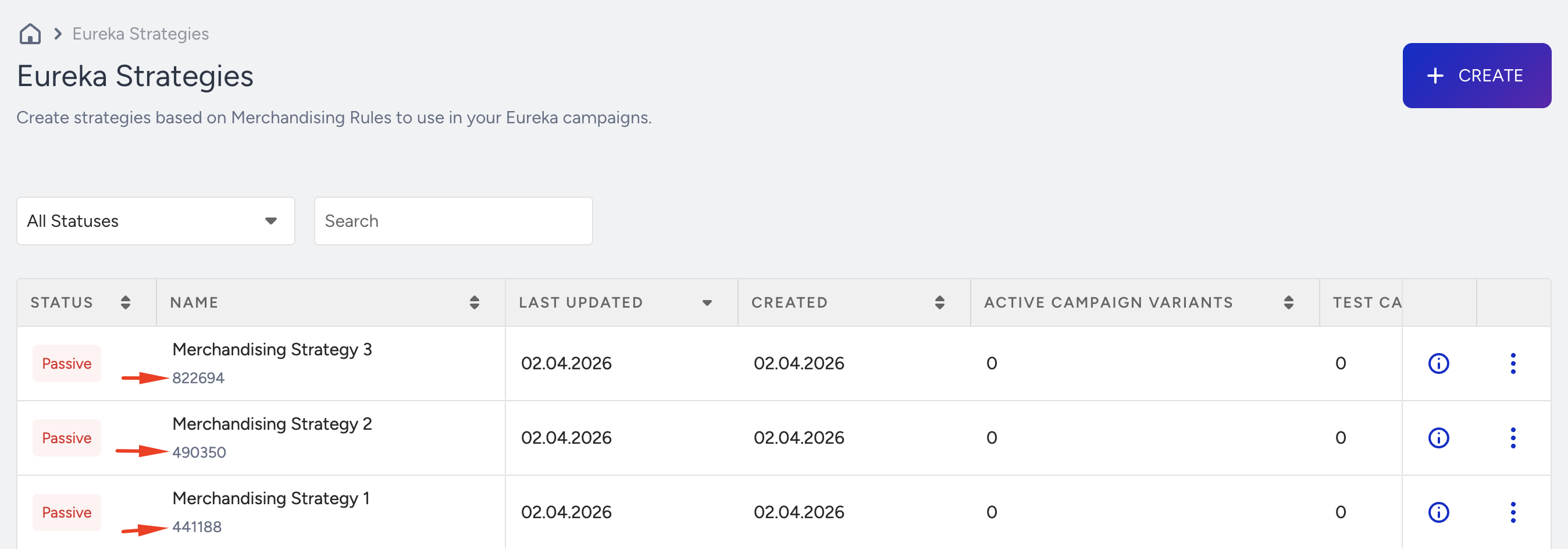
sid | Strategy ID. The unified identifier for a merchandising strategy. If Eureka Strategies are enabled for your account, you need to add this parameter to utilize the strategy. When provided, the listed products are enhanced with the merchandising rules belonging to the specified strategy. Merchandising actions such as boosting, burying, pinning, and hiding products are applied to category pages based on the rules defined within that strategy. | String | No | sid=123456 |
a | Filter the products with the following pattern: a={field}~{value} | List of String | No | a=size~38~39 |
pf | Index indicating from which order the products will start to be listed. It is used for pagination. The default value is pf=0. | Integer | No | |
ps | Number of products that will be returned in the response. The default value is ps=6. | Integer | No | |
st | Sorting type of the listed products. It only takes one of the predefined sorting types. The default value is st=Relevancy. | String | No | |
oi | The listed products will only be displayed as item IDs. The default value is oi=False | Boolean | No | |
oc | The listed products will be displayed without their variants. The default value is false. | Boolean | No | |
u | User ID can be found in local storage by the key name spUID. spUID, which is a stringified object and contains data and expired properties. | String | No |
The sid (Strategy ID) parameter enables strategy-based merchandising. When a valid strategy ID is provided, the API applies the merchandising rules associated with that strategy to the search results. This includes product-level actions (boost, high-boost, bury, high-bury, pin, hide) and attribute-level actions (boost attribute, bury attribute, hide by attribute).
A Eureka Strategy becomes active once it is assigned to a Eureka Campaign. However, when using strategies with the Eureka Category API, a strategy can still be applied to category pages even if it is not assigned to any campaign and remains inactive. In this case, the strategy will take effect when the sid parameter is included in the API request.
If sid is omitted, no strategy-based merchandising rules are applied to the search results.
Additionally, if Eureka Strategies are enabled for your account, refer to the image below showing where to locate the sid: