The Array of Objects (AoO) is a user attribute type that allows you to store multiple structured records under a single attribute.
In real life, users do not have just one value. They have multiple related records over time. A user can have multiple:
Subscriptions
Credit cards or loans
Insurance policies
Pets
Object keys can also include nested object keys, allowing additional structured details to be stored within the main object, such as status, price, and start_date.
The Array of Objects helps you manage lifecycle-based data consistently and queryably for segmentation and personalization.
Understanding Array of Objects: Technical Overview
The Array of Objects is a structured data format for handling one-to-many relationships within a user profile. It ensures that multi-record data, such as product catalogs, subscription histories, or event logs, remains consistent, searchable, and actionable.
1. Structure Definition in the InOne panel first
The Array of Objects attribute and its object keys (including nested keys, if any) must be created in the InOne panel before data is sent.
This ensures all incoming data follows a predefined structure.
2. Data Ingestion via Upsert API
Data is managed exclusively through the Upsert API. During updates, only predefined object keys are accepted.
This prevents unexpected or inconsistent data from entering the system and preserves the defined structure.
3. Segmentation Logic
Segmentation operates directly on the individual object records stored for each user. This allows for granular, relational filtering.
Created Array of Objects attributes are evaluated based on the data received via the Upsert API.
Filters apply at the object level (not just user level).
Multiple objects can be evaluated against defined conditions.
“Number of Objects” logic allows you to define how many records must meet the criteria.
4. Deterministic Object Selection (Array Rules)
In high-concurrency environments or multi-record scenarios, a user may possess several objects that meet a segment's criteria. Array Rules remove ambiguity by determining which specific record is injected into a campaign.
This structured approach keeps object data clean, predictable, and fully ready for segmentation and campaign activation.
To store and activate the structured object data, follow the steps below:
For example, for the Subscription Lifecycle use case, for your business needs, you want to:
Store multiple subscriptions per user
Update subscription status when changes happen
Segment users whose subscriptions are about to renew
Segment users who have cancelled subscriptions
Send personalized campaigns based on subscription plan
Step 1. Create the Array of Objects Attribute
Before data ingestion or activation can occur, you must establish a formal schema within the Attributes and Events section.
Array of Objects cannot be populated via API or utilized in segmentation logic until they are explicitly registered in the InOne panel.
To create a new Array of Object attribute,
Navigate to the Components > Attributes and Events page and click the Create button on the Attributes tab.
Set the data type to Array of Objects.
Define a unique identifier (e.g., Subscriptions).
Adds object keys such as:
Key Name | Data Type |
|---|---|
subscription_id | String |
plan_name | String |
start_date | Date |
renewal_date | Date |
status | String |
monthly_price | Number |
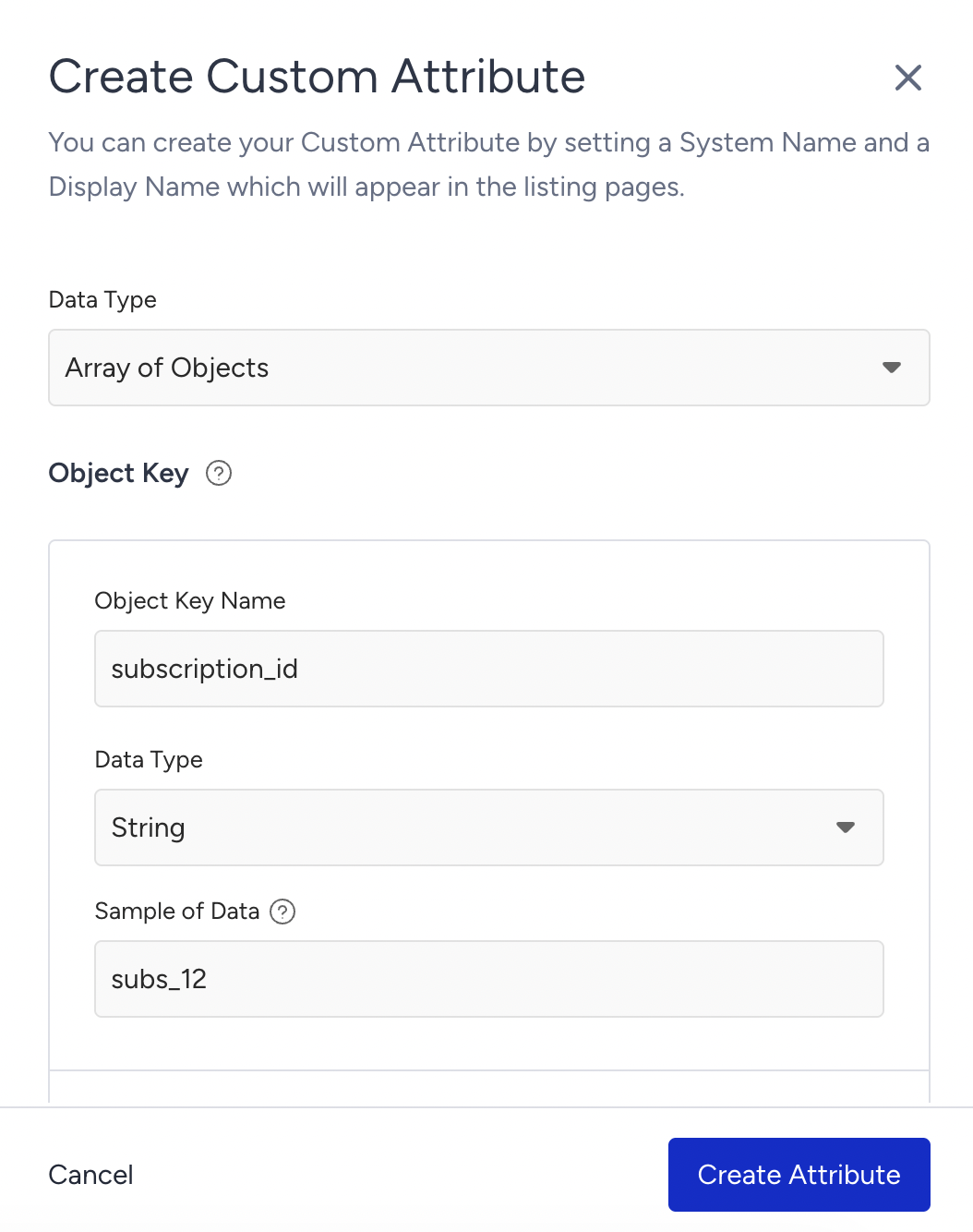
Object-Type Keys
If you select the Array of Object as the data type:
A object key creation area appears under that key.
Nested fields can be defined inside the object. Each object key requires:
Name
Data type
(Optional) Sample of data
Supported Data Types
When defining object keys for an Array of Objects attribute, the following data types are supported:
Data Type | Description | Subscription Example |
|---|---|---|
String | Text values | plan_name: "Premium" |
Number | Numeric values | monthly_price: 19.99 |
Date | ISO-8601 datetime | renewal_date: "2026-03-15T10:00:00Z" |
Boolean | True/False values | auto_renew: true |
URL | Valid web link | invoice_url: "https://example.com/invoice/1" |
String Array | List of text values | tags: ["premium", "loyal"] |
Number Array | List of numeric values | discount_codes: [101, 202] |
Object | Nested structured object | payment: { method: "credit_card", last_four: "1234" } |
Object-Type Keys
If you select Object as the data type:
A new Sub-key creation area appears under that key.
You may add multiple sub-keys, each with its own:
Name
Data type
(Optional) Sample of Data
Edit an Array of Object Attribute
After you create an Array of Objects attribute, its editability depends on how and where it is used. The following rules apply when updating an AoO attribute:
Attribute IS NOT used in any campaign or segment
Editable | Not Editable |
|---|---|
|
|
You cannot delete the existing keys and sub-keys.
Attribute IS used in at least one campaign or segment
Editable | Not Editable |
|---|---|
|
|
Step 2. Ingest Subscription Data (Upsert API)
After you define the Array of Objects attribute, you start sending subscription records through the Upsert API. Over time, you update the same subscription object using patch actions.
The Array of Objects supports patch-based updates. Instead of overwriting the entire array, you can apply specific actions to add, update, replace, or remove individual objects. Each action has defined required fields and predictable behavior.
The following table explains how each patch action works:
Action | Required Fields | Behavior |
|---|---|---|
Add | Value | Adds a new object (or multiple objects) to the array. The maximum object limit is enforced. |
Merge | Match, Value | When using merge, the system finds objects that match the provided key/value pairs and updates only the specified fields. If append=true, array-type fields are appended and de-duplicated. Otherwise, array fields are replaced. |
Replace | Match, Value | Replaces the entire matched object with the new object. Only predefined keys are allowed. |
Remove | Match | Removes the matched object(s) from the array. |
Remove | None | Removes all objects from the array for the specified user. The array becomes empty. No match is required. |
Add a new object
The sample request below shows how to add a new object via the Upsert API:
curl --location --request POST 'https://unification.useinsider.com/api/user/v1/upsert' \
X-PARTNER-NAME: PARTNER_NAME_GOES_HERE
X-REQUEST-TOKEN: TOKEN_GOES_HERE
Content-Type: application/json
{
  "append": true,
  "users": [
    {
      "insider_id": "iid-12345",
      "attributes": {
        "na": "Subscription User",
        "age": 29
      },
      "object_attributes": {
        "custom": {
          "subscriptions": [
            {
              "action": "add",
              "value": [
                {
                  "subscription_id": "sub-9001",
                  "plan_name": "Premium",
                  "start_date": "2026-02-15T10:00:00Z",
                  "renewal_date": "2026-03-15T10:00:00Z",
                  "status": "active",
                  "monthly_price": 19.99
                }
              ]
            }
          ]
        }
      }
    }
  ]
}
Sample Response:
{
    "data": {
        "successful": {
            "count": 1
        },
        "fail": {}
    }
}
View an Array of Objects in the User Profile
After sending the Add Subscription request for your use case, you can confirm that the object is stored correctly directly from the Insider One’s InOne panel.
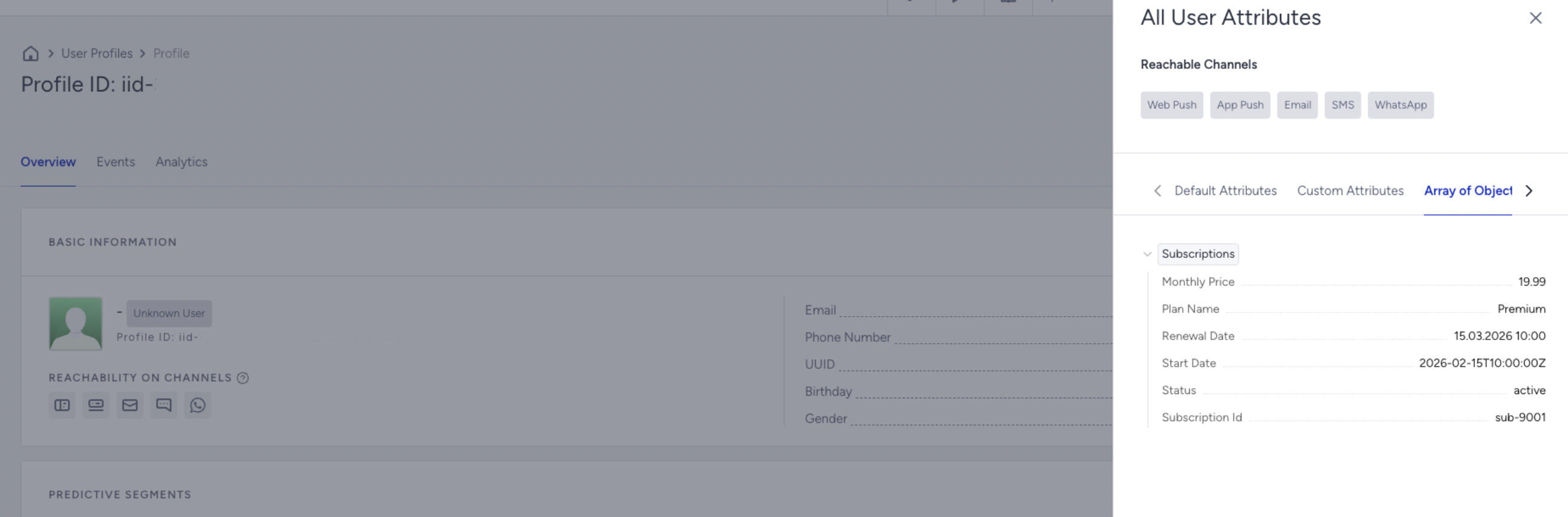
You can view all the Array of Objects attributes a user has directly from the View All User Attributes modal inside the User Profile.
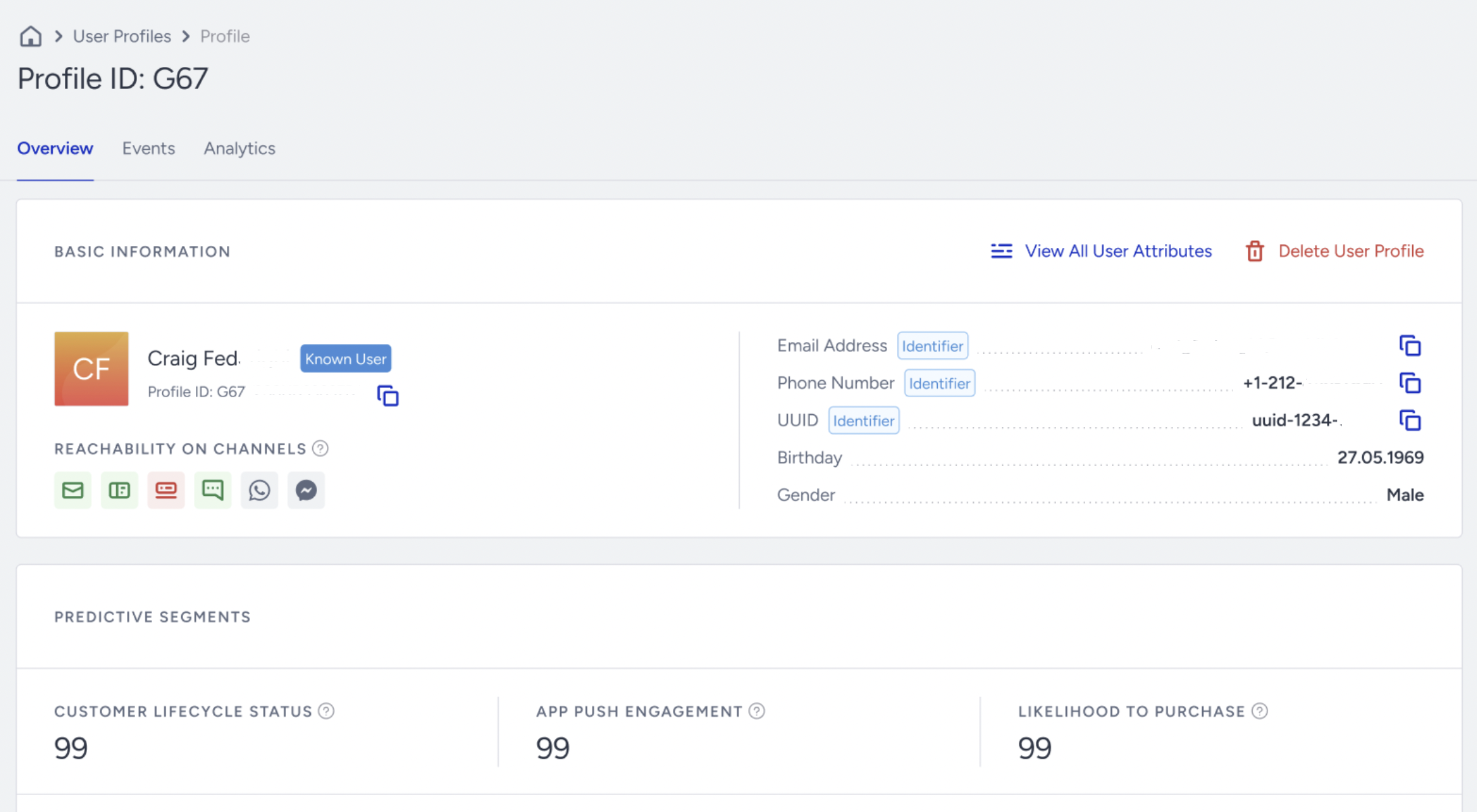
You can see the Array of Objects attributes under the Array of Object Attributes tab. This view allows you to quickly explore the structure and details of all the Array of Objects attributes the user has.
Merge: Update an existing object
curl --location --request POST 'https://unification.useinsider.com/api/user/v1/upsert' \
X-PARTNER-NAME: PARTNER_NAME_GOES_HERE
X-REQUEST-TOKEN: TOKEN_GOES_HERE
Content-Type: application/json
{
  "append": true,
  "users": [
    {
      "insider_id": "iid-12345",
      "object_attributes": {
        "custom": {
          "subscriptions": [
            {
              "action": "merge",
              "match": { "subscription_id": "sub-9001" },
              "value": {
                "renewal_date": "2026-04-15T10:00:00Z",
                "monthly_price": 24.99
              }
            }
          ]
        }
      }
    }
  ]
}
Replace: Full overwrite of the matched object
curl --location --request POST 'https://unification.useinsider.com/api/user/v1/upsert' \
X-PARTNER-NAME: PARTNER_NAME_GOES_HERE
X-REQUEST-TOKEN: TOKEN_GOES_HERE
Content-Type: application/json
{
  "append": true,
  "users": [
    {
      "insider_id": "iid-12345",
      "object_attributes": {
        "custom": {
          "subscriptions": [
            {
              "action": "replace",
              "match": { "subscription_id": "sub-9001" },
              "value": {
                "subscription_id": "sub-9001",
                "plan_name": "Premium Plus",
                "start_date": "2026-02-15T10:00:00Z",
                "renewal_date": "2026-05-15T10:00:00Z",
                "status": "active",
                "monthly_price": 29.99
              }
            }
          ]
        }
      }
    }
  ]
}
Remove: Delete a matched object
curl --location --request POST 'https://unification.useinsider.com/api/user/v1/upsert' \
X-PARTNER-NAME: PARTNER_NAME_GOES_HERE
X-REQUEST-TOKEN: TOKEN_GOES_HERE
Content-Type: application/json
{
  "append": true,
  "users": [
    {
      "insider_id": "iid-12345",
      "object_attributes": {
        "custom": {
          "subscriptions": [
            {
              "action": "remove",
              "match": { "subscription_id": "sub-9001" }
            }
          ]
        }
      }
    }
  ]
}
Remove: All Object Value
curl --location --request POST 'https://unification.useinsider.com/api/user/v1/upsert' \
--header 'X-PARTNER-NAME: PARTNER_NAME_GOES_HERE' \
--header 'X-REQUEST-TOKEN: TOKEN_GOES_HERE' \
--header 'Content-Type: application/json' \
--data-raw {
  "users": [
    {
      "insider_id": "iid-12345",
      "object_attributes": {
        "custom": {
          "subscriptions": [
            {
              "action": "remove",
              "match": "*"
            }
          ]
        }
      }
    }
  ]
}
The example below removes all existing subscription objects and adds a new subscription in the same request:
curl --location --request POST 'https://unification.useinsider.com/api/user/v1/upsert' \
--header 'X-PARTNER-NAME: PARTNER_NAME_GOES_HERE' \
--header 'X-REQUEST-TOKEN: TOKEN_GOES_HERE' \
--header 'Content-Type: application/json' \
--data-raw {
  "users": [
    {
      "insider_id": "iid-12345",
      "object_attributes": {
        "custom": {
          "subscriptions": [
            {
              "action": "remove",
              "match": "*"
            },
            {
              "action": "add",
              "value": [
                {
                  "subscription_id": "sub-9100",
                  "plan_name": "Premium Plus",
                  "start_date": "2026-02-20T10:00:00Z",
                  "renewal_date": "2026-03-20T10:00:00Z",
                  "status": "active",
                  "monthly_price": 29.99,
                  "auto_renew": true,
                  "tags": ["premium_plus"]
                }
              ]
            }
          ]
        }
      }
    }
  ]
}
Important notes
Match rules
Match only works with keys that are defined in the Array of Objects metadata.
If the provided match condition matches more than one object in the array, the action is applied to every object that satisfies the match criteria.
If you send match keys that are not defined in metadata, only the predefined keys are evaluated, and the others are ignored.
If all match keys are dropped, the action becomes a no-op. It is not an error.
Extra keys
If you send object keys that are not defined in metadata, only the keys defined in metadata are stored. Any undefined keys are ignored.
This applies to both value and match.
Append behavior
append=true affects how array-type fields inside an object behave during merge.
With append=true, array fields are appended and de-duplicated.
Without append=true, array fields are replaced.
Example for the append function:
{
  "subscription_id": "sub-9001",
  "tags": ["premium", "loyal"]
}
If you want to send a merge request:
"value": {
  "tags": ["vip"]
}
Case 1: append=true
Result:
"tags": ["premium", "loyal", "vip"]The new value is added.
Case 2: append=false
"tags": ["vip"]The old array is replaced completely.
Error Message Examples
Exceed String Length Limit (More Than 500 Characters)
Request Example:
{
    "data": {
        "successful": {},
        "fail": {
            "count": 1,
            "errors": {
                "users.0.object_attributes.custom.subscriptions[0].value[0].plan_name": [
                    "string value must be at most 500 characters"
                ]
            }
        }
    }
}
Step 3. Use an Array of Object in Segmentation
After creating the Array of Objects attribute, you can use it directly in Dynamic Segments.
This example demonstrates how to target users whose subscription will renew within the next 7 days:
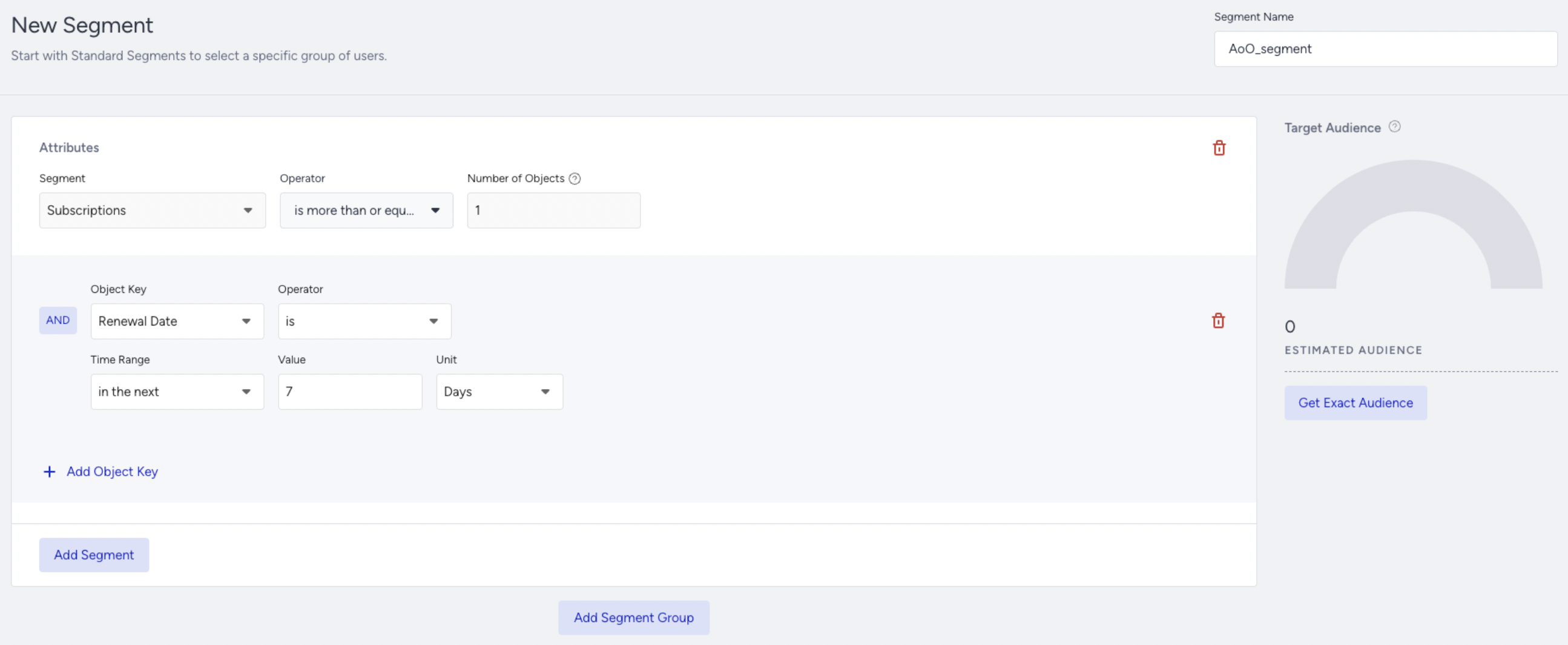
Segment Goal: Target users who have at least one subscription renewing in the next 7 days.
This is typically used for:
Renewal reminder campaigns
Payment preparation notifications
Upgrade before renewal
Step 4. Use an Array of Objects in Journey Message Personalization
1. Define Array of Objects Rule
Before using the Array of Objects in campaigns for dynamic content, you need to create an Array Rule first.
Array Rules determine:
Which object to evaluate
How objects are filtered
How objects are ordered
How many objects are considered
Without an Array Rule:
The system cannot determine which object to use
If multiple objects match the conditions, it cannot clearly decide which object’s key value (for example, renewal_date or plan_name) will be used in personalization
Array Rules ensure consistent and predictable object selection.
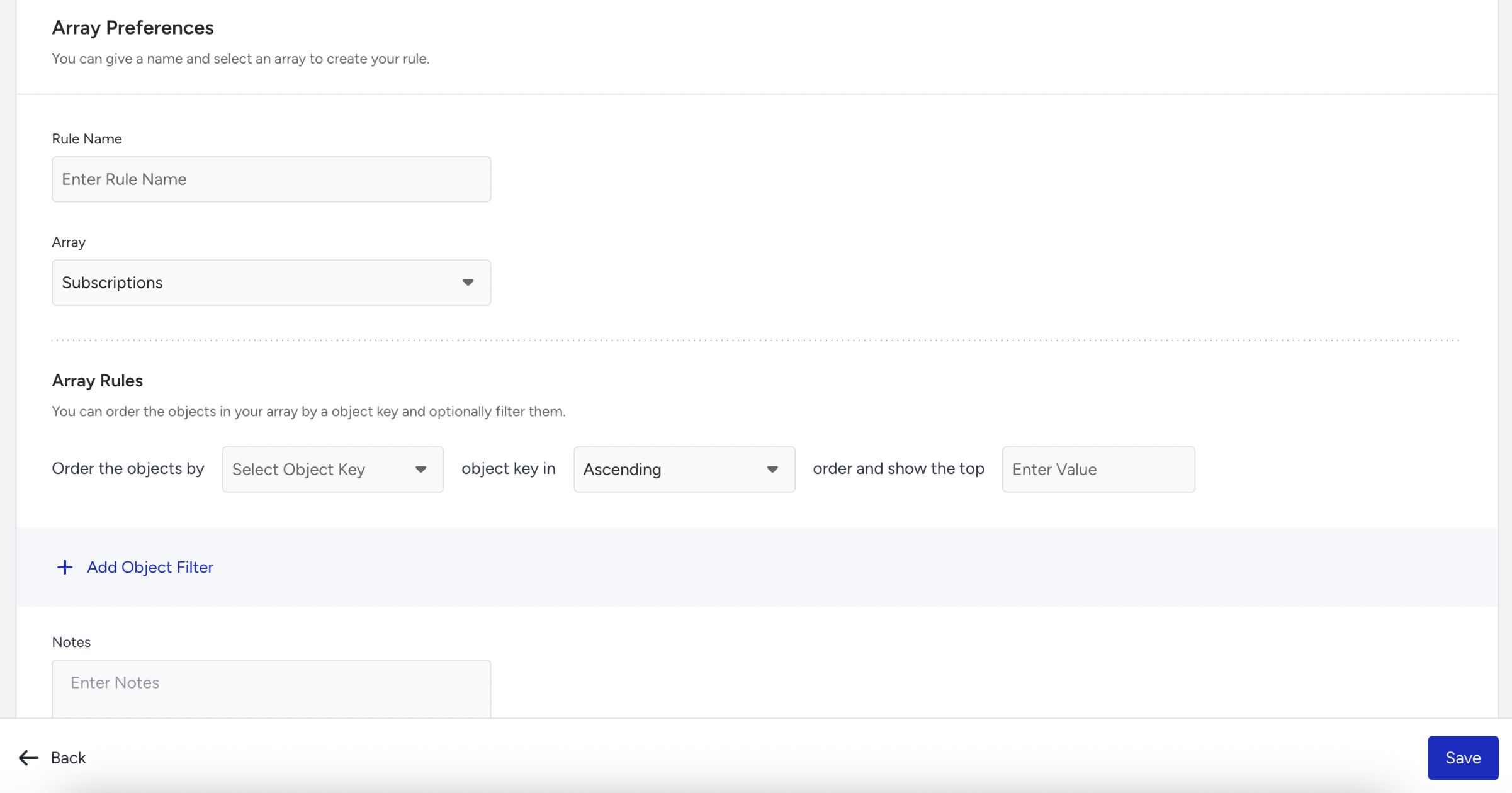
When configuring Order the objects by in an Array Rule, the selected object key must be one of the following data types:
Date
Number
String
Ascending and descending ordering is supported only for these types because they can be logically compared and sorted.
For example:
If you order by renewal_date (Date)
Ascending: from the earliest date to the latest date
Descending: from the latest date to the earliest date.
Example Array Rule Configuration
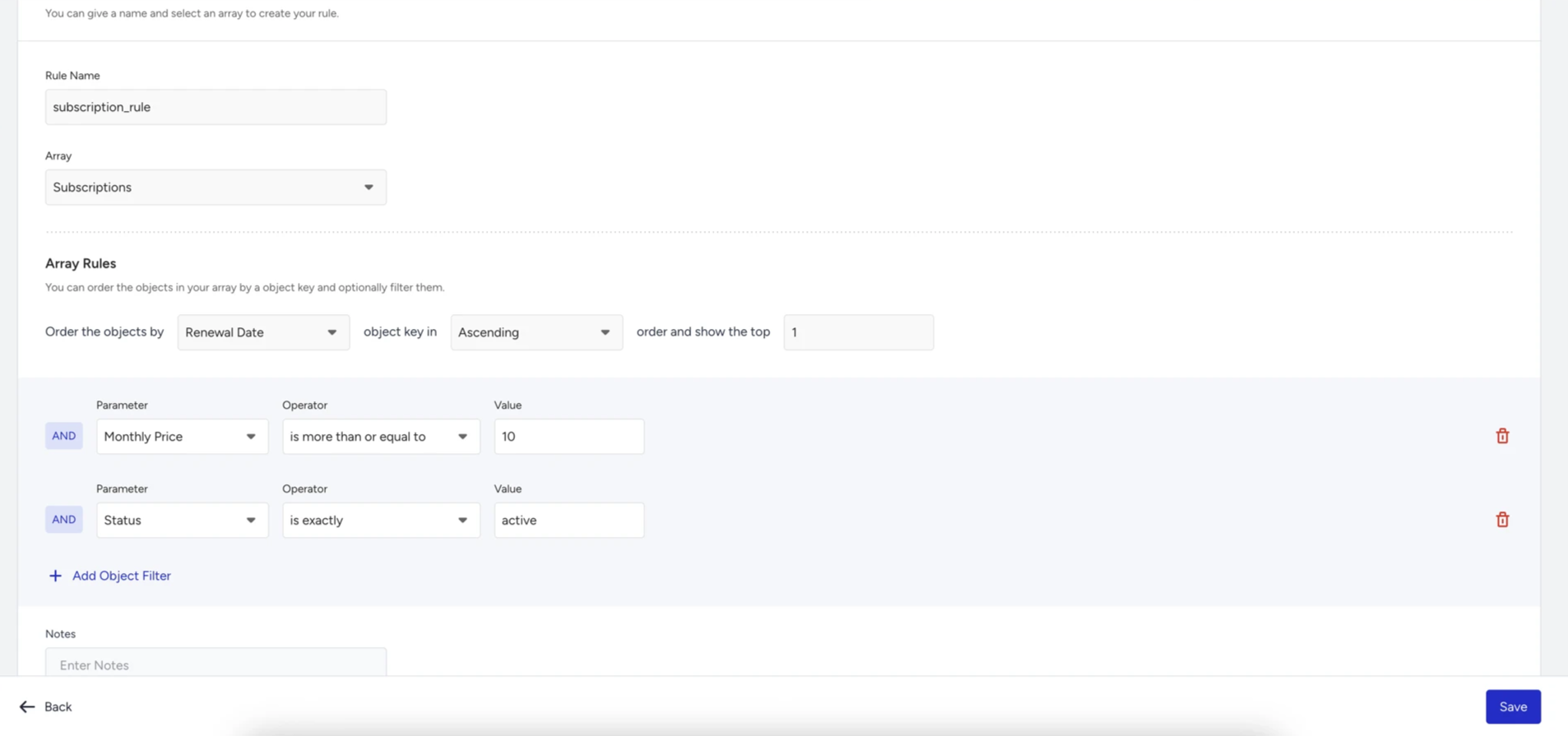
The screenshot below shows an example rule configuration for the Subscriptions Array of Objects. This example demonstrates how you can:
Filter only active subscriptions
Apply a price threshold
Order by renewal date
Select the nearest upcoming subscription
The configuration shown is only an example and can be adjusted based on business needs.
2. Use Array of objects in Dynamic Content
After creating the segment and defining the Array Rule, you can use object fields directly inside Journey messages for dynamic personalization.
This example demonstrates how subscription data can be used in a Journey campaign:
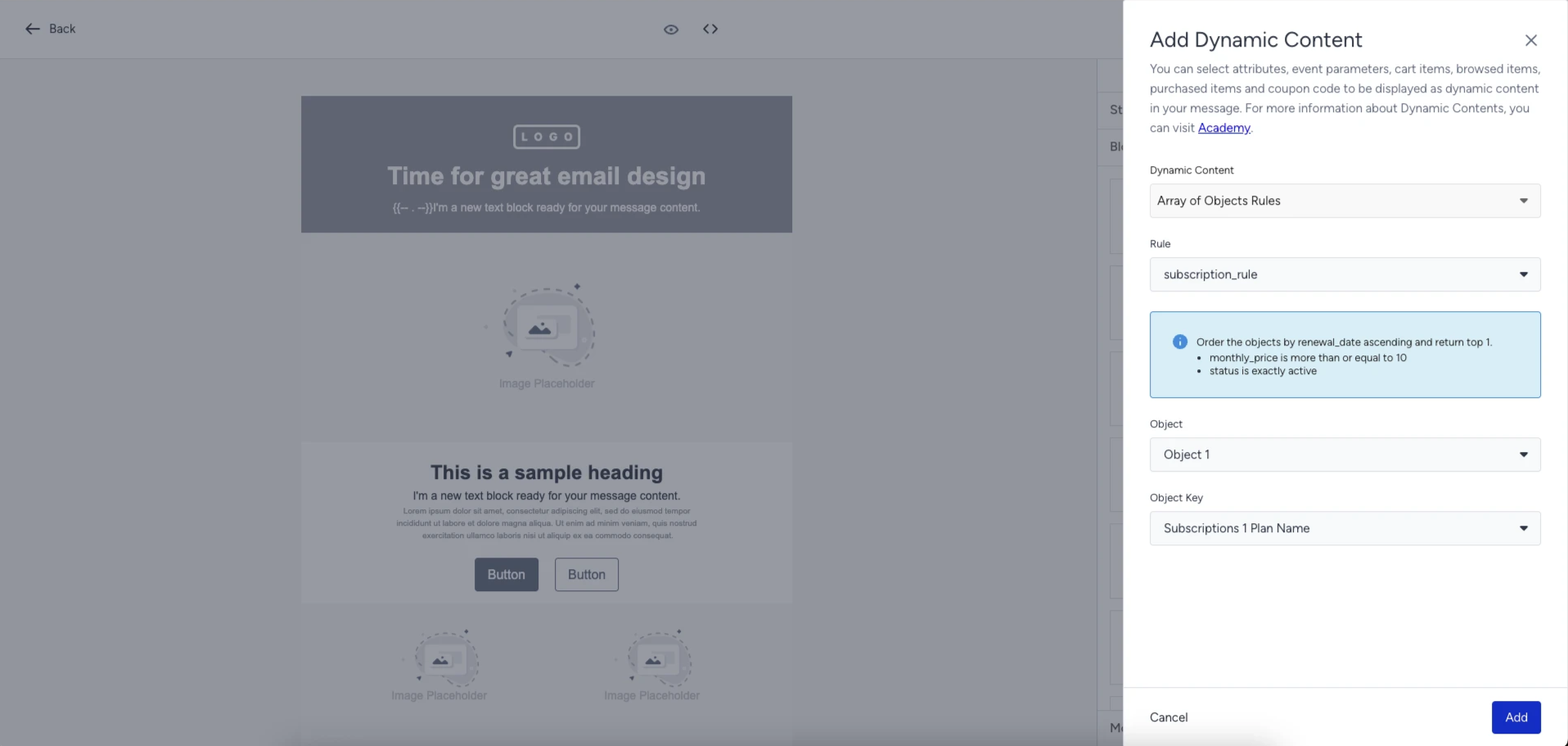
Message Content Example:
Your {{subscription_rule.c_subscriptions_1_plan_name}} subscription will renew on {{subscription_rule.c_subscriptions_1_renewal_date}}.
Limitations
Each account can have a maximum of 20 Array of Objects attributes.
Each Array of Objects attribute supports up to 50 objects per profile.
Each object can contain up to 20 keys.
A maximum of 2 nesting levels is supported (keys and sub-keys).
Nested Array of Objects is not supported. Object-type keys are allowed, but another Array of Objects cannot be nested.
Object order may differ from the ingestion order.
String values cannot exceed 500 characters.
Payload size is limited to 5 MB per request (Upsert API).
The Array of Objects attributes must be registered via metadata before ingestion.
Key and sub-key names and data types cannot be renamed or deleted after creation. Structural changes require deleting and recreating the attribute.
The Array of Objects data updates can only be performed via the Upsert API.
The Array of Objects attributes cannot be included in InOne panel-based user data exports.
Use Cases
You can use the Array of Objects in lifestyle scenarios where users have multiple related records.
Ecommerce - Saved Products
A user can have multiple products associated with their profile.
Why use the Array of Objects
Store all products under one structured attribute
Update warranty or status independently
Segment users by product category or ownership count
Personalize campaigns using specific product details
Example Use Cases
Notify users whose warranty is expiring
Promote accessories based on owned category
Target users who own more than 3 products
Exclude inactive products from communication
Travel Bookings
A traveler can have multiple travel-related records stored in their profile.
Why use the Array of Objects
Store multiple travel documents and memberships under a single user attribute
Update one document or membership without overwriting the others
Segment users based on expiration dates, country, or loyalty tier
Personalize messages using the most relevant travel record
Example Use Cases
Target users who have an active loyalty membership with the Gold or Platinum tier
Personalize lounge or fast-track offers based on the user’s loyalty program and tier
Insurance Policies
A customer can have multiple active policies: health, car, travel, and home. Each policy has renewal dates and status changes.
Why use the Array of Objects
Track multiple policies independently
Send renewal reminders per policy
Segment based on active policy type
Avoid sending renewal messages for cancelled policies
Example Use Cases
Renewal reminder 14 days before policy expiration
Cross-sell travel insurance to users with active car insurance
Exclude expired policies from segmentation
Financial Products
A user can have multiple cards, loans, or financial products.
Why use the Array of Objects
Track expiry dates
Manage status updates
Personalize communication per product
Ensure deterministic object selection
Example Use Cases
Notify users of card expiration
Offer limit increase to high-usage cards
Promote upgrade to premium card tier
Exclude blocked cards from campaigns
Loyalty Programs
A user can have multiple loyalty accounts or tiers across brands or programs.
Why use the Array of Objects
Track tier changes
Update points balance per membership
Personalize rewards messaging
Segment based on tier or expiration
Example Use Cases
Notify users whose points expire soon
Promote tier upgrade
Reward top-tier members
Exclude inactive memberships
Event & Concert
A user can attend or register for multiple events or concerts.
Example Use Cases
Send reminders for upcoming events
Promote similar concerts based on past attendance
Offer VIP upgrades for selected tickets
Pets
A user can register multiple pets under their profile.
Example Use Cases
Send vaccination reminders
Promote pet-specific products
Segment users by pet type
Music
A user can have multiple favorite artists, playlists, or purchased tracks.
Example Use Cases
Recommend new releases based on favorite artists
Promote concerts for followed musicians
Personalize content based on listening preferences
Frequently Asked Questions
Q: Is the Array of Objects an event or an attribute?
A: Array of Objects is a user attribute type. It stores structured profile data that belongs to the user, not behavioral events. Array of Objects represents structured records that exist under the user profile.
Q: Do I have to create the structure before sending data?
A: Yes. The Array of Objects attribute and its object keys must be defined in the InOne panel before ingestion. Only predefined keys are accepted during updates.
Q: Can I update only one object without sending the entire array?
A: Yes. The Array of Objects supports patch-based actions:
add
merge
replace
remove
remove-all
You do not need to resend the full array when updating a single record.
Q: What happens if multiple objects match the match condition?
A: If more than one object meets the match criteria, the action is applied to all matching objects.
Q: What happens if I send object keys that are not defined in metadata?
Only keys defined in metadata are stored. Undefined keys are ignored.
Q: What happens if I send match keys that are not defined?
A: Only predefined match keys are evaluated. If none remain valid, the action becomes a no-op. This is not treated as an error.
Q: Is the Array Rule mandatory?
A: It is not mandatory for segmentation; you can segment directly on object fields. However, it is mandatory for campaign personalization; an Array Rule is required to deterministically select which object to use.
Q: Why is the Array Rule required for personalization?
A: If multiple objects exist, the system needs to know:
Which object to evaluate
Which key value to use in the message
Array Rules define filtering, ordering, and selection logic to ensure predictable object selection.
Q: What data types support ordering in Array Rules?
A: Ordering is supported only for:
Date
Number
String
These types can be logically compared and sorted. For wxample:
Date Ascending → earliest to latest
Date Descending → latest to earliest
Q: Can Array of Objects be updated via CSV import?
A: No. Updates must be performed only via the Upsert API.
Q: Can I rename or delete object keys after creation?
A: Object keys cannot be renamed or deleted after the Array of Objects attribute is created. Key names and their data types are fixed. If structural changes are required, the attribute must be deleted and recreated.
However, the Array of Objects display name and system name can be edited.
Q: Can I nest another Array of Objects inside an object?
A: No. Object-type keys are allowed, but the nested Array of Objects is not supported.
Q: What are the system limits for Array of Objects?
A: The following limits apply:
The maximum payload size per Upsert request is 5 MB.
The maximum string length per field value is 500 characters.
The maximum number of objects per attribute per user is 50.
The maximum number of Array of Objects attributes per panel is 20.
Q: Can the Array of Objects be used in all channels?
A: You can use the Array of Objects in Segmentation and Architect.
Q: What happens if I exceed the object limit (50 per user)?
A: When using the add action:
The request fails only if adding the new objects exceeds the maximum limit of 50 objects per user.
If multiple objects are sent and some exceed the limit, the excess objects are ignored.
Q: Can I export the Array of Objects data?
No. The Array of Objects attributes cannot be included in InOne panel-based user data exports. However, you can export them using the Export Raw User Data API.
When using the Export Raw User Data API, the Array of Objects attributes are returned in their full raw structure. No object-level filtering or rule evaluation is applied during export.