Suggested reading: Create a WhatsApp Business Template on InOne
You can track links in buttons, quick replies, and the body of your messages. You can effortlessly track every link added to your CTAs, whether using a short URL or your domain. This will provide you with invaluable insights into the performance and effectiveness of your WhatsApp campaigns.
Link tracking is available for new message templates. Therefore, we highly suggest you create new templates to ensure links are trackable and help you maximize CTRs. By adopting new templates, you can leverage enhanced tracking capabilities, leading to improved campaign performance and increased engagement.
You can track the following types of links in your WhatsApp campaigns:
Area | Shortened Link | Unshortened Link |
|---|---|---|
Message Body | Dynamic / Custom Link | Your website |
Quick Reply Response | Dynamic / Custom Link | Your website |
CTA | Dynamic / Custom Link | Dynamic / Custom Link |
You can't track external platform response links; you need to go to the relevant external platform to track these links.
To structure your URL correctly, avoid using invalid characters like commas (,) or exclamation marks (!). If you include them, you must encode them to prevent errors.
You can refer to the table below to see the encoded versions of each character:
Character | From Windows-1252 | From UTF-8 |
|---|---|---|
space | %20 | %20 |
! | %21 | %21 |
" | %22 | %22 |
# | %23 | %23 |
$ | %24 | %24 |
% | %25 | %25 |
& | %26 | %26 |
' | %27 | %27 |
( | %28 | %28 |
) | %29 | %29 |
* | %2A | %2A |
+ | %2B | %2B |
, | %2C | %2C |
- | %2D | %2D |
. | %2E | %2E |
/ | %2F | %2F |
0 | %30 | %30 |
1 | %31 | %31 |
2 | %32 | %32 |
3 | %33 | %33 |
4 | %34 | %34 |
5 | %35 | %35 |
6 | %36 | %36 |
7 | %37 | %37 |
8 | %38 | %38 |
9 | %39 | %39 |
: | %3A | %3A |
; | %3B | %3B |
< | %3C | %3C |
= | %3D | %3D |
> | %3E | %3E |
? | %3F | %3F |
@ | %40 | %40 |
A | %41 | %41 |
B | %42 | %42 |
C | %43 | %43 |
D | %44 | %44 |
E | %45 | %45 |
F | %46 | %46 |
G | %47 | %47 |
H | %48 | %48 |
I | %49 | %49 |
J | %4A | %4A |
K | %4B | %4B |
L | %4C | %4C |
M | %4D | %4D |
N | %4E | %4E |
O | %4F | %4F |
P | %50 | %50 |
Q | %51 | %51 |
R | %52 | %52 |
S | %53 | %53 |
T | %54 | %54 |
U | %55 | %55 |
V | %56 | %56 |
W | %57 | %57 |
X | %58 | %58 |
Y | %59 | %59 |
Z | %5A | %5A |
[ | %5B | %5B |
\ | %5C | %5C |
] | %5D | %5D |
^ | %5E | %5E |
_ | %5F | %5F |
` | %60 | %60 |
a | %61 | %61 |
b | %62 | %62 |
c | %63 | %63 |
d | %64 | %64 |
e | %65 | %65 |
f | %66 | %66 |
g | %67 | %67 |
h | %68 | %68 |
i | %69 | %69 |
j | %6A | %6A |
k | %6B | %6B |
l | %6C | %6C |
m | %6D | %6D |
n | %6E | %6E |
o | %6F | %6F |
p | %70 | %70 |
q | %71 | %71 |
r | %72 | %72 |
s | %73 | %73 |
t | %74 | %74 |
u | %75 | %75 |
v | %76 | %76 |
w | %77 | %77 |
x | %78 | %78 |
y | %79 | %79 |
z | %7A | %7A |
{ | %7B | %7B |
| | %7C | %7C |
} | %7D | %7D |
~ | %7E | %7E |
%7F | %7F | |
€ | %80 | %E2%82%AC |
| %81 | %81 |
‚ | %82 | %E2%80%9A |
ƒ | %83 | %C6%92 |
„ | %84 | %E2%80%9E |
… | %85 | %E2%80%A6 |
† | %86 | %E2%80%A0 |
‡ | %87 | %E2%80%A1 |
ˆ | %88 | %CB%86 |
‰ | %89 | %E2%80%B0 |
Š | %8A | %C5%A0 |
‹ | %8B | %E2%80%B9 |
Π| %8C | %C5%92 |
| %8D | %C5%8D |
Ž | %8E | %C5%BD |
| %8F | %8F |
| %90 | %C2%90 |
‘ | %91 | %E2%80%98 |
’ | %92 | %E2%80%99 |
“ | %93 | %E2%80%9C |
” | %94 | %E2%80%9D |
• | %95 | %E2%80%A2 |
– | %96 | %E2%80%93 |
— | %97 | %E2%80%94 |
˜ | %98 | %CB%9C |
™ | %99 | %E2%84 |
š | %9A | %C5%A1 |
› | %9B | %E2%80 |
œ | %9C | %C5%93 |
| %9D | %9D |
ž | %9E | %C5%BE |
Ÿ | %9F | %C5%B8 |
%A0 | %C2%A0 | |
¡ | %A1 | %C2%A1 |
¢ | %A2 | %C2%A2 |
£ | %A3 | %C2%A3 |
¤ | %A4 | %C2%A4 |
¥ | %A5 | %C2%A5 |
¦ | %A6 | %C2%A6 |
§ | %A7 | %C2%A7 |
¨ | %A8 | %C2%A8 |
© | %A9 | %C2%A9 |
ª | %AA | %C2%AA |
« | %AB | %C2%AB |
¬ | %AC | %C2%AC |
| %AD | %C2%AD |
® | %AE | %C2%AE |
¯ | %AF | %C2%AF |
° | %B0 | %C2%B0 |
± | %B1 | %C2%B1 |
² | %B2 | %C2%B2 |
³ | %B3 | %C2%B3 |
´ | %B4 | %C2%B4 |
µ | %B5 | %C2%B5 |
¶ | %B6 | %C2%B6 |
· | %B7 | %C2%B7 |
¸ | %B8 | %C2%B8 |
¹ | %B9 | %C2%B9 |
º | %BA | %C2%BA |
» | %BB | %C2%BB |
¼ | %BC | %C2%BC |
½ | %BD | %C2%BD |
¾ | %BE | %C2%BE |
¿ | %BF | %C2%BF |
À | %C0 | %C3%80 |
Á | %C1 | %C3%81 |
 | %C2 | %C3%82 |
à | %C3 | %C3%83 |
Ä | %C4 | %C3%84 |
Å | %C5 | %C3%85 |
Æ | %C6 | %C3%86 |
Ç | %C7 | %C3%87 |
È | %C8 | %C3%88 |
É | %C9 | %C3%89 |
Ê | %CA | %C3%8A |
Ë | %CB | %C3%8B |
Ì | %CC | %C3%8C |
Í | %CD | %C3%8D |
Î | %CE | %C3%8E |
Ï | %CF | %C3%8F |
Ð | %D0 | %C3%90 |
Ñ | %D1 | %C3%91 |
Ò | %D2 | %C3%92 |
Ó | %D3 | %C3%93 |
Ô | %D4 | %C3%94 |
Õ | %D5 | %C3%95 |
Ö | %D6 | %C3%96 |
× | %D7 | %C3%97 |
Ø | %D8 | %C3%98 |
Ù | %D9 | %C3%99 |
Ú | %DA | %C3%9A |
Û | %DB | %C3%9B |
Ü | %DC | %C3%9C |
Ý | %DD | %C3%9D |
Þ | %DE | %C3%9E |
ß | %DF | %C3%9F |
à | %E0 | %C3%A0 |
á | %E1 | %C3%A1 |
â | %E2 | %C3%A2 |
ã | %E3 | %C3%A3 |
ä | %E4 | %C3%A4 |
å | %E5 | %C3%A5 |
æ | %E6 | %C3%A6 |
ç | %E7 | %C3%A7 |
è | %E8 | %C3%A8 |
é | %E9 | %C3%A9 |
ê | %EA | %C3%AA |
ë | %EB | %C3%AB |
ì | %EC | %C3%AC |
í | %ED | %C3%AD |
î | %EE | %C3%AE |
ï | %EF | %C3%AF |
ð | %F0 | %C3%B0 |
ñ | %F1 | %C3%B1 |
ò | %F2 | %C3%B2 |
ó | %F3 | %C3%B3 |
ô | %F4 | %C3%B4 |
õ | %F5 | %C3%B5 |
ö | %F6 | %C3%B6 |
÷ | %F7 | %C3%B7 |
ø | %F8 | %C3%B8 |
ù | %F9 | %C3%B9 |
ú | %FA | %C3%BA |
û | %FB | %C3%BB |
ü | %FC | %C3%BC |
ý | %FD | %C3%BD |
þ | %FE | %C3%BE |
ÿ | %FF | %C3%BF |
Custom Links
You can enter any link and follow it for tracking purposes.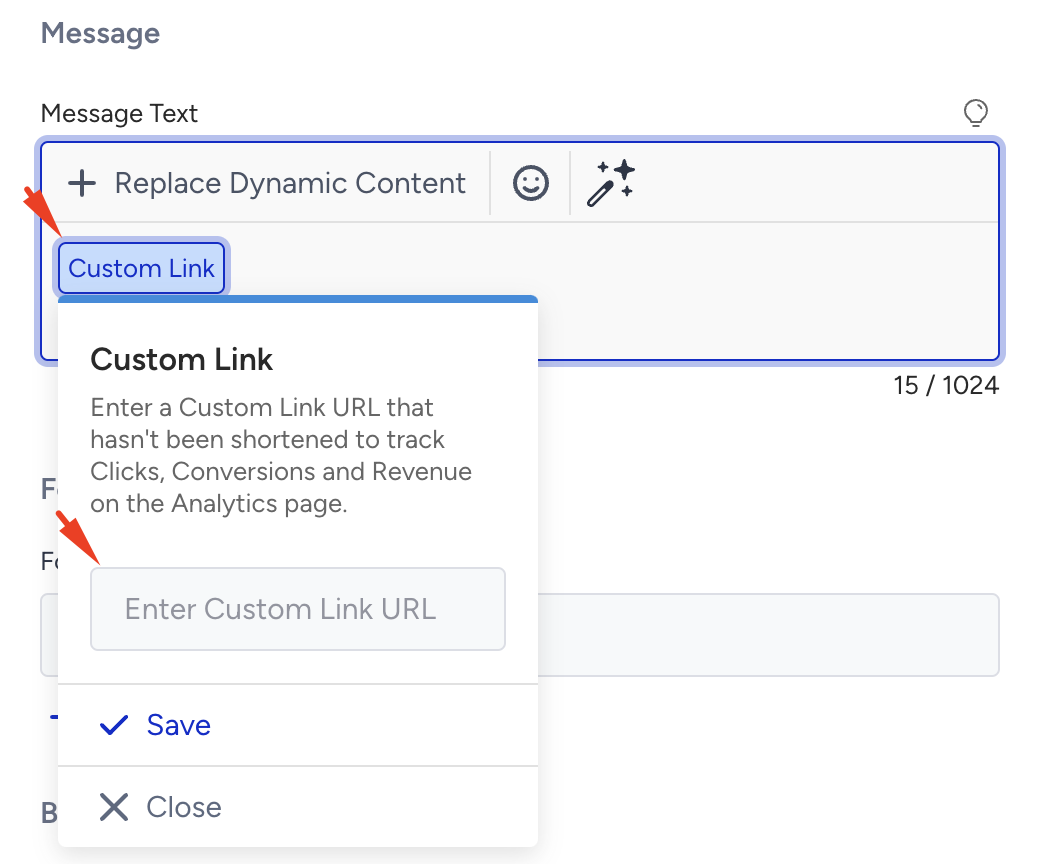
Dynamic Links
You can include any dynamic link as a variable, which can then be followed and tracked.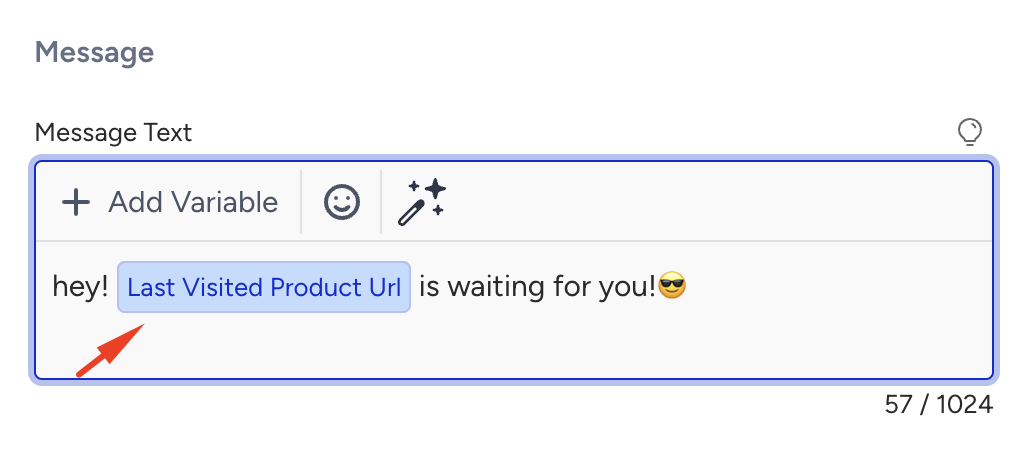
Shortened/Unshortened URLs
You need to shorten the links you add to the message body and quick reply inputs to track. If the links are not shortened, they should start with your domain to remain trackable. Otherwise, links cannot be followed.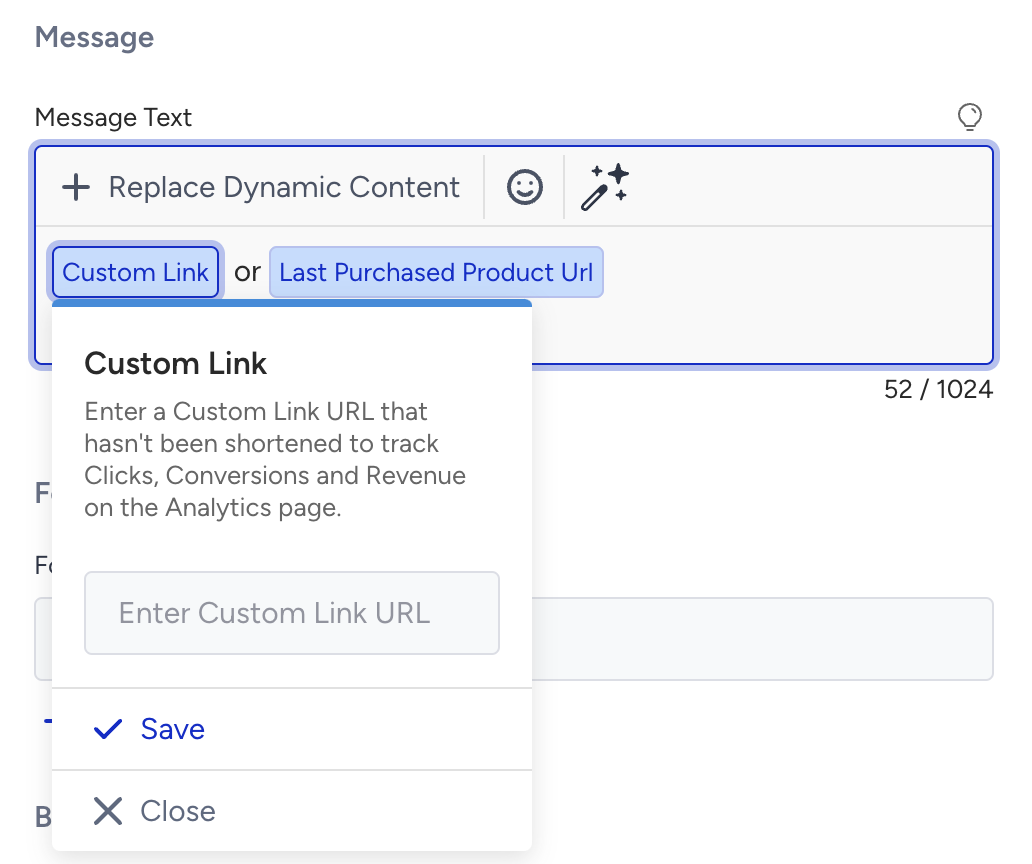
All links included in the Call-to-Action (CTA)
Whether or not they are shortened, you can track all links you include in the CTA section.
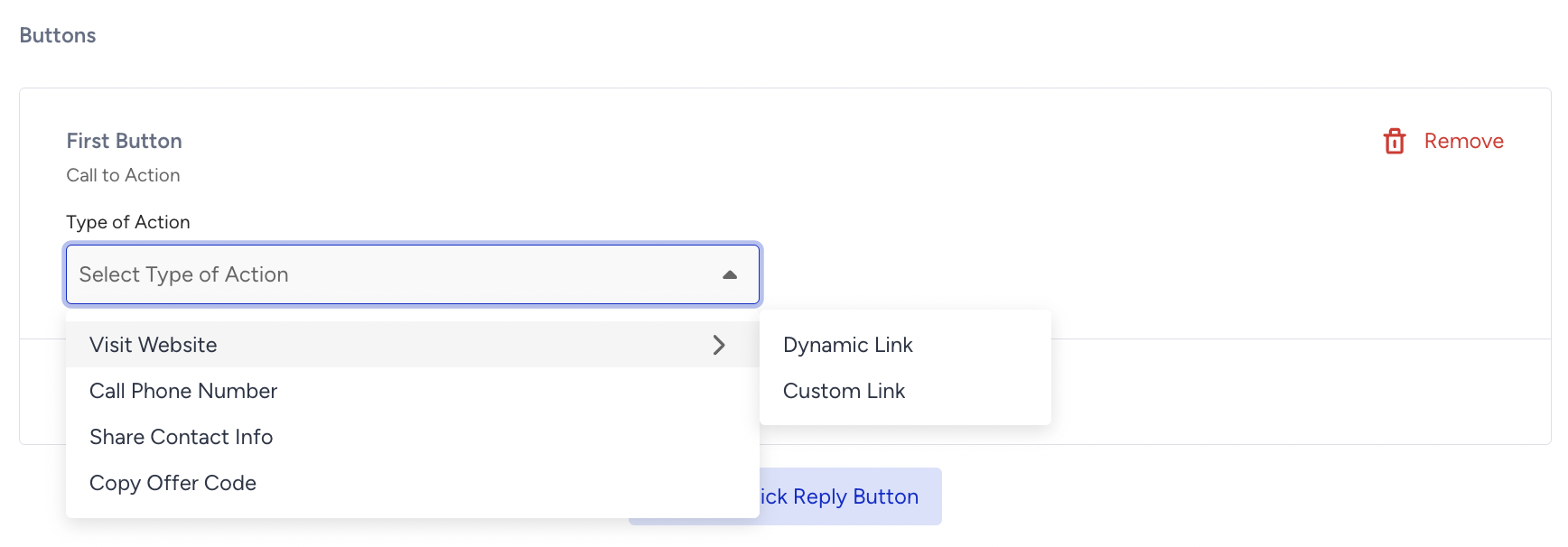
You can update the links you enter during the template creation step in the campaign creation step, which ensures flexibility and adaptability throughout the campaign lifecycle.
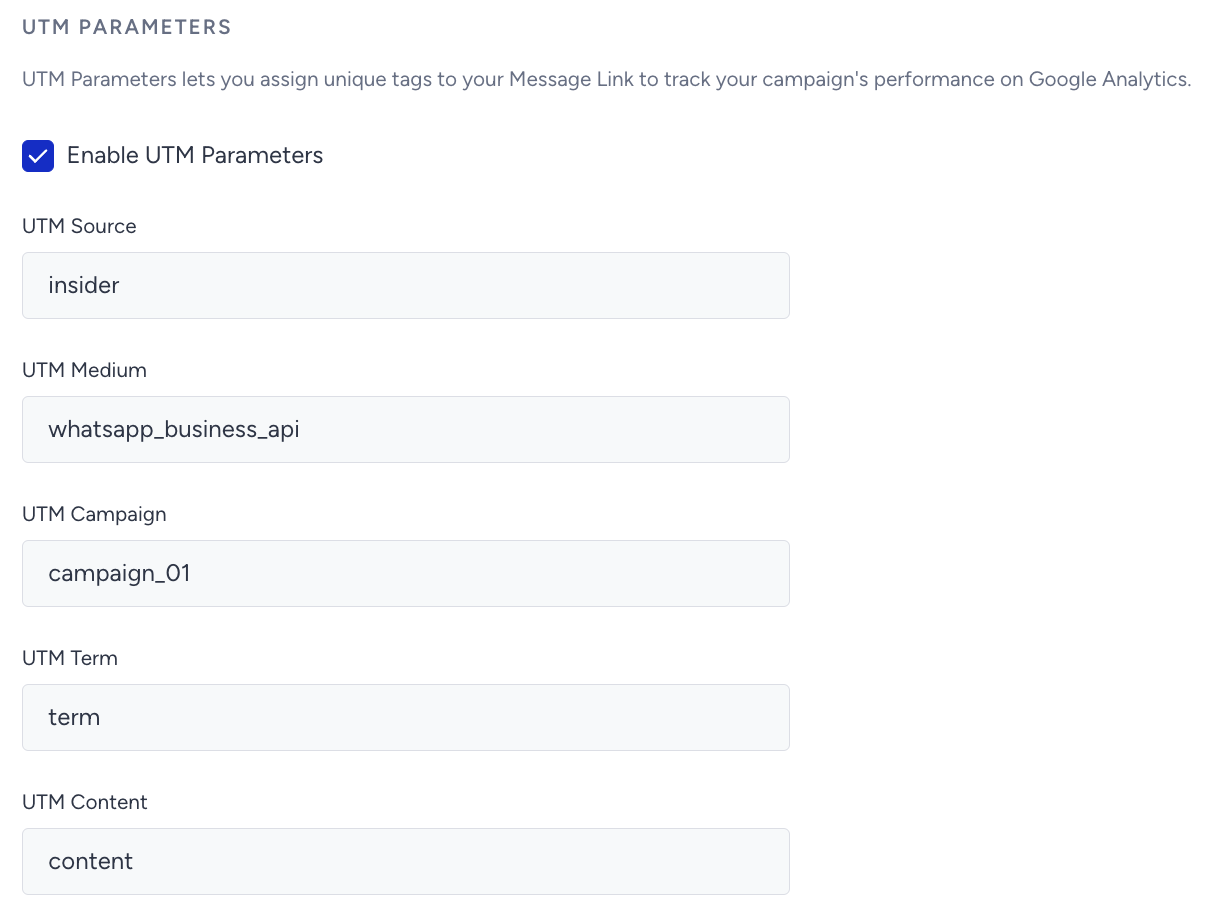
UTM Parameters
UTM parameters (Urchin Tracking Module parameters) let you assign unique tags to your message links to track your campaign's performance on Google Analytics. UTM parameters typically include fields like source, medium, campaign, term, and content, each providing detailed tracking data.
The UTM parameters are as follows:
utm_source (required): Identifies the source of your traffic (e.g., search engine, web push notification, or other referrals). An example of this tag is utm_source=insider_whatsapp_business_api.
utm_medium (required): Identifies the medium where the link was used (e.g., whatsapp_business_api, CPC, or another method of sharing). An example of this tag is utm_medium=whatsapp_business_api.
utm_campaign (required): Identifies a strategic campaign (e.g., product launch, new feature, partnership, etc.) or a specific promotion (e.g., a sale, a giveaway, etc.). An example of this tag is utm_campaign=mothers_day_campaign.
utm_term: Suggested for paid search to identify keywords for your ad. You can skip this for Google AdWords if you have connected your AdWords and Analytics accounts. Let’s say you are running a Google Adwords campaign for your non-profit WordPress theme. You would have specific keywords picked up for your campaign. Some examples for this tag are utm_term=wordpress-theme, utm_term=non-profit-theme, utm_term=non-profit-template, etc.
utm_content: Suggested for additional details for A/B testing and content-targeted ads. Some examples of this tag are utm_content=cta-top-banner, utm_content=cta-sidebar, utm_content=cta-bottom, etc.
The additional parameters are added to the URL by default to track the conversion and revenue of the WhatsApp campaigns and cannot be removed.
If the URL is shortened, all values are appended to the long URL as query strings. Since the short URL is used, these values are not visible. Sales transactions following a click are tracked using ins.js. The following keys in ins.js are used to determine which campaign the click originates from and whether the user comes from our platform:
waId represents our campaign ID.
jId refers to the journey ID.
isIns indicates that the user comes from our platform for mobile tracking.
insLC confirms in ins.js that the user comes from our platform.
Additionally, on the final page, a parameter is sent to store the campId on-site to collect revenue. The following link includes this parameter: &mmId=NTEXMW==&jId=MA==&isIns=1&insLC=1If these parameters are not included, sales cannot be recorded.
If the URL is not shortened, only an msKey value appears at the end of the URL. On-site, this key is used to request a different service to retrieve campaign details, which are then written on-site. The msKey parameter is stored to track clicks. When the msKey parameter is included, only the isIns parameter is included. isIns helps determine if the user comes from our platform for mobile tracking. Without the msKey parameter, clicks cannot be tracked, and without isIns, sales cannot be recorded. The following link includes these parameters: &isIns=1&msKey=jj7TQ27860SK4vs
You can enable the tracking parameters on the Design step when creating your WhatsApp campaigns.