You cannot make any changes to External Platform Integrations without having either an Administrator or an Editor with PII access in InOne. Refer to User Roles for further information.
This guide shows how to set up the Klaviyo integration in InOne. After setup, InOne syncs Klaviyo profiles, events, and subscription changes to Insider One on separate schedules.
The table below summarizes the key capabilities and behavior of the integration.
Capability | Details |
|---|---|
Auth method | API Key |
Data flow | One-way: Klaviyo to Insider One |
Sync behavior | Incremental for all three sync types |
Sync modes | Profile Sync, Event Sync, Subscription Profile Sync (run independently) |
Scheduling | Three separate schedules, one per sync type |
Requirements
Ensure you have the required credentials before setting up the integration.
You must have a Klaviyo API Key. This is a private API key generated in Klaviyo.
To obtain it, navigate to Klaviyo > Account > Settings > API Keys. Create a Full Access or scoped key with Profiles (Read) and Events (Read) permissions.
This integration does not require OAuth. The API key is stored securely and is not exposed after setup.
Step 1: Create a new integration
Navigate to Components > Integrations > External Integrations for the setup.
.png)
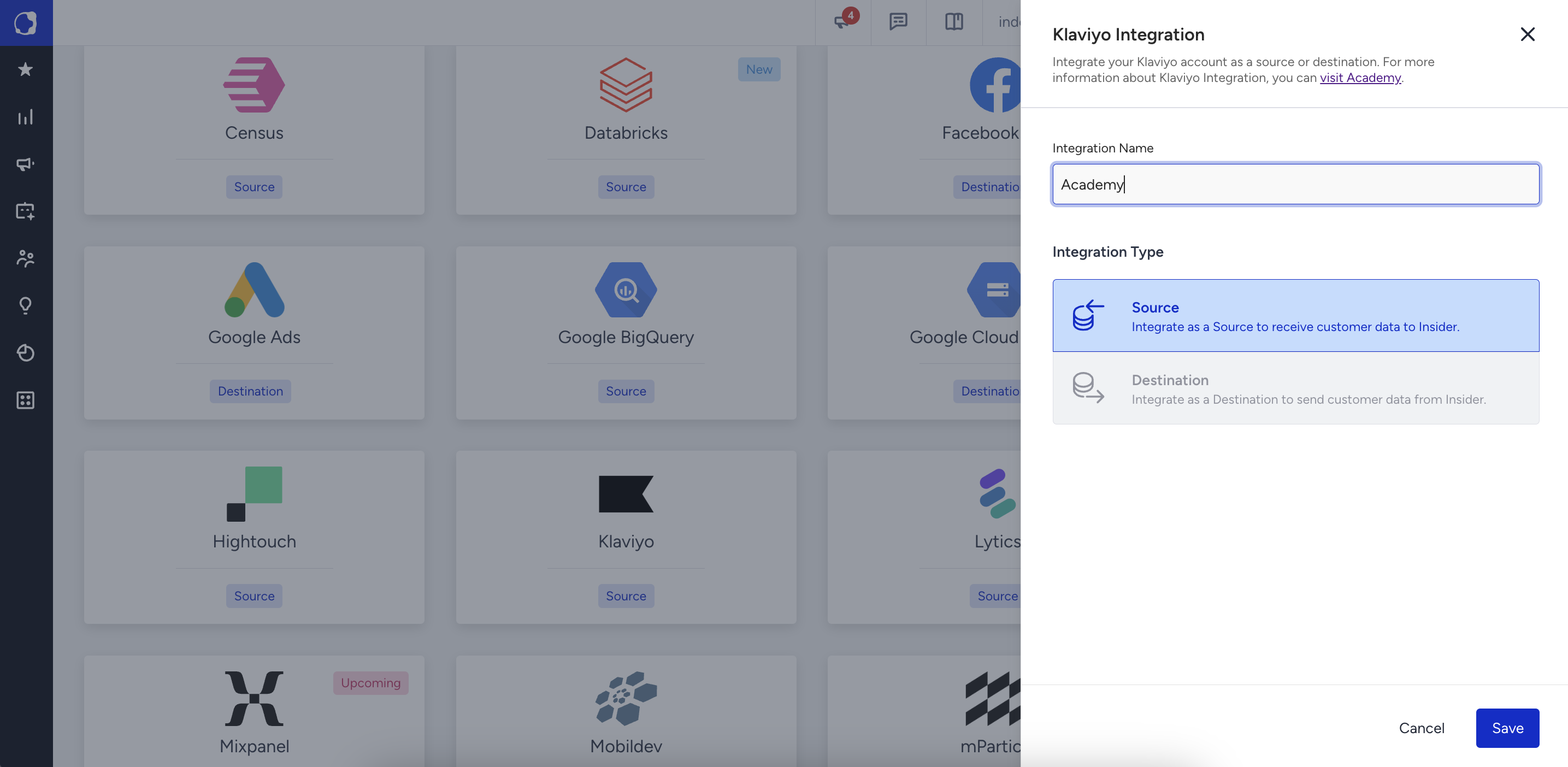
Select the Klaviyo platform to view methods in the Klaviyo category.

Give the integration a unique name and click Save.
Step 2: Enter your Klaviyo API Key
Navigate to Klaviyo to enter your Klaviyo private API key. Must have at a minimum Profiles (Read) and Events (Read) permissions.
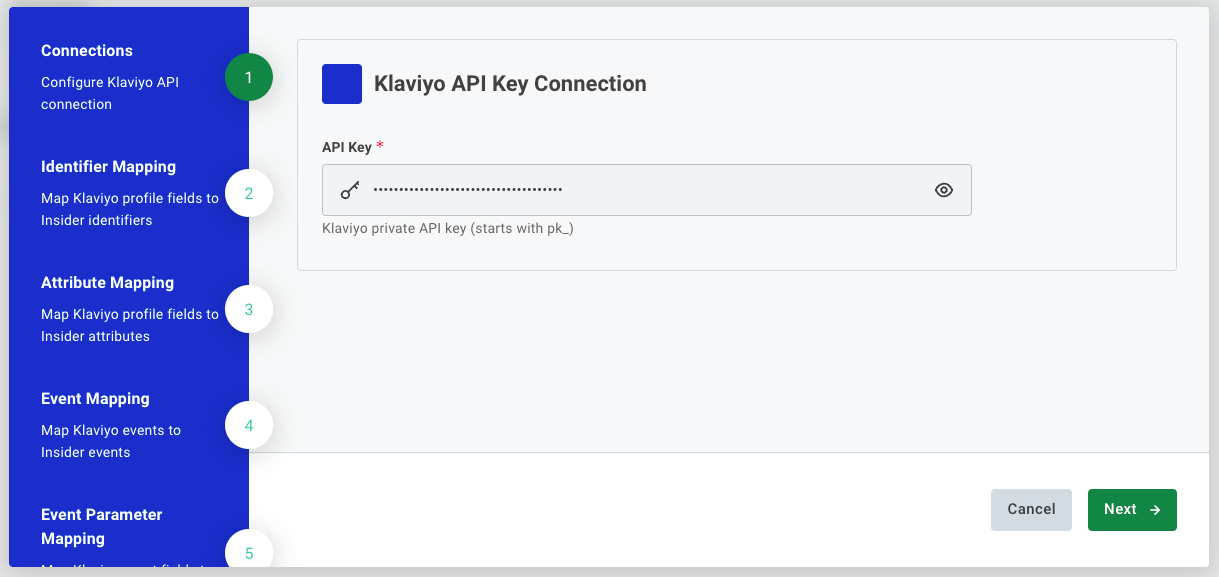
Click Next to proceed.
Step 3: Identifier Mapping
Map Klaviyo profile fields to Insider One identifier types. At least one mapping is required.
Field | Description |
|---|---|
Identifier Type | The Insider One identifier type: Email Address, Phone Number, UUID, or any custom identifier configured for your account. |
Source Field | The Klaviyo profile field to use as the identifier value (e.g. |
Click + Add to Profile Identifier Mapping to add rows. Click Next when done.
Step 4: Attribute Mapping
Map Klaviyo profile fields to Insider One user profile attributes.
Column Mappings: Each row maps a Klaviyo profile property to an Insider One attribute. The field value is written to the matched user profile on each sync.
Fixed Value Mappings: Sets a static value on every synced profile, regardless of what Klaviyo contains. Common use: set
data_sourcetoklaviyo.
Click Next when done.
Step 5: Event Mapping
Map Klaviyo metric names to Insider One event types.
Field | Description |
|---|---|
Klaviyo Metric Name | The name of the Klaviyo metric (event type) to map, e.g. |
Insider One Event Type | The corresponding Insider One event type to fire when this Klaviyo metric is received. |
Add one row per Klaviyo metric you want to sync. Metrics not listed here are ignored.
Click Next when done.
Step 6: Event Parameter Mapping
Map Klaviyo event properties to Insider One event parameters for the events configured in Step 5.
Column Mappings: Each row maps a Klaviyo event property to an Insider One event parameter (e.g.
$valuetoorder_value).Fixed Value Mappings: Sets a static parameter value on every synced event.
Click Next when done.
Step 7: Additional Settings
This page configures schedules for all three sync flows and advanced options.
Schedules
Field | Description |
|---|---|
Profile Sync Schedule | Cron expression (UTC) for how often Klaviyo profiles are synced. |
Event Sync Schedule | Cron expression (UTC) for how often Klaviyo events are synced. |
Subscription Sync Schedule | Cron expression (UTC) for how often subscription-change events are processed. |
Sync Behavior
Field | Description |
|---|---|
Initial Sync Lookback Hours | On the very first run, how many hours back to look for profiles and events. Set to |
Max Pages | Safety limit on the number of pages fetched per sync run. Each page contains up to 100 profiles. |
Advanced
Field | Description |
|---|---|
Skip Hook | Suppresses Architect journey triggers for all users upserted in this run. |
Phone Number Settings | Normalizes phone values to E.164 format and optionally adds a country code. |
Identifier Settings | Controls behavior when an identifier value fails validation. |
Click Finish to save and activate the integration.
How do the three sync flows work?
Flow | What it does | Sync method |
|---|---|---|
Profile Sync | Fetches Klaviyo profiles updated since the last run. Updates Insider One user profiles with mapped attributes. | Incremental: filters by |
Event Sync | Fetches Klaviyo metric events (e.g., Placed Order, Clicked Email) created since the last run. Fires matching Insider One events. | Incremental: filters by event creation time |
Subscription Profile Sync | Detects subscription-status changes (opt-in, opt-out), reloads the affected profiles, and upserts them to Insider One. | Incremental: tracks subscription-change events |
All three flows run independently on their own schedules. A failure in one flow does not block the others.
Troubleshooting
Symptom | What to check |
|---|---|
API key rejected | Confirm the key is a private API key, not a public key. Verify it has Profiles and Events read permissions. |
Profiles not syncing | Check the Profile Sync Schedule and confirm the integration is active. On the first run, only profiles updated within the last |
Events not syncing | Verify the Klaviyo metric name in Event Mapping matches exactly (case-sensitive) the metric name in Klaviyo. |
Profiles missing attributes | Confirm the Klaviyo property is added in Attribute Mapping and exists on the profile in Klaviyo. Custom properties must be referenced by their exact key. |
Sync pagination cut off | If profile pages exceed Max Pages, the sync stops early to prevent replay loops. Increase Max Pages or run syncs more frequently to reduce per-run volume. |
Subscription changes are not reflecting | Confirm the Subscription Sync Schedule is active. This flow re-fetches the full profile for any contact whose subscription status changed, then upserts the updated profile. |
Frequently Asked Questions
Q: Does the integration fetch all Klaviyo profiles on each run or only changes?
A: Only profiles updated since the last sync run are fetched. The integration is fully incremental using Klaviyo's greater-than(updated, <timestamp>) filter. The first run uses the Initial Sync Lookback Hours setting to limit scope.
Q: Do all three sync flows need to be active?
A: No. If you only need profile data, you can leave Event Mapping empty, and the event flows will produce no output. All three flows run on their own schedules regardless; unused flows simply produce no records.
Q: What happens if a Klaviyo profile has no email or phone?
A: The profile is skipped if no valid identifier can be resolved from the mapped fields. Configure Identifier Settings to choose whether to skip just the identifier or the entire record.
Q: Can duplicate events be created in Insider One?
A: The integration uses deduplication based on timestamp and record IDs at the sync boundary. Overlapping sync windows (e.g., very frequent schedules) include a short overlap period; records already processed in the previous run are deduplicated before upsert.
Q: Will syncing profiles trigger Architect journeys?
A: By default, yes. Enable Skip Hook to suppress journey triggers. Note that Skip Hook is an org-level setting and must be enabled by the Insider One team.
Q: How do I sync all historical Klaviyo data?
A: Set Initial Sync Lookback Hours to 0 on the first run. This fetches all profiles from the beginning of your Klaviyo account history. Switch it back to a smaller value (e.g. 24) after the backfill completes, to keep subsequent runs efficient.