You can display your date-type and number-type default or custom attributes in different formats to make your WhatsApp messages more precise and more localized for the recipient.
This capability allows you to adjust how information such as birthdays, membership dates, or prices appears inside your messages.
Customize Date Formats
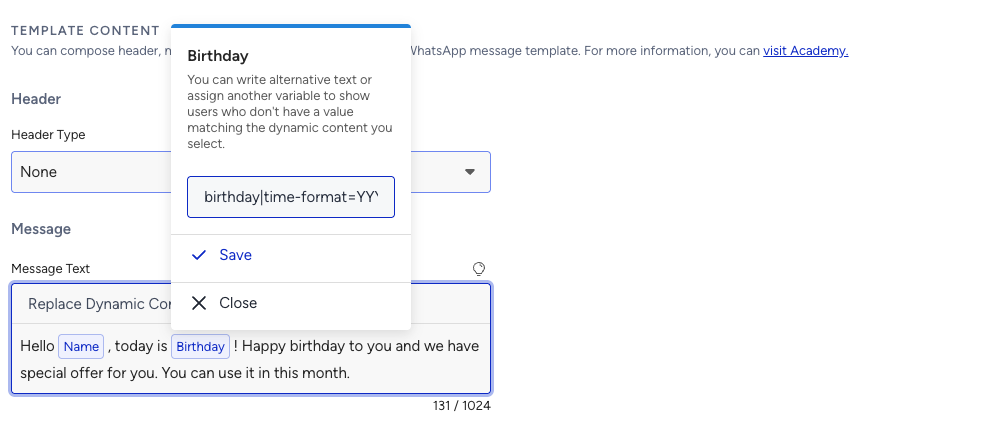
You can personalize how date values appear in WhatsApp by using a time format. This can apply to any attribute that holds a date value, such as:
{{birthday}}{{membership_date}}{{insurance_expiry_date}}
Syntax example:
{{attribute_name|time-format=DD-MM-YYYY}}{{attribute_name|time-format=MMMM/DD/YY}}{{attribute_name|time-format=YYYY-MM-DD hh:mm:ss A}}
Format Elements
Formatting | Description | Example |
|---|---|---|
DD | Day as a number with zero | 07 |
D | Day as a number without zero | 7 |
M | Month as a number with zero | 09 |
MM | Month as a number without zero | 9 |
MMM | Month as text in short format | Mar |
MMMM | Month as text in full format | March |
YY | Last two digits of the year | 23 |
YYYY | Year as a number in full format | 2023 |
Sample Time Format Usages:
{{event_time|time-format=hh:mm:ss}}{{meeting_start|time-format=HH:mm}}{{deadline|time-format=YYYY-MM-DD hh:mm:ss A}}
If the time value is exactly 00:00:00, it will be displayed as 12:00:00.
Formatting Rules and Validation for WhatsApp
If the format is not entered in a valid structure, the message will be marked as invalid and not sent.
If the dynamic value is not provided, the default value of the attribute will be used.
If you use a custom time format, you must include the fallback within the same expression, if needed.
{{birthday|time-format=YYYY-MM-DD hh:mm:ss}}✅
{{birthday|time-format=YYYY-MM-DD hh:mm:ss|fallback=Not Provided}}✅
{birthday|fallback=Not Provided}}→ Not supported if you're also formatting ❌
Customize Number Formats
You can add a separator between the digits of your number-type default and custom attributes, such as {{price}}, {{amount}}, {{phone_number}}, etc., to customize the format of the dynamic content in your WhatsApp message and make it easier for your recipients to read the numbers.
You can use a comma (,), a dot (.), a space ( ), and an apostrophe (') as thousand and decimal separators.
Syntax example: {{dynamic_attribute|number-format=thousand_separator,decimal_separator}}
thousand_separator: Specifies the character used to separate thousands.
decimal_separator: Specifies the character used to separate decimals.
Examples
Below you can see some examples of the usage of the thousand and decimal separators.
Separator | Syntax | Example |
|---|---|---|
Dot as thousand | {{last_purchase_amount|number-format=dot,comma}} | 1.234.567.890,00 |
Comma as a thousand | {{last_purchase_amount|number-format=comma,dot}} | 1,234,567,890.00 |
Apostrophe as a thousand | {{last_purchase_amount|number-format=apostrophe,comma}} | 1'234'567'890,00 |
Space as a thousand | {{last_purchase_amount|number-format=space,dot}} | 1 234 567 890.00 |
Dot as thousand | {{last_purchase_amount|number-format=dot,comma}} | 1.234.567.890,00 |
Dot as thousand | {{last_purchase_amount|number-format=dot,dot}} | 1.234.567.890.00 |
Apostrophe as a thousand | {{last_purchase_amount|number-format=apostrophe,dot}} | 1'234'567'890.00 |
Dot as thousand | {{last_purchase_amount|number-format=dot}} | 1.234.567.890.00 |
Comma as a thousand | {{last_purchase_amount|number-format=comma}} | 1,234,567,890.00 |
Apostrophe as a thousand | {{last_purchase_amount|number-format=apostrophe}} | 1'234'567'890.00 |
Space as a thousand | {{last_purchase_amount|number-format=space}} | 1 234 567 890.00 |
Empty thousand | {{last_purchase_amount|number-format=,comma}} | 1234567890,00 |
Empty thousand | {{last_purchase_amount|number-format=,dot}} | 1234567890.00 |
Empty thousand | {{last_purchase_amount|number-format=,apostrophe}} | 1234567890'00 |
Empty thousand | {{last_purchase_amount|number-format=,space}} | 1234567890 00 |