You can trigger this method to change the partner name during the current session before the next initialization. This method allows you to change the partner name within the current session instantly.
You may want to change the partner name for various reasons, such as a user's location or language change on the app. For example, let's say you have an app that operates in multiple countries and one Insider panel for each country you operate in. When a user changes their country on the app, you should trigger this method to log the respective data for the user for each country and to send the messages based on the user's selected country from the correct panel accordingly.
The following table displays the data type for the parameters of the method.
| Parameter | Data Type |
|---|---|
| newPartnerName | String |
Method Signatures
The following code snippets show how to use this method in Objective-C and Swift.
[Insider reinitWithPartnerName:@"newPartnerName"];Insider.reinit(withPartnerName: "newPartnerName")Once you change the partner name:
- The events for a user are logged separately for each panel.
- User's attributes such as opt-in information, device token, UDID (unique device ID), and device attributes are also shared with the user profile on the other panel.
- If a user receives a push notification from panel A and doesn't click it, but clicks the push notification after switching to panel B, this push notification cannot be tracked.
- It is recommended to not trigger any events in 1 second upon reiniting the SDK as the reinit operation needs to be processed first. This duration might differ depending on the user's network.
- If the user's GDPR opt-in is false, this method cannot be executed for the respective user.
Multiple Inone Panel Name Handling For QR/Email
The partner name you add to URL Types to direct to the application with QR/Email during the integration process is functional for a single panel.
If your application uses the reinit method to switch between multiple panel names, you must also register each panel name in URL Types. For every panel name used with reInit, add a corresponding URL Scheme entry following the format below:
insider<panel_name>
For example, if your application is initialized with panelA and later reinitialized with panelB, the following URL Schemes should be added:
insiderpanelA
insiderpanelB
This ensures that QR/Email redirections continue to work correctly regardless of which panel name is currently active.
As shown in the example below, separate URL Scheme entries should be created for both the initial panel name and any panel names used via reinit.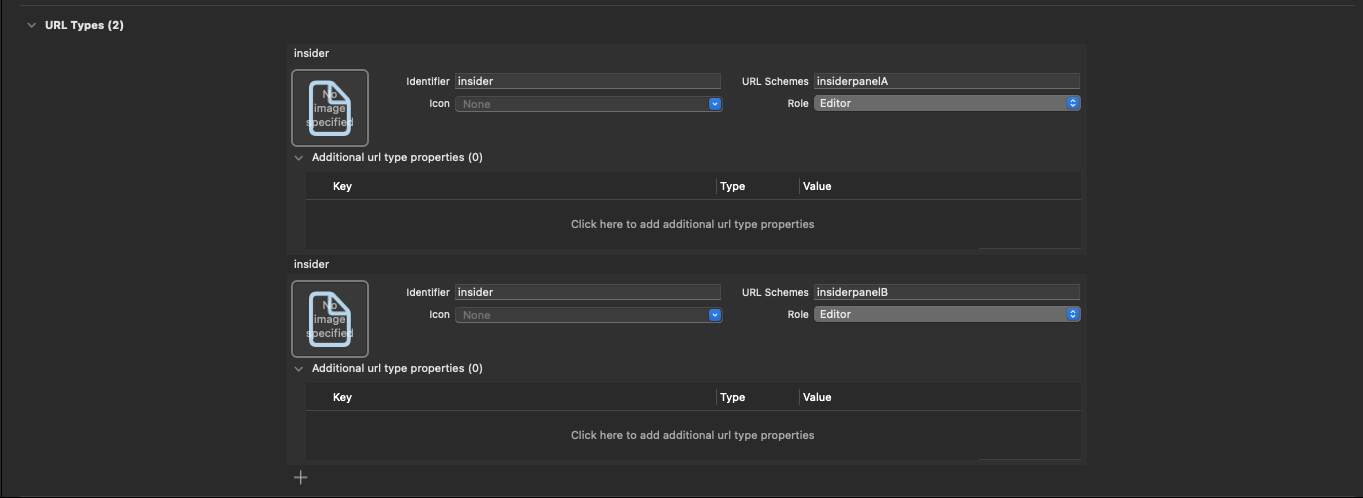
Constraints
The SDK must already be initialized before you call reinit. If initWithLaunchOptions:partnerName:appGroup: has not run yet, the call is dropped with a "Reinit returned. Regular init is not done." log line.
If the user has not granted GDPR consent, reinit cannot run. Call setGDPRConsent: with YES first, then trigger reinit.
reinit runs asynchronously. The SDK first closes the current session, swaps the partner name, then issues identity and session-start requests; queued events are flushed only after that chain completes. Events tagged while the chain is in flight may land in either panel, depending on where the chain is when each event is enqueued. For deterministic attribution, drive event tagging from a user action that follows the UI flow, which triggered the reinit, rather than firing events immediately after the call returns.
Calling reinit with the same partner name that is currently active is a no-op. The SDK keeps the existing session running and logs "Reinit returned. Partner name is the same."