Eureka Category Merchandising API is a powerful tool designed to help you organize and prioritize products in your Category Pages within your ecommerce platforms.
It arranges products within categories according to their rankings and allows you to customize the product order using the Eureka Category Merchandising feature. You can use the pin, hide, boost, or bury operations at the product level or attribute level to define the order of the products in the selected category.
This API is compatible with Mobile Web, Desktop Web applications, and Native Mobile Apps.
This resource is made to help you easily integrate Eureka into your websites and native mobile apps. You can find answers to questions related to the Category Merchandising API in this article:
Prerequisites
Before integrating and starting to use the Category Merchandising API,
You need to integrate the product catalog, and all the necessary product information needs to be retrieved.
The locale needs to be initialized, and initial indexing needs to be completed.
You need to complete the Eureka settings, which are:
Smart Variant Grouping (optional)
Sorting Options (optional)
Facets (optional)
You need to create the Category Merchandising Rules.
For Category pages with a merchandising rule, products are ordered according to the rule specified. Otherwise, they are listed based on Insider One’s special product ranking algorithm, which is calculated based on the product’s attractiveness.
Request parameters
You need to send these parameters within the payload to trigger a successful request to the Category Merchandising API.
Parameter | Description |
|---|---|
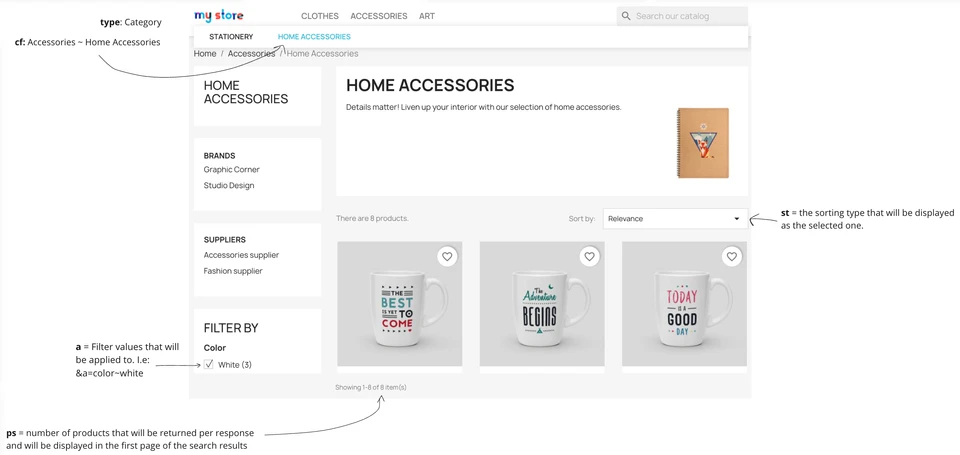
type | The type of the page that has been triggered. For now, this parameter only accepts Category as input. However, it is designed to support the sorting of various types of pages, such as "sale," "new-arrivals," "outlet," "valentines-special," etc., for special collection pages. Currently, only category pages are supported. These pages are generated as sub-collections of the product catalog, filtered by values of one or more product attributes. |
cf | The category clicked by the end-user of the ecommerce platform. If the clicked category is not the main category but a subcategory, the hierarchical parts must be separated by lambda, such as cf=Women~Shoes~Trainers. |
p | Partner ID |
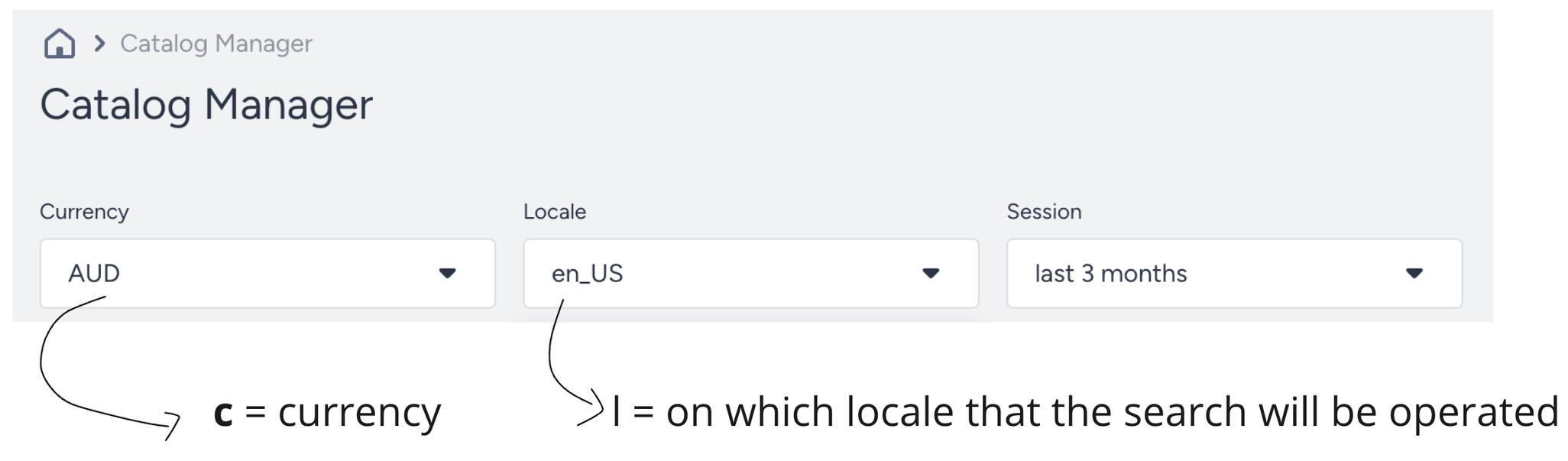
l | Locale that represents language and the region. |
c | Currency of the products listed. |
Some of the optional but mostly used parameters are:
Parameter | Description |
|---|---|
ps | Number of products that will be sent in a single response. |
a | Filters that have been selected by the users, such as Color: Red, Category: Shoes, etc. |
st | Sorting type that has been selected by the user, such as Newest First, Most Popular First, etc. |

Response parameters
Some of the primary response objects that are used while displaying the category page are:
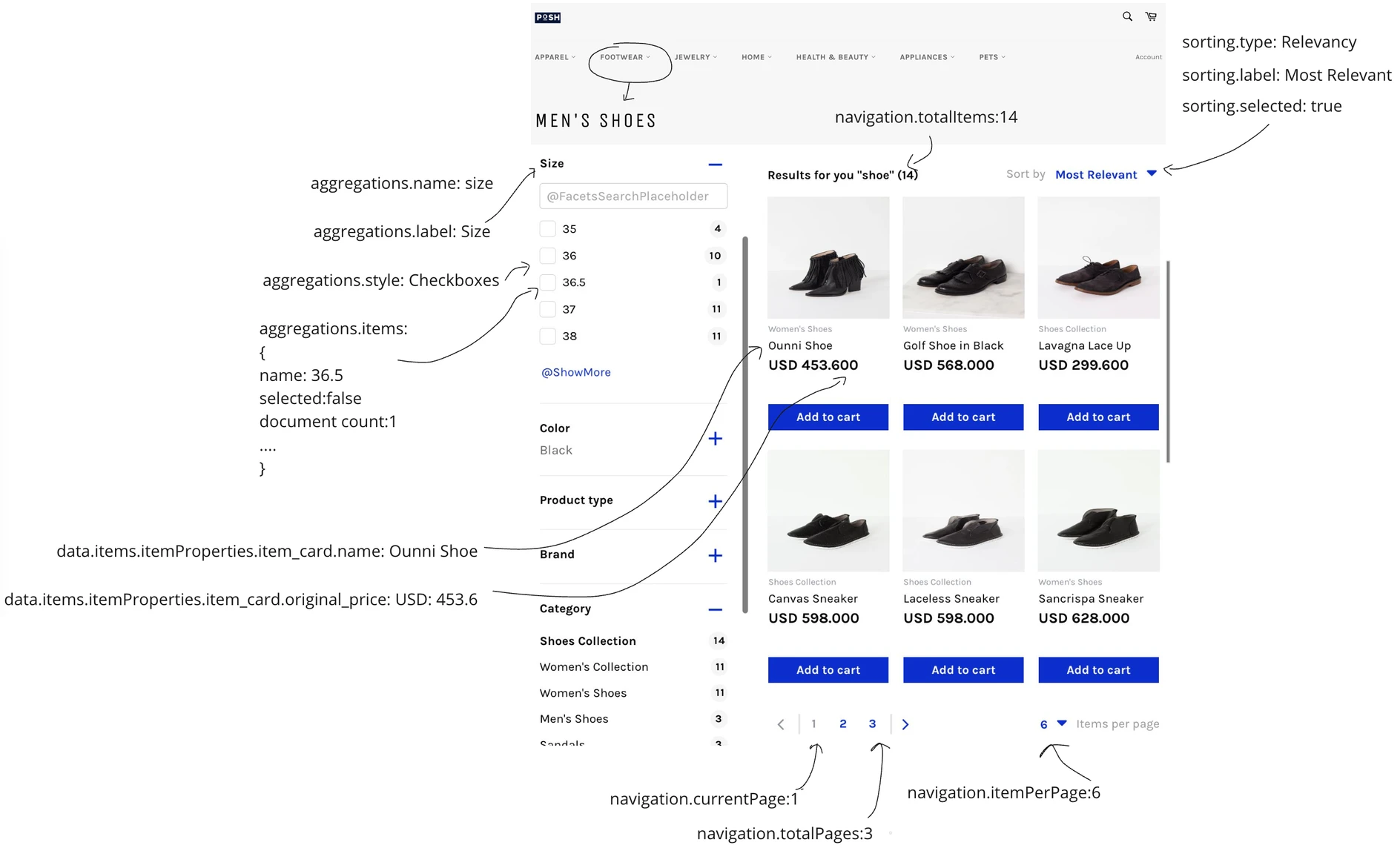
data.items: This object contains all the product information in response to the category listing operations.
data.items.itemProperties.item_card: This object holds all the details about a specific product. It includes everything needed for displaying the product on a card, like its name, category, price, color, size, etc., or necessary information not to be displayed directly, such as in_stock, quantity, URL, attractiveness_score, etc.
data. items.itemVariants: If your smart variant grouping setting is enabled in the Eureka settings, the products are grouped according to their group_code, and only one of the variants will be displayed in the search results. But the other variants, such as different colors, will be sent in the response object and data.items.itemVariants object.
data.aggregations: This field contains the list of filters available according to the category listing results.
data. aggregations.items: This field contains the list of values a filter type can have. For example, for the size filter, the items can be 38,40,2 etc.
data. aggregations.sequence: This field shows the order of the related filter.
data.navigation: This field contains navigation information such as pagination and total item count.
data.sortings: This field contains information about the sorting types, selected sorting option, and its label.
Collection Types
When retrieving products from the product catalog, three different collection types help organize and filter results based on specific criteria. These collection types are:
Category Collection
The Category Collection type allows users to retrieve all products in the catalog that belong to a specific category, helping them narrow down their results based on product type. For example, to get all shoes, you can retrieve products under the "Footwear" category.
Brand Collection
The Brand Collection type allows users to retrieve all products from a specific brand in the catalog, helping users access products from their preferred brands easily. For example, if you want to get all Nike products, you can use this option to retrieve only items from the "Nike" brand.
All Products Collection
The All Products Collection type allows users to retrieve all products in the catalog without restrictions, providing access to the entire product catalog. For example, if you want to see all products, you can use this option to retrieve all products in the catalog.
Using these collection types, you can retrieve products efficiently based on your specific needs.
Once your integration is complete, you can explore the full payload structure, parameters, and available endpoints in the Category Merchandising API articles.