This guide is designed to help you successfully install the Swift Package Manager (SPM) for both Objective-C and Swift projects. It provides a step-by-step walkthrough of the installation process.
Requirements
1. Go to Project > Package Dependencies > + (plus) button.
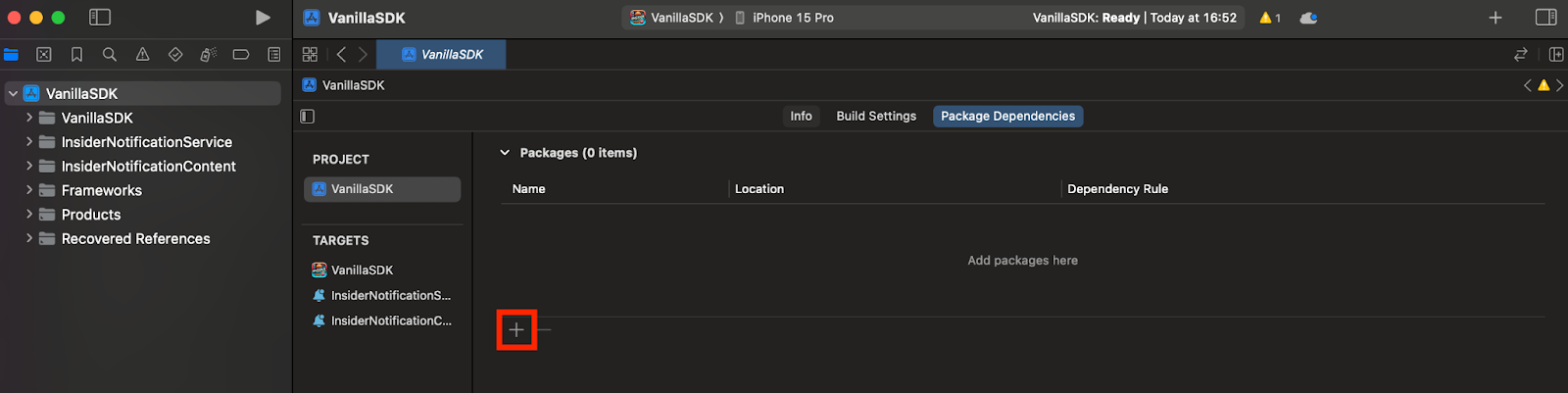
2. Follow the steps below in the Add Package Dependencies… window.
Enter package URL: https://github.com/useinsider/Insider-iOS-SDK
Select insider-ios-sdk
Choose Dependency Rule Up to Next Major Version, you can leave the version field without changing.
Add the libraries to the following packages as directed. Note that you will not have access to those features unless you include the InsiderGeofence and InsiderMobileAdvancedNotification libraries.
Required: InsiderMobile to your Application Target.
Optional: InsiderGeofence to your Application Target.
Optional: InsiderMobileAdvancedNotification to your Application Target
Ensure the required InsiderMobile and other optionally selected libraries (InsiderGeofence and InsiderMobileAdvancedNotification) have been added.


Now that you have configured your SPM installation, you can proceed with the next steps of the SDK setup.
When adding the Insider-iOS-SDK package via Swift Package Manager, you must add all SDKs (including InsiderMobileAdvancedNotification) to the main app target, not to the Notification Service Extension or Notification Content Extension targets. The extensions still link the rich push framework correctly because it is bundled inside the host app.
Configure Targets
Notification Service Extension
You need to get the Notification Service and paste it into your Notification Service. You can find the Notification Service details below:
//
//  NotificationService.swift
//  Example
//
//  Created by Insider on 7.11.2025.
//

import InsiderMobileAdvancedNotification
@preconcurrency import UserNotifications

/// A notification service extension that intercepts and modifies incoming push notifications
/// to support Insider rich push content such as images, carousels, and interactive elements.
///
/// This extension runs in a separate process with a limited execution time. It downloads
/// rich media attachments via the Insider SDK and attaches them to the notification content
/// before displaying it to the user.
///
/// - Important: The `appGroup` must match the App Group identifier configured in both
///   the main app target and this extension target for shared data access.
public final class NotificationService: UNNotificationServiceExtension {

    /// The completion handler provided by the system to deliver the modified notification content.
    nonisolated(unsafe) private var contentHandler: ((UNNotificationContent) -> Void)?

    /// A mutable copy of the original notification content that can be modified before delivery.
    nonisolated(unsafe) private var bestAttemptContent: UNMutableNotificationContent?

    /// The App Group identifier used for sharing data between the main app and this extension.
    private let appGroup = "group.com.useinsider.mobile-ios"

    /// Called when a push notification is received, allowing modification of its content before display.
    ///
    /// This method delegates to the Insider SDK to download and attach rich push media (images, videos, etc.)
    /// to the notification. If the attachment download succeeds, it is added to the notification content.
    ///
    /// - Parameters:
    ///   - request: The original notification request containing the payload.
    ///   - contentHandler: A completion handler to call with the modified notification content.
    public override func didReceive(
        _ request: UNNotificationRequest,
        withContentHandler contentHandler: @escaping @Sendable (UNNotificationContent) -> Void
    ) {
        guard
            let bestAttemptContent = request.content.mutableCopy() as? UNMutableNotificationContent
        else { return }
        defer {
            self.contentHandler = contentHandler
            self.bestAttemptContent = bestAttemptContent
        }
        if let source = bestAttemptContent.userInfo["source"] as? String,
           source == "Insider" {
            InsiderPushNotification.showInsiderRichPush(
                bestAttemptContent,
                appGroup: appGroup,
                nextButtonText: "Next",
                goToAppText: "Go to App",
                success: { attachment in
                    if let attachment {
                        bestAttemptContent.attachments = [attachment]
                    }
                    contentHandler(bestAttemptContent)
                }
            )
        } else {
            // Handle other rich push providers in here.
        }
    }

    /// Called just before the extension is terminated by the system due to time expiration.
    ///
    /// Delivers the best attempt content as-is (potentially without rich media attachments)
    /// to ensure the user still receives the notification even if the download did not complete in time.
    public override func serviceExtensionTimeWillExpire() {
        if let contentHandler, let bestAttemptContent {
            contentHandler(bestAttemptContent)
        }
    }
}
Notification Content Extension
You need to get the Notification View Controller and paste it into your own Notification View Controller. The following is the NotificationViewController:
//
//  NotificationService.swift
//  Example
//
//  Created by Insider on 7.11.2025.
//

import InsiderMobileAdvancedNotification
@preconcurrency import UserNotifications

/// A notification service extension that intercepts and modifies incoming push notifications
/// to support Insider rich push content such as images, carousels, and interactive elements.
///
/// This extension runs in a separate process with a limited execution time. It downloads
/// rich media attachments via the Insider SDK and attaches them to the notification content
/// before displaying it to the user.
///
/// - Important: The `appGroup` must match the App Group identifier configured in both
///   the main app target and this extension target for shared data access.
public final class NotificationService: UNNotificationServiceExtension {

    /// The completion handler provided by the system to deliver the modified notification content.
    nonisolated(unsafe) private var contentHandler: ((UNNotificationContent) -> Void)?

    /// A mutable copy of the original notification content that can be modified before delivery.
    nonisolated(unsafe) private var bestAttemptContent: UNMutableNotificationContent?

    /// The App Group identifier used for sharing data between the main app and this extension.
    private let appGroup = "group.com.useinsider.mobile-ios"

    /// Called when a push notification is received, allowing modification of its content before display.
    ///
    /// This method delegates to the Insider SDK to download and attach rich push media (images, videos, etc.)
    /// to the notification. If the attachment download succeeds, it is added to the notification content.
    ///
    /// - Parameters:
    ///   - request: The original notification request containing the payload.
    ///   - contentHandler: A completion handler to call with the modified notification content.
    public override func didReceive(
        _ request: UNNotificationRequest,
        withContentHandler contentHandler: @escaping @Sendable (UNNotificationContent) -> Void
    ) {
        guard
            let bestAttemptContent = request.content.mutableCopy() as? UNMutableNotificationContent
        else { return }
        defer {
            self.contentHandler = contentHandler
            self.bestAttemptContent = bestAttemptContent
        }
        if let source = bestAttemptContent.userInfo["source"] as? String,
           source == "Insider" {
            InsiderPushNotification.showInsiderRichPush(
                bestAttemptContent,
                appGroup: appGroup,
                nextButtonText: "Next",
                goToAppText: "Go to App",
                success: { attachment in
                    if let attachment {
                        bestAttemptContent.attachments = [attachment]
                    }
                    contentHandler(bestAttemptContent)
                }
            )
        } else {
            // Handle other rich push providers in here.
        }
    }

    /// Called just before the extension is terminated by the system due to time expiration.
    ///
    /// Delivers the best attempt content as-is (potentially without rich media attachments)
    /// to ensure the user still receives the notification even if the download did not complete in time.
    public override func serviceExtensionTimeWillExpire() {
        if let contentHandler, let bestAttemptContent {
            contentHandler(bestAttemptContent)
        }
    }
}
Update the Notification Content Extension Info.plist
1. Navigate to InsiderNotificationContent>Info.plist and open it as source code.
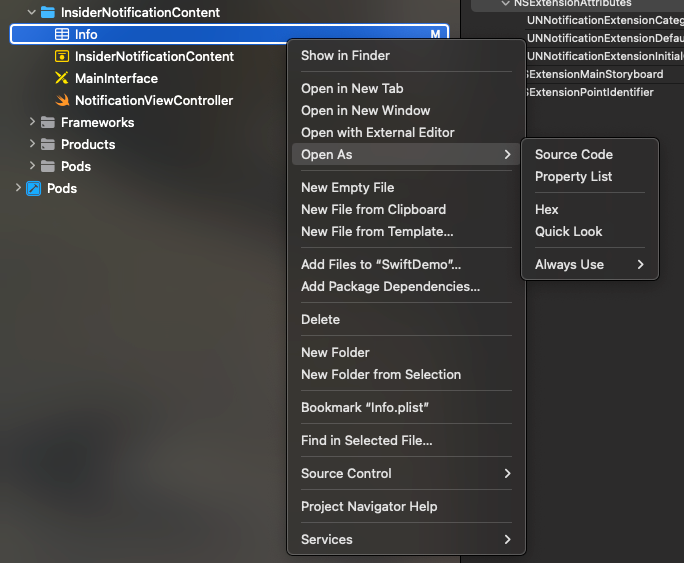
2. Replace the auto-generated NSExtension block in the target's Info.plist with.
<key>NSExtension</key>
<dict>
    <key>NSExtensionAttributes</key>
    <dict>
        <key>UNNotificationExtensionCategory</key>
        <string>insider_int_push</string>
        <key>UNNotificationExtensionDefaultContentHidden</key>
        <false/>
        <key>UNNotificationExtensionInitialContentSizeRatio</key>
        <real>0.5</real>
    </dict>
    <key>NSExtensionMainStoryboard</key>
    <string>InsiderInterface</string>
    <key>NSExtensionPointIdentifier</key>
    <string>com.apple.usernotifications.content-extension</string>
</dict>
Your Info.plist should look as follows:

Now that you have completed configuring your SPM installation, you can proceed with the next steps of the SDK setup.
The UNNotificationExtensionCategory value insider_int_push is what the SDK uses to route interactive push payloads to your Content Extension; do not change it.
The App Group identifier on both extension targets must be identical to the one on your main app target. A mismatch will prevent the SDK from sharing data between the app and its extensions.
Now that you have completed configuring your SPM installation, you can proceed with initializing the SDK.
SPM does not provide InsiderInterface.storyboard automatically. Copy the storyboard from the Insider iOS SDK repository (InsiderMobileAdvancedNotification/Resources/InsiderInterface.storyboard) into your Notification Content Extension target. Open it in Xcode and check Inherit Module From Target in the Identity Inspector so the runtime can resolve your extension's NotificationViewController class.
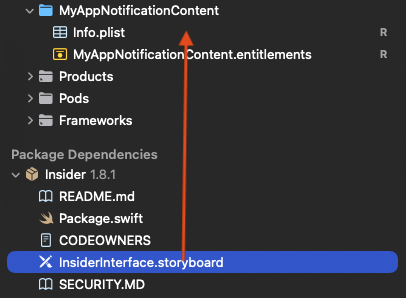
The storyboard added to the Notification Content Extension target in the Project Navigator