BIMI (Brand Indicators for Message Identification) enables brands to send messages authenticated by the email clients that support BIMI. Companies can become verified brand profiles to add their logos when sending an email with their BIMI records.
BIMI aims to give opportunity and flexibility to brands to display their logos when their messages are received in the mail services. Once the BIMI setup is completed, brands can choose and upload the logos they want to show in the inboxes as displayed below:
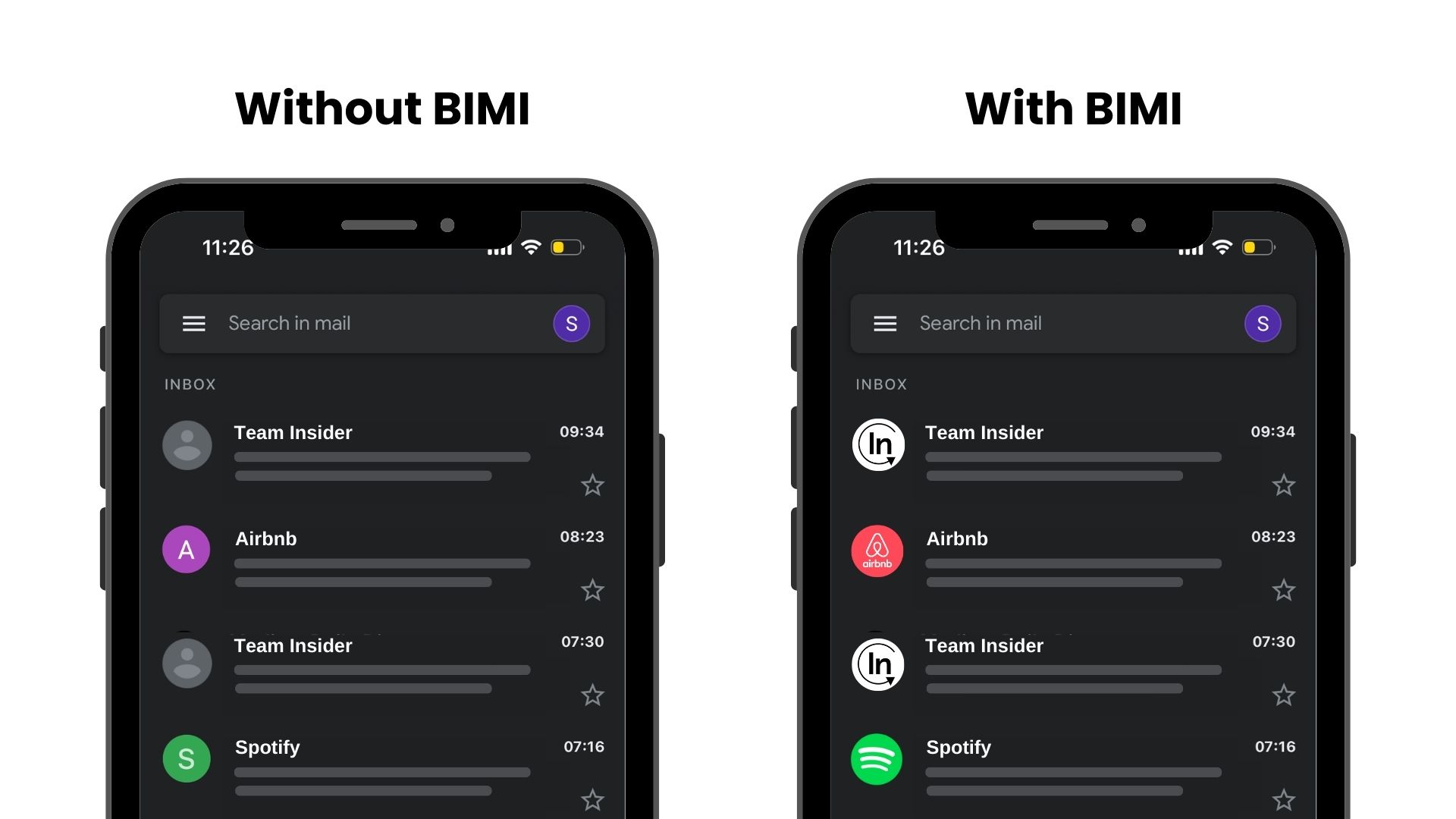
This guide aims to provide details on Providers Supporting BIMI, Benefits of BIMI, and BIMI Setup.
Providers Supporting BIMI
Currently, not all email clients support BIMI. That's why you should consider this when you are configuring your BIMI record.
Below you can see the list of email clients that support, are planning to support, and do not support BIMI:
| Email Client | Supports | Planning to support | |
|---|---|---|---|
.png) | Google Gmail | Yes | - |
 | Apple Mail | Yes | - |
 | Yahoo! | Yes | - |
 | Cloudmark | Yes | - |
 | Fastmail | Yes | - |
.png) | Zone | Yes | - |
 | La Poste | Yes | - |
(1).png) | Onet Poczta | Yes | - |
.png) | Atmail | No | Yes |
 | Yahoo! Japan | No | Yes |
 | BT | No | Yes |
 | Seznam.cz | No | Yes |
.jpeg) | Qualitia | No | Yes |
 | Gmx | No | Yes |
 | Microsoft doesn't support BIMI | ||
Google displays the verified checkmarks for the senders who adopted BIMI on both Gmail web and Gmail application on Android and iOS devices to more clearly identify messages from legitimate senders.
Benefits of BIMI
With BIMI, you can achieve not only better visual aspects but also increased security in the inboxes. You can build trust, increase your deliverability, and expand your brand recognition.
Build Trust
Associating a received email message with a brand logo helps readers trust the sender and the message in the inbox. Once recipients identify your brand through your logo in the email preview, they are more prone to allow messages from you. Logos imply that the sender is reliable and the message is not a phishing attempt. BIMI helps you to build that foundational trust with your audience.
Increase Deliverability
Since getting a BIMI record requires a setup of authentication protocols such as SPF, DKIM, and DMARC, your overall sender reputation increases accordingly. Additionally, these authentication methods decrease the unsubscribes and spam rates and help senders to boost their email deliverability.
Brand Recognition
BIMI enables you to reach your audience even though they do not open your email and view your content. Once the recipient sees your email, they will be exposed to your logo and get familiar with your brand from the beginning.
BIMI Setup
You should complete the following 5 steps along with their checklists to set up BIMI for your mail domain.
Step 1: Authenticate all of your organization's emails with SPF, DKIM and DMARC
This first step requires you to make sure all authentication protocols are configured. To complete these steps, you should have the sign-in information of your domain host.
SPF (Sender Policy Framework): Specifies which mail servers are authorized to send emails from a specific domain to validate your email.
DKIM (DomainKeys Identified Mail): Attaches a digital signature to emails to confirm that your domain sent the message and is accountable for its content to enhance email security.
DMARC (Domain-based Message Authentication, Reporting & Conformance): Instructs inbox providers on how to manage emails that lack authentication through SPF or DKIM.
Below you can see a checklist to make sure that you can proceed to the next step:
I have an SPF record that aligns with DKIM and DMARC.
I have a DKIM record which aligns with SPF and DMARC.
I have a DMARC record on the organizational domain (aka root or apex domain) which aligns with SPF and DKIM.
- The "p" (policy) option should be configured as either "quarantine" or "reject". BIMI does not work with DMARC policies set to "none".
- The "pct" (percent) option should be set to 100. This means that the DMARC policy is applied to all outgoing emails (100 percent) from your domain.
DMARC risk and mitigation for Insider senders
BIMI requires an enforced DMARC policy: p=quarantine or p=reject, with pct=100. Moving directly to enforcement can cause legitimate emails to be quarantined or rejected if some sending sources do not pass DMARC.
Before enabling enforcement:
- Audit all senders: Identify every system that sends email using your domain, including Insider One, other email providers, transactional systems, helpdesk tools, and internal applications. Confirm that each source passes DMARC through SPF or DKIM aligned with the visible From domain.
- Verify Insider authentication: Publish the domain-specific CNAME and DKIM records shown in InOne Domain Management. Do not use example values from another domain. Verify the records and confirm that Insider test emails pass DMARC before continuing.
- Monitor DMARC reports: Add a rua address to your DMARC record. Review aggregate reports to find unknown senders or legitimate sources failing SPF, DKIM, or alignment.
- Roll out enforcement gradually: Increase enforcement only when reports show no unexplained failures:
p=none; pct=100
→ p=quarantine; pct=10–50
→ p=quarantine; pct=100
→ optionally p=reject; pct=100
p=none and p=quarantine with pct<100 are monitoring or transition stages. BIMI becomes eligible at p=quarantine; pct=100 or p=reject; pct=100. p=reject is not mandatory.
Verify the BIMI setup
After publishing the BIMI TXT record, use BIMI Inspector to check the DMARC policy, BIMI record, SVG logo URL, and Evidence Document or certificate, if used.
Apple Mail supports BIMI on supported versions of iOS, iPadOS, macOS, and iCloud.com. Make sure Insider One emails pass aligned authentication, and the logo uses an Apple-supported BIMI Evidence Document. Passing technical checks does not guarantee that the logo will appear for every recipient.
Step 2: Produce an SVG Tiny PS version of your official logo
You need to generate your brand logo image which will be the BIMI logo in SVG (Scalable Vector Graphics) format, and upload it to your domain's public web server.
According to accepted guidelines, your image should be uploaded as an SVG file, its sizes should be square, and hosted with public HTTPS access. Your image should not contain taglines or any additional text as these details will not be visible in inboxes.
Also, your web server should be hosted on the same domain as your outgoing email server. This is the domain where you add a BIMI TXT record through your domain provider and activate BIMI.
Once you've uploaded the SVG file, make sure to copy the URL (web address) of the file. You will need this URL when configuring your BIMI TXT record.
I have a logo image in “SVG Tiny 1.2” - format. You can refer to Free BIMI SVG logo converter for an online image conversion tool and SVG Conversion Tools Released - BIMI Group for some more suggestions.
Step 3: Acquire a Verified Mark Certificate (VMC) or Common Mark Certificate (CMC) for your logo (Recommended, but optional)
A Verified Mark Certificate verifies logo trademark ownership and may become a standard requirement across BIMI-supporting providers. It is issued by Mark Verifying Authorities such as DigiCert.
Gmail also supports Common Mark Certificates (CMC), a new type of BIMI certificate issued by Certificate Authorities. CMCs allow a broader range of senders to use BIMI who might not have the registered trademark required for a VMC. With a CMC, the sender's brand avatar is displayed without the Gmail verified checkmark that's shown for VMCs.
[Recommended] I have a Verified Mark Certificate (VMC) issued by a supported Certificate Authority.
[Alternative] I have a Common Mark Certificate (CMC) issued by a supported Certificate Authority.
Step 4: Publish a BIMI record for your domain in DNS
After you set up your domain-based authentications and generate your compatible logo, the last step is to create a DNS record for BIMI in your domain DNS settings.
BIMI record is a line of text that includes the URL of your brand logo’s SVG file. Below you can see an example record.
| Type | Host | Value |
|---|---|---|
| TXT | default._bimi | "v=BIMI1; l=https://mydomain.com/image.svg;" |
I have a BIMI record on the mail domain or on the organizational domain with the correct type, host and value structure.
BIMI Troubleshooting
To check if your BIMI record is successfully configured and your logo is displayed in inboxes, you can refer to BIMI Inspector.